

Most products start life as tools, not as social networks.
A video platform plays content. A sports app shows scores and fixtures. A trading app draws charts and deals. People open the app, do the thing they came for, and leave.
However, user behaviour has moved on. People still need to perform the core task, but they also want to feel other people around the same moment: react to a goal, compare notes on a chart, ask a quick question without opening another tab. So they keep a messenger on the side and build their own “second screen” around your product.
The problem: almost no team wants to rebuild their app as a full social platform just to support that behaviour.
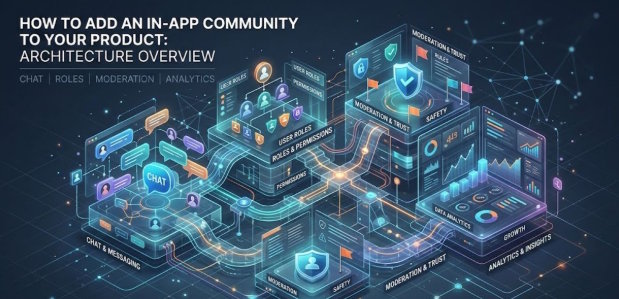
That’s where the community layer comes in. It isn’t a new product. It’s a thin layer inside the product you already have: chat, reactions, a basic sense of presence, some roles, moderation and analytics — all placed next to the main experience instead of replacing it.
Where the community layer lives in your stack
From an architecture point of view, you usually end up with two clearly separated responsibilities:
- Your core backend keeps doing what it already does well: user accounts, content, events, payments, permissions.
- A separate community or chat service looks after rooms, messages, roles, mutes, bans, flags, basic presence.
On the frontend they meet on the same screen: the main thing (video, scores, chart, report) with a small social panel or overlay beside it.
When the page loads, your app passes two key pieces of information to the community service:
- user ID;
- event ID
The community backend uses those two IDs to decide:
- which room or rooms users join;
- what they’re allowed to do there (read-only, react, write, moderate);
- how to tag activity for analytics later.
From your app’s perspective, the community layer is just another service: you give it identity and context, and it gives you back real-time updates about messages, presence and engagement. In practice, this can be your own microservice or an external chat community app plugged in via SDK or API.
Chat, rooms and roles: a minimal model
You don’t need a full social graph to get value. You need a simple model that mirrors the way your product already thinks about content.
In most cases something like this is enough:
- One room maps to one object in your domain. One match → one match room. One team or league → one long-lived fan room. One report, course or dashboard → one discussion room for that screen.
- Presence is light. A small list of “who’s here”, maybe typing indicators, is fine.
- Roles are simple. A typical set is: user (can post and react), moderator (can delete, mute, ban), speaker (influencer with speaker rights, for special occasions).
Internally, the community service is dealing with a small set of things: room_ids, user_ids, and messages. The important part is that each roomid is tied to something your core system already knows. That gives you a way to line up product behaviour (what they watched, clicked or bought) with community behaviour (what they said, reported or reacted to).
Moderation: keeping chat loud but not dangerous
As soon as you add real-time chat, familiar problems appear: spam, abuse, people dropping phone numbers or emails into public rooms. That’s normal. The trick is to handle it without turning the room into a dead zone.
Most teams end up with a small pipeline like this:
- A message is sent.
The user hits “send”. Before anyone else sees it, the text goes through a basic filter and, if you use it, an AI moderation API. - The risk is scored.
The message is checked for obvious spam, direct harassment, slurs, scam patterns and exposed personal data. - An action is taken.
- Low-risk content goes straight into the room.
- High-risk content is blocked or masked (for example, hide phone numbers and emails).
- Borderline content can be shown only to the sender, queued for review, or partially obscured.
Wiring analytics into the community layer
A community layer is much more useful when its data sits next to the rest of your product analytics instead of living in its own black box.
The cleanest way to do this is to have the community service emit events into the same pipeline you already use (GA4, Mixpanel, Amplitude, Segment, or your own system).
Common events look like:
- community_room_joined / community_room_left
- community_message_sent
- reaction_added
- community_message_reported
- user_muted / user_banned
Each event carries:
- user_id
- room_id or context_id (the match, report, asset or course it belongs to)
- a timestamp and a bit of metadata (device, language, message type, etc.)
With that in place you can answer normal product questions, not just “chat questions”:
- Do users who post at least once a week churn less than users who never post?
- Which matches, teams or features generate the most discussion?
- At what point in the journey do people usually open the room for the first time?
From an engineering point of view, this is just more event plumbing. From a product point of view, it’s the link between “we added chat” and “we can prove it changes behaviour”.
Rolling it out without derailing the roadmap
The easiest way for a community project to fail is to treat it as “let’s build our own social network”. A more practical approach is to ship a thin layer in a few places and then grow it if it works.
In practice, that usually looks like this:
- Start with one or two high-intent screens. The live player, the match or event centre, the main dashboard — anywhere users already spend a lot of time.
- Add a single room around each of those objects. One match → one live room. One key report → one discussion room. See whether real messages appear.
- Make participation light. Short messages, reactions on big moments, simple polls tied to what’s on screen. You don’t need threads, media uploads and profiles on day one.
- Turn on basic moderation from the start. Simple filters, the ability to mute or ban, automatic masking of personal data. Enough to avoid firefighting spam in real time.
- Only then add more. New rooms for new objects, richer profiles, achievements, links into existing loyalty or subscription programmes.
You don’t have to build every part of this stack yourself. Platforms like https://watchers.io/ provide an embedded social layer — chat, community tools, live streaming and AI moderation — that can be dropped into an existing app via SDK, API or webview.
Through all of this, the core idea doesn’t change:
Your product keeps doing its main job.
The in-app community is a thin layer alongside it, giving people a place to see and hear each other without ever leaving your app.

