


I love testing new technologies and learning new stuff, that although may look useless at first sight, it will play an important role in the future. That's the case of React, because i've been always working on apps that use plain JavaScript and jQuery, so upgrading because of monetary costs isn't an option. However, when a new project shows up and has no specific requirements, i always try to use the latest technologies available.
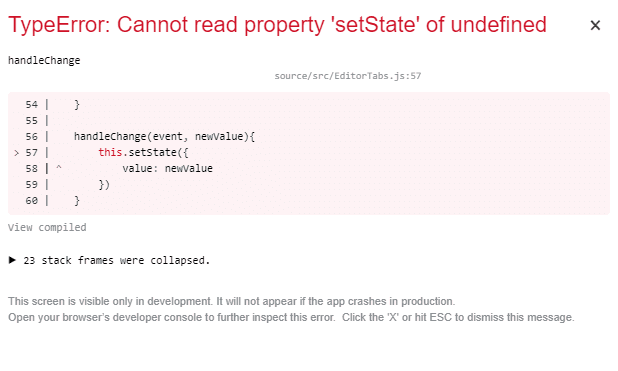
Since i didn't touch react recently, i ended up with a persistent behaviour that blew my mind because it was pure JavaScript logic, but it wasn't working. Consider the following example of a react component that renders some tabs:
class EditorTabs extends React.Component {

    constructor(props) {
        super(props);

        this.state = {
            value: 0
        };
    }

    handleChange(event, newValue){
        this.setState({
            value: newValue
        })
    }

    render() {
        return (
            <div>
                <AppBar position="static" color="default">
                    {/* note the onChange handler */}
                    <Tabs
                        value={this.state.value}
                        onChange={this.handleChange}
                    >
                        <Tab label="Item One"/>
                        <Tab label="Item Two"/>
                    </Tabs>
                </AppBar>
                <TabPanel value={this.state.value} index={0}>
                    Item 1
                </TabPanel>
                <TabPanel value={this.state.value} index={1}>
                    Item Two
                </TabPanel>
            </div>
        );
    }
}

export default EditorTabs;
The special part of the example to understand why i'm exposing it in this article, is the fact that the AppBar component attaches the handleChange function to the onChange event of the component (which is clearly defined inside the same EditorTabs class). However, during the execution of the code, the mentioned handleChange function will trigger an exception as the this context will refer to itself and not the this context of the react component itself. The solution for this problem is to simply bind the this context in the constructor to the desired method. For example:
// ... //

class EditorTabs extends React.Component {

    constructor(props) {
        // ... //

        // !important
        // Bind the this context of the React.Component
        this.handleChange = this.handleChange.bind(this);
    }

    handleChange(event, newValue){
        // So now the this context in handleChange will be
        // the this context of the component itself
        // Now calling the setState function won't trigger the exception
        this.setState({
            value: newValue
        })
    }

    render() {
        // ... //
    }
}

// ... //
By simply updating the this context of the function:
this.handleChange = this.handleChange.bind(this);Will make your code work properly and as it theoretically should.
Happy coding !

