

Migrating an ecommerce store between platforms is a high-wire act. There is no staging environment for your revenue. Every decision, from data schema mapping to DNS cutover timing, carries real financial consequences. The brands that execute migrations successfully follow a disciplined, phase-by-phase process. The ones that wing it usually pay for it in lost organic traffic, broken integrations, and weeks of post-launch firefighting.
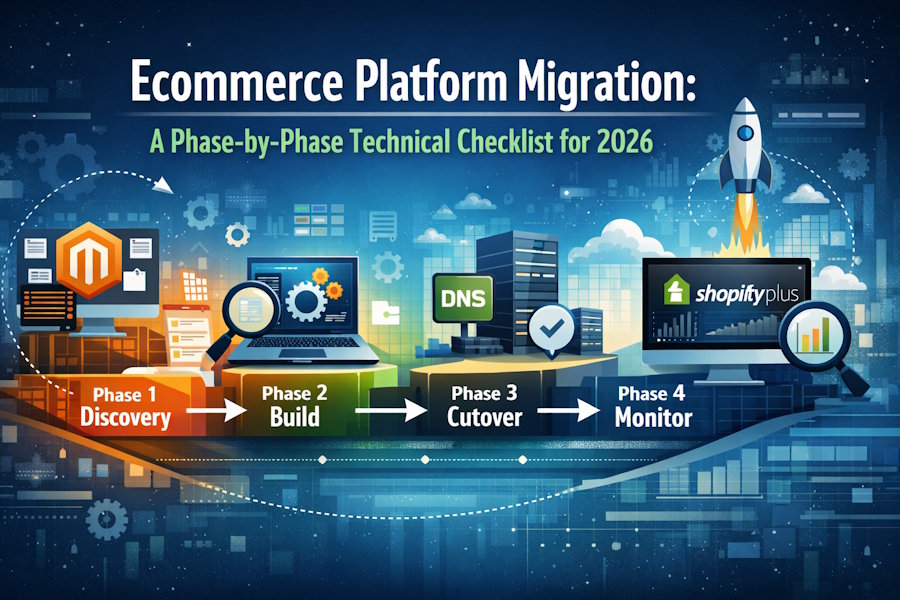
This checklist breaks the migration process into four distinct phases, each with specific technical deliverables that need to be completed before moving to the next. It is written for technical decision-makers and developers who are planning or currently executing a move to Shopify Plus from Magento, BigCommerce, WooCommerce, or a legacy custom platform.
Phase 1: Discovery and Audit (Weeks 1-3)
The discovery phase determines whether the migration will be orderly or chaotic. Skipping it is the most common and most expensive mistake teams make.
Data inventory. Export and catalog every data entity from the source platform: products (including variants, metafields, and images), customers (including addresses, order history, and loyalty data), orders (including fulfillment records and refund history), blog content, static pages, and navigation structures. Document the schema for each entity type. Identify fields that exist in the source but have no direct equivalent in Shopify Plus, and decide how each will be handled—mapped, transformed, or deprecated-for Shopify Plus customers.
URL audit. Generate a complete inventory of every indexed URL on the source platform. This includes product pages, collection/category pages, blog posts, informational pages, and any programmatically generated pages like filtered collection views. Cross-reference this against Google Search Console data to identify the highest-traffic URLs that absolutely cannot be missed during redirect mapping. Working with Shopify Plus migration experts who have handled dozens of these transitions is particularly valuable during this phase, because they have already encountered the URL edge cases that trip up less experienced teams: query parameter handling, trailing slash inconsistencies, case sensitivity differences, and pagination URL structures.
Integration inventory. Catalog every third-party integration currently active on the source platform: ERP connections, email marketing platforms like Klaviyo, SMS providers, review systems, loyalty programs, shipping calculators, tax engines, payment gateways, and analytics tools. For each integration, document the data flow direction, API version, and any custom middleware. Classify each as direct replacement available (a Shopify app exists), custom rebuild required, or deprecated.
Performance baseline. Before changing anything, capture comprehensive performance metrics on the source platform. Record page load times for every major template type (homepage, product detail, collection, cart, checkout) across both desktop and mobile. Document Core Web Vitals scores. Record conversion rates segmented by device type, traffic source, and funnel stage. This baseline is the yardstick against which post-migration performance will be measured.
Phase 2: Build and Configure (Weeks 4-10)
With discovery complete and a detailed migration plan in hand, an SEO migration agency ensures the build phase translates planning into implementation on the destination platform.
Theme development. Whether building a custom theme or configuring an existing one, the theme should replicate the source site’s functionality while improving on its performance and UX. Key decisions include: section and block architecture for content flexibility, JavaScript budget to maintain fast load times, image optimization pipeline for next-gen formats and responsive delivery, and mobile-first design patterns that address any mobile conversion gaps identified in the baseline.
Data migration scripts. Write and test the scripts that will transform source data into Shopify’s schema. Run test migrations against a staging store multiple times. Each iteration will surface edge cases: products with more than one hundred variants that exceed Shopify’s default limits, customer records with malformed email addresses, order histories with custom fulfillment statuses that do not map to Shopify’s fulfillment model. Document every edge case and its resolution.
Redirect map. Build the complete 301 redirect map linking every source URL to its destination on Shopify. Automate this process wherever possible rather than building the map manually. Validate the map programmatically by crawling the source site and verifying that every URL has a corresponding redirect entry. Flag any orphaned URLs for manual review.
Integration rebuilds. Implement each integration according to the classification from Phase 1. For direct replacements, configure the Shopify app and verify data flow parity with the source. For custom rebuilds, develop and test against sandbox environments before connecting to production systems. Sequence integration work so that business-critical systems (payment processing, inventory sync, order management) are validated first.
Staging validation. Run the complete migration process against the Shopify staging environment at least three times. Each run should include full data migration, redirect verification, integration testing, and user acceptance testing. After the final staging run, conduct a conversion rate optimization audit on the staged store to identify any UX regressions and establish optimization priorities for the post-launch phase.
Phase 3: Cutover (Launch Day)
The cutover should be a non-event. If Phases 1 and 2 were executed thoroughly, launch day is simply the final execution of a well-rehearsed process.
Timing. Schedule the cutover during the lowest-traffic window available, typically a weekday between midnight and six in the morning in your primary market’s timezone. Avoid launching near major sales events, holidays, or marketing campaign peaks.
Runbook. Every team member should have a copy of the cutover runbook with their specific responsibilities and timing. The runbook should include: final data migration execution with timestamp, DNS record updates with expected propagation timeline, SSL certificate verification on the new domain, CDN configuration confirmation, payment processing test transactions (place and refund a real order), redirect spot-check against the top one hundred highest-traffic URLs, email notification system verification, and inventory sync confirmation.
Rollback plan. Document the specific steps to revert to the source platform if critical issues emerge during cutover. While full rollbacks in ecommerce migrations are messy and rarely clean, having the documented option is non-negotiable. Define the specific criteria that would trigger a rollback decision (payment processing failure, greater than twenty percent of redirects failing, critical integration down) before launch, not during a crisis.
Phase 4: Post-Launch Monitoring (Days 1-90)
The migration is not done when the new site goes live. The first ninety days require focused monitoring to catch issues that only surface under real production traffic.
Week 1: Daily monitoring. Check Google Search Console daily for crawl errors, indexing issues, and sudden ranking drops. Monitor real-time analytics for conversion rate anomalies compared to the pre-migration baseline. Verify that all integrations are processing data correctly by reconciling order counts, inventory levels, and customer creation events between Shopify and connected systems.
Weeks 2-4: SEO stabilization. Some ranking volatility in the first few weeks is normal as Google recrawls and reindexes the new URL structure. Sustained drops beyond three weeks typically indicate a technical problem: missing redirects, noindex tags incorrectly applied, canonical URL issues, or content rendering problems. Investigate and resolve any persistent ranking declines during this window.
Weeks 4-12: Performance optimization and CRO. With the migration stable, shift focus to optimization. Audit the new theme for render-blocking resources. Implement lazy loading, image optimization, and critical CSS extraction. Compare post-migration conversion rates against the pre-migration baseline by device type and traffic source. Use the first twelve weeks of live data to prioritize CRO initiatives for the ongoing retainer engagement.
Ongoing: Documentation. Document every decision made during the migration, every edge case encountered, and every workaround implemented. This documentation is invaluable for the team that will maintain and evolve the store going forward. It also serves as the foundation for future migrations if the brand expands to additional markets or storefronts.
Choosing the Right Migration Partner
Ecommerce platform migrations are not a place to learn on the job. Brands should work with agencies that have completed multiple Shopify Plus migrations and can provide specific metrics on SEO preservation and post-migration conversion performance. The agencies serving mid-market ecommerce brands in New York, Los Angeles, and Miami tend to have the deepest migration experience, having handled the highest volume of transitions as brands in these markets move aggressively toward Shopify Plus.
The right partner follows a process that looks very much like the checklist above, not because they read it here, but because they learned it through dozens of successful migrations where the discipline of phase-by-phase execution made the difference between a smooth transition and a costly one.

