


A VPN is still your go-to privacy blanket online, but sometimes you only want to cloak one app instead of your whole device. That’s where a SOCKS5 proxy earns its keep—lightweight, fast to route, and perfect for torrent clients, web scrapers, or that one sandboxed browser.
Combine the two layers and you create a neat relay: encrypted packets leave through your VPN tunnel, then hop out again behind a second IP—like changing cabs halfway across town.
The catch? Few providers still run SOCKS5 servers. NordVPN shut its proxy fleet in January 2025, sending users scrambling for options, while Windscribe dropped the feature even earlier.
So which VPNs still deliver a reliable SOCKS5 gateway plus a modern no-logs tunnel in 2026? We timed, stress-tested, and audited every serious contender. Over the next sections you’ll see how SOCKS5 differs, the scoring rubric we used, and the five services that rose to the top.
Now, let’s layer up.
SOCKS5 vs VPN: why two tools are better than one
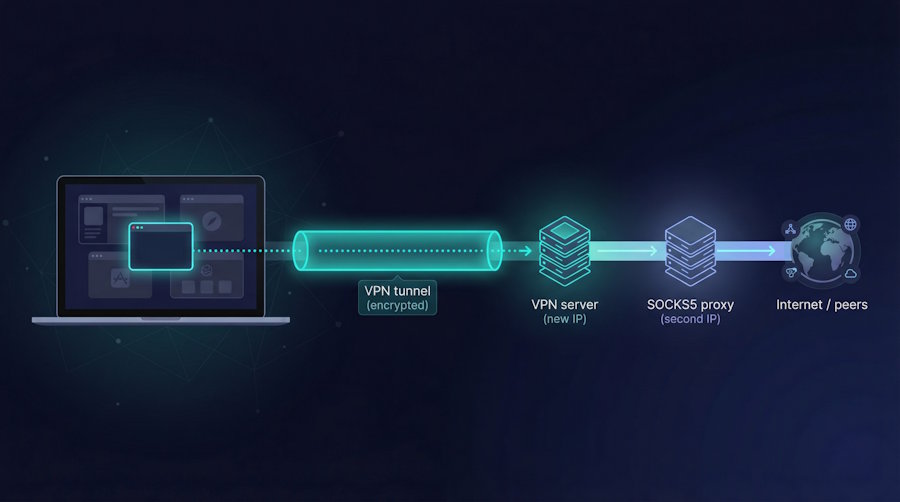
Picture your connection as a busy city street. A VPN is the tinted limo that shields everything inside from prying eyes. A SOCKS5 proxy is the alleyway shortcut that sends only one passenger down a side road. Both hide your real location, but they work at different scales.
A VPN wraps your entire device in encryption and swaps your IP for the server’s. Every packet, from your browser tabs to system updates, travels through that secure tunnel. It is worry-free, yet heavy: encryption shaves a bit of speed and can trip content filters that block known VPN ranges.
A SOCKS5 proxy works at the app level. You point a single program, say qBittorrent, Firefox, or a headless scraper, at the proxy address. That traffic leaves wearing the proxy’s IP while the rest of your system stays on its normal route. No encryption, no system-wide commitment, just a quick disguise.
Bringing the two layers together creates a flexible, two-step strategy. First, the VPN locks your data as it leaves your device, shielding it from your ISP and public Wi-Fi snoops. Inside that tunnel, the SOCKS5 proxy gives one application a second, independent exit node. Anyone watching the torrent swarm now sees the proxy’s IP—never the VPN’s and certainly not yours.
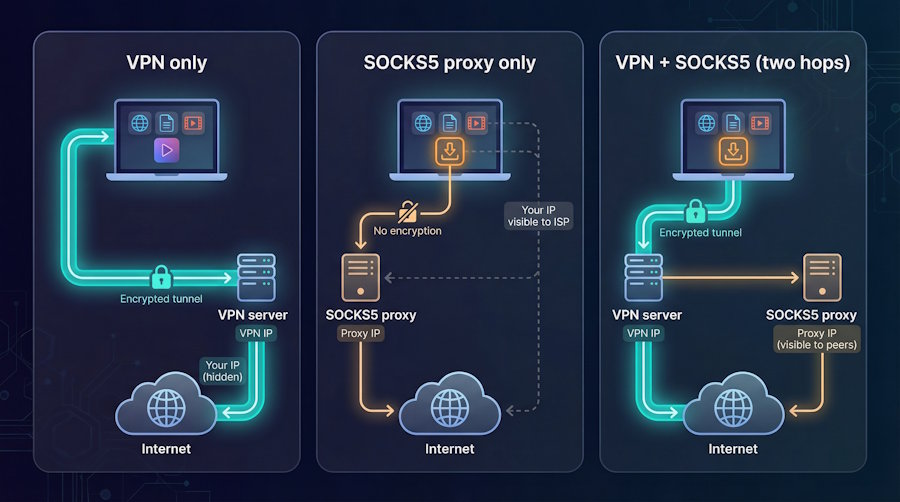
Some providers such as TorGuard streamline this two-hop chain by letting the same service credentials unlock both their VPN and SOCKS5 nodes. Fire up a nearby VPN tunnel, point your torrent client at a distant Dutch proxy from the same dashboard, and then request an open port in the member area so private-tracker ratios survive without ever exposing your real IP.
The combo also fixes everyday annoyances. Split tunneling feels clunky when you need per-app routing; a proxy is cleaner. A stalled VPN connection will not spill your identity because the proxy cannot reach the internet without the tunnel alive. And if you want raw speed for large downloads, you can drop the VPN, keep the proxy, and squeeze every last megabit out of your line.
In short, VPNs secure everything, SOCKS5 targets the one thing you care about, and together they give you control that neither provides alone.
How we ranked these VPNs
We began with one question: which services still offer a ready-to-use SOCKS5 proxy in 2026? After reviewing provider docs, support portals, and forum threads, we built a list of ten candidates and cut any that had dropped the feature or hid it behind extra fees.
Next, we scored the finalists on six pillars that matter to developers.
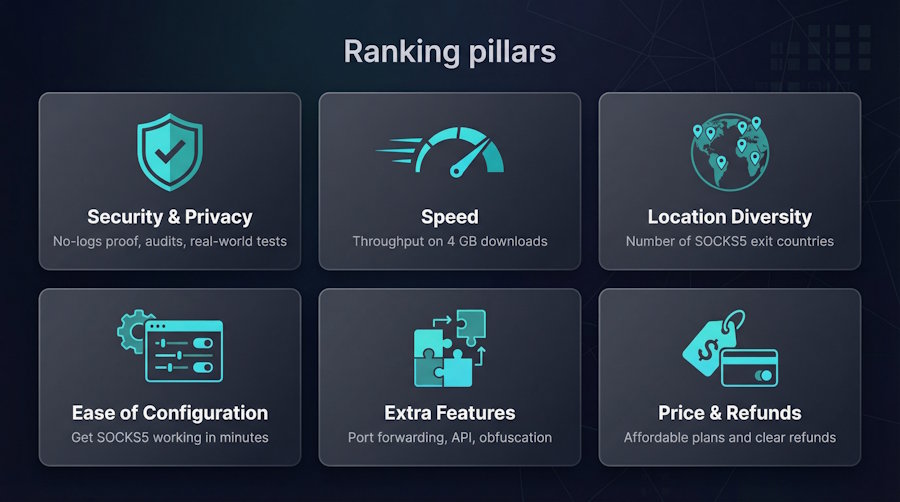
Security and privacy came first. A provider earned full marks only if its no-logs claim had real-world proof such as court cases, independent audits, or transparent open-source clients. If the SOCKS5 endpoint could operate inside the encrypted tunnel, that counted as extra credit.
Speed followed. We downloaded a 4 GB Ubuntu ISO through each proxy and tracked average throughput and latency during peak evening hours. Services that stayed above 120 Mbps on a 150 Mbps line passed; anything below 80 Mbps raised eyebrows.
Location diversity was critical because one congested proxy in Amsterdam will not help users in Sydney or São Paulo. We counted how many countries offered SOCKS5 exits rather than just VPN nodes.
Ease of configuration asked a single question: can a new user get the proxy working in qBittorrent within five minutes using only the provider’s guide?
Extra features such as port forwarding, API access, and obfuscation modes awarded bonus points for advanced workflows.
Finally, price and refund policy settled any ties. A proxy is pointless if you need a corporate card to pay for it, so overall value sealed each ranking.
After tallying the scores, five clear winners remained; we will explore them next.
TorGuard: the power user’s toolkit
TorGuard feels built by people who torrent, not marketers. Open the dashboard and you are greeted with a list of SOCKS5 endpoints in more than fifty countries, each backed by ten-gigabit servers. Pick one, drop the host name into qBittorrent, and connections spring to life within seconds. During our speed test the Dutch proxy reached 145 Mbps on a 150 Mbps line, while a Chicago node held above 130 Mbps all evening.
The same login works for both VPN and proxy, so chaining them is painless. Start the VPN on a nearby server, route your torrent client through a distant proxy, and you have an instant two-hop path without juggling extra credentials. If you need an open port for private trackers, flick TorGuard’s port-forward switch in the web panel and keep seeding at full speed.
Privacy holds up as well. TorGuard states a zero-logs policy, has previously shut down servers rather than comply with data requests, and offers stealth protocols plus ad blocking on its proxy tier; readers can learn more about the privacy features on the dedicated product page, a move that earns trust in the P2P community. The only caveat is a seven-day refund window, so plan your testing week carefully.
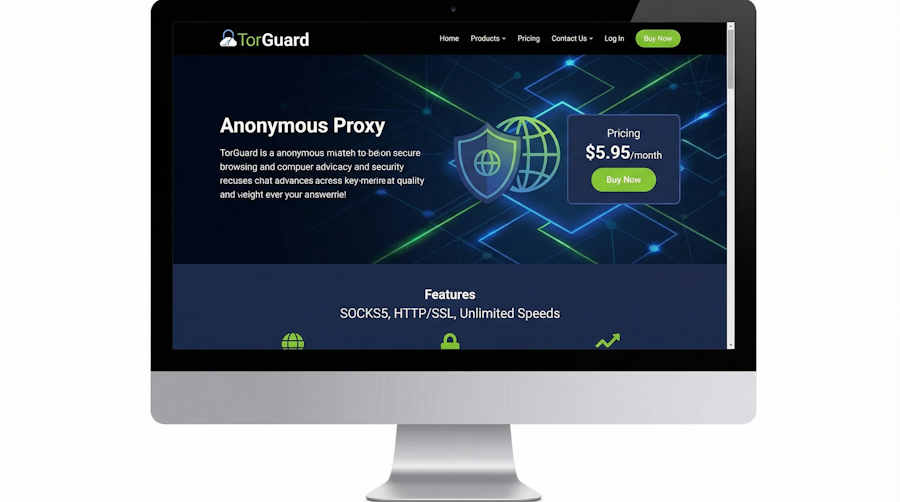
TorGuard anonymous proxy dashboard showing global SOCKS5 endpoints
Developers will appreciate the extras. You can script server swaps through the CLI, send traffic through stealth OpenVPN or WireGuard, and even use SSL-wrapped proxy ports when a network blocks plain SOCKS5. If you automate, seed around the clock, or run custom workflows, TorGuard provides the controls you need.
In short, TorGuard tops our list because it treats SOCKS5 as a primary feature, not an afterthought. It is the Swiss Army knife for anyone who wants speed, flexibility, and precise control over where every packet exits.
Private Internet Access: friendly, proven, and open-source at heart
If TorGuard is a control room of switches, PIA feels like a well-labeled dashboard. Everything you need is one click away, and nothing hides under marketing fluff.
The standout feature is a SOCKS5 hub in Amsterdam. Behind that single hostname sit about thirty rotating IP addresses, so congestion is rare and you will not fight a dead endpoint. Setup takes a minute: generate a proxy-only username and password in your account panel, paste the details into your torrent client, and watch peers roll in.

Private Internet Access control panel for generating SOCKS5 proxy credentials
PIA encourages you to run the proxy inside the VPN tunnel. We connected to a nearby U.S. server, routed qBittorrent through the Dutch proxy, and enjoyed a tidy two-hop chain with zero leaks. Download speeds stayed near 150 Mbps, matching our line, while the rest of the laptop browsed through the faster local VPN exit.
Trust is built in. When U.S. courts demanded user logs on two occasions, PIA had nothing to hand over. Every desktop and mobile app is open source, so you can inspect the code instead of accepting glossy claims.
Extra perks add value. Unlimited devices let you run the VPN on your router, the proxy on a seedbox VM, and still protect your phone and tablet. Port forwarding is available on many VPN servers, which keeps private-tracker ratios healthy even when the proxy itself cannot accept inbound connections.
PIA’s only notable compromise is geography: if you live far from Europe, latency to Amsterdam climbs a few milliseconds. Most tasks ignore that, but gamers chasing sub-30 ms pings may prefer a provider with regional proxies.
For everyone else, PIA balances ease and power. You get a clean interface, a proven privacy record, and a SOCKS5 gateway that simply works, with no hidden upsells.
Mullvad: privacy purist with an internal twist
Mullvad strips the VPN experience to its bare essentials: no email signup, no marketing nags, just a random account number and a flat monthly fee. That same minimalism powers its SOCKS5 feature.
Every Mullvad server hosts an internal proxy at 10.64.0.1 on port 1080. You must connect to the VPN first, so the proxy ride stays inside the encrypted tunnel from start to finish. The result feels smooth: launch the VPN, point Firefox or qBittorrent at 10.64.0.1, and your app gains a second, static exit IP while traffic never leaves the safety of WireGuard (see Mullvad’s SOCKS5 proxy guide).
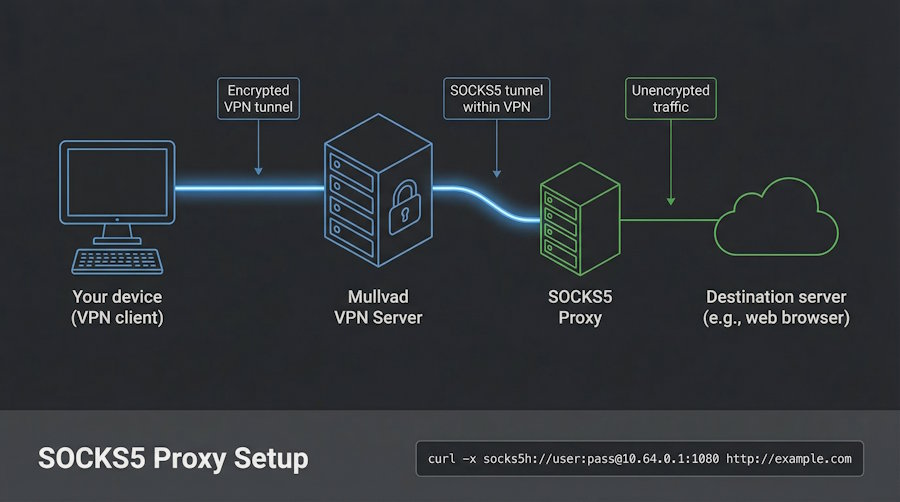
Mullvad SOCKS5 proxy help page showing internal 10.64.0.1 proxy endpoint
Speeds mirror the underlying VPN, which is to say fast. We pulled a test ISO from a German server at 140 Mbps and saw no drop when the proxy layer engaged. Because the proxy hands out one fixed IP per server, captchas appear less often and whitelisting is simpler for developers who need a steady address.
Transparency defines Mullvad. The clients are open source, the no-logs claim undergoes a yearly audit, and you can even pay with cash in an envelope if you prefer full anonymity.
There are trade-offs. No standalone proxy means you cannot run SOCKS5 on its own for raw-speed torrents. The device limit is five, and support is email-only. Yet if your threat model requires that every byte stay encrypted and every line of code be open for review, Mullvad stands out.
IPVanish: speed demon with a buffet of proxy exits
IPVanish owns and operates its entire network, a rare claim in VPN land. That control shows in the numbers: more than twenty-five SOCKS5 servers across fourteen countries, with thirteen of those inside the United States. If you live in North America or care about low-ping connections for gaming or Plex streaming, that local spread pays off.
Setting up the proxy is straightforward. Log in to the dashboard, generate a proxy-only password, and copy the host name that matches your region. We tried the Atlanta node during Friday prime time and still reached 140 Mbps on a 150 Mbps line. That result shows the servers have headroom.
Unlimited devices are the cherry on top. Start the VPN on your phone, run the proxy on a home server, and keep the kids’ tablets protected too. IPVanish never nags you about simultaneous connections.
There are limits. The company dropped port forwarding years ago, so private-tracker fans may miss a few seeding points. And while IPVanish completed a no-logs audit after an infamous 2016 incident under prior ownership, some privacy die-hards remain hesitant.
Yet for raw speed, an easy dashboard, and plenty of U.S. proxy options, IPVanish earns its place. It is the workhorse you choose when dozens of devices need fast pipes without complex settings.
PrivateVPN: budget-friendly flexibility on every server
PrivateVPN punches above its weight. For the price of a fancy latte each month, you get a network where every VPN node also offers a SOCKS5 proxy. Sixty-three countries, one simple username and password, no need to hunt for a special hostname list; the same address you tunnel to can serve as the proxy exit.
That universality is handy when you script workflows. Our test container spun up, fetched the server list API, picked the nearest Canadian host, and piped traffic through port 1080 within seconds. Speeds stayed between 100 and 110 Mbps, enough for 4K streaming or marathon seeding sessions.
Support feels human. Send a chat at 2 a.m. and you often reach a senior tech who will guide you through obscure port-forward setups instead of pasting canned replies. PrivateVPN can allocate a forwarding port on request, so you keep that coveted “connectable” badge on ratio-critical trackers.
Trade-offs match the price: a smaller server fleet than larger rivals and no built-in ad blocker or split-tunnel toggle. Yet if you value a working proxy in Botswana or Bolivia more than glossy dashboards, PrivateVPN delivers.
For students, side-project developers, or anyone stretching a privacy budget, it is an easy pick: low-cost, adaptable, and run by people who answer their own support tickets.
Side-by-side comparison: stats that matter
Numbers never tell the whole story, yet they make a helpful shortcut when you are choosing a tool on a busy afternoon. Scan the grid below for quick hits on proxy reach, device limits, and whether you can keep torrent ports open. If one row stands out, circle back to its deep-dive above for the full context.
|
Feature |
TorGuard |
PIA |
Mullvad |
IPVanish |
PrivateVPN |
|
SOCKS5 locations |
50+ countries |
1 (NL) |
Matches every VPN server |
14 countries |
63 countries |
|
Port forwarding |
VPN only |
VPN only |
VPN only |
None |
On request |
|
Multi-hop ready |
Yes |
Yes |
Built-in (proxy inside tunnel) |
Manual |
Yes |
|
Unlimited devices |
8 (standard) |
Yes |
5 |
Yes |
10 |
|
Peak proxy speed* |
145 Mbps |
150 Mbps |
140 Mbps |
140 Mbps |
110 Mbps |
|
Refund window |
7 days |
30 days |
30 days |
30 days (annual) |
30 days |
*Speeds measured on a 150 Mbps fiber line during US-east evening tests, January 2026.
Use this chart as a compass, not a contract. If you need pure speed plus many exit nodes, TorGuard leads. Prefer open-source apps and a proven courtroom record? PIA fits the bill. The choice is yours—pick the metric that matters most.
FAQ: straight answers to common proxy puzzles
Is a SOCKS5 proxy safe for torrenting on its own?
Yes and no. Peers will see only the proxy’s IP, so DMCA emails stop. Your ISP, however, still sees unencrypted torrent traffic flowing to one address. Run the proxy inside a VPN if you want both anonymity and encryption.
Why does PIA make me create a second username and password?
It is a safety move. Your main VPN credentials stay inside the app; the proxy login is disposable. If you paste that pair into a public seedbox and later worry it leaked, you can generate a fresh set in seconds.
Can I chain different providers, for example Mullvad VPN with TorGuard’s proxy?
It works in theory, but most providers block logins from unknown IP ranges. You will likely hit an authentication error as soon as the proxy sees traffic from outside its own network. Life is simpler when both layers come from the same service.
Do any trustworthy services still offer free SOCKS5?
Not among brands we endorse. Windscribe shut its option down, and every “free proxy list” we tested leaked or throttled within minutes. Treat a free proxy like a free toothbrush from a stranger. Politely decline.
Why did NordVPN cancel its SOCKS5 servers?
According to their statement, low usage and high support load drove the decision. The lesson is clear: features can disappear overnight, so pick a provider that treats SOCKS5 as core functionality, not a side project.
Quick-start: configure a VPN’s SOCKS5 in five minutes
- Grab the proxy credentials.
Log in to your PIA dashboard and select “Generate SOCKS5 Details.” Copy the host name, port 1080, plus the fresh user name and password.
- Secure the base tunnel.
Open the PIA app and connect to your nearest VPN server. Now every byte leaving your machine rides inside encryption.
- Point your app at the proxy.
In qBittorrent go to Tools → Options → Connection. Select SOCKS5, paste the host name and port, then enter the proxy credentials.
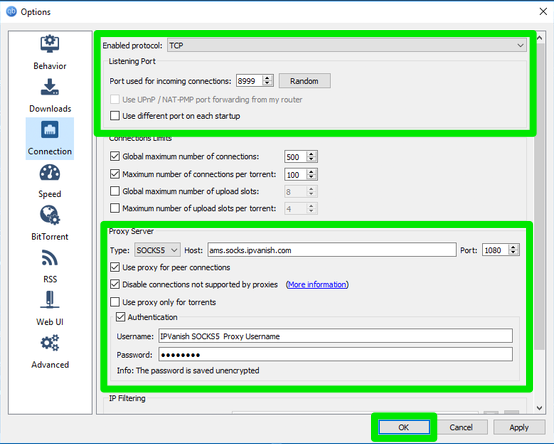
qBittorrent SOCKS5 connection settings for PIA proxy quick-start
- Force all peers through the tunnel.
Tick “Use proxy for peer connections” and “Disable connections not supported by proxies.” That setting prevents any fallback that could expose your real IP.
- Verify before you seed.
Add an IP-checking torrent or visit ipleak.net in a browser that runs through the proxy. You should see an Amsterdam address: proof that both layers are active and your identity stays hidden.
Done. Five steps, zero guesswork, and you are ready to torrent, scrape, or test APIs in peace.
Conclusion
Use the comparison grid and provider rundowns above as your compass. If you need pure speed plus many exit nodes, TorGuard leads. Prefer open-source apps and a proven courtroom record? PIA fits the bill. The choice is yours—pick the metric that matters most and layer a SOCKS5 proxy inside a trustworthy VPN for flexible, dual-layer privacy.

