

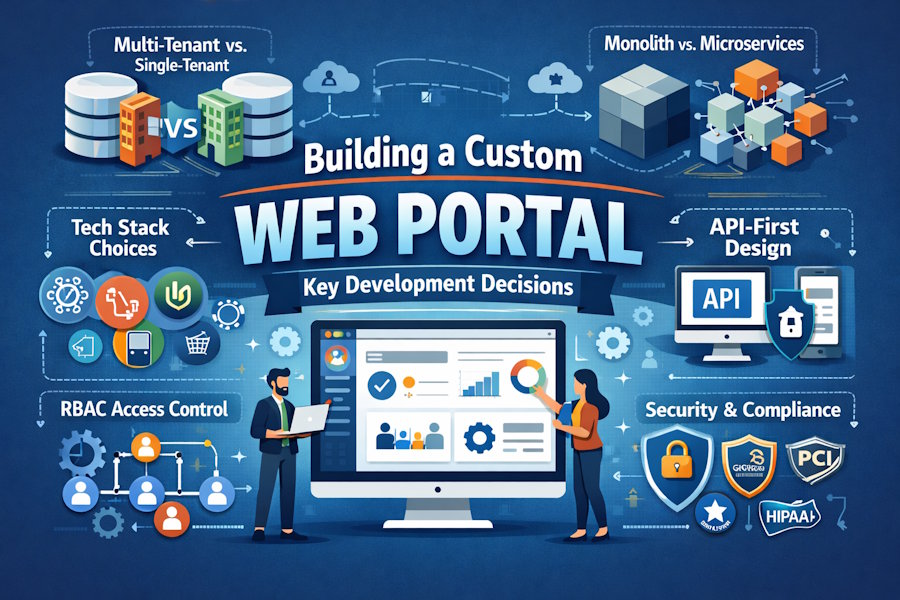
Web portals are deceptively complex. On the surface, they look like standard web apps with a login page, a dashboard, and a few user roles. Underneath, they need to handle multi-tenant data isolation, real-time integrations, role-based permissions, and compliance rules that vary by industry.
This guide skips the usual "what is a web portal" primer. Instead, it covers the architecture choices, tech stack trade-offs, and implementation decisions that determine whether your portal scales or needs a rewrite.
Pick Your Architecture Pattern First
The most important decision in portal development has nothing to do with frameworks. It is choosing how your system handles multiple user types, organizations, and data sources.
Multi-Tenant vs. Single-Tenant
If your portal serves one organization, keep it simple. One database, one deployment, straightforward scaling. But if you need to serve multiple organizations from the same codebase (B2B vendor platforms, white-label SaaS, partner management), you need multi-tenant architecture from day one. Retrofitting tenant isolation after launch is one of the most expensive rewrites you can face.
Three common approaches exist. A shared database with a tenant_id column on every table is cheapest but least isolated. Separate schemas per tenant gives you a balanced trade-off. Separate databases per tenant offers the strongest isolation at the highest cost. Healthcare and financial portals typically need schema-level or database-level isolation, while internal tools can use shared databases with row-level security.
Monolith vs. Microservices
For an MVP or a small team, start with a modular monolith. Build it as a single deployable unit but enforce strict boundaries between modules. Authentication, notifications, file management, and core business logic should each live in their own service layer with defined interfaces.
Portal modules evolve at different speeds. Notification volume might spike during campaigns. Payment processing might need independent uptime guarantees. If you design internal contracts as if modules were already separate services, you can extract any module into a standalone service later without ripping apart a tangled codebase.
Choosing the Right Tech Stack
Most tech stack comparisons treat frameworks as interchangeable. In portal development, they carry specific strengths for role-based dashboards, real-time updates, form-heavy workflows, and integrations.
Frontend
React works best for portals with complex, stateful dashboards. Its component model maps naturally to widget-style interfaces where notifications, tables, charts, and sidebars each maintain independent state. Libraries like Radix and Shadcn give you accessible components without design system lock-in.
Angular suits enterprise portals where multiple teams contribute to the same codebase. Built-in dependency injection, strict typing, and an opinionated project structure enforce consistency at scale. The trade-off is steeper onboarding.
Vue.js offers the fastest path to a working feature for smaller teams. Its reactivity system needs less boilerplate, and the single-file component format keeps everything co-located. For mid-complexity portals where speed matters more than enterprise governance, Vue is a solid pick.
Backend
Node.js (Express or NestJS) fits portals that need real-time features like live notifications or WebSocket connections. Full-stack JavaScript means shared language context across your team. NestJS adds structure with modules, dependency injection, and decorators that hold up well at portal scale.
Laravel (PHP) gives you the fastest path to a working portal backend. Built-in authentication via Sanctum, authorization through policies, Eloquent ORM, and Spatie Permission for RBAC cover what every portal needs out of the box. For data-heavy portals with complex forms and reporting, Laravel cuts out significant boilerplate.
Django (Python) shines for portals with heavy data analytics, reporting, or machine learning features. The admin panel provides an instant back-office interface, and Python's ecosystem opens up data science libraries directly.
Database Layer
PostgreSQL is the safe default for relational data with complex queries. Its row-level security feature is especially handy for multi-tenant portals. MongoDB works for flexible, document-style content. Redis is essential as a caching and session layer.
When to Build In-House vs. Hire a Specialist
This is not a sales pitch. It is a practical look at when your team can handle this and when outside expertise makes more sense.
Building in-house makes sense when:
- Your team has hands-on experience with the specific architecture patterns your portal needs, like multi-tenant isolation, complex RBAC, or real-time event processing.
• The portal is a core product and you need full control over the roadmap and IP.
• You have bandwidth for development, security patches, compliance updates, and feature iteration without blocking other projects.
Bringing in a specialist makes sense when:
- Your team is strong in application development but lacks portal-specific experience like multi-tenant architecture, enterprise SSO, or compliance-driven data handling.
- The portal needs integrations with CRMs, ERPs, payment gateways, or EHR platforms, and you need a team that has built those connections before.
- You are working against a tight timeline that leaves no room for learning portal patterns through trial and error.
For portals that involve multi-tenant data isolation, role-based workflows across several user types, and compliance with industry regulations, working with an experienced web portal development company can help you avoid foundational architecture mistakes that get more expensive to fix as the user base grows.
Whichever path you choose, the implementation decisions below apply equally to in-house teams and external partners.
Implementing Access Control That Scales
Portals are multi-user systems by nature. The access control model you set up in sprint one determines how much refactoring you face when roles get more complex than the original spec.
The solid starting point is RBAC with a dedicated permissions table. Roles like admin, manager, member, and external_partner each map to granular permissions such as view_dashboard, edit_orders, and manage_users. New roles get composed from existing permissions without touching application code. Spatie Permission handles this in Laravel. Casbin covers Node.js and Go. Django Guardian works at the object level in Python.
Things get trickier with conditional access. A regional manager should only see data from their territory. A vendor can view orders but not edit pricing. For these patterns, plan for attribute-based access control (ABAC) early. ABAC evaluates permissions based on user attributes, resource attributes, and context rather than static role assignments. Avoid flat permission models where roles live as strings on the user table. That approach breaks the moment you need tiered or conditional access.
Design the API Layer Before the Frontend
Many portals start as server-rendered apps where the backend generates HTML directly. It works at first. Then it becomes a constraint the moment you need a mobile app, a partner API, or a frontend framework migration. Without an API layer, every feature is embedded in controller actions tied to templates, and adding a new consumer means duplicating business logic.
Build your portal with RESTful or GraphQL APIs as the primary data layer from day one. Even if the only consumer right now is your web frontend, every feature should be accessible through a documented endpoint. Use OpenAPI or Swagger to document as you build. The spec acts as a contract between teams and speeds up onboarding for every developer who joins later.
GraphQL deserves a look for portals with deeply nested data where different views need different slices of the same entities. A customer dashboard, admin overview, and partner report might all pull from order data but need different fields. GraphQL lets each view request exactly what it needs without creating dozens of specialized REST endpoints.
Security Patterns That Matter
Portal security goes beyond standard web app security. Portals handle multiple user types with different trust levels, all interacting with shared data through a single interface.
Authentication: Use proven libraries instead of building your own. Laravel Sanctum or Passport for PHP, Passport.js for Node.js, and Django Allauth for Python handle registration, login, session management, token rotation, and MFA out of the box. For enterprise clients, implement OpenID Connect or SAML for SSO. If the portal serves customers, employees, and partners, use separate authentication contexts rather than cramming everyone into one user table with a role flag.
Encryption: Encrypt data at rest with AES-256 and in transit with TLS 1.3. For healthcare or financial portals, manage encryption keys through services like AWS KMS or HashiCorp Vault instead of storing them alongside your application code.
Compliance: HIPAA requires audit logging and strict access controls for healthcare portals. GDPR demands right-to-deletion workflows for EU user data. PCI DSS applies to any portal that touches payment card data. These shape your data storage, logging, and access control architecture from the beginning, not something you add before launch.
Input validation: Enforce server-side validation on all inputs. Use parameterized queries against SQL injection, content security policies for XSS, and CSRF tokens on state-changing requests. Run scans with tools like OWASP ZAP in your CI/CD pipeline.
Planning Third-Party Integrations
Portals rarely work in isolation. They pull data from CRMs, push updates to ERPs, process payments, and sync with identity providers. How you structure these integrations determines whether adding a new connection takes days or weeks.
Build an integration layer that wraps each third-party service behind an internal interface. Every integration should be its own module with dedicated error handling, retry logic, and logging. When a CRM changes its API format or a payment gateway updates its auth method, the fix stays contained in one module.
For portals that pull data from multiple systems into a single dashboard, use a message broker like RabbitMQ or Redis Pub/Sub. External systems push events to a queue and your portal processes them asynchronously. This decouples performance from external API response times and adds resilience during third-party outages. Document every integration point with its data exchange format, auth method, rate limits, and fallback behavior.
Getting the Foundation Right
The portals that scale and the portals that need rewrites rarely differ in framework choice or team size. The difference comes down to a handful of decisions made in the first two weeks: multi-tenant isolation, module boundaries, RBAC design, API-first architecture, security patterns, and integration strategy.
Get them right early, and the portal handles whatever your business throws at it. Every pattern in this guide has mature library support across major frameworks. Implementing them in sprint one costs a fraction of what retrofitting them costs in month twelve.

