


Decode channels: RUA vs. RUF
DMARC report readers exist to turn raw provider feedback into operational insight. Two streams matter:
- RUA (aggregate): mail receivers like Google and Yahoo send aggregate XML reports summarizing authentication outcomes by sending source and domain. These aggregate XML reports are the backbone of DMARC monitoring, allowing you to trend pass/fail rates across email streams.
- RUF (forensic): message-level samples of failures for deeper domain inspection. Forensic reporting augments aggregate XML reports with evidence needed to investigate unauthorized email, email spoofing, and domain abuse.
Aggregate XML reports pipeline
Vendors ingest XML feedback from URIs listed in your DMARC record (rua= and ruf=). The pipeline typically:
- Verifies report integrity, parses the reporting format, and normalizes fields (SPF, DKIM results, policy alignment, and source IP).
- Correlates to the organizational domain and subdomains for true visibility.
- Maps outcomes to your DMARC policy (none, quarantine, reject) and percentage tag for staged rollouts.
XML feedback pitfalls and why normalization matters
Aggregate XML reports vary by reporting interval, schema quirks, and IP-to-sender mappings. Without robust normalization, your DMARC monitoring will be skewed, masking issues like forwarding-induced DKIM breaks or misconfigured sender policy records. A strong report parser produces a human readable report that isolates root causes, driving faster remediation and better email domain protection.
Normalization, enrichment, and deliverability signals
Beyond parsing, leading tools enrich each DMARC report with ASN, geolocation, and provider hints to flag suspicious sources and detect shadow IT senders. They correlate SPF and DKIM alignment failures to specific SaaS platforms and publish actionable steps to fix sender policy (SPF) and keys (DKIM), accelerating DMARC compliance and reducing email fraud risk.
Human-readable outputs that drive action
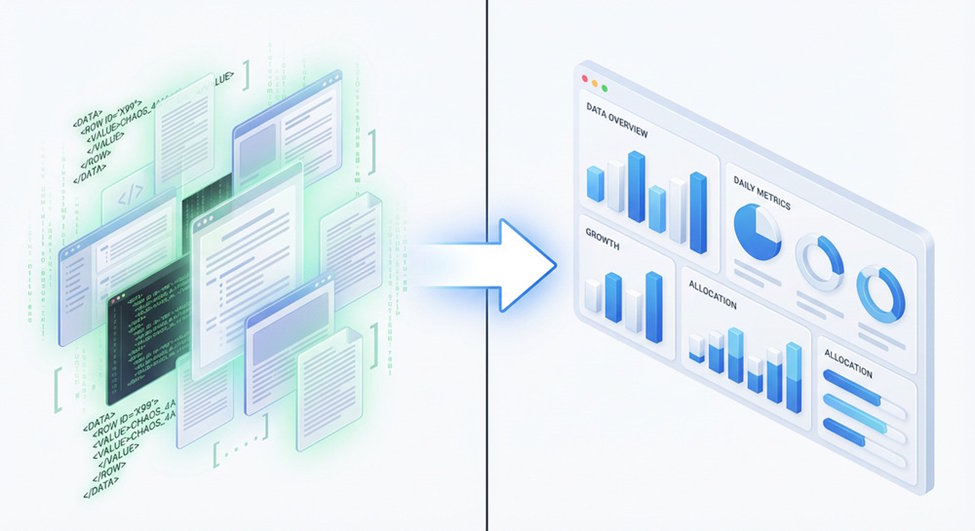
The best readers convert every DMARC report into dashboards and alerts: pass/fail by domain, policy alignment rates, quarantine/reject effectiveness, and trendlines by sending platform. Some add a delivery center view that blends email authentication with deliverability diagnostics, so teams can see how quarantine decisions affect inbox placement.
Policy alignment and compliance posture
Readers summarize policy alignment for From, Return-Path (SPF), and DKIM d= domains, guiding safe progression from none to quarantine to reject. They also track Google and Yahoo sender requirements and highlight gaps in your DMARC record, SPF flattening, DKIM key rotation, and TXT record hygiene.
DMARC inspector vs DMARC analyzer tool: capabilities, depth of insights, and typical use cases
What is a DMARC inspector (lightweight domain inspection)?
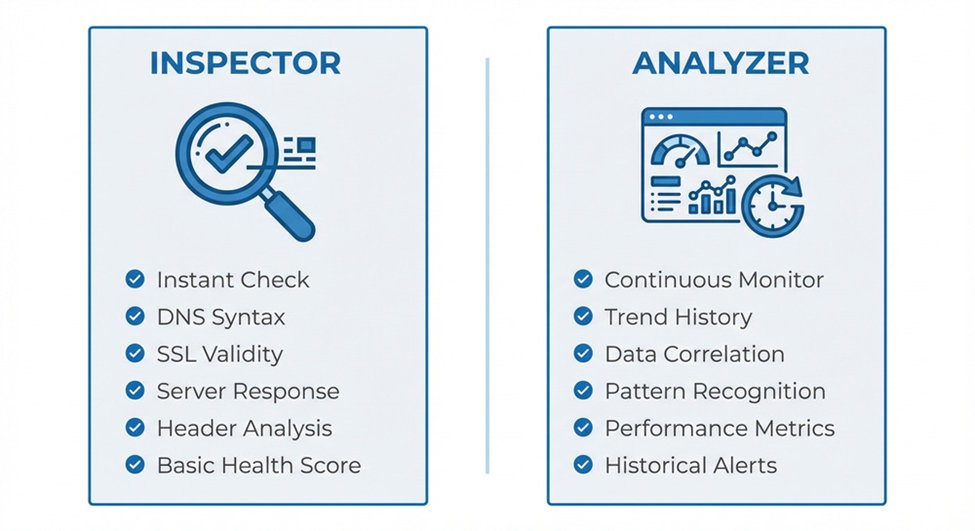
A DMARC inspector is a diagnostic tool focused on surface checks:
- Confirms presence and syntax of your DMARC record and associated TXT record entries (SPF, DKIM).
- Provides quick domain inspection and a dmarc record checker output.
- May visualize current policy (none/quarantine/reject), URIs, and percentage tag. Use cases: initial setup DMARC record, policy sanity checks, and rapid verification during incident response.
Typical inspector features
- On-demand lookups and a human readable report
- Limited reporting options, often no historical trendlines
- Basic guidance for sender policy (SPF) and DKIM existence
- Minimal or no aggregation of aggregate XML reports
What is a DMARC analyzer tool (full-stack platform)?
A DMARC analyzer tool ingests aggregate XML reports continuously, correlates SPF and DKIM outcomes, applies policy alignment analytics, and runs ongoing DMARC monitoring. It delivers dashboards, APIs, and workflow to move safely from none to quarantine and finally reject.
Advanced analyzer insights
- Full ingest of RUA and optional forensic reporting (RUF)
- Source attribution across email streams (marketing, transactional, CRM)
- Recommendations to fix SPF includes, DKIM selectors, and alignment
- Alerting on spikes in unauthorized email to combat domain abuse
For an overview and usage guide, see DMARC analyzer tool.
When to choose which
- Choose an inspector for quick TXT record checks, ad hoc domain inspection, and immediate visibility during setup.
- Choose a DMARC analyzer tool when you need continuous DMARC monitoring, aggregate XML reports normalization, policy alignment tracking, and automated workflows to quarantine or reject malicious sources at scale.
Integration fit: APIs, SIEM/SOAR exports, identity/RBAC, and multi-domain governance
APIs and export formats
Enterprise stacks require programmatic access to each DMARC report:
- REST APIs to pull normalized data by organizational domain, time window, and sending IP.
- Bulk exports in JSON and CSV, plus raw aggregate XML reports for audit trails.
- Webhooks for near-real-time XML feedback. Check that the vendor exposes reporting interval controls and a consistent reporting format for ingestion into your data lake.
SIEM/SOAR connectors
Security teams want DMARC monitoring signals beside phishing protection alerts. Look for:
- Native connectors for Splunk, QRadar, Sentinel, or Chronicle
- SOAR playbooks that escalate spikes in unauthorized email or DKIM failures
- Enrichment with threat intel to prioritize quarantine and reject moves
Identity, RBAC, and audit trails
Demand SSO/SAML, granular RBAC, and immutable logs for policy changes—who edited the DMARC policy, when quarantine thresholds changed, and which URIs were updated. This enables auditability for internal controls and external reviews.
Multi-domain and organizational domain governance
Larger organizations need portfolio management across dozens to hundreds of domains:
- Hierarchical grouping by business unit
- Inheritance of default DMARC policy and reporting options
- Rollup metrics by organizational domain to show global DMARC compliance
Data handling, security, and compliance: PII, retention, residency, and auditability
Data classification and PII in forensic reports
RUA data is aggregate; RUF can contain message fragments and potential PII. Confirm:
- Optional redaction for forensic reporting
- Scoped access via RBAC to limit who can view samples
- Clear statements on encryption in transit/at rest and key management
Retention, residency, and auditability
Document retention periods for aggregate XML reports and forensic payloads, data residency options (EU/US/region), and verifiable audit logs of policy changes. Ensure vendors align with your compliance obligations while keeping enough history to prove email authentication progress from none to quarantine to reject.
Compliance frameworks and mailbox provider expectations
Ask for attestations (SOC 2, ISO 27001) and guidance mapped to Google and Yahoo sender requirements. The platform should help validate SPF, DKIM, and DMARC policy readiness ahead of enforcement waves, reducing email spoofing and email fraud exposure while strengthening email domain protection.
Cost, scale, and licensing patterns
Scaling with email streams and mail receivers
Costs rise with the number of domains, the volume of DMARC report data, and how many mail receivers submit aggregate XML reports. Ensure the platform can scale ingestion and analytics as you add new email streams and expand quarantine/reject enforcement.
Pricing levers: domains, volume, and features
Expect tiers based on:
- Number of domains and organizational domain groups
- RUF enablement and retention
- API/SIEM exports and advanced report parser features
- Support SLAs and SSO/RBAC Factor in onboarding help to setup DMARC record, fix sender policy (SPF), rotate DKIM selectors, and guide policy alignment.
Vendor landscape snapshots
You’ll find options across the spectrum:
- Inspectors: MxToolbox checks, Postmark DMARC Digests, and lightweight dmarc record checker utilities
- Full analyzers: dmarcian, DMARC Advisor, ONDMARC, EasyDMARC, Dmarcly, DMARC Analyzer (by Mimecast), and integrated suites from Mimecast These tools differ in depth of DMARC monitoring, normalization quality, delivery center analytics, and how they move you toward quarantine and reject with confidence.
Selection checklist and a 30-day evaluation plan
Practical selection checklist
- Parsing fidelity: Accurate report parser across providers; clean human readable report outputs
- Authentication depth: Clear SPF and DKIM diagnostics, policy alignment scoring, and guidance
- Policy management: Safe progression from none to quarantine to reject with percentage tag control
- Integration: APIs, SIEM/SOAR exports, webhooks, and flexible reporting format/interval
- Governance: Multi-domain management, RBAC, SSO, audit logs
- Compliance: Residency, retention, encryption, and forensic reporting controls
- Outcomes: Measurable visibility into unauthorized email and reduced domain abuse
30-day evaluation plan
- Week 1: Setup DMARC record (TXT record with rua/ruf URIs), validate with an inspector, confirm aggregate XML reports start arriving. Baseline SPF and DKIM across all senders.
- Week 2: Connect the DMARC analyzer tool, enable dashboards, tag known email streams, and triage failing sources. Pilot quarantine for a low-risk subdomain using the percentage tag.
- Week 3: Integrate APIs and SIEM; test alerts on spikes in SPF/DKIM Review delivery center metrics and ensure phishing protection playbooks trigger on unauthorized email.
- Week 4: Prove DMARC compliance gains, document policy alignment improvements, and prepare a plan to extend quarantine then reject across the organizational domain. Capture audit logs and finalize reporting options for stakeholders.
Success metrics to track
- Increase in aligned SPF/DKIM rates within each DMARC report
- Reduction in unknown sources and faster remediation cycles
- Safe expansion of quarantine and eventual reject with minimal user impact
- Sustained visibility across providers (Yahoo, Google) and consistent XML feedback quality across mail receivers
By aligning tool capabilities with integration, governance, and compliance needs—and validating them against real aggregate XML reports—you’ll choose the right balance between quick domain inspection and the depth only a full DMARC analyzer tool can deliver.

