

TakeProfit vs TradingView: Which Platform Is Better for Traders in 2026?
TradingView remains the undisputed heavyweight champion of technical analysis. Trusted by over 100 million users, it offers an industry-standard charting experience, massive global market coverage, comprehensive broker integrations, and a library of more than 100,000 community-built indicators. However, many of its most useful features are locked behind five pricing tiers that can reach $199.95 per month.
TakeProfit positions itself as a modern alternative for self-directed traders and developers. Instead of a tiered pricing model, it offers a single flat-rate plan at $20 per month or $100 per year. Its main differentiators include Indie, a Python-based scripting language, unlimited charts per workspace, an AI-assisted MCP Server for coding, and a creator-first marketplace that pays out 80% to 100% of revenue to indicator creators.
Key insight: Choose TradingView for unmatched global market coverage and community scale. Choose TakeProfit if you want flat pricing, Python-based indicator development, and unrestricted workspace flexibility.
Quick Comparison Overview
| Feature | TakeProfit | TradingView |
|---|---|---|
| Free plan | Yes (basic toolkit, creator publishing) | Yes (1 chart per tab, 2 indicators per chart, ads) |
| Paid pricing | $20/month or $100/year (flat rate) | $12.95 to $199.95/month (four paid tiers) |
| Charts per layout | Unlimited (widget-based) | 1 to 16 (depends on tier) |
| Scripting language | Indie (Python-based) | Pine Script (proprietary) |
| Market data | US equities, 100+ crypto exchanges | Global markets: stocks, forex, crypto, bonds |
| Alert limits | Up to 50 alerts, no artificial throttle | 20 to 1,000, with a 15 alerts / 3 min firing cap |
| Customer support | Human support for all users via Discord and email | Tiered ticket support for paid users only |
| Marketplace | Yes (80% to 100% revenue to creators) | Free community scripts; paid invite-only scripts |
1. Pricing: Flat Rate vs. Tiered Paywalls
Pricing is one of the clearest differences between these two platforms.
TradingView uses a five-tier structure: Free, Essential ($12.95/month), Plus ($28.29/month), Premium ($56.49/month), and Ultimate ($199.95/month). Importantly, its base subscription usually does not include real-time market data for major exchanges such as NASDAQ, NYSE, and CME. A trader on the Essential plan may still need to spend an additional $15 to $25 per month for US equities data.
TakeProfit takes a simpler route with just two plans: Free and Paid. For $20 per month, or $100 per year, users unlock the full paid platform. That includes real-time data for NASDAQ, NYSE, and NYSE Arca without separate exchange fees.
Pricing and Feature Matrix
| Feature | TV Essential | TV Plus | TV Premium | TV Ultimate | TakeProfit Paid |
|---|---|---|---|---|---|
| Monthly cost (annual billing) | $12.95 | $28.29 | $56.49 | $199.95 | ~$8.33 ($100/year) |
| Charts per tab | 2 | 4 | 8 | 16 | Unlimited |
| Indicators per chart | 5 | 10 | 25 | 50 | Unlimited |
| Price alerts | 20 | 100 | 400 | 1,000 | 50 |
| Real-time US data | Extra cost | Extra cost | Extra cost | Extra cost | Included |
| Volume profile | Yes | Yes | Yes | Yes | Yes |
2. Charting and Workspace Flexibility
TradingView: Deep but Gated
TradingView provides a mature charting ecosystem with up to 21 chart types, including advanced options such as Renko and Volume Footprint on higher tiers, plus more than 110 drawing tools. It supports second-based intervals and detailed multi-timeframe analysis. The main drawback is that workspace freedom is restricted by plan level. Free users are limited to one chart per tab, while unlocking eight charts requires the Premium plan.
TakeProfit: A Widget-Based Sandbox
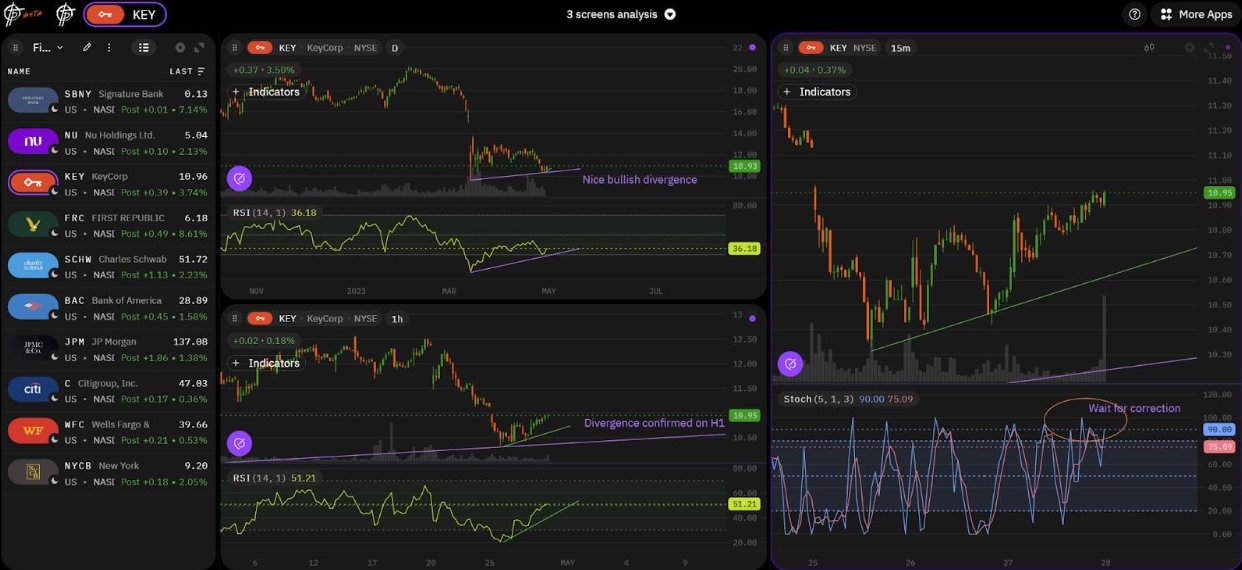
TakeProfit rethinks the interface with a drag-and-drop widget dashboard. Users can add charts, watchlists, screeners, and code editors freely, even on the free plan. The platform uses WebGL and WASM for fast browser rendering. Although it still lacks some of TradingView’s most advanced charting features, such as automated pattern recognition, it offers a cleaner and more flexible environment for traders who want complete control over layout design.
3. Scripting: Pine Script vs. Indie
For algorithmic traders and developers, scripting flexibility matters.
Pine Script (TradingView): Pine Script is a proprietary language built specifically for TradingView. Its main advantage is ecosystem size: there are over 100,000 public indicators and strategies available. The trade-off is portability, since code written in Pine Script remains tied to TradingView.
Indie (TakeProfit): Indie is a Python-based scripting language. Because it closely resembles Python, it is easier to learn for developers and offers more transferable skills. TakeProfit also integrates an MCP Server that allows LLM-based tools to help write, validate, and convert Indie code from natural language instructions.
Code Comparison: Dual SMA Overlay
TradingView (Pine Script v6)
// @version=6
indicator("Dual SMA", overlay = true)

shortLen = input.int(12, "Short SMA")
longLen  = input.int(42, "Long SMA")

plot(ta.sma(close, shortLen), "Short", color.blue)
plot(ta.sma(close, longLen), "Long", color.gray)
TakeProfit (Indie Python)
# indie:lang_version = 5

from indie import indicator, color, plot
from indie.algorithms import Sma


@indicator('Dual SMA', overlay_main_pane=True)
@plot.line(color=color.BLUE)
@plot.line(color=color.GRAY)
def Main(self):
    short = Sma.new(self.close, 12)
    long  = Sma.new(self.close, 42)

    return short[0], long[0]
4. Alerts and Automation
TradingView scales alert capacity by subscription level, reaching up to 1,000 alerts on the Ultimate plan. However, active traders should note its documented firing cap of 15 alerts every 3 minutes across all plans. During periods of high volatility, that restriction may affect execution workflows.
TakeProfit offers up to 50 alerts on its paid plan and does not document an equivalent artificial throttle. It also supports multi-condition logic, email delivery, Discord webhooks, Telegram bot integrations, and time-based scheduling rules through Indie.
5. Monetization and Customer Support
Creator Monetization
TradingView allows users to publish free indicators, but monetizing protected scripts is more restrictive and often depends on higher-tier plans and off-platform payment handling. By contrast, TakeProfit includes a built-in marketplace where creators can sell indicators directly. Revenue sharing ranges from 80% to 100%, depending on how customers are acquired.
Customer Support
TradingView uses a tiered support model, where free users typically receive no direct support and lower paid tiers may experience slower response times. TakeProfit provides human support through Discord and email for all users, including free accounts.
6. Who Should Choose Which Platform?
Choose TradingView if you:
- Need broad global market coverage, including forex, international equities, futures, and bonds.
- Want broker integrations for trading directly from charts.
- Rely on the large public library of Pine Script indicators.
- Need advanced tools such as Volume Footprints or automated pattern detection.
Choose TakeProfit if you:
- Prefer a flat pricing model without tier-based feature restrictions.
- Want a Python-like scripting language instead of a proprietary one.
- Need a highly customizable workspace with unlimited chart layouts.
- Plan to monetize indicators through a built-in marketplace.
- Primarily trade crypto or US equities.
Migration Strategy: How to Switch
- Create a free TakeProfit account and build your preferred layout with drag-and-drop widgets.
- Rebuild your core watchlists for US equities and crypto.
- Use AI tooling connected to the TakeProfit MCP Server to help translate Pine Script logic into Indie.
- Recreate key webhooks, Telegram alerts, and automation rules.
- Run both platforms side by side and compare workspace efficiency, alert behavior, and scripting workflow.
Frequently Asked Questions
- Is TakeProfit a viable TradingView alternative in 2026?
- Yes, especially for self-directed traders, indicator developers, and traders focused on US equities or crypto. Traders needing wider forex or global macro coverage may still prefer TradingView.
- How does TakeProfit pricing compare to TradingView?
- TakeProfit costs $20 per month or $100 per year for full access, including real-time US equity data. TradingView ranges from $12.95 to $199.95 per month, and real-time exchange data is usually billed separately.
- Can Pine Script be converted to Indie automatically?
- There is no one-click conversion, but TakeProfit’s MCP Server helps AI tools understand Indie documentation and speed up translation from Pine Script logic to Python-style code.
- Are both platforms free to try?
- Yes. TradingView offers a free plan with stricter chart and indicator limits plus ads. TakeProfit also offers a free plan with unlimited charts per layout and access to the creator marketplace.

