

Software development is going through a quiet transformation. Tasks that once required separate frontend, backend, and infrastructure specialists can now be handled inside a single AI-driven platform.
Today’s full-stack builders do much more than generate code snippets. Many can design interfaces, create databases, configure login systems, and even deploy applications automatically. This makes it possible to move from idea to usable product much faster than before.
For startups, product teams, and independent developers, selecting the right platform can directly affect both development speed and budget. To make this easier, we reviewed several platforms based on completeness, workflow flexibility, deployment simplicity, and cost practicality for early-stage projects.
Choosing the Right Tool for Different Development Tasks
Each platform focuses on a different part of the product lifecycle. Some specialize in infrastructure, others in design or frontend speed. Here is a quick positioning overview:
- MeDo – AI platform focused on building complete applications
- Railway – Deployment platform for simplifying hosting workflows
- Neon – Database platform built for modern Postgres workflows
- Figma – Interface design and product collaboration tool
- Postman – API testing and backend collaboration environment
- v0 by Vercel – Frontend generation focused on React interfaces
Because of these differences, many teams combine several of these tools instead of relying on only one.
6 Platforms Helping Developers Build Faster
1. MeDo
Pricing: Free credits available; paid plans start at $20/month
Best for: Builders who want a working product without complex setup
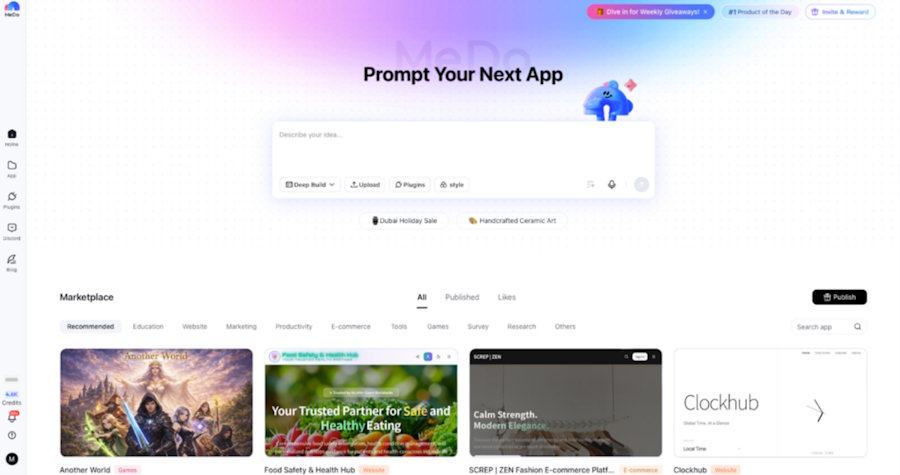
MeDo presents itself as a complete AI development workspace instead of a narrow tool. Rather than only generating UI or isolated backend logic, it produces full applications including frontend structure, backend services, database schemas, authentication flows, and deployment setup.
This unified approach allows users to stay inside one environment instead of managing multiple external services. The result is a product that can be tested and launched with fewer technical steps.
Strengths
- Generates full application stacks instead of partial outputs
- Includes deployment without requiring separate hosting tools
- Supports iteration through simple prompts
- Can replace multiple separate services
Limitations
- Still building awareness compared to older platforms
- Native mobile app generation is not yet fully supported
2. Figma
Pricing: Free tier available; paid plans from $20/user/month
Best for: Teams focused on product design and UI planning
Figma has become one of the standard tools for interface collaboration. Teams use it to prototype flows, test layouts, and validate product ideas before development starts.
Its main advantage is communication. Designers and developers can share the same visual reference instead of relying on written specifications.
Strengths
- Real-time collaboration
- Strong prototyping features
- Large plugin ecosystem
- Helpful design documentation tools
Limitations
- Does not produce production applications
- May be excessive for small projects
- Learning curve for beginners
3. Postman
Pricing: Free individual plan; paid plans from $14/month
Best for: Teams working heavily with APIs
Postman is widely used for API development and testing. Developers can simulate requests, automate testing, document endpoints, and coordinate backend workflows inside one environment.
For API-driven products, it remains a common standard.
Strengths
- Large developer ecosystem
- Strong automation tools
- Makes API collaboration easier
- Supports multiple API formats
Limitations
- Limited to backend workflows
- Can feel heavy for simple use cases
- Some collaboration tools require payment
4. Railway
Pricing: Free credits available with usage billing
Best for: Developers who want easier deployment
Railway focuses on simplifying infrastructure. After connecting a repository, the platform detects the stack and prepares the environment automatically.
Instead of treating deployment as a technical challenge, it turns it into a routine workflow step.
Strengths
- Straightforward deployment process
- Free credits for testing
- Automatic updates
- Unified dashboard for services
Limitations
- Costs can grow with traffic
- Less flexibility than enterprise cloud setups
- Does not generate product logic
5. v0 by Vercel
Pricing: Free limited tier; paid plans from $20/month
Best for: Fast front-end generation
v0 concentrates on interface creation speed. Using text descriptions or visual prompts, it generates React components styled with Tailwind CSS.
It works best as a frontend accelerator rather than a full development solution.
Strengths
- Generates production-ready UI code
- Speeds up interface iteration
- Integrates well with Vercel
- Handles complex UI patterns
Limitations
- Focused only on frontend
- Requires developer integration work
- Usage limits may affect testing
6. Neon
Pricing: Free tier available; paid plans around $19/month
Best for: Modern Postgres database workflows
Neon brings version-control ideas into database management. Teams can create database branches for testing without affecting production data.
This makes experimentation safer and reduces risks during development.
Strengths
- Database branching improves testing
- Usage-based pricing
- Managed infrastructure
- Fast database cloning
Limitations
- Database-only solution
- Needs other tools for full applications
- Smaller ecosystem than older providers
How We Evaluated These Platforms
Instead of ranking tools by popularity, we focused on practical development concerns:
- How quickly projects can begin
- Workflow flexibility
- Practical AI usefulness
- Deployment reliability
- Cost efficiency
The goal was to highlight real development value rather than brand reputation.
Practical Tips for Using Full-Stack Builders Effectively
Teams that move fastest with these platforms often follow similar habits:
- Plan your data structure before generating apps
- Add authentication early
- Test on real devices, not only previews
- Use branching when adding major features
- Keep exported code backups
These practices help avoid refactoring later and reduce technical debt.
Conclusion
Full-stack builders are reducing the need for large engineering teams by combining multiple technical layers into unified environments. This allows smaller teams to ship functional products without hiring specialists for every stage.
For teams trying to simplify development and avoid managing multiple tools, platforms that combine frontend, backend, database, and deployment clearly provide efficiency advantages.
Among these, MeDo stands out because it focuses on generating complete products instead of isolated features. By combining AI generation, infrastructure setup, and deployment into one workflow, it helps users move from idea to working software with fewer barriers.
Developers who want to explore this approach can start with MeDo’s free tier and experiment with building a full-stack application in minutes.

