

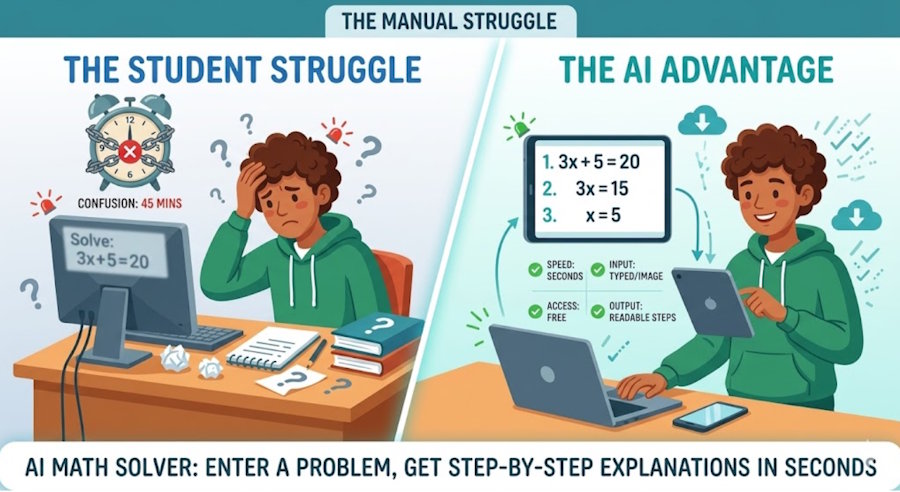
For students and educators, math work is rarely just about getting an answer. It is about understanding how a problem unfolds, where confusion begins, and how to move from uncertainty to a clear method. That process takes time, and in busy classrooms or packed study schedules, time is usually the scarcest resource.
This is one reason this kind of solver has become more visible in everyday academic workflows. Instead of treating problem-solving support as something available only during office hours or tutoring sessions, students can now type a question, upload a photo, and review the steps almost immediately. Educators, meanwhile, can use the same kind of tool to prepare examples, compare methods, or spot where learners may be getting stuck. That shift is part of what makes this category of tools more relevant in education than it was even a few years ago. You can see the same pattern in adjacent utilities such as AI Image Detector, which also turn time-consuming checks into quick, accessible tasks.
Arting AI fits naturally into that audience-specific shift because its tools are designed to be easy to access at the moment someone actually needs help.
Quick Reference: Math Study Support
|
Feature |
At a Glance |
|
Generation Speed |
Enter the problem, get a result right away |
|
Input Requirements |
Type the math or upload a clear image |
|
Scene Options |
Move from homework to exam review to lesson prep |
|
Access Model |
Open online and start — no setup required |
|
Key Limitation |
Start with clear input; highly complex work may need more |
How the Technology Has Improved
Math tools have changed significantly in a short time. Earlier digital solvers often behaved like answer machines: you entered a problem, got an output, and were left to figure out the reasoning on your own. That could be useful for checking a result, but it was less helpful for actual learning. If a student did not understand why the answer was correct, the tool had not really solved the deeper problem.
Newer systems work differently. They are better at handling natural input, better at interpreting photographed equations, and better at presenting a sequence of steps that feels closer to guided support than a simple result dump. Instead of requiring carefully formatted expressions every time, many tools now let users move through a simpler process: enter the problem, review the solution, follow the explanation.
That improvement matters in classrooms because the bottleneck is not always the math itself. Sometimes the real issue is access to timely help. A student may understand most of a worksheet but get stuck on one line and lose momentum. An educator may want a quick second example before class starts. A support tool that can respond immediately changes those moments. It keeps the work moving.
There is also a practical shift in how these tools are accessed. What once required software, separate accounts, or a more technical workflow can now happen in a browser. For both students and teachers, that lighter entry point makes a difference. If the path to help has too many steps, people stop using it. If the path is simple, it becomes part of the routine.
What Makes a Reliable Tool in This Space
Not every tool that solves equations is equally useful in an educational setting. Reliability here goes beyond whether an answer shows up. It is about whether the experience actually supports learning without creating extra work along the way.
Clarity is the starting point. A reliable tool should let users move from input to explanation in a way that feels easy to follow. If the output is cramped, confusing, or too abrupt, students may leave with the correct answer but without any better understanding of the method behind it.
Students do not always work from perfectly typed equations, which makes input flexibility just as important. Sometimes they have handwritten notes, textbook pages, or screenshots from an assignment portal. A tool that can handle both typed problems and image-based input fits real study habits much better than one that demands ideal formatting every time.
Access rounds out the picture. In schools and universities, people often need help in short bursts — switching devices, working between classes, reviewing one question late at night. A tool that keeps the process simple, especially one that is free and easy to open in a browser, is far more likely to become a genuine part of academic routine.
Reliability also includes honesty about limits. Very advanced problems can still challenge general-purpose systems. Poor-quality images can still lead to weaker output. And while step-by-step explanations are genuinely valuable, they do not replace a full course or a subject expert in every situation. The most useful tools are the ones that handle common needs well and state their boundaries clearly.
Arting AI and Easy Access for Learning Support
For this audience, the lead feature that matters most is access model. If a student needs help with one equation before class, or an educator wants to check the flow of a worked example while building tomorrow's lesson, the tool has to be available immediately. That is where Arting AI's approach stands out: open the page, enter the problem, review the result.
This is how the AI Math Solver fits into that workflow. You arrive online, type the expression or upload an image, wait briefly, and then review both the answer and the steps. For users who are trying to move from confusion to understanding without a long setup process, that sequence matters.
What the Product Offers
Access comes first. The tool is free and easy to reach online, which lowers the barrier for casual and repeated use. That matters because math support is rarely evenly distributed across a week. A student may need help with several algebra problems one night and none the next. A teacher may open the tool twice during lesson planning and not return for a few days. A lightweight access model fits that kind of rhythm far better than something that asks for commitment before it has proven its value.
The solving process is also fast. You enter the problem and get a result almost immediately, which is useful when momentum matters. Long pauses can break concentration, especially during homework sessions. Quick turnaround keeps the attention on the math rather than on the waiting.
Input flexibility is another practical advantage. The tool works with both text and image input, so students can type a problem directly or upload a clear picture when that is easier. That fits the way real academic work happens. Sometimes the cleanest version of the question is typed into a homework platform. Sometimes it is scribbled in a notebook margin five minutes before class.
Step-by-step explanation is where the tool becomes more than a shortcut. Instead of stopping at the final answer, it walks through the process. For educators, that can help when preparing examples or checking whether a method is being presented clearly. For students, it can turn a blocked moment into a review opportunity. A lot of learners still do the very human thing of checking the final answer first and only then reading the steps, but at least the steps are there when they need them.
The limitations are worth stating plainly. Very complex problems may still produce less satisfying support than a specialized academic tool or a subject expert. Clear input gives the system a better chance of interpreting the question accurately, so blurred photos or incomplete expressions can reduce the quality of the output. And while the explanations are useful, their depth may remain lighter than what a dedicated specialist platform or advanced classroom discussion can provide.
Those boundaries do not weaken the tool's core use case. In ordinary study and teaching situations, the process is often exactly what people need: enter a problem, see the result, review the explanation, move on with better momentum.
Classroom and Study Uses
Students often use a tool like this at very specific points of friction. One equation in a homework set does not make sense. A geometry problem looks familiar but not fully clear. A calculus step seems to jump too quickly from one line to the next. In those moments, waiting for the next class meeting is rarely ideal. A quick solution path can keep the learner engaged instead of stuck.
Educators use these tools differently, but just as practically. A teacher preparing a lesson may want a second way to show the same method. A tutor may want to test whether a photographed problem reads clearly before sending guidance to a student. An instructor building practice material may want to check how a sequence of steps looks from a learner's point of view. These are not flashy use cases. They are everyday teaching tasks, and that is exactly why the tool fits.
The AI Math Solver becomes useful here not as a replacement for instruction, but as a support layer around instruction. It helps fill the small gaps that slow people down.
Who Benefits
Students benefit most obviously, especially those studying independently or working outside normal classroom hours. A quick way to move from question to explanation can help them stay engaged long enough to finish the task in front of them. That matters for confidence as much as efficiency. When learners can check a step, correct a misunderstanding, and keep going, the work feels manageable.
Educators benefit in a different rhythm. They may use the tool to sanity-check examples, prepare alternate explanations, or anticipate where students are likely to hesitate. For tutors and teaching assistants, the value is similar: less time spent reconstructing routine examples from scratch, and more time available for the parts of teaching that require real human judgment.
Arting AI matters to both groups because it keeps the access barrier low. People do not need an elaborate onboarding process to solve one immediate problem. They can open the tool, work through the question, and return to the larger task they were already doing.
Conclusion
For students and educators, efficiency in math work is not about rushing to the end. It is about removing the small delays that interrupt understanding. When help is easy to reach, problem-solving becomes smoother, feedback arrives faster, and more attention can stay on the reasoning itself.
That is why the AI Math Solver is becoming a practical part of modern study and teaching workflows. It supports a simple sequence that fits academic life well: bring the problem, review the answer, study the steps, continue the work.
The same demand for quick, focused support appears in other parts of educational and content workflows too. The AI Image Detector serves a different purpose, but it reflects a similar expectation: open the tool, run the check, get a usable result without unnecessary delay.
AI Image Detector shows how broadly that design pattern applies. Whether the task is verifying an image or working through an equation, people increasingly value tools that are easy to reach, fast to use, and clear about what they can and cannot do.

