

Modern video workflows rarely start from one type of input alone. Some teams begin with a prompt, a script, or a product brief. Others begin with screenshots, design frames, reference images, or existing brand assets. In real projects, both paths often belong to the same system. That is why Kling 2.6 API makes more sense when viewed through workflow design rather than through a single endpoint in isolation.
For developers and workflow teams, the real value is not simply that video generation is available. More useful questions come later: when should a team use text-to-video, when should it use image-to-video, and how should both routes fit into one repeatable production process?
Kling 2.6 API Integration Starts With Workflow Design, Not Just Endpoint Access
Teams often make the mistake of treating video generation as a one-step feature decision. In practice, integration works better when the workflow goal is defined first. A team building concept drafts from messaging needs a different setup from a team extending existing visual assets. Both routes may use the same API, but they solve different input problems.
That is why text-to-video and image-to-video should not be framed as competing modes. They usually belong to the same content system. One handles prompt-led generation. The other handles asset-led extension.
Text-to-Video and Image-to-Video Often Belong to the Same Content System
Prompt-led and asset-led workflows often coexist. A product team may generate early direction from text, then use existing visuals to refine asset outputs in later stages.
Kling 2.6 API Works Better When Teams Define the Output Goal Early
A demo draft, a campaign asset, a product explainer, and a visual variation all place different demands on the workflow. Clarity on that goal improves integration decisions from the start.
Kling Text to Video API Fits Prompt-Led Video Workflows
Prompt-led generation is the natural entry point when the team already has structured language. Product messaging, short scripts, launch concepts, storyboard notes, and campaign direction can all become usable starting inputs. In those cases, Kling Text to Video API works less like a novelty layer and more like a drafting layer.
That distinction matters. Teams rarely need a perfect output on the first request. More often, they need something visible enough to evaluate, iterate, and improve. Prompt-led generation helps create that early visual layer quickly.
Prompt-Led Inputs Work Best for Concept Drafts and Script-Based Assets
A clear script or prompt structure creates a better basis for early output than vague experimentation. Developers testing workflow fit usually get more useful results when the prompt already reflects a real use case.
Kling Text to Video API Supports Fast Iteration in Early Video Drafting
Once teams start with a stable prompt pattern, iteration becomes easier. Refining output is far more practical than trying to invent the workflow from scratch every time.
Kling Image to Video API Fits Asset-Led Workflow Design
Not every workflow starts with text. Plenty of teams already have product screenshots, interface visuals, slide decks, creative references, or brand assets that should not be discarded when video enters the system. That is where Kling Image to Video API becomes more relevant.
Asset-led generation changes the integration goal. The team is no longer trying to imagine the content from zero. It is trying to extend something that already exists. That usually makes the workflow more controlled and easier to align with the rest of the product or brand experience.
Existing Screens, Designs, and Reference Images Change the Generation Goal
A team working from screenshots and established visuals usually needs extension, not invention. That changes how success should be measured.
Kling Image to Video API Extends Existing Assets Instead of Replacing Them
Video generation becomes more useful when it increases the value of assets a team already owns instead of forcing an entirely new production path.
How to Use Kling 2.6 API Documentation Through Kie.ai
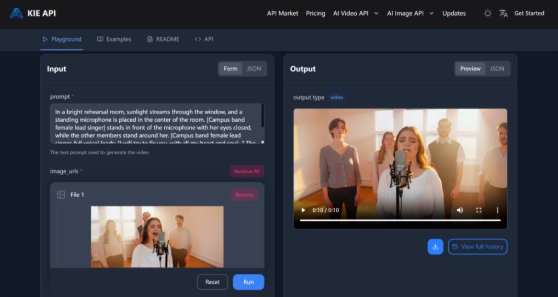
For teams using Kie.ai as the access route, the most practical approach is to treat Kling 2.6 API documentation as a workflow guide, not just a parameter list. The first step is not to test every supported path at once. A better starting point is to pick the simplest request that matches the real use case. If the workflow is prompt-led, begin with text-to-video. If the workflow depends on existing visuals, begin with image-to-video.
That approach reduces friction in the first testing cycle. Kie.ai Kling 2.6 API documentation is most useful when it helps the team answer three questions quickly: what input the workflow starts from, what output type the team actually needs, and how to move from a first successful request into repeatable usage.
A practical “how to use” pattern looks like this: choose one workflow goal, send the smallest realistic request, evaluate whether the output matches the intended content path, then expand into prompt refinement, asset reuse, or system-level embedding only after the first call works reliably. That is more effective than trying to test every mode in one session.
Start With the Simplest Request That Matches the Workflow Goal
A focused first request usually reveals more than a broad exploratory test. One good use case is enough to validate whether the route is worth expanding.
Use the Kling 2.6 API Documentation to Match Input Type to Output Intent
Documentation becomes more useful when it supports decisions, not just syntax. Teams need to know which route fits the job before they need every implementation detail.
Move From First Successful Call to Repeatable Usage
The first successful output is only the beginning. Real value appears when the API becomes part of a repeatable process rather than a one-time experiment.
Kling Video 2.6 API Becomes More Useful When Teams Separate Testing From Production
Testing and production should not be treated as the same stage. Early tests should focus on one repeatable use case, one input type, and one clear output expectation. Production decisions come later, once the team understands timing, cost, and reliability under normal conditions.
That separation matters because many integrations fail for the wrong reason. A team either tests too broadly and learns nothing useful, or it assumes one good output means production readiness. Neither is a strong evaluation method.
Early Testing Should Focus on One Repeatable Use Case
A narrow test makes it easier to refine prompts, input handling, and review logic without confusing the results.
Production Work Depends on Repeatability, Not One Good Result
One successful draft proves potential. Repeated successful drafts prove workflow value.
Kling 2.6 API Price, Turnaround Time, and Workflow Trade-Offs
Technical fit is only part of the picture. Workflow teams also need to understand whether repeated calls remain practical. Kling 2.6 API price becomes more important once testing turns into ongoing usage. Turnaround time matters because iteration depends on momentum. Asset type matters because image-led and prompt-led workflows rarely place the same load on the system.
That means workflow fit should be evaluated in context. A small product team testing demo clips may care most about clarity and speed. A larger content system may care more about repeated request volume and review overhead, which is also worth checking against a newer model like kling 3 before locking in a long-term integration.
Kling 2.6 API Price Matters More in Repeated Calls Than in First Tests
The first few requests are not where budget pressure shows up. Real cost becomes visible once the workflow repeats under regular use.
Workflow Fit Depends on Speed, Asset Type, and Request Volume
No single metric decides adoption. Teams usually need to judge the full balance of inputs, outputs, timing, and usage patterns.
Kling AI 2.6 API Works Best Inside a Multi-Step Content System
Kling AI 2.6 API becomes more valuable once teams define the full chain around it: input, generation, review, and delivery. That is where the API stops being a standalone experiment and starts acting like infrastructure. Teams that already know how output will be reviewed, reused, or distributed usually get more value from integration than teams testing without any downstream plan.
For that reason, Kling video generation API fits best as one layer inside a broader content system. Prompt-led and asset-led routes both become stronger when they serve an existing product or communication workflow rather than sitting beside it.
Kling AI API Adds More Value After Teams Define Input, Output, and Review Stages
Clear stages make the API easier to judge, easier to tune, and easier to place in real work.
Kling Video Generation API Fits Better as a Workflow Layer Than an Isolated Experiment
The strongest integrations usually happen when the API supports a system that already exists rather than trying to create the whole system by itself.
Kling 2.6 API in Real Text-to-Video and Image-to-Video Workflows
The most useful way to understand Kling AI 2.6 API is not as a choice between text-to-video and image-to-video, but as a way to support both within the same workflow when needed. Prompt-led generation gives teams a route from language to early visual output. Asset-led generation gives them a route from existing material to stronger extensions.
With a practical Kie.ai documentation path layered in, the API becomes easier to move from first test to real use. For developers and workflow teams, that is what makes the integration question worth solving in the first place.

