

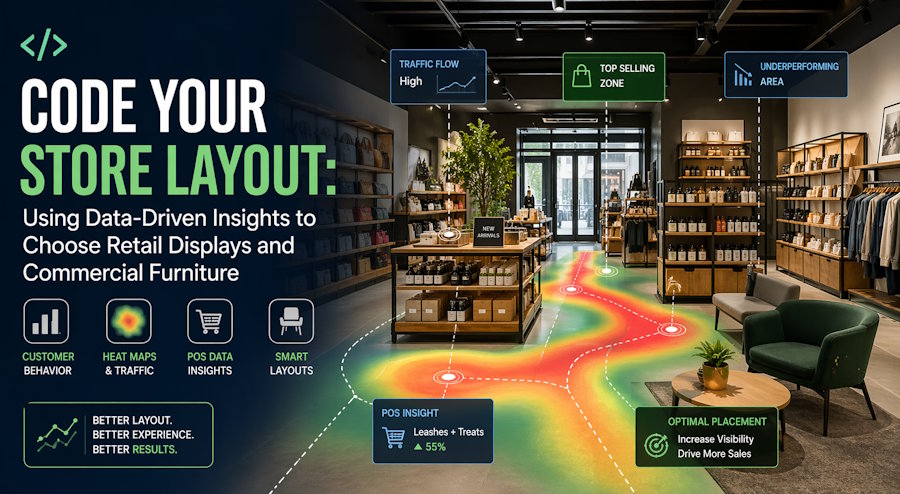
Guessing is expensive. You think the shelf looks nice. You put it somewhere. Then nothing sells. You move it. Still nothing. You are just guessing. Stop guessing. Start using data. Your store creates data every single day. Which aisle do people walk down first? Which display do they touch but not buy? Which shelf empties the fastest? That data tells you exactly where to put you Custom Shop Displays. It tells you what height to set for your Retail Store Shelving. It tells you which commercial furniture is a waste of space. This is not complicated. You do not need a degree. You need to watch, count, and adjust. Let me show you how.
I have seen shops double their sales just by moving things. No new products. No discounts. Just a data-driven layout. A bookstore in Des Moines moved their impulse shelf near the register. Sales of small items went up to 60%. A shoe store in Omaha watched where people stopped. They moved their best Retail Store Shelving to that spot. Sales went up to 40%. Data works.
Step One: Watch How People Walk
Do not ask customers what they want. They lie. Or they do not know. Watch them instead. Stand near your door for an hour. Pick a slow Tuesday. Watch every person who enters.
Where do they look first? Where do their feet go? Do they turn left or right? Do they stop at the first Custom Shop Displays they see? Do they walk past everything and go straight to the counter?
Write it down. On paper. A real notebook. After one hour, you will see a pattern. 70% of people turn right. 20% go straight. 10% turn left. That means your right side is your most valuable space. Put your best Retail Store Shelving on the right. Put your highest margin products there.
I saw a gift shop in Cedar Rapids. 80% of customers turned right. But the owner had put her clearance shelf on the right. Cheap stuff. Waste of space. She moved her best jewelry to the right side. Sales from that jewelry went up 300% in two weeks. No new customers. Just a better placement.
Step Two: Track What People Touch
Touching is not buying. But no touch means no buy. So, track touch. Put small stickers on the floor in front of each Custom Shop Displays unit. Every time a customer stops there, they make a mark. Every time they touch a product, they make another mark.
After a week, count your marks. Some displays get lots of stops but few touches. That means the display looks good, but the products are not interesting. Change the products. Some displays get many touches but few sales. That means people like the products but not the price. Or the products are hard to reach. Adjust your Retail Store Shelving height. Lower the products by six inches. Watch what happens.
A hardware store in Sioux City did this. Their screwdrivers shelf got many touches but zero sales. People picked them up. Put them down. I walked away. The owner lowered the Retail Store Shelving by eight inches. Suddenly kids could reach. Dads could see better. Sales started happening. Same screwdrivers. Same price. Different heights.
Step Three: Map Your Store's Heat Zones
Every store has hot zones and cold zones. Hot zones are where people stop and look. Cold zones are where people walk fast and do not look. Your job is to move your Custom Shop Displays into hot zones. And stop putting expensive products in cold zones.
How to find hot zones? Look at your floor. Seriously. Look at the wear patterns. The dirty carpet. The scuffed tile. The faded linoleum. That is where people walk the most. Those are your hot zones.
Put your Retail Store Shelving along those paths. Put your Custom Shop Displays at the end of those paths. Put your commercial furniture like benches and fitting rooms off to the side. Do not block the path.
A bakery in Davenport noticed their floor was worn near the door and near the register. The middle of the store had a clean floor. Nobody walked there. They moved their impulse display from the middle to the path between the door and register. Sales of impulse items doubled. The middle area became a storage. No loss.
Step Four: Use Your POS Data
Your point-of-sale system knows everything. Which items sell together? Which items do you never sell? Which hour of the day has the most transactions? Use that data to choose your Custom Shop Displays.
If you sell coffee and pastries together often, put them on the same Retail Store Shelving unit. Near each other. Make it easy. Do not make customers walk across the store for a muffin to go with their coffee.
If an item never sells, move it to a different display. Maybe it is hidden. Maybe it is too high. Maybe it is near the door where people do not stop. Move it to a hot zone. Test for two weeks. If it still does not sell, stop selling it.
A pet store in Iowa City looked at their POS data. Dog leashes and dog treats are sold together often. But the leashes were in front of the store. Treats were at the back. Customers had to walk past everything else. Many just grabbed the leash and left. No treat. The owner moved treats to a Custom Shop Displays unit right next to the leashes. Treat sales went up 55% in one month. Same treats. Same price. Just closer.
Step Five: Test One Change at a Time
Do not change everything at once. You will not know what worked. Change one thing. Wait for two weeks. Measure the difference. Then change to another thing.
Week one: Move one Custom Shop Displays unit from the back to the front. Measure sales from that unit before and after.
Week three: Lower one section of Retail Store Shelving by six inches. Measure touch and sales before and after.
Week five: Add a mirror near your fitting room. Measure time spent in the store before and after.
A clothing shop in Ames did this slowly. One changes every two weeks. After four months, they moved twelve things. Sales were up to 85%. When asked what single change worked best, the owner said "I have no idea. But together, they worked perfectly."
Decoration Tips That Support Your Data
Decoration is not random. Decoration should guide people where your data says they want to go.
If your data shows people stop at bright colors, paint one wall yellow. Put your best Retail Store Shelving on that wall.
If your data shows people avoid dark corners, add a floor lamp there. Or move your clearance items there. Do not put expensive products in the dark.
If your data shows people touch products with their left hand more often (yes, this is real), put your Custom Shop Displays on the left side of the aisle. People use their dominant hands to touch them. Right-handed people touch their right hand. So, they angle their body to make that hand free. Test it. You will see.
A toy store in Waterloo noticed kids touched toys on the bottom two shelves only. Parents picked toys from higher shelves. The owner moved the kids' toys to the bottom shelves. Moved parents' items (batteries, gift wrap) to higher shelves. Sales increased for both. Because each customer found what they wanted at their own height.
Commercial Furniture That Responds to Behavior
Your commercial furniture includes seating, counters, and fitting rooms. Data should drive where you put these too.
If your data shows people gather near the window, put a bench there. Let them sit. While sitting, they look at products near the bench. Put Custom Shop Displays near that bench.
If your data shows people stand at the counter for a long time (paying, chatting, wrapping gifts), put small impulse items on the counter. Cheap things. $5 or less. People buy them while waiting.
If your data shows people use fitting rooms but leave without buying, check your lighting in the fitting rooms. Dim lighting makes people look bad. They do not buy. Add brighter bulbs. Test it again.
A shoe store in Dubuque added a bench near their boot section. Data had shown couples stood there while one person tried boots. The other person waited. Bored. The bench made them comfortable. While sitting, they looked at socks and laces on nearby Custom Shop Displays. Impulse sales from that bench area hit $300 per week. The bench cost $80.
How RTdisplay Builds Displays That Work with Your Data
You can collect all the data in the world. But if your furniture is wrong, the data does not matter. You need displays that adjust. Shelving that moves. Units that fit your specific hot zones. That is where Rtdisplay is a professional retail store fixtures manufacturer offering customized retail displays & shopfitting. You send them your data. Your floor plan. Your heat map. They build Custom Shop Displays that match your customers' actual behavior. Need a unit that is low on one side and high on the other? Done. Need Retail Store Shelving that can be reconfigured every month as your data changes? Done. RTdisplay does not guess. They build based on your numbers. They have worked with stores across the US and beyond. Data-driven stores. Smart stores. Stores that do not waste money on bad layouts.
A Real Example from a Home Goods Store in Des Moines
Let me tell you about a home goods store in Des Moines. They sold candles, pillows, kitchen tools, and small furniture. Sales were flat for two years. The owner tried discounts. I tried ads. Nothing worked.
He started collecting data. He watched where people walked. He tracked touches. He mapped his hot zones.
The data showed something strange. 90% of customers walked in, turned right, walked past the candles, stopped at the pillows, then left. Nobody went to the back of the store where the kitchen tools were. The back was a dead zone.
The owner moved his Custom Shop Displays for kitchen tools to the right side of the store. Right where people turned. He put his best Retail Store Shelving for knives and gadgets right in that turn path.
He also added a Custom Shop Displays unit at the end of the pillow aisle. That unit held small kitchen tools like peelers and thermometers. Impulse items.
Results? Kitchen tool sales went up 110% in two months. Total store sales went up to 45%. The owner spent zero dollars on new products. He just moved things based on data.
Your Action Plan This Week
You do not need fancy software. Do this with a notebook and a pen.
One: Stand at your door for one hour on a slow day. Write down where every customer walks first. Draw a map. Your map does not need to be pretty.
Two: Put small stickers on the floor in front of each Custom Shop Displays unit. Every time someone stops, they make a mark. Do this for three days.
Three: Look at your POS data. Find one item that sells well and one item that sells poorly. Swap their locations. Put the poor seller in the hot zone. Put the good seller in the cold zone. Test for two weeks. You will learn something.
Four: Lower one section of Retail Store Shelving by six inches. Count touches before and after.
Five: Call RTdisplay. Tell them your data story. Ask for a quote for one Custom Shop Display that fits your biggest hot zone. Test it for 30 days.
Data is not scary. Data is just watching. Watch your own customers. They tell you everything. You just must look. Now go look.

