

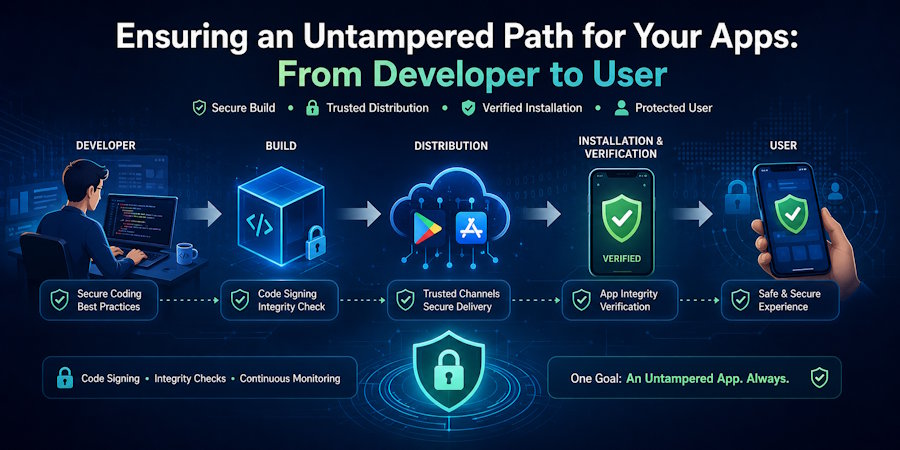
Have you ever wondered how far your mobile app has actually traveled before it lands on your device? Before it reaches you, every app goes through a long journey. The code is created, assembled, packaged, released, tested, and distributed across multiple systems and teams. Most users never think about this process. We simply tap “Install” and assume what we’re getting is exactly what the developer intended.
But that assumption has a gap - and attackers know exactly where to exploit it. One of the most critical yet overlooked aspects of the software development lifecycle is ensuring the delivery of an untampered app.
This article explains how to apply proven app security best practices, such as code signing and app integrity verification, to ensure a secure and untampered app launch.
What Does an Untampered App Path Mean
An untampered app remains original, authentic and verifiable from the time it leaves the developers’ build environment until it operates on an end user’s device. This sounds simple. But in practice, it requires a constant chain of trust across three stages:
Build: Code compiles into a binary package.
Distribution: The package travels through channels to users.
Installation: The app lands and executes on the device.
Each stage depends on the one before it. If the build stage is compromised, no amount of distribution security can fix it. If distribution is uncontrolled, even a perfectly built app becomes a risk. And if installation is not verified, users may run something that appears to be your app but isn’t.
Code signing sits at the centre of this process. This process uses a code signing certificate to cryptographically bind your identity to the app and lets every downstream system verify that nothing has been altered. Your untampered app cannot be reliable without proper signing.
How Apps Get Tampered in Real Scenarios
Tampering is not always loud; most dangerous attacks are the ones users never notice. They modify apps silently to preserve functionality while adding malicious payloads.
Repackaged Apps with Hidden Malicious Code
These apps are one of the most common threats. An attacker downloads your legitimate APK or IPA, and injects malicious code, a keylogger, an ad injector, a data harvester, and re-uploads it to a third-party store under your app’s name and icon. Users download it thinking it is yours.
Compromised CI/CD Pipelines
In 2021, a Codecov breach occurred when attackers injected malware into the continuous integration system, affecting hundreds of organizations’ build outputs, including mobile apps. Similar incidents hit Jenkins servers, and GitHub Actions runners are used for mobile builds.
Tampered Updates Delivered to Users
Tampered updates are another silent threat. An attacker who can intercept or spoof an update mechanism can push a modified version of your app directly to existing users, bypassing the initial install review entirely.
Most attacks succeed because the untampered app appears unchanged to the naked eye. Users cannot identify the difference, which is why secure app protection must be proactive.
Steps to Ensure an Untampered Path from Developer to User
The untampered app requires protection at every stage. Follow these mobile app security best practices to lock down the chain.
Secure the Build Before Release
Use a new and isolated short-term build environment. Do not use an untrusted third-party library. Run OWASP Dependency Checker or a similar tool on all application dependencies. Run Static Application Security Testing (SAST) and binary analysis before the package is built. Only signed, approved builds exit the pipeline. That cuts off supply chain attacks at the source.
Control How Your App is Distributed
Launch only on Google Play or Apple Store. Keep an eye on marketplaces for cloned apps. Release only code-signed application packages. For enterprise apps, use the Scalefusion Mobile Device Management (MDM) solution with additional verification layers.
Verify App Integrity on User Devices
Basic signatures are carried out by platforms, but they are not the only ones. Create your own runtime verification by comparing the application’s hash or certificate to expected values at initial launch. Notify the user and halt execution if verification is unsuccessful. Sideloaded or altered APKs and IPAs are detected by this additional app integrity layer.
Protect the App after Installation
Insert tamper-detection mechanisms such as runtime application self-protection (RASP). Check if a device is rooted/jailbroken using safety-net checks (Android) or jailbreak APIs (iOS). Scan for debugging tools, emulators, or any strange runtime behaviour. Deny sensitive operations in insecure environments. These are the mainstay of secure app protection.
Secure the Update Process
Sign all updates with the same private key used for the original build. Check signature and version integrity before installing. Do not use insecure “silent” update mechanisms that bypass store review. Treat all updates as a new distribution point, re-check app integrity on the device.
Monitor and Respond to Integrity Issues
Detect crashes, usage anomalies, and unexpected network calls through Firebase Crashlytics or Sentry. Scan app stores for rogue builds. If a rogue build is found, revoke your certificate. Notify users right away and push a clean replacement.
Why This Path Matters for Your App and Users
A single weak spot can bring the entire app down without tampering with it. Users cannot differentiate between the original and a tampered version, trust disappears. More than half of apps were attacked within weeks of launch, often through tempering vectors.
If your objective is to safeguard your app and the users, you should consider investing in mobile app security best practices such as code signing and continuous app integrity checks. As a result, you will notice fewer support inquiries from users and stronger brand loyalty with significantly reduced risk.
Conclusion
App security goes beyond development. The journey to your untampered app is only secure if it remains secure at every step, from the first build to the last update. The journey of your untampered app must be locked down from start to finish. The trust can only be broken if the app is compromised at any point in its journey. Use these mobile app security best practices to deliver secure app protection that users can trust.

