

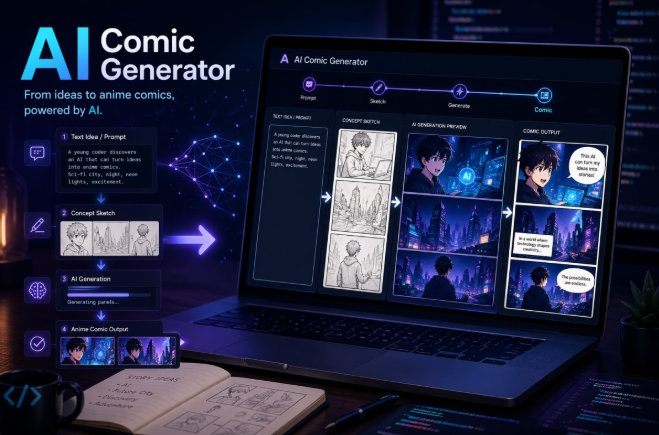
I’ve tested enough creative AI tools over the past year to notice a pattern: most people don’t fail because the model is weak. They fail because they approach visual storytelling like a one-click magic trick. That almost never works.
When I started experimenting with anime-style comic creation, I was really just trying to speed up a workflow that used to take far too long. Sketching characters, finding a consistent tone, fixing scene continuity, and rewriting panel ideas ate up hours before I even had something usable. A good free AI anime generator changed that for me—not because it replaced creativity, but because it gave me a faster way to move from concept to draft.
That shift matters, especially if you are a developer, indie creator, hobby artist, or content publisher trying to produce visual stories without building a full illustration pipeline from scratch. The real question is no longer “Can AI generate anime images?” It can. The more useful question is this: can it help you build a comic people actually want to read?
From my experience, the answer is yes, but only if you treat AI as part of a process rather than the whole process.
Why Comic Creation Is Harder Than Basic Image Generation
Generating a single pretty image is easy now. Generating a sequence that reads like a story is where the work begins.
A comic needs continuity. Characters should look related from panel to panel. Expressions need to change in a believable way. Backgrounds should support the scene instead of confusing it. Dialogue pacing matters. Even the camera angle plays a role, because one awkward composition can flatten a dramatic moment.
That’s why many people get disappointed after their first few tries. They produce a nice hero image, a decent close-up, maybe an action pose, and then the sequence falls apart. The hair changes, the clothing shifts, the mood becomes inconsistent, and the “story” starts to feel like a pile of unrelated posters.
I learned pretty quickly that AI comic work is less about prompting for “beautiful art” and more about controlling structure.
My Practical Workflow Looks Much Less Glamorous Than People Expect
What works for me is a simple workflow built around planning, iteration, and restraint.
I usually begin with a short concept note, not a giant prompt. Something like this:
- protagonist: quiet teenage exorcist
- setting: rainy city alley
- tone: tense but emotional
- visual style: clean anime linework, soft cinematic lighting
- story beat: discovers a cursed letter, then sees a ghost behind him
That tiny outline does more for consistency than a bloated paragraph full of adjectives. Once I have the story beat clear, I break it into panels. Usually four to six is enough for a short comic strip or teaser page.
Here’s the structure I rely on most:
|
Step |
What I Focus On |
Why It Helps |
|
Idea Draft |
Core premise and mood |
Prevents random generation |
|
Character Definition |
Face, outfit, age, attitude |
Improves continuity |
|
Panel Planning |
What happens in each frame |
Keeps pacing readable |
|
Image Generation |
One scene or panel at a time |
Easier to control |
|
Cleanup |
Dialogue, layout, text fixes |
Makes it publishable |
That table may look basic, but skipping any one of those steps usually costs me more time later.
The Biggest Improvement Came From Thinking In Panels, Not Prompts
This was the turning point for me.
At first, I wrote prompts as if I were asking for a movie poster: dramatic, rich, overloaded with style terms. The results looked impressive but not sequential. Once I started thinking panel by panel, the outputs became more usable.
Instead of saying, “Create a dramatic supernatural anime scene,” I’d define one frame more precisely:
- Panel 1: medium shot, boy walking in rain, looking down, letter in hand
- Panel 2: close-up of wet envelope with strange seal
- Panel 3: over-the-shoulder view, blurred ghost figure in background
- Panel 4: shocked face, widened eyes, streetlight glow, tension rising
That level of control gave the page rhythm. It also made revision easier. If Panel 3 failed, I only had to fix Panel 3.
When I want a faster route for this kind of work, I usually test a dedicated AI comic generator, because tools designed around story frames tend to reduce friction. General image models, like Grok Imagine, can still help, but comic-oriented workflows often save time by aligning better with how sequential art is actually built.
What Still Needs Human Judgment
This is where I think many articles oversell AI. The model can help with production, but taste still comes from the user.
I still make human decisions on:
- which expression feels honest
- where a pause should happen
- whether a panel should be quiet or intense
- how much dialogue is too much
- when to simplify a scene instead of making it more detailed
That last point is underrated. A comic page can become visually noisy very quickly. AI often wants to “decorate” everything. I’ve learned to pull it back. Cleaner backgrounds, stronger silhouettes, and fewer competing details usually produce a more readable result.
The same goes for text. If you try to cram too much dialogue into an AI-generated layout, it starts to feel amateur. I prefer short speech lines and stronger visual acting.
Common Mistakes I See Again and Again
A lot of failed AI comics share the same issues, so they’re worth naming directly.
1. Too Much Story In One Page
People try to fit a full arc into five panels. The result feels rushed. A short comic works better when it captures one clear beat: discovery, confrontation, confession, escape, or reveal.
2. Weak Character Anchoring
If the character description is vague, the design drifts. I now define a few “must-keep” traits before generating anything: hairstyle, eye shape, main clothing pieces, and emotional tone.
3. Overwritten Prompts
Long prompts are not always better. In fact, they often create contradictions. I’ve had stronger results from prompts that are shorter but more intentional.
4. Ignoring Layout Logic
Even good art can fail if the reading flow is awkward. I try to keep the eye moving naturally from top left to bottom right, with visual emphasis where the emotional beat lands.
Where I Think This Is Going
What excites me most is not the novelty of AI art anymore. That phase passed. What interests me now is workflow compression.
The gap between “I have an idea” and “I can show someone a readable comic draft” has become much smaller. For solo creators, that’s powerful. For developers building content products, fandom tools, story generators, or creator platforms, it opens a lot of room for experimentation.
I wouldn’t argue that AI replaces comic artists. It doesn’t. What I would argue, based on real testing, is that it lowers the barrier to prototyping visual stories. That matters for people who want to explore ideas before investing in a full production pipeline.
Final Thoughts
After months of using these tools, my conclusion is fairly simple: AI works best for comics when you stop asking it for perfection and start asking it for momentum.
That’s how I use it now. I sketch the story logic, anchor the character, define the panels, generate in small steps, and edit with a reader’s eye. The output is faster, cleaner, and much more usable than the chaotic experiments I started with.
If you’re curious about AI-assisted comic creation, don’t begin with the assumption that the tool will do everything for you. Begin with a scene you actually want to tell. Once that part is real, the software becomes far more useful.

