

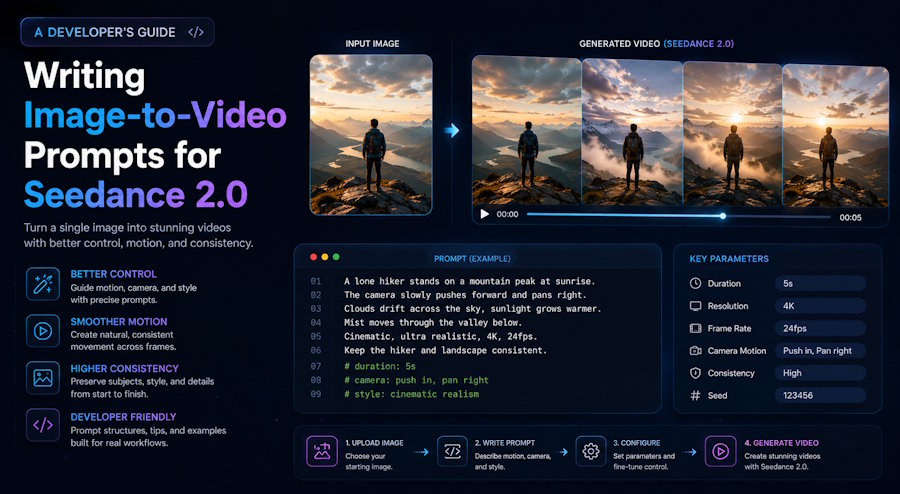
If you've spent any time generating AI video clips this year, you've probably hit the same wall I did. Image-to-video models reward prompts that look more like code than creative writing. Vague mood paragraphs give vague output. Structured prompts give repeatable output. The second mode is what developers should care about.
This guide is a working reference for writing image-to-video prompts that behave predictably in Seedance 2.0, ByteDance's multimodal video model launched on February 12, 2026. The patterns and templates below are what I keep in a prompt library and reuse across projects, with notes on the failure modes that show up when you skip the structure.
Why Seedance 2.0 Image-to-Video Prompts Are Different From Text-Only Video
A text-to-video model has to invent everything: subject, environment, motion, style. An image-to-video model already has the subject and environment from the uploaded frame. Your prompt tokens go on what changes over time, not what exists. Most people miss this when they write their first image-to-video prompt.
The practical consequence is direct: a prompt that re-describes the image is wasted. The model sees the image. It does not need you to tell it "a woman in a blue dress on a cobblestone street." It needs you to tell it what moves.
Most people who try Seedance 2.0 for the first time treat it like a text-only video model by writing a dense paragraph full of style words, dramatic adjectives, and camera terms, then expecting the model to figure out timing, pacing, movement, and visual consistency on its own. — Seedance 2.0 Prompts: The Complete Working Guide (Cliprise)
The one rule that pays off more than any other: describe motion, not subject.
The Six-Part Image-to-Video Prompt Anatomy
The structure that keeps working across projects looks like this:
1. Subject action — what the main subject does
2. Secondary motion — what else moves (hair, water, fabric, smoke)
3. Camera move — exactly one, with a pacing word
4. Environment beat — light, weather, ambient detail
5. Style anchor — photographic / cinematic / handheld / studio
6. Negative constraint — what should NOT happen
A prompt should hit four to six of these slots, in 60 to 100 words total. The 60-100 word target comes out of practitioner guides aggregating thousands of generations (Apiyi, Seedance 2.0 Official Prompt Guide In-depth Interpretation) and matches my own iteration logs. Going longer makes each instruction weaker, not stronger. Seedance 2.0 has a soft attention budget per clip and dilutes long input.
Six Templates That Hold Up Under Iteration
The templates below are the ones I copy-paste from a local Markdown file every time I start a new project. Each is annotated with the slot it fills. Treat them as starting points; the slot structure is what to keep, the contents are what to swap.
Template 1 — Single-subject portrait motion
[Subject action] turns head slowly toward the window.
[Secondary motion] hair lifts gently in a soft breeze, eyes blink once.
[Camera] static medium shot, no camera movement.
[Environment] soft morning light from the left.
[Style] photographic, natural pace.
[Negative] no warping, no zoom, no background drift.
Use case: animated avatars, talking-head leads, hero portraits.
Template 2 — Product hero loop
[Subject action] product rotates slowly on its vertical axis.
[Secondary motion] subtle reflective highlights shift across the surface.
[Camera] smooth orbit around the product, slow pace.
[Environment] clean studio backdrop, even key light.
[Style] commercial product photography.
[Negative] no logo distortion, no texture warping, no shadow flicker.
Use case: e-commerce listings, landing-page product reveals, ad creative.
Template 3 — Landscape ambience
[Subject action] distant clouds drift slowly to the right.
[Secondary motion] foreground grass sways gently, water surface ripples.
[Camera] slow dolly forward, steady pace.
[Environment] late afternoon golden hour, long shadows.
[Style] cinematic, shallow depth of field preserved.
[Negative] no time-lapse, no flicker, no frame drift.
Use case: section dividers, background loops, mood pieces.
Template 4 — UI demo motion
[Subject action] cursor moves smoothly across the interface and clicks the primary button.
[Secondary motion] button briefly depresses, panel transitions in from the right.
[Camera] static screen capture, no camera movement.
[Environment] clean modern UI, neutral background.
[Style] screen-recording realism, 24fps cadence.
[Negative] no UI element drift, no text warping, no resolution change.
Use case: feature explainers, demo loops, in-product walkthroughs.
Template 5 — Food and texture close-up
[Subject action] steam rises from the surface of the dish.
[Secondary motion] a small drop of sauce slides down the edge.
[Camera] slow dolly in toward the center of the plate.
[Environment] warm overhead light, dark wooden table.
[Style] editorial food photography, shallow focus.
[Negative] no over-saturation, no synthetic glossiness, no plate movement.
Use case: restaurant marketing, recipe blogs, hero loops.
Template 6 — Identity-locked character motion
[Subject action] character looks down at the book and turns the page.
[Secondary motion] hair settles, fabric of the shirt shifts slightly.
[Camera] static close-up, eye level.
[Environment] soft library light, dust particles in the air.
[Style] cinematic, preserve composition and colors from reference image.
[Negative] maintain exact appearance from reference image, no facial drift, no clothing change.
Use case: any narrative work where the character must look identical across multiple clips.
The lines preserve composition and colors and maintain exact appearance from reference image are two of the most useful additions for character consistency in Seedance 2.0, documented across multiple practitioner guides (Cliprise, Seedance 2.0 Prompts; Apiyi, Seedance 2.0 Official Prompt Guide). Drop them in any clip where a face, logo, or product shape needs to stay recognizable.
Failure Patterns and How to Debug Them
Every time a generation comes back wrong, the cause falls into one of a small number of buckets. Treat this as a debug checklist rather than a creative block.
Character drift between frames. The subject morphs as the clip progresses. Fix: Add maintain exact appearance from reference image and preserve composition and colors. If the drift continues, switch to multi-image reference mode and tag the character image explicitly so it is held as a hard constraint, not a hint.
Output ignores half the prompt. Long mood paragraphs read fine to humans but the model selectively obeys. Fix: Cut the prompt under 100 words. Use slot-style structure, not flowing prose. Drop adjectives that don't change motion. Words like beautiful, stunning, epic add zero motion signal and steal attention budget from words that do.
Motion is chaotic. Everything moves at once and nothing reads. Fix: Specify exactly one primary motion and one secondary motion. Add a negative constraint freezing everything else: background remains static, or only the subject's hair moves.
Camera fights the subject. Aggressive camera move plus complex subject motion produces visual mush. Fix: One camera move per clip. Pacing words (slow, smooth, gentle) outperform technical specs (24mm focal length, f/1.4) in this model.
Generation rejected before text processing. Seedance 2.0 runs an image evaluation layer that fires before the prompt is read. Clearly recognizable celebrity faces, copyrighted character designs, and certain restricted content categories trigger a pre-text rejection. Fix: Use original images, generic characters, or your own asset library. Re-prompting will not save a flagged input image.
Treating Prompts as Reusable Assets
Here's where a one-off experiment turns into a real workflow. If you're going to generate more than five clips for a project, the prompts are part of your asset pipeline and should be treated like the rest of it.
A reasonable starting setup:
prompt-library/


├── portraits/


│   ├── single-subject-static-camera.md


│   └── identity-locked-narrative.md


├── product/


│   ├── hero-orbit.md


│   └── close-up-texture.md


├── ambient/


│   └── landscape-golden-hour.md


└── _README.md
Each .md file holds the template, the reference image filename, the resulting clip filename, and notes on what worked and what didn't. After two or three projects, the library produces more reliable output than you can write from scratch each time, because you are iterating on a working baseline instead of starting from a blank prompt for every clip.
For team work, version-control the library. Prompts that worked last month on a specific image may behave differently after a model update. A git log on the prompt file plus a dated note (worked well 2026-04-02 on identity-locked portraits) is enough scaffolding to keep the library honest. Same discipline you apply to migrations and config: small, dated, reversible records.
Where to Test Your Image-to-Video Prompts
The fastest way to iterate on prompts is in a browser-based generator where the round trip from edit to output is under two minutes. I have been using Seedance2.so, which runs the Seedance 2.0 model, gives new accounts three free credits to test with, and lets you swap reference images and tweak prompts without leaving the page. Any browser interface for the model will work; none of the templates above depend on a specific UI.
Closing
Image-to-video prompts work best when you treat them like config: a fixed set of slots, concrete values, explicit negatives. The mental model shifts from creative writing to code-like specification. It's a small shift, and it changes how reliably you can ship output across a project.
Build a prompt library. Reuse what works. Read failed generations as debug output, not creative blocks. The model is a conditioning system at heart, and the more precisely you condition it, the more predictably it behaves.

