

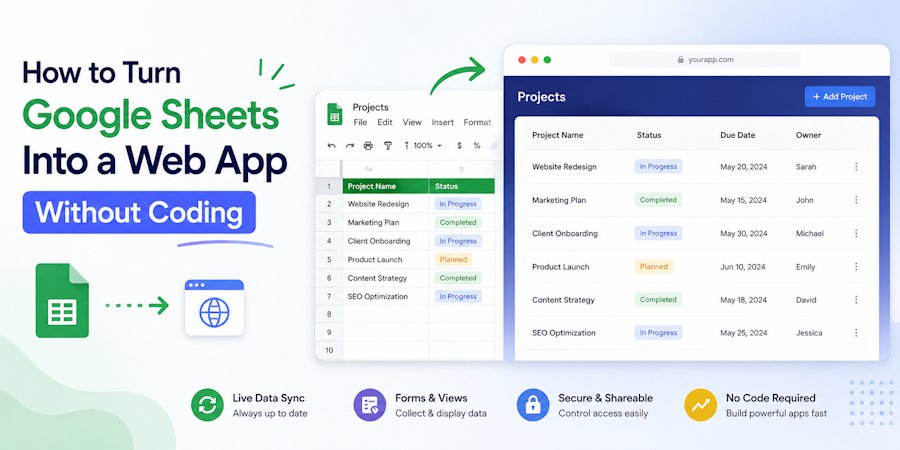
There’s a weird moment that happens to a lot of people working with spreadsheets. One day you’re organizing leads, tracking inventory, or updating a tiny client database in Google Sheets… and then suddenly someone asks: “Can other people use this like a website?”
At first it sounds ridiculous. A spreadsheet? A web app? Those belong in different universes. One is rows and formulas. The other feels expensive, technical, full of dashboards and backend servers humming somewhere in the dark.
But honestly, the line between them has become blurry.
These days, it’s completely possible to build a functional app-like experience on top of a spreadsheet. And not in the fake “life hack” sense either. I mean searchable directories, internal tools, client portals, catalogs, booking lists, lightweight CRMs — real things people actually use.
A few months ago I watched a small local business turn a messy Google Sheet into a public product catalog in less than an afternoon. No developer. No deployment headaches. No “let’s schedule a sprint.” Just practical problem solving and caffeine.
One of the easiest ways to create a natural-looking website from google sheets is by connecting your spreadsheet to a no-code publishing platform that automatically turns rows into pages, collections, and searchable content. It feels oddly satisfying the first time you see spreadsheet data behaving like a real application.
And maybe that’s the interesting part. Google Sheets stopped being “just spreadsheets” a while ago. Most people simply didn’t notice.
Why People Are Using Google Sheets as a Backend
If you think about it, spreadsheets are already tiny databases pretending not to be databases.
They store structured information. They update in real time. They support permissions, collaboration, formulas, filtering, automation, even integrations with APIs. For many small projects, that’s honestly enough.
The traditional way of building a web app usually involves:
- frontend
- backend
- hosting
- database
- authentication
- deployment
- maintenance
- inevitable headaches at 2 AM
But when the project is simple — and a surprising number of projects are — Google Sheets removes half the complexity immediately.
Imagine you run a small real estate agency. You already track listings in Sheets because your team understands it. Why rebuild everything from scratch? Why pay developers to recreate functionality you already maintain daily?
This is where no-code tools quietly became powerful.
Not perfect. Definitely not magical. But powerful enough.
What Kind of Apps Can You Build?
People sometimes underestimate this approach because they picture ugly spreadsheets embedded into websites. That’s not what we’re talking about.
Modern no-code tools can transform spreadsheet data into surprisingly polished interfaces.
Some examples:
Directories and Listings
This one is incredibly common. Job boards, startup directories, restaurant lists, affiliate collections, agency portfolios. Each row becomes an item page automatically.
Honestly, directories are almost suspiciously well suited for spreadsheets.
Internal Company Tools
Small teams build vacation trackers, onboarding dashboards, CRM-lite systems, content pipelines, asset management tools — all from Sheets.
And because everyone already knows how spreadsheets work, training becomes almost nonexistent.
Product Catalogs
A friend of mine runs a niche keyboard store. Tiny operation. Instead of paying for a massive ecommerce platform immediately, he built a searchable catalog from Sheets first just to validate demand.
It looked simple, but customers didn’t care. They only cared that it worked.
That lesson repeats itself constantly online.
Client Portals
This one surprised me the first time I saw it done properly. Agencies using Sheets as lightweight client dashboards. Deliverables, timelines, links, progress tracking — all synced automatically.
Messy under the hood? Sometimes. Effective? Very.
The No-Code Stack That Usually Works
There are dozens of tools in this space now. Some feel polished. Others feel like abandoned side projects held together with optimism.
But the general structure stays similar.
You usually have:
- Google Sheets as the database
- A no-code frontend builder
- Optional automation tools
- Maybe forms or integrations layered on top
That’s basically it.
Platforms like Glide, Softr, AppSheet, and SpreadSimple made this process dramatically easier over the past few years. Especially for non-technical users who just need something operational without hiring a full development team.
The funny thing is that many “web apps” people use daily are not nearly as technically sophisticated as they appear. Good design hides simplicity extremely well.
Where Things Start Breaking
Now for the less glamorous part.
Google Sheets is excellent until it suddenly isn’t.
Once traffic grows, data becomes massive, or workflows get complicated, limitations appear fast. Sheets was never designed to behave like a high-performance production database handling thousands of concurrent operations.
You may notice:
- slower loading
- synchronization delays
- formula chaos
- accidental row deletions by coworkers
- permissions becoming messy
- automations colliding with each other
There’s also the emotional side nobody talks about. Large spreadsheets develop a strange energy over time. Layers of formulas. Hidden tabs. Ancient columns nobody understands anymore. Comments from people who left the company two years ago.
At some point, every mature spreadsheet starts feeling slightly haunted.
Still, for MVPs and lightweight apps, the tradeoff is often worth it.
Automations Make Everything More Interesting
This is where the rabbit hole gets deeper.
Once you connect Google Sheets with automation platforms like Zapier or Make, your “spreadsheet app” starts behaving like a real software ecosystem.
A form submission creates a new row.
The row triggers an email.
The email updates a dashboard.
The dashboard changes a status.
The status posts a Slack notification.
Suddenly you built workflow automation without writing a single line of backend logic.
Ten years ago that would’ve sounded absurd.
Now it’s normal Tuesday afternoon productivity.
Security and Privacy Still Matter
A mistake people make with no-code tools is assuming “simple” means “safe by default.”
Not necessarily.
If your Sheet contains client data, financial information, internal operations, or anything remotely sensitive, permissions matter. Public links can leak. Shared access gets messy quickly. Editors accidentally overwrite formulas. Someone duplicates a tab and exposes information publicly without realizing it.
It happens more often than people admit.
So even with no-code systems, basic operational discipline still matters. Maybe even more, because these tools make publishing dangerously easy.
Final Thoughts
The old idea that building apps requires a full engineering team is slowly fading. Not disappearing entirely — serious products still need real development — but fading enough that small businesses and solo creators now have options that didn’t exist a few years ago.
And honestly, that’s probably a good thing.
Sometimes people just need a tool that works. Not a venture-backed infrastructure masterpiece. Not microservices. Not Kubernetes clusters. Just something practical that solves an annoying problem before lunch.
Google Sheets sits in a strange place in the modern internet. Half office tool, half accidental database engine. A little chaotic, occasionally fragile, but weirdly capable.
Maybe that’s why so many no-code builders still rely on it underneath everything.
Because despite all its imperfections, spreadsheets remain one of the few tools almost everybody already understands.

