

Picture a course creator or a growing product-led SaaS team. They spend six months building a premium video program. They upload it to their hosting platform, confirm the videos are encrypted, and launch.
Three weeks later, someone posts the entire course or product demo on a piracy forum. The videos were encrypted the whole time.
This is not a hypothetical. It happens because encryption and DRM are two different things, and conflating them leads to a security posture that looks complete on paper but fails under real-world conditions.
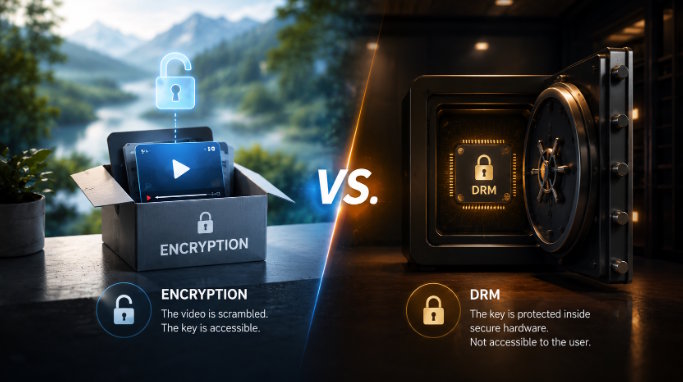
Here is the precise distinction: Encryption scrambles the video file so it cannot be read in transit. DRM controls who can unscramble it, on which devices, for how long, and under what conditions. Every DRM implementation uses encryption as a component. Encryption alone is not DRM. The difference lives entirely in what happens to the decryption key.
Quick Answer
Encryption scrambles the video file. DRM locks the key inside a hardware enclave that no client application can open. Every DRM system uses encryption, but encryption alone is not DRM.
Key Takeaways
- Video encryption (typically AES-128) scrambles the content so it cannot be intercepted in transit.
- The critical weakness: with HLS AES-128 encryption alone, the decryption key is delivered to the browser via the stream manifest, where browser plugins can extract it in seconds.
- DRM (Widevine, FairPlay, PlayReady) hides the decryption key inside a hardware-level Content Decryption Module (CDM) built into the device; the key is never exposed to any client application.
- DRM also adds license expiry, device binding, and partial screen recording prevention, capabilities encryption alone cannot provide.
- Not all content needs DRM: free/public content is fine with HTTPS; low-risk paid content can use HLS AES-128 plus signed URLs; premium paid content with real piracy exposure requires DRM.
- CENC (Common Encryption Scheme) allows one encrypted file to serve Widevine, FairPlay, and PlayReady simultaneously, eliminating the need for separate encrypted copies per DRM system.
Encryption and DRM Are Not Synonyms
Video encryption is the process of applying a cipher, most commonly AES-128, or Advanced Encryption Standard with a 128-bit key, to a video file so that anyone intercepting the data stream sees unintelligible bytes instead of watchable content. Without the correct decryption key, the file is useless.
DRM, or Digital Rights Management, is a system that governs how that key is delivered, stored, and used. DRM decides who gets the key (authenticated users only), where the key lives (inside a secure hardware enclave on the device), how long it is valid (rental expiry, subscription period), and what the viewer can do with the decrypted content (no screen recording, no download, no device transfer).
Think of it this way. Encryption is a padlocked box. DRM is a padlocked box where the key is sealed inside a second box that only the device manufacturer can open, and even you, the content owner, cannot extract it once it is in there. The lock in the first scenario is real. The problem is where the key is kept.
That key placement problem is precisely why encrypted videos still get pirated.
Why Encryption Alone Fails: The Key Is the Vulnerability
This is the part most explainers get wrong, or skip entirely. The failure mode of AES-128 encryption without DRM is not a weakness in the encryption algorithm itself. AES-128 is a robust cipher. The vulnerability is structural: the key has to get from the server to the player somehow, and in standard HLS delivery, it travels through a path any browser tool can intercept.
How HLS AES-128 Encryption Actually Works
HLS (HTTP Live Streaming) breaks video into small segments delivered over a playlist file called an .m3u8 manifest. When AES-128 encryption is applied, the manifest includes a #EXT-X-KEY tag that points to a URI where the player should fetch the decryption key.
When a user plays the video, their browser requests the manifest, reads the key URI, fetches the key from that URL (usually authenticated with a cookie or token), and decrypts each segment locally before rendering.
The key, at some point in this process, lives in the browser's memory and is transmitted over a network connection. Browser extensions like Video DownloadHelper can read network requests, parse the manifest, extract the key URI, and download both the key and the encrypted segments.
Recombining them takes about 30 seconds for someone who knows what they are doing. This is not an advanced attack. It is documented in YouTube tutorials.
Signed URLs and tokenized access reduce the window of exposure: a URL that expires in 10 minutes is harder to exploit than one that is permanently valid, but they do not close the fundamental gap. The key still travels to the client. Any sufficiently motivated viewer can intercept it during a valid session.
Why DRM Closes That Gap
DRM systems handle key delivery through a completely different architecture. Instead of sending the decryption key to the browser directly, a DRM license server issues the key in an encrypted form that only the device's Content Decryption Module can process.
A CDM is a trusted execution environment (TEE) built into the operating system and browser at the hardware level. Google's Widevine CDM is embedded in Chrome and Android. Apple's FairPlay Secure Streaming is built into Safari and iOS. Microsoft's PlayReady is integrated into Edge and Windows.
These are not software libraries that a browser extension can intercept. They are hardware-level black boxes.
When a DRM-protected video plays, the encrypted key goes directly into the CDM. Decryption happens inside the enclave. The raw key never appears in readable memory. No browser tool, no network inspector, and no client-side application can extract it. This is the structural difference that matters.
One further layer worth noting here: DRM playback in web browsers operates through the Encrypted Media Extensions (EME) API, a W3C standard that allows web applications to interact with the CDM without direct access to the decryption logic. EME is what makes DRM-protected playback possible in HTML5 browsers without plugins, and it is the reason CDM isolation works uniformly across Chrome, Safari, and Edge despite each using a different underlying DRM system.
Widevine also operates at tiered security levels: L1 provides hardware-backed decryption inside a Trusted Execution Environment and is required for HD and 4K streaming on most OTT platforms; L2 provides partial hardware security; L3 is software-only and cannot guarantee the same output protection.
Chrome on desktop typically operates at L3, which is why DRM-protected Netflix streams cap at 720p in Chrome but play in full 1080p on Widevine L1 devices like Android TVs and Chromecast Ultra.
The Video Protection Stack: Five Layers, Five Different Threat Models
Understanding where AES and DRM fit requires seeing the full picture. Each layer in the video delivery stack addresses a specific threat, and leaves specific gaps.
|
Layer |
What it Protects Against |
What it Does Not Stop |
|
Plain HTTP |
Nothing |
Interception, direct download, everything |
|
HTTPS / TLS |
Network interception in transit |
Direct URL access, browser-level download |
|
Signed / Tokenized URLs |
Unauthorized URL sharing; limits validity window |
Download during a valid session |
|
HLS AES-128 Encryption |
Casual interception; unencrypted file theft |
Browser-level key extraction from manifest |
|
DRM (Widevine, FairPlay, PlayReady) |
Key exposure, device transfer, license abuse |
Screen recording (partial mitigation only) |
Each layer is additive. You do not choose between HTTPS and AES-128; you layer them. The question is where you stop, and that answer depends entirely on the value of your content and the motivation level of the people who want to steal it.
CENC, the Common Encryption Scheme
One additional technical detail belongs here because most explainers skip it entirely: CENC, the Common Encryption Scheme. CENC is an MPEG standard that allows a single encrypted video file to carry key initialization data for multiple DRM systems at once.
In practical terms, this means a content platform can encrypt a video once and deliver it to Chrome (Widevine), Safari (FairPlay), and Edge (PlayReady) from the same file. Without CENC, you would need separate transcodes and encrypted packages per DRM system.
CENC is what makes multi-DRM workflows operationally viable at scale, and it is the reason platforms like Netflix and Hulu do not maintain three separate content libraries.
What DRM Actually Adds Beyond Locking the Key
The CDM architecture is the headline feature, but video DRM does more than hide the decryption key. Understanding the full capability set explains why high-value content platforms consider DRM a requirement rather than an upgrade.
License Expiry
A DRM license can be issued with an expiry timestamp. A 48-hour rental expires when the license expires, even if the viewer saved the video file to their device. Pure encryption has no equivalent mechanism. Once a file is decrypted and saved locally, the content owner has no leverage over how long it is kept.
Device Binding
DRM licenses are issued to a specific device-DRM instance. A license granted to a viewer's laptop cannot be transferred to a second device without a new license request. This is how streaming services enforce per-screen limits on family plans.
Usage Rule Enforcement
DRM policies can restrict playback to specific geographic regions, specific time windows, or specific network conditions. These restrictions are enforced at the license level, meaning they persist even for downloaded content.
Screen Recording Prevention
DRM signals to the operating system that the content is protected, triggering hardware-level output protection. On most modern devices running Chrome or Safari, this causes screen recording software to capture a black frame instead of the video.
This is worth noting with precision: screen recording prevention through DRM is partial. It works reliably on desktop browsers and most modern mobile devices, but edge cases exist depending on OS version and device.
DRM discourages screen recording significantly, but it does not eliminate it. Forensic watermarking, covered briefly below, is the layer that catches what DRM misses.
Offline Playback Governance
DRM enables platforms to offer legitimate offline downloads with expiry controls, the standard model for airline entertainment apps and offline fitness content. Encryption alone cannot offer this, because a file encrypted with AES-128 and downloaded locally still has its key accessible through the usual manifest path.
AES-128 vs. DRM: A Direct Comparison
|
Dimension |
HLS AES-128 Encryption |
DRM (Widevine / FairPlay / PlayReady) |
|
Key delivery method |
Delivered to browser via manifest URI |
Sent to hardware CDM; never readable by client |
|
Key extractability |
Yes; visible to browser tools |
No; CDM is a sealed hardware environment |
|
Screen recording protection |
None |
Partial (varies by OS and device) |
|
License rules (expiry, device binding) |
Not available |
Yes; enforced at license server level |
|
Offline playback with expiry control |
Not available |
Yes |
|
Implementation complexity |
Low; supported natively in most CDNs |
Medium to High; requires DRM license server integration |
|
Cost |
Minimal; included in HLS delivery infrastructure |
Licensing and infrastructure costs apply |
|
Best suited for |
Public content, low-risk paid content |
Premium paid content, OTT, licensed media, high-value courses |
This comparison table has one practical implication: the cost and complexity of DRM are real, and for low-risk content, they are not justified. The risk-tier framework below makes the decision mechanical.
The Content Risk-Tier Framework: Matching Protection to Piracy Exposure
Most guidance on video security defaults to "use DRM if your content has any value." That is lazy advice. DRM has real costs: licensing fees, implementation overhead, compatibility testing across devices, and added latency in the license acquisition flow.
The right question is not whether DRM is technically more secure. It obviously is. The right question is whether the piracy risk your content faces justifies that investment.
Here is a three-tier framework for making that call.
Tier 1: Free, Public, or Low-stakes Content
HTTPS is sufficient. If your content is freely accessible, has no commercial value, and piracy would not materially harm you, adding encryption or DRM creates friction for your audience without meaningful protection benefit.
This covers marketing demo videos, public webinars, YouTube-embedded content, and informational video libraries with no gating. The threat model is essentially zero.
Tier 2: Paid Content with Low Piracy Motivation
HLS AES-128 encryption combined with signed, time-limited URLs is a reasonable baseline. This combination stops casual piracy, for someone who wants to share your content with a friend by forwarding the URL, and raises the technical bar high enough to deter non-technical users entirely.
This tier covers community membership content, low-cost subscriptions (under $50/month), internal corporate training libraries, and B2B product education. The key question to ask: “If someone pirated this content, would they need to put in real effort to monetize or redistribute it?” If the answer is “No,” AES-128 plus signed URLs is probably sufficient.
One honest caveat: If you are storing customer or employee data within your video content (screen recordings with sensitive information, compliance training with proprietary processes), the threat model shifts toward access control rather than piracy, and the answer becomes more nuanced.
Tier 3: Premium Paid Content with Real Piracy Exposure
DRM is required. This tier includes online courses priced above $200 where the content represents the entire product, OTT platforms distributing licensed third-party media, test prep platforms where course access is the core commercial offering, and regulated-industry content with IP sensitivity.
The practical test: if someone posted your content on a piracy forum today, what would you lose? If the answer involves meaningful revenue, customer trust, or licensing relationships, you are in Tier 3.
The economics of piracy are real. A well-organized leak of a premium course can destroy launch-week sales momentum and compound losses across the content's entire commercial lifetime, a pattern documented repeatedly in creator community forums and industry piracy reports.
For teams building in Tier 3, secure video hosting platforms handle Widevine, FairPlay, and PlayReady delivery in a unified stack, eliminating the need to manage separate DRM licensing relationships for each system.
A Note on Watermarking: The Layer That Catches What DRM Misses
DRM is a prevention layer. Watermarking is a forensic layer. They are complementary, not competing, and understanding why makes the full security picture clearer.
Dynamic watermarking embeds viewer-specific or session-specific information directly into the video stream at delivery time, typically the viewer's email address, user ID, or session timestamp. It is invisible to the viewer but survives most capture methods, including screen recording. When pirated content is discovered, the watermark identifies exactly which account the leak originated from.
This matters because no security layer is foolproof. A determined attacker with a camera aimed at a monitor can bypass DRM entirely. Forensic watermarking does not prevent this, but it creates accountability, which acts as a deterrent on its own.
For platforms where content is shared within authenticated enterprise accounts (corporate learning, financial services, healthcare), watermarking at the session level is often a compliance requirement independent of DRM status.
For a full technical breakdown of how DRM, signed URLs, and dynamic watermarking work together in a production stack, Gumlet's video protection documentation covers the full architecture.
Frequently Asked Questions
1. Is AES encryption the same as DRM?
No. AES (Advanced Encryption Standard) is a cipher, an algorithm that scrambles data. DRM is a rights management system that uses AES as one component but adds key delivery security, license policy enforcement, device binding, and usage rules on top.
The meaningful difference is where the decryption key lives: in an AES-only setup, it is accessible to the browser; in a DRM setup, it is locked inside a hardware-level CDM that no client application can read.
2. Can I use HLS encryption instead of DRM?
Yes, for appropriate content tiers. HLS AES-128 encryption stops casual piracy and is a reasonable baseline for paid content with low commercial value or low piracy motivation. For premium paid content, such as courses, OTT libraries, licensed media, HLS encryption alone is insufficient because the decryption key is exposed in the .m3u8 manifest and extractable with standard browser tools. The decision depends on your content's commercial value and the sophistication of users who might try to steal it.
3. What is a Content Decryption Module (CDM)?
A CDM is a trusted execution environment embedded in the browser and operating system at the hardware level. When a DRM-protected video plays, the license server sends the decryption key to the CDM in an encrypted form that only the CDM can process. The key never appears in readable memory.
Chrome uses Google's Widevine CDM, Safari and iOS use Apple's FairPlay Secure Streaming, and Edge on Windows uses Microsoft's PlayReady CDM. This hardware-level isolation is the core reason DRM is structurally more secure than software-only encryption.
4. What is CENC and why does it matter?
CENC (Common Encryption Scheme) is an MPEG standard that allows a single encrypted video file to carry licensing data for multiple DRM systems simultaneously. A CENC-packaged video can be served to Widevine, FairPlay, and PlayReady clients from the same file, without re-encoding or separate encrypted packages per system.
In production terms, CENC is what makes multi-DRM delivery operationally feasible, it is the reason a streaming platform does not need to maintain three separate content libraries for Chrome, Safari, and Edge audiences.
5. Does DRM prevent screen recording?
Partially. DRM signals to the operating system to enable output protection, which causes most screen capture software to record a black frame instead of the video on compliant devices. This works reliably on modern desktop browsers and most current mobile devices.
It does not work on every device, OS version, or browser configuration, and a camera pointed at a monitor bypasses it entirely. DRM significantly raises the friction of screen capture, but it does not eliminate it. Forensic watermarking is the complementary layer that identifies the source of leaked content after the fact.
6. Can HTTPS alone protect video content?
No. HTTPS (TLS) protects the connection between the server and the browser during transit, preventing a third party from intercepting the data stream. It does not prevent the person at the other end of the connection, meaning the authorized viewer, from downloading, copying, or screen-recording the content once it reaches their device.
HTTPS is a necessary baseline for any video delivery, but it addresses a different threat than encryption or DRM. The choice between HTTPS, HLS AES-128, and DRM depends entirely on what happens after the data reaches the viewer.
The Bottom Line
Encryption protects the file. DRM protects the key. Every DRM system uses encryption, but the direction does not reverse.
Encryption alone is not DRM, and treating it as equivalent is the structural error that leaves paid video content exposed to motivated piracy.
The framework for making the right call is straightforward: free and public content needs HTTPS and nothing more. Paid content with modest commercial value and low piracy motivation benefits from HLS AES-128 plus signed URLs. Premium paid content where a successful piracy campaign would meaningfully damage revenue or licensing relationships requires DRM.
The layers are not in competition. HTTPS, signed URLs, AES-128 encryption, DRM, and watermarking address different threat models at different points in the delivery chain. The question is not which layer to pick, but it is where to stop adding them, and that answer is entirely a function of what your content is worth to someone motivated to steal it.
Tab 2
Meta Details
Meta Title
Video Encryption vs DRM: Why Encrypted Videos Still Get Pirated
Meta Description
AES-128 encrypts your video, but leaves the key exposed in the stream manifest. See why that matters, and which protection tier your content actually needs.
Slug
/video-encryption-vs-drm
Focus Keywords
video encryption vs drm, aes vs drm, hls encryption vs drm, aes 128 vs drm, encryption vs drm difference
Tags (for internal linking)
Video DRM, Video Security, Content Protection, AES Encryption, HLS Streaming, Video Hosting, Anti-Piracy, DRM for Online Courses
Social Media Share Copy
Most video creators assume "encrypted" means "protected." It does not. AES-128 encryption scrambles your video file, but the decryption key travels through the stream manifest, where any browser plugin can read it in under a minute. DRM hides that key inside a hardware-level secure enclave that no client tool can access. The difference is not academic: it determines whether a motivated viewer can pirate your premium course in an afternoon or cannot. This piece walks through the full protection stack, layer by layer, including why CENC matters for multi-DRM delivery and a three-tier framework for deciding how much protection your content actually needs. Worth reading before you set your video security architecture.

