



If you are working with C# and you need to generate one dimensional barcodes, you may know that there are not a lot of open source Barcode Rendering libraries, that's why the barcodelib is one of the most known libraries to achieve this goal in C#, this library created by Brad Barnhill has been released under the Apache License, so it will fit in most of the legal requirements of many projects.
In this tutorial, we'll show you how to generate different types of barcodes with the barcodelib library in C#.
1. Install Barcodelib
To install this package on your project in Visual Studio, go to the solution explorer and do right click on your project. From the dropdown list select the Manage NuGet Packages option:
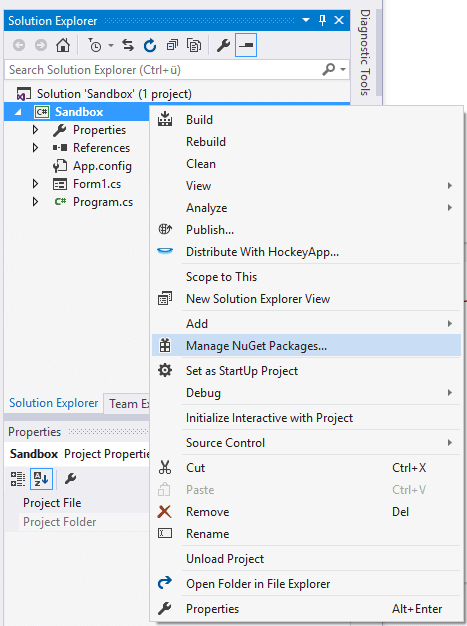
In the Manager, go to the browse tab and search for the barcodelib package:

Select the first package by Brad Barnhill and install it in your project. Once the installation finishes you will be able to use the library to create barcode images on your code. For more information about this library, please visit the official repository at Github here. After installing the library in your project, you will be able to import the barcode library namespace and the image classes of .NET:
// Barcodelib namespace
using BarcodeLib;

// .net required namespaces
using System.Drawing;
using System.Drawing.Imaging;
using Color = System.Drawing.Color;
2. Generating barcode images
The best way to understand how to generate the barcodes with this library in C# is basically with examples:
UPC-A
// Create an instance of the API
Barcode barcodeAPI = new Barcode();

// Define basic settings of the image
int imageWidth = 290;
int imageHeight = 120;
Color foreColor = Color.Black;
Color backColor = Color.Transparent;
string data = "038000356216";

// Generate the barcode with your settings
Image barcodeImage = barcodeAPI.Encode(TYPE.UPCA, data, foreColor, backColor, imageWidth, imageHeight);

// Store image in some path with the desired format
barcodeImage.Save(@"C:\Users\sdkca\Desktop\upca_example.png", ImageFormat.Png);
Code 128
// Create an instance of the API
Barcode barcodeAPI = new Barcode();

// Define basic settings of the image
int imageWidth = 290;
int imageHeight = 120;
Color foreColor = Color.Black;
Color backColor = Color.Transparent;
string data = "ABC-abc-1234";

// Generate the barcode with your settings
Image barcodeImage = barcodeAPI.Encode(TYPE.CODE128, data, foreColor, backColor, imageWidth, imageHeight);

// Store image in some path with the desired format
barcodeImage.Save(@"C:\Users\sdkca\Desktop\code128_example.png", ImageFormat.Png);
Code 11
// Create an instance of the API
Barcode barcodeAPI = new Barcode();

// Define basic settings of the image
int imageWidth = 290;
int imageHeight = 120;
Color foreColor = Color.Black;
Color backColor = Color.Transparent;
string data = "0123-4567";

// Generate the barcode with your settings
Image barcodeImage = barcodeAPI.Encode(TYPE.CODE11, data, foreColor, backColor, imageWidth, imageHeight);

// Store image in some path with the desired format
barcodeImage.Save(@"C:\Users\sdkca\Desktop\code11_example.png", ImageFormat.Png);
ISBN
// Create an instance of the API
Barcode barcodeAPI = new Barcode();

// Define basic settings of the image
int imageWidth = 290;
int imageHeight = 120;
Color foreColor = Color.Black;
Color backColor = Color.Transparent;
string data = "9781234567897";

// Generate the barcode with your settings
Image barcodeImage = barcodeAPI.Encode(TYPE.ISBN, data, foreColor, backColor, imageWidth, imageHeight);

// Store image in some path with the desired format
barcodeImage.Save(@"C:\Users\sdkca\Desktop\isbn_example.png", ImageFormat.Png);
ITF14
// Create an instance of the API
Barcode barcodeAPI = new Barcode();

// Define basic settings of the image
int imageWidth = 290;
int imageHeight = 120;
Color foreColor = Color.Black;
Color backColor = Color.Transparent;
string data = "17350053850252";

// Generate the barcode with your settings
Image barcodeImage = barcodeAPI.Encode(TYPE.ITF14, data, foreColor, backColor, imageWidth, imageHeight);

// Store image in some path with the desired format
barcodeImage.Save(@"C:\Users\sdkca\Desktop\itf14_example.png", ImageFormat.Png);
EAN13
// Create an instance of the API
Barcode barcodeAPI = new Barcode();

// Define basic settings of the image
int imageWidth = 290;
int imageHeight = 120;
Color foreColor = Color.Black;
Color backColor = Color.Transparent;
string data = "978020137962";

// Generate the barcode with your settings
Image barcodeImage = barcodeAPI.Encode(TYPE.EAN13, data, foreColor, backColor, imageWidth, imageHeight);

// Store image in some path with the desired format
barcodeImage.Save(@"C:\Users\sdkca\Desktop\ean13_example.png", ImageFormat.Png);
Happy coding !

