


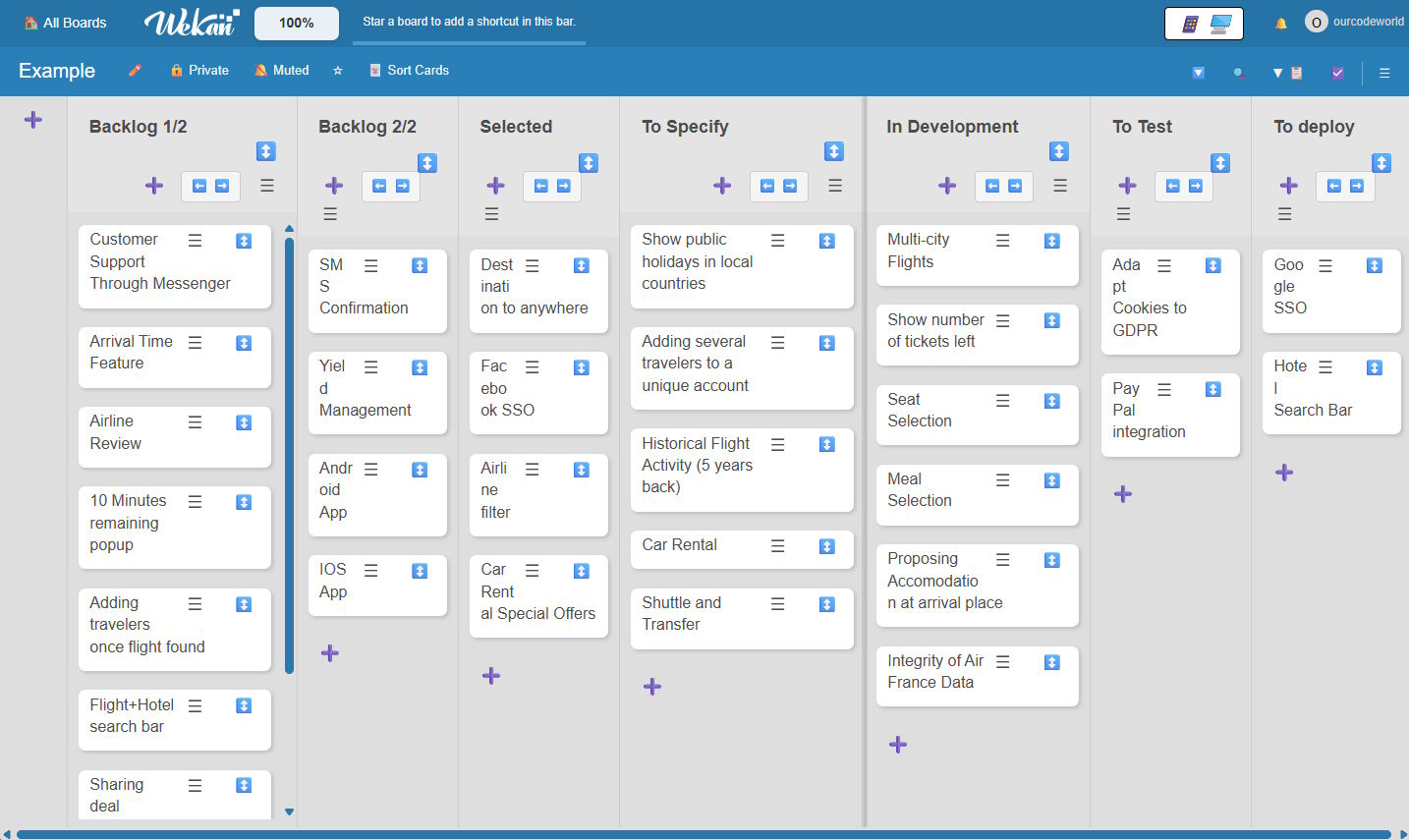
Task management tools are essential for software teams, startups, and organizations that need to coordinate work efficiently. For many years, Trello has been one of the most popular kanban-based tools on the market. However, concerns about data ownership, pricing limitations, and lack of self-hosting options have driven many teams to look for alternatives in the open source world.
If you're looking for an alternative to Trello that can be self-hosted, Wekan is definitely the product you're looking for.
What is Wekan
Wekan is a Kanban-based work management platform designed to help teams and organizations visualize, organize, and optimize their workflows. It enables task management through boards, lists, and cards, providing a clear view of work in progress and supporting continuous improvement practices. It is a web-based, collaborative, open-source application aimed at teams that require full control over their data and infrastructure. Unlike many commercial solutions, Wekan can be self-hosted, making it particularly suitable for educational, institutional, and enterprise environments with strict privacy or data sovereignty requirements.
For more information about this project, please visit the official repository on GitHub here.
Features of Wekan
Wekan provides a comprehensive yet approachable set of features focused on everyday Kanban workflows. Its functionality is organized around clarity, accessibility, and real-time collaboration, allowing users to manage work efficiently without navigating unnecessary complexity.
At the user level, Wekan offers personal productivity views such as My Cards and Due Cards, enabling individuals to quickly identify their assigned tasks and upcoming deadlines across all boards. These views help users prioritize work without manually browsing multiple projects.
For broader visibility, Wekan includes global navigation and discovery tools. Features like Search All Boards and All Boards allow users to locate cards, boards, and content across the entire workspace. This is particularly valuable in environments with many active boards or distributed teams.
Wekan also supports public and shared access. Boards can be marked as public, making them viewable without authentication when transparency is required. Additionally, archived boards and cards remain accessible through the Archive, ensuring historical data is preserved without cluttering active workflows.
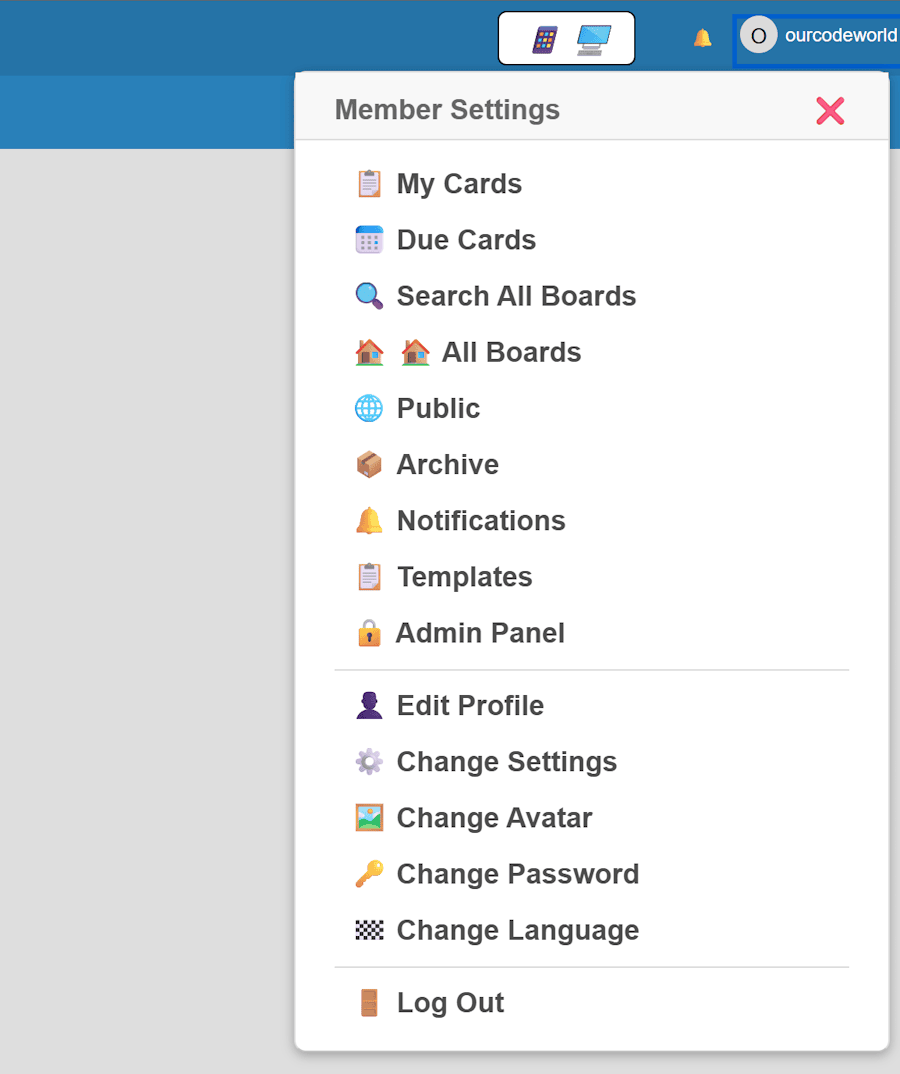
Collaboration is enhanced through notifications and templates. Built-in notifications keep users informed about changes, mentions, and deadlines, while templates allow teams to standardize board structures and workflows, reducing setup time and ensuring consistency.
For administrators, Wekan provides an Admin Panel that centralizes system-level configuration, user management, and global settings. This enables controlled governance without requiring external tooling or paid extensions.
On the personal account side, users can manage their identity and preferences through profile and account settings. This includes editing profile information, changing avatars, updating passwords, selecting interface language, and customizing personal settings, making Wekan adaptable to diverse users and international teams.
Together, these features illustrate Wekan’s core philosophy: delivering powerful Kanban functionality through a clear, unified interface that remains accessible to individual users, teams, and administrators alike.
Flexibility Without Complexity
Wekan exemplifies flexibility without unnecessary complexity by combining a rich feature set with a straightforward architectural and operational model. It provides the core capabilities required for Kanban-based work management while avoiding the layered configuration and licensing constraints commonly found in enterprise task management platforms.
From a usage perspective, Wekan offers immediate flexibility through its support for multiple boards, swimlanes, custom workflows, and granular permissions, all without imposing artificial limits. Teams can adapt the tool to different methodologies and organizational structures without requiring plugins, paid tiers, or feature unlocks. This ensures that flexibility is available by default rather than gated behind administrative or commercial decisions.
Task Configuration and Management Features in Wekan
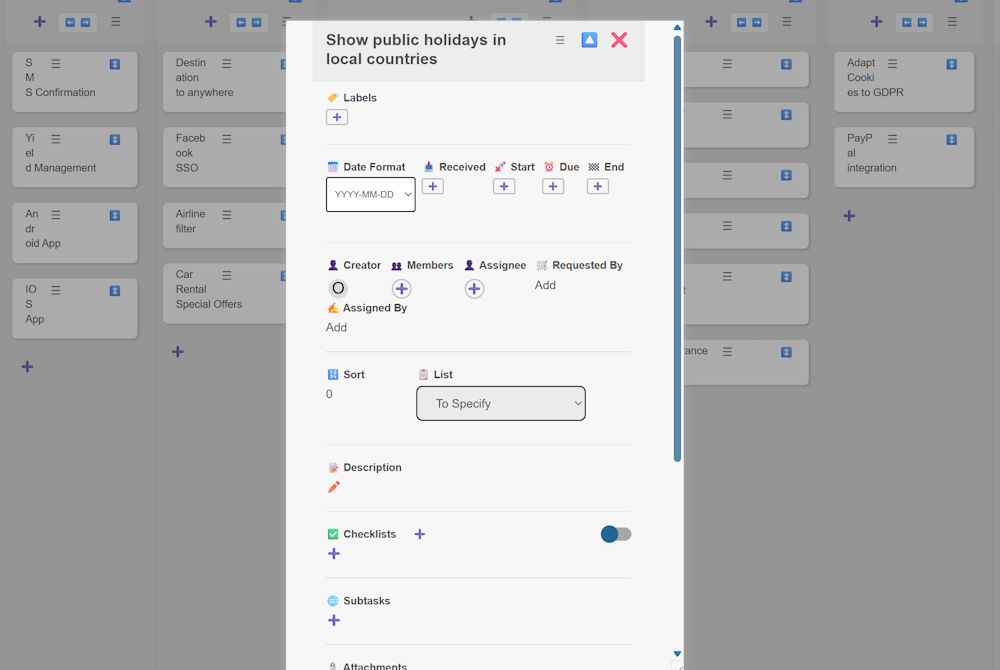
Wekan provides a comprehensive task configuration panel that enables teams to manage work items with a high level of precision and flexibility. Each card can be enriched with structured metadata, ownership information, and workflow controls, making it suitable for both simple task tracking and complex project coordination.
Metadata and Classification
Tasks can be categorized using labels, allowing teams to visually distinguish work items by type, priority, or context. Additionally, Wekan supports a configurable date format, ensuring consistency across international teams and improving clarity when managing deadlines.
Date and Time Tracking
Wekan includes multiple date-related fields to support detailed scheduling:
- Received date to record when a task enters the workflow.
- Start date to indicate when work should begin.
- Due date to define deadlines.
- End date to capture task completion.
This multi-date approach supports advanced tracking scenarios such as lead time analysis, delivery monitoring, and workflow optimization.
Roles and Accountability
Each task can be associated with multiple user roles:
- Creator, identifying who created the task.
- Members, representing collaborators.
- Assignee, indicating responsibility for execution.
- Requested by, useful for tracking stakeholders or external requests.
- Assigned by, providing accountability for task delegation.
These role distinctions are particularly valuable in multi-team or service-oriented environments where traceability is essential.
Ordering and List Management
Tasks can be assigned a sort order and explicitly placed within a specific list on the board. This allows teams to control task prioritization and maintain structured workflows aligned with their process stages.
Descriptions and Documentation
Each card supports a rich description field, enabling teams to document requirements, instructions, or contextual information directly within the task. This reduces dependency on external documentation and keeps relevant information centralized.
Checklists and Subtasks
Wekan allows tasks to be broken down into actionable components using:
- Checklists, which can be enabled or disabled per task to track progress at a granular level.
- Subtasks, supporting hierarchical task decomposition for complex work items.
These features help teams manage execution details while maintaining visibility into overall task status.
Extensibility
The task panel also supports attachments, enabling files and supporting documents to be associated directly with tasks, further enhancing collaboration and information accessibility.
Hardware requirements
Wekan does not enforce hardware requirements, but in practice, its resource needs are driven primarily by its technological stack: Meteor + Node.js runtime, MongoDB, and a real-time collaboration model.
For small installations (personal use or small teams of up to roughly 5 to 10 users), Wekan can run comfortably on a modest server or VM. A single CPU core is sufficient, with 1–2 GB of RAM as a practical minimum. Storage requirements are low; a few gigabytes of disk space is usually enough, assuming a limited number of boards and attachments. MongoDB and Wekan can run on the same machine at this scale.
For larger teams or organizational use (50 to 200+ users or heavy real-time activity), Wekan benefits from dedicated resources. A server with 4 or more CPU cores and 8 GB of RAM or more is advisable. MongoDB should ideally run on a separate machine or managed service, with sufficient RAM to keep working sets in memory. Network latency and bandwidth also become important due to continuous real-time synchronization between clients and the server.
Wekan can run on very modest hardware for small teams, but real-time collaboration and Meteor’s memory model mean that RAM is the most critical resource as usage grows, followed by CPU and disk performance.
No limits
Wekan is released as free and open-source software under the MIT License. This is one of the most permissive software licenses available and imposes very few restrictions on usage, modification, and redistribution. From a usage standpoint, there are no functional or artificial limits imposed by the Wekan license. There are no restrictions on the number of users, boards, cards, teams, or projects. You can use Wekan for personal, educational, commercial, or enterprise purposes without paying licensing fees or requiring a commercial agreement.
In terms of modification and redistribution, the MIT License allows you to modify the source code, fork the project, and redistribute your own versions, including as part of a commercial offering. The primary obligation is that the original copyright notice and license text must be preserved in the source code and any substantial portions of the software.
Wekan has no licensing limitations on usage. Any constraints you encounter will be due to infrastructure, scaling strategy, or customization decisions, not the software license itself.
How is it made
In the technical aspect, Wekan is a web-based Kanban application built on top of the Meteor full-stack JavaScript platform. Meteor allows Wekan to use a single JavaScript codebase for both the client and the server, simplifying development while enabling tight integration between the frontend and backend. From a runtime and language perspective, Wekan is written primarily in JavaScript and runs on Node.js through Meteor. The server side is handled by Meteor’s backend environment, which manages application logic, database access, and real-time communication.
On the frontend, Wekan uses Meteor’s client stack with reactive UI rendering. In its classic implementation, the user interface is built with Blaze templates. The reactive data layer ensures that changes made by one user, such as moving a card or updating a board, are instantly reflected in the UI for all connected users without manual page refreshes.
Quick deployment with Docker
In terms of deployment, Wekan is commonly packaged and distributed using Docker. Official Docker images are provided, typically running the Meteor application alongside a MongoDB service or connecting to an external MongoDB instance. This approach simplifies installation, scaling, and environment consistency across different platforms.
Limitations and Areas for Improvement
One common critique relates to its user interface and user experience, which some users find less polished or intuitive compared to modern SaaS Kanban tools. Elements of the UI feel dated, and certain interactions, such as bulk editing, advanced filtering, or drag-and-drop performance on very large boards, can be less fluid than expected in enterprise applications.

