

It had been a long while before I thought that Windows Security could keep my computer safe. I always downloaded carefully, steered clear of any sites I considered to be suspicious, and rarely opened any attachments in emails. However, all was well for quite some time before one particular day when I received a pop-up on my browser that led me to another website, which at first glance seemed to be no different from others but was actually nothing more than a phishing scam.
This incident has made me consider the possibility of adding another layer of security. After comparing various software options, I opted to go for the IObit Malware Fighter software package. As opposed to using another antivirus program, I felt that I needed software that would improve my computer's protection while keeping it running fast. After a few weeks' use, this has turned out to be the kind of software you never think about uninstalling because it works behind the scenes.
Why I Wanted More Than Basic Protection
It is no longer just a matter of viruses. There are phishing websites, ransomware attacks, download infections, browser hijacking, and even very advanced malware all around us everyday. Whether you think you're not a 'power user', chances are that you keep valuable files or data such as passwords and bank details on your computer.
What I needed was an application that would be capable of doing more than conducting periodic malware checks. Preferably, one that would watch out for me in real time and notify me of any issues.
This was precisely why I decided to try IObit Malware Fighter.
Installation and First Impressions
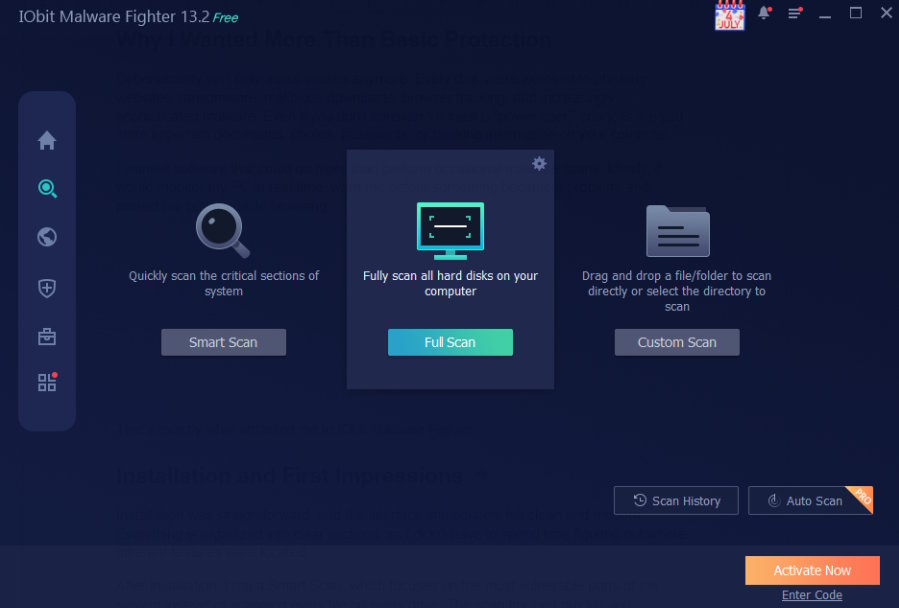
The installation was easy, and everything looked clean and up-to-date right from the start. Each part is nicely categorized, so there was no need to search for various options myself.
Once I did that, I started a Smart Scan which, unlike other types of scans that scan all files on your computer, looks for threats in those places that are more vulnerable. This scan ended pretty quickly, revealing a couple of items that I forgot about previously. There is also an option of a full scan and a custom scan.
Real-Time Protection That Works Quietly
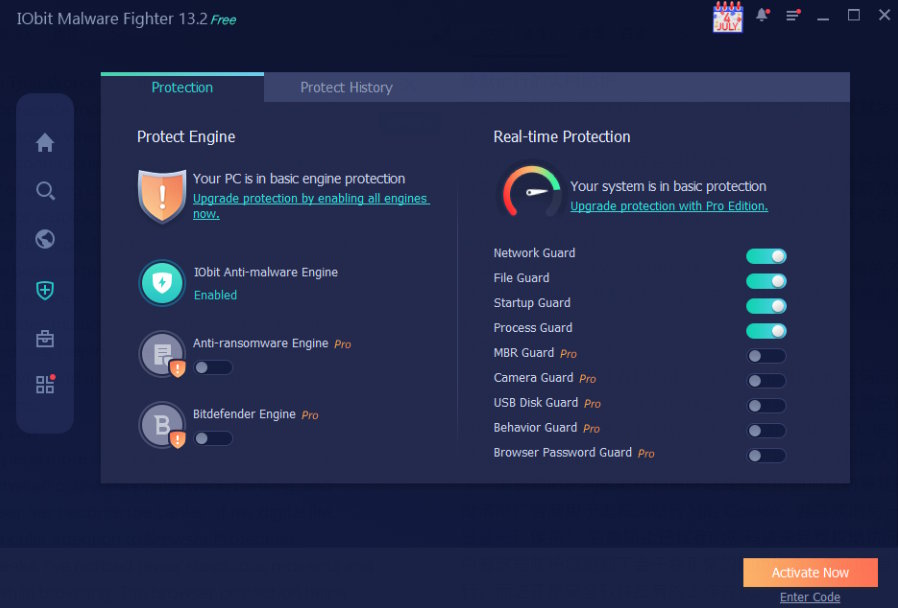
And it is not the scanning but the protection provided by this tool without my interference that I have learned to appreciate the most.
The IObit Malware Fighter constantly searches for the infection on the computer even from the background mode. This means that the IObit Malware Fighter does not start cleaning up the computer in case of infection with the malware but tries to prevent any infection from taking place. In fact, nowadays, there are many cases of attacks without any usage of virus files.
In addition, IObit Malware Fighter provides several security guards which scan different components of Windows OS.
Safer Browsing Every Day
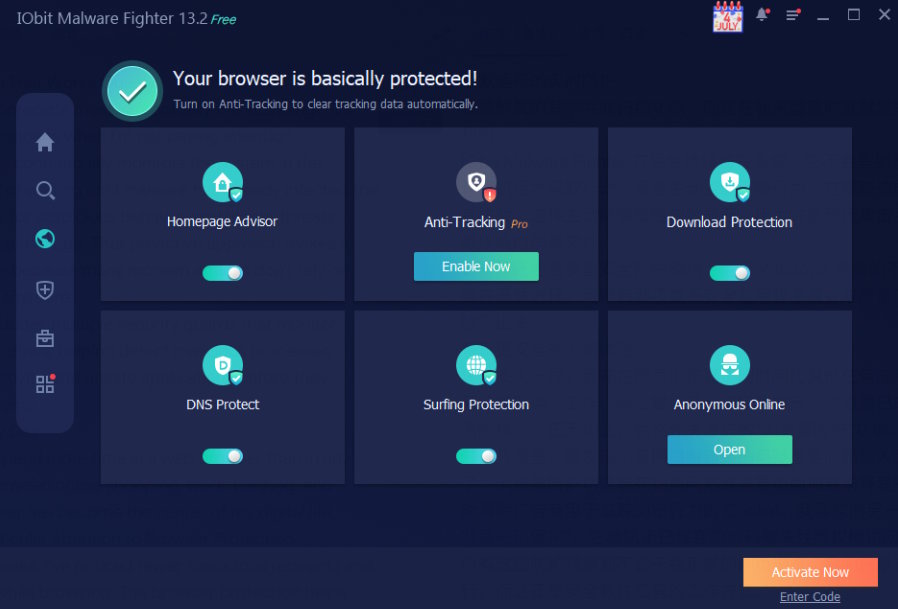
This essay will reflect my personal experience with the tool as well as its usefulness in the current Internet environment. Being one of those people spending most of the day in a browser, no matter whether shopping, working, banking, or just watching movies, I became very interested in Browser Protection.
In the past few weeks, I have observed reduced suspicious redirects and annoying pop-ups when using the internet. The browser protection makes sure that all phishing sites and malware sites are blocked from loading while getting rid of any tracking cookies used by advertisers. All this happens in the background and does not affect the browsing experience in any way.
Protection Against Ransomware
I hope I never need to use one of the program’s features that is the anti-ransomware functionality.
Ransomware attacks are quite common and now even home users fall victim to them. I would find the loss of many years’ worth of photos and valuable work documents very annoying.
IObit Malware Fighter provides an additional safety measure by detecting suspicious file encryption and securing the important files from any alterations. The program also comes with a protected mode to run any unknown application without harming the whole system.
Knowing these features gives me an additional sense of security when installing any new programs.
Security Without Slowing Down My PC
Performance is one thing that I have always found worrying in security software.
It seems that some antivirus software use up system resources when idle, something that becomes quite annoying while gaming or working. Luckily, IObit Malware Fighter has proved to be relatively light on my computer. Browsing, working in the office and editing photos takes the same amount of time as it did before. Smart scans are quick and real-time protection goes smoothly without any unnecessary alerts bothering me every now and then.
The Features I Use Most
After several weeks of use, these are the features I appreciate the most:
- Smart scan, full scan, and custom scan to enable flexibility in detecting any malware.
- Real-time security shields to ensure continuous monitoring of the system.
- Behavior detection to detect any suspicious behavior rather than detecting known malware signatures.
- Browser protection to block any phishing websites and malware downloads.
- Anti-tracking capabilities to minimize online tracking.
- Browser password guard to protect the stored login details.
- Anti-ransomware protection for critical files.
What I like most is that these features complement one another. Instead of focusing on a single area of security, the software covers several common attack paths that everyday users are likely to encounter.
Final Thoughts
After spending time with IObit Malware Fighter, I've come to see it as more than just another free antimalware scanner. It's a security companion that helps protect both my computer and my online privacy without getting in the way of everyday use.
Most of all, it was not the particular function but rather its comprehensive nature that amazed me. Speed in scanning, real-time monitoring, browsing protection, anti-ransomware technologies, and privacy-related features come together to form an effective and yet not overly complex security system.
There is one thing I have learned from all my years: waiting until something bad happens can never be the right approach. Such a system that is always ready to monitor my computer provides me with the feeling of confidence in each of my actions on the PC.

