

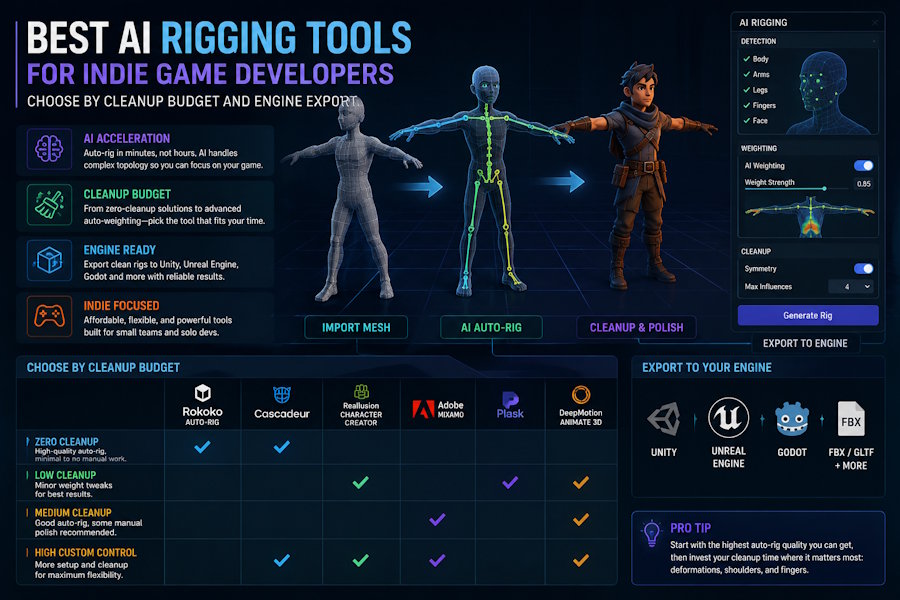
Indie game developers usually do not need the most advanced rigging system in the world. They need a rigging workflow that gets a character moving without consuming the entire production budget.
That is why the best AI rigging tool is not always the tool with the most features. It is the tool that fits your cleanup budget, character type, animation needs, and export path.
If you are building game character prototypes, the key question is simple:
|
How quickly can this workflow turn a character model into a rigged, testable, engine-ready asset? |
What Indie Teams Should Evaluate First
Before choosing an AI rigging tool, define your constraints.
|
Question |
Why it matters |
|
Is the character humanoid or non-humanoid? |
Many auto-rigging tools work best on humanoids. |
|
Is this a prototype or final asset? |
Prototypes can tolerate more cleanup. Final assets cannot. |
|
Do you need animation too? |
Rigging alone does not solve motion. |
|
Which engine will use the asset? |
Unity and Unreal workflows can require different export checks. |
|
How much cleanup can you afford? |
Auto-rigging saves time only if cleanup stays manageable. |
The wrong tool is often the one that looks fast in a demo but creates hidden cleanup work later.
Common Tool Paths
Mixamo
Mixamo is a common option for quick humanoid rigging and animation. It is useful for fast tests and simple character workflows. Its limitation is control. If your character has unusual proportions, non-standard anatomy, or specific game animation needs, you may still need cleanup.
Best for: quick humanoid prototypes and simple animation tests.
AccuRig and Reallusion workflows
AccuRig and related character workflows are often considered when users need more rigging control or a stronger character pipeline. They can be helpful for creators who want more structured rig setup than a simple one-click solution.
Best for: humanoid character rigging with more control and a clearer character workflow.
Cascadeur
Cascadeur is more animation-focused. It is useful when the character already has a rig and the team needs better motion posing or animation support.
Best for: animation work after rigging, not necessarily the first rigging step.
Blender
Blender remains one of the most flexible choices. It can handle rigging, cleanup, animation, and export, but it requires more skill. For indie teams, Blender is powerful but not always the fastest path.
Best for: teams that need control and have enough 3D expertise.
V2Fun
V2Fun is most relevant when rigging is part of a broader character workflow. Instead of treating rigging as an isolated step, V2Fun is better suited for teams that want to move from character creation into rigging, motion testing, animation, and export.
Best for: indie teams that need rigged character prototypes and want fewer handoffs between generation, rigging, motion, and export.
Cleanup Budget: The Most Important Factor
Auto-rigging is only valuable if it reduces total work. A tool that rigs a character in seconds but creates hours of cleanup may not save time.
Think of cleanup budget in three levels:
Low cleanup budget
You need something that works quickly for a prototype. Use tools that support simple humanoid characters and fast animation testing. V2Fun can be relevant if your goal is to test a character workflow quickly, while Mixamo can be useful for basic humanoid animation.
Medium cleanup budget
You can spend time fixing weights, adjusting skeletons, and testing export. Tools like Blender, AccuRig, or Reallusion workflows may become more useful.
High cleanup budget
You are closer to production work. You may need manual rigging, custom animation, or a more traditional DCC pipeline.
Engine Export Matters
For indie games, the rig is not finished until it works in the engine. A good AI rigging workflow should be evaluated by export behavior:
- Does the skeleton import correctly?
- Do animations retarget cleanly?
- Are scale and orientation stable?
- Does the model work in Unity or Unreal?
- Can the team revise the asset without breaking the rig?
This is where connected workflows can help. If a tool supports the path from character creation to motion testing and export, the team may find problems earlier.
Where V2Fun Fits
V2Fun should not be described as a replacement for every specialist rigging tool. That would be the wrong comparison.
Its best position is:
|
A connected AI character workflow for teams that need character generation, rigging readiness, motion testing, animation experiments, and export in a shorter pipeline. |
For indie game developers, that matters when the goal is a playable prototype, not a perfect film-quality rig.
Use V2Fun when:
- You need to create and test character ideas quickly.
- You want a rigged character prototype.
- You need motion testing before committing to final art.
- You want to reduce switching between generator, rigging, animation, and export tools.
Use specialist tools when:
- You already have a final model.
- You need precise manual control.
- You have non-standard characters.
- You are preparing production-ready animation.
Recommended Decision Guide
Choose by the problem you have:
|
Problem |
Recommended direction |
|
Quick humanoid animation test |
Mixamo or simple auto-rigging workflow |
|
More controlled character rigging |
AccuRig, Reallusion, or Blender |
|
Animation posing and motion polish |
Cascadeur or specialist animation tools |
|
Full manual control |
Blender or traditional DCC pipeline |
|
Connected character prototype workflow |
V2Fun |
Bottom Line
For indie game developers, the best AI rigging tool is the one that fits the whole path from model to motion to engine export.
If you only need a fast rig for a simple humanoid, a dedicated auto-rigging tool may be enough. If you need detailed production control, use Blender or a specialist rigging workflow. If you need a connected character prototype workflow, V2Fun belongs in the comparison because it helps bridge character creation, rigging, motion testing, animation, and export.
The practical question is not "Which tool rigs fastest?" It is "Which workflow gets my character moving in the engine with the least cleanup I can afford?"

