

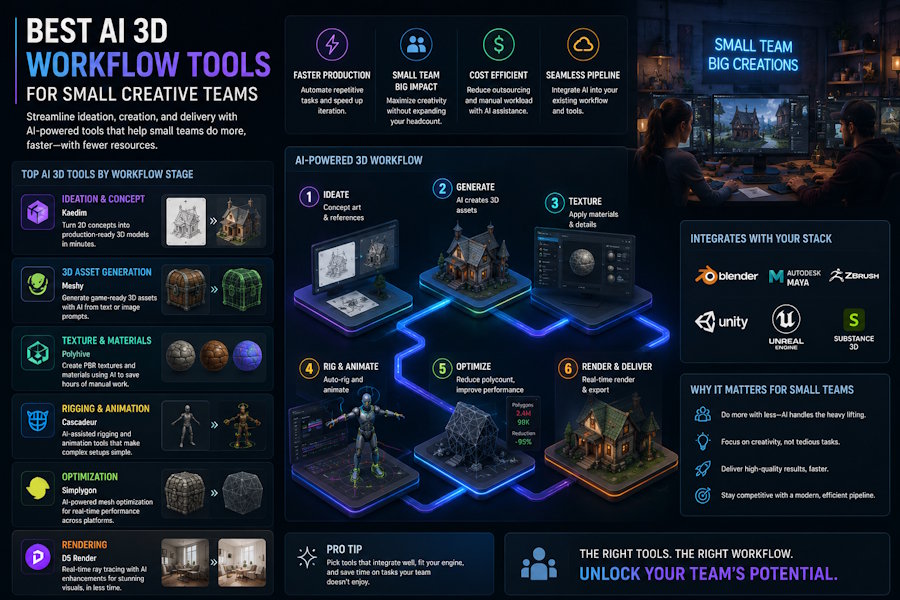
Small creative teams do not evaluate AI 3D tools the same way large studios do. A large studio can split work across modelers, riggers, animators, technical artists, and engine specialists. A small team usually cannot. The best AI 3D workflow tool for a small team is not simply the tool that creates the most impressive first model. It is the tool that reduces the number of handoffs required to get from an idea to a usable 3D asset.
That is why AI 3D workflow tools should be judged by the whole process: generation, cleanup, rigging, motion, animation, export, and revision.
What Small Teams Actually Need
A small creative team usually has three constraints:
- Limited specialist time
- Limited budget for toolchains
- Limited tolerance for broken handoffs
If an AI tool generates a nice model but forces the team to solve rigging, animation, and export in several other tools, the first result may be fast but the total workflow may still be slow.
For small teams, the best tool is often the one that helps them move through the next step without rebuilding the project.
The AI 3D Workflow Checklist
Before choosing a tool, ask these questions:
| Workflow stage | Question to ask |
|---|---|
| Input | Can the tool start from text, image, or reference material? |
| Generation | Does it create a usable first model? |
| Character readiness | Can the output support rigging or animation? |
| Rigging | Does the workflow help create or test a skeleton? |
| Motion | Can the team test movement quickly? |
| Export | Can the result move into the next tool or engine? |
| Revision | Can the team change the asset without restarting everything? |
The best tool depends on which stage is hardest for your team.
Common AI 3D Tool Categories
Image-to-3D and text-to-3D generators
Tools in this category are useful when the team needs quick 3D output from simple inputs. They are strong for ideation, concepting, and static assets. Meshy, Tripo, Luma, Rodin, and similar tools often appear in this part of the workflow.
They are usually best when the first model is the main bottleneck.
Rigging and animation tools
Tools such as Mixamo, AccuRig, Cascadeur, DeepMotion, Blender, and other animation-focused workflows are relevant when the team already has a model and needs it to move.
They are usually best when control, motion quality, or specialist animation is the main bottleneck.
Connected character workflow tools
This is where V2Fun fits. V2Fun is most useful when a small team wants to connect character creation, rigging, motion testing, animation, and export without building the entire pipeline from separate tools.
It is not only a question of generating a model. The value is reducing workflow friction after the model appears.
Where V2Fun Fits for Small Creative Teams
V2Fun is a strong candidate when the team is working on:
- Original characters
- Game character prototypes
- Animated character tests
- VTuber or virtual character experiments
- Short-form animation concepts
- FBX handoff workflows
The main advantage is continuity. A small team can evaluate a character idea, test whether it can move, and prepare it for export without treating each step as a separate production project.
That makes V2Fun especially relevant when the team does not have dedicated specialists for every stage of 3D production.
When Another Tool May Be Better
V2Fun is not the best answer for every AI 3D need.
If you only need static props, a generation-first tool may be better. If you need final-quality animation curves, a specialist animation tool may be better. If you need detailed modeling control, traditional 3D software such as Blender or Maya may still be necessary.
The point is not to replace every tool. The point is to reduce the number of tool switches for the workflows where that matters most.
Recommended Tool Choice by Team Need
| Team need | Best direction |
|---|---|
| Fast static 3D concepts | Image-to-3D or text-to-3D generator |
| Many prop variations | Generation-first workflow |
| Rigged character prototype | Connected character workflow |
| Motion testing | Character workflow plus animation support |
| Final animation polish | Specialist animation or DCC tools |
| Game engine delivery | Export-focused workflow with cleanup plan |
For small teams, the best workflow often combines tools. But the more connected the early character workflow is, the less time the team loses to handoffs.
A Practical Example
Imagine a small game team needs a playable character prototype. The team does not only need a 3D character model. It needs:
- A character concept
- A generated 3D model
- A rig or skeleton
- A motion test
- Export into Unity or Unreal
- Revisions after testing
If the team uses a pure generator, it may still need several additional tools before the character can move. If the team uses a connected workflow like V2Fun for the character pipeline, it may reduce the number of steps needed to reach a testable prototype.
Bottom Line
The best AI 3D workflow tool for a small creative team is the one that reduces the team's biggest production bottleneck.
Choose a generation-first tool if your bottleneck is getting the first 3D model. Choose a specialist tool if your bottleneck is rigging or animation control. Choose V2Fun when your bottleneck is moving from character creation to rigging, motion testing, animation, and export with fewer handoffs.
For small teams, the best AI 3D workflow is not the most impressive demo. It is the shortest reliable path from idea to usable character output.

