

I remember spending an entire weekend in 2023 trying to turn a product photo into a short promotional video using one of the early AI video tools. The result was a 4-second clip where the product slowly melted into the background, there was no audio at all, and the lighting changed three times in four seconds. I laughed, deleted the file, and that experience basically set my expectations for AI video generators: great demos, frustrating real use.
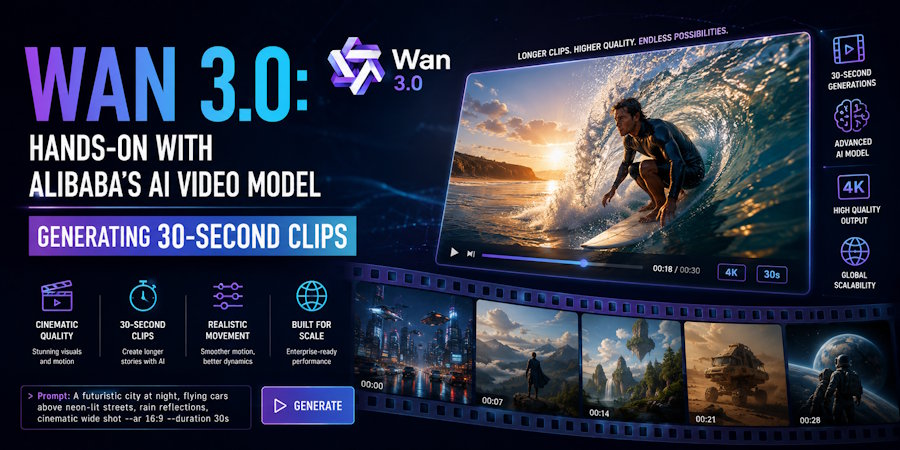
So when Alibaba opened the public beta of Wan 3.0 on August 6, 2026, I was curious but honestly not expecting much. The headline claims were simple but bold: one model that can generate a video of up to 30 seconds in a single run, with the audio (speech, singing, ambient sound) generated together with the image instead of being added later. That alone would be a big improvement over what I was used to, so I decided to test it properly for a week and write down my impressions. This article is the result of that testing.
What is Wan 3.0 and why it matters
For those who don't follow the AI video scene closely, the Wan family of models from Alibaba has been one of the most interesting open video model lines of the last couple of years. Wan 2.1 and 2.2 became popular in the ComfyUI and open-model community because they produced surprisingly good results on consumer hardware, and Wan 2.7 continued that line but as a collection of task-specific models: one for text-to-video, another for image-to-video, another for reference-to-video, another for video editing. As a user, you had to decide which model you needed before you even wrote your prompt, which was a bit annoying.
Wan 3.0 replaces that whole lineup with a single unified model. The same endpoint accepts text, images, video clips, audio files, and (new this generation) documents like PDFs or PPT files as reference inputs. The native length limit also doubles from 15 to 30 seconds. In my opinion, those two changes matter more than any single quality improvement, because they change how you work: you no longer plan a generation around the model's limitations, you just describe the scene and let the model figure it out.
The main changes compared to Wan 2.7
To keep things practical, here's the comparison that mattered to me:
- Model lineup. Wan 2.7 shipped as separate models for each task, while Wan 3.0 is a single model that accepts every input type.
- Length. The native limit doubles from 15 to 30 seconds.
- References. Wan 2.7 took text plus a first and last frame (and a source clip for editing); Wan 3.0 takes up to 10 images, 5 video clips, 5 audio files, documents and webpages all together.
- Audio. In 2.7 audio was generated on some tasks; in 3.0 it's on by default and can also be used as a reference.
- Resolution and ratio. 720P/1080P becomes 480P/720P/1080P, and the fixed aspect ratios get an adaptive mode.
- Duration control. You can still pick any whole second manually, or let the model recommend one.
A few things worth explaining in more detail:
One model, all references. In practice this means you can point the prompt at each input by position, for example "the character from image 1 picks up the object in image 3 while the camera follows the movement from clip 2". The model assembles all of that into a single take. I found this much easier than the old workflow of generating a clip, then editing it, then trying to make the face consistent.
30 seconds native. This is one of the features that most impressed me. Not 30 seconds stitched from six 5-second clips, but one continuous take with a beginning, middle and end. It makes a real difference for anything narrative, like a short ad or a product story, because the pacing is generated, not assembled.
Audio is part of the generation. Characters can speak, sing, or rap in sync with the scene, and the ambience comes with it. The audio track is on by default and you can turn it off if you want a silent output.
Documents and webpages as input. This is the most surprising addition. You can attach a PDF or a webpage (one document or one webpage per generation, not both) and the model will read it before generating. The "thinking" mode helps here for parsing the content.
Digital scene rendering. Structured content like software interfaces, motion graphics and on-screen text is rendered much more accurately than what I got with previous models. That's the feature that makes product walkthroughs and UI demos actually usable.
How I tested it (and the small reality check)
Here I have to be honest about one thing: the public beta of Wan 3.0 runs through Alibaba Cloud's Model Studio and partner services, and reproducing the full model locally would require a serious workstation that I simply don't own. So for this test I used a browser-based workspace that integrated the model a few days after the beta opened, the Wan 3.0 Video tool (Wan 3.0 Video). It does the same job without me having to install anything, which was convenient because my laptop is definitely not built for video generation.
I ran several tests, and here are the ones worth mentioning:
Test 1: a 30-second clip with a speaking character. I gave the tool a photo of a friend (with her permission) and a short script about her small bakery. The result was a 30-second video where she introduced the bakery, walked around the counter, and ended looking at the camera. The consistency of the face was genuinely good, much better than the melting-face experience I described at the beginning. The only issue was a small lip-sync delay in the last few seconds, barely noticeable.
Test 2: a product demo with on-screen text. I uploaded a logo and a screenshot of a fictional app interface, and asked for a 30-second demo where the interface is shown from different angles with text labels. This is the test I expected to fail, and it mostly didn't. The interface stayed recognizable, the camera movements were smooth, and the text was correct except for one typo in a label that I had to regenerate once.
Test 3: first-frame control. Instead of giving full references, I gave a single first frame and let the model continue from it. This worked well for a simple scene (a character walking through a market), and the first-and-last-frame mode gave an even more defined result for a scene that had to end in a specific position.
Test 4: document to video. I attached a one-page PDF (a short product spec) and asked for a 30-second explainer. The result was a basic but correct summary video with a voiceover. The facts were right, the phrasing was a bit generic, but for an internal draft it's honestly useful.
What it's actually useful for
After a week of testing, here's where I think Wan 3.0 helps right now:
- Product demos and UI walkthroughs. If your product is software, the digital scene rendering is the difference between a demo you can ship and a demo that embarrasses you.
- Short ads for social media. A 30-second take with native audio fits the short-form format without any editing.
- Storyboards and pitch drafts. When you need to communicate a visual idea quickly, generating a rough animated version is way more convincing than a static storyboard.
- Docs to video. Turning a specification or a report into a narrated video is surprisingly useful for internal communication, even if the result is not publishable as-is.
Honest limitations
I don't want this to sound like a hype article, so here are the limitations I actually hit:
- Audio quality is good, not studio-grade. Voices are clear and synced, but for professional voiceover you'd still want a human or a dedicated voice model.
- Text accuracy is improved, not perfect. One typo in my interface test, and I've seen worse cases reported in long documents.
- Complex scenes can still drift. The consistency is impressive for simple scenes with one character, but with multiple characters and many props you should review the output carefully.
- The model is not local-friendly. You need the cloud API or a partner service for now, which means you're paying for compute. It's not free.
- Always review before publishing. Even in the best results, the model can invent small details (a logo variation, a wrong product color) that matter for a real client.
Tips if you want to try it
Based on my testing, these four tips will save you time:
- Write direction, not keywords. The model reads long prompts (up to 5000 characters), so describe the scene like you would direct a camera operator.
- Use positional references. "The person in image 1 picks up the object in image 3" works. The model resolves references by position.
- Enable thinking mode for documents. If you attach a PDF or webpage, the model parses it much better with thinking enabled.
- Choose a duration, or let the model choose. The smart duration feature recommends a length based on your prompt, and honestly it picked better pacing than I did in most tests.
Final thoughts
I went into this expecting the usual AI video experience: impressive examples online, frustrating results in my hands. That didn't happen this time. The 30-second native generation with sound, the unified reference system, and the digital scene rendering turned Wan 3.0 from "a model to watch" into "a tool I would actually use for drafts and quick demos". It's still not perfect, and you should always review the output before sending it anywhere, but the gap between demo and real use has clearly closed a lot. If you've been waiting for a good reason to try AI video generation again, this is probably it. And if you don't have a workstation for it, the browser workspace I used for this article is a good place to start without committing to anything.
Common FAQs
Do I need a powerful GPU to use Wan 3.0?
Not necessarily. The public beta runs through cloud services, so you can use the API or a browser-based workspace. A local setup is possible for some related models, but it's not the easiest path right now.
Can Wan 3.0 really generate singing?
It can generate singing or rapping in sync with the scene, and the result is impressive for a single take, but the audio quality is still below a studio recording. Good for drafts, not for final release vocals.
Is the output always 30 seconds?
No. The model generates natively from 2 to 30 seconds, and you can also let it recommend a duration based on your prompt and references.
Can I use both a document and a webpage in the same generation?
No, they are mutually exclusive. You can attach one document or one public webpage per generation, plus the other reference media.

