

The Three Ways a Scraper Dies in 2026
A scraper that pulled clean data in January can return nothing by March, and the code didn't change. The target site did.
Automated traffic crossed 53% of all web traffic in 2025, up from 51% the year before, according to Imperva's 2026 Bad Bot Report. Sites have responded by getting aggressive about anything that looks automated, and legitimate scrapers get caught in the same net as actual bad bots.
In practice, almost every broken scraper fails for one of three reasons: the page needs JavaScript to render before the data exists, the IP address has been flagged and blocked, or a CAPTCHA has stopped the run cold. This piece walks through all three, plus a working code example using a web scraping API that handles them without you building your own infrastructure.
What Is Web Scraping?
If you already know what web scraping is, skip ahead. If you don't, here's the short version.
Web scraping is the automated version of extracting information off a webpage. Instead of a person opening a page, reading it, and typing the numbers into a spreadsheet, a script visits the page and pulls out exactly the fields you tell it to grab, at whatever scale and schedule you set.
A few concrete examples make it less abstract:
- A company wants to track a competitor's prices every day. Instead of someone checking the page manually each morning, a scraper visits it on a schedule and logs the price automatically.
- A recruiter wants every new listing from three different job boards in one place. A scraper pulls listings from all three and normalizes them into one dataset instead of three browser tabs.
- A sales team wants contact details from a business directory instead of copying names and emails out one at a time. A scraper extracts the fields and hands back structured data ready to import, though a scraped list is only as good as its deliverability. Running new contacts through the Email Checker API (free to start, same 10,000-credit tier) before they hit a CRM catches invalid and disposable addresses before they cost you a bounce.
None of this is exotic. It's the same task a person could do by hand, just automated and repeatable. The hard part isn't the concept, it's what happens when the website doesn't want to be scraped, which is most of the rest of this article.
TL;DR
- Scrapers usually break for one of three reasons: the page needs JavaScript to render, the IP got flagged, or a CAPTCHA stopped the run.
- A plain HTTP request only sees the server's initial response, not content added by JavaScript after the page loads.
- Rotating proxies spreads requests across different IP addresses so one address doesn't get flagged for repeat visits.
- CAPTCHA solving handles image and audio challenges inside the same request instead of stopping the pipeline.
- Static requests cost a fraction of JS-rendered ones, so only escalate when the static version actually fails.
- None of this guarantees you'll never get blocked. It raises your success rate, it doesn't eliminate defenses built specifically to stop this.
Why the Page Comes Back Empty: JavaScript Rendering
This is the single most common mistake: trying to scrape a JavaScript-heavy site with a plain HTTP client that never actually runs the page's scripts.
What curl Actually Sees on a JS-Heavy Site
Run curl against a modern React, Vue, or Angular page and you'll often get back a nearly empty HTML shell, a <div id="root"></div> and a pile of script tags. The actual product name, price, or listing you want doesn't exist yet. It gets added to the page after the browser downloads and runs JavaScript.
A plain HTTP request, whether it's curl, fetch, or Python's requests, never runs that JavaScript. It grabs whatever the server sent on the first response and stops there. If the content you need shows up after a script runs, a static request will never see it, no matter how you tweak the headers or how long you wait.
Headless Browsers vs. Just Waiting Longer
The instinct when a scraper comes back empty is to add a longer timeout or a hardcoded sleep(5000) before reading the response. That doesn't work, because the problem isn't speed, it's that nothing ever executed the JavaScript in the first place. Waiting longer for a script that never ran doesn't produce data.
The actual fix is rendering the page in a real browser (usually a headless one, meaning no visible window) that executes the JavaScript the same way a person's browser would, then reading the page after it settles. That's what people mean by "headless browser scraping": the browser runs invisibly, does the same rendering work a visitor's browser does, and hands back the finished page instead of the raw shell.
Why the IP Gets Flagged: Rate Limits and Bans
Learning to scrape a website without getting blocked mostly comes down to one thing: not looking like a bot in the first place.
How Sites Detect a Repeat Visitor
Sites don't need to know your name to notice a scraper. A handful of signals give it away fast: dozens of requests from one IP in a short window, missing browser headers that a real visitor's browser always sends, identical request timing that's too regular to be human, or a user agent that names a scraping library directly.
Once a site's defenses flag those signals, the response is usually a 429 status code (too many requests), a hard IP ban, or a CAPTCHA challenge inserted before the real page loads. Any one of these will silently break a scraper that isn't checking for it.
Rotating Proxies Without Running Your Own Fleet
The direct fix for IP-based blocking is spreading requests across multiple IP addresses instead of hitting a target repeatedly from one. That's proxy rotation, and building it yourself means buying, configuring, and monitoring a pool of proxies, which is its own maintenance job most teams don't want.
This is where APIFreaks' Web Scraper API is worth naming directly, because it bundles the fix for all three failure modes in this article into one REST endpoint: JavaScript rendering, automatic proxy rotation, and CAPTCHA solving, all behind a single POST request to https://api.apifreaks.com/v1.0/scraping.
It's free to start: 10,000 credits with no credit card required. After that, pricing is usage-based and scales with how much work each request actually does. A static request (no rendering) costs 4 credits, a JavaScript-rendered request costs 40, and a rendered request with CAPTCHA solving enabled costs 80. Failed requests (4xx or 5xx responses) aren't charged at all, so a blocked attempt doesn't cost you credits, only successful ones do.
Why the Run Stops Cold: CAPTCHA Walls
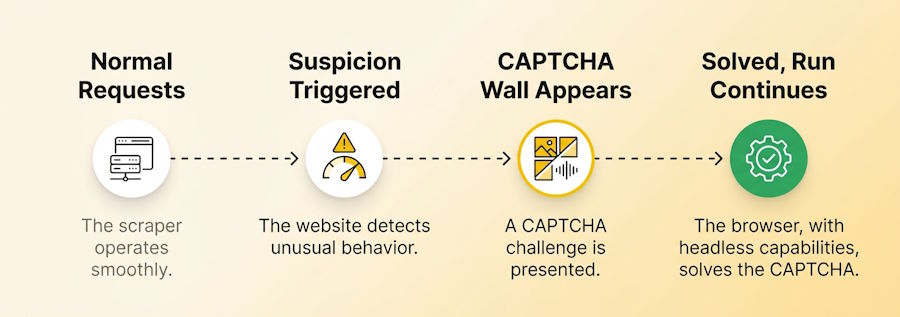
Image vs. Audio Challenges, and Why They Show Up Mid-Run
A CAPTCHA usually isn't the first thing a site shows you. It shows up after something else triggers suspicion, too many requests too fast, a flagged IP, or a missing header, and it's designed specifically to stop an automated pipeline in the moment a human isn't there to click through it.
Solving one programmatically means recognizing the challenge type (usually an image selection or an audio clip) and returning the correct response inside the same request flow, without a person opening a browser to do it manually. The same Web Scraper API handles this by setting captcha=true on a request and adding a CAPTCHA-handling step to the instructions array. The API solves the challenge and continues to the extraction step automatically.
Failure Mode, Fix, and Cost at a Glance
| What You See | What's Actually Happening | The Fix | Relative Cost |
|---|---|---|---|
| Page comes back with no real data, just an empty shell | The content is added by JavaScript after the initial page load, and a plain request never runs it | Enable JavaScript rendering (jsEnabled=true) | 40 credits, vs. 4 for a static request |
| Requests start returning 429s, or the IP gets blocked outright | The site has flagged your IP after repeated requests from the same address | Turn on proxy rotation (proxy=true) | Same request cost, no extra credit charge |
| A challenge screen appears mid-run and the pipeline stalls | The site triggered a CAPTCHA, usually after suspicious volume or a flagged IP | Enable CAPTCHA solving (captcha=true) | 80 credits (JS rendering + CAPTCHA combined) |
A Working Example: Scraping a JS-Rendered Page End to End
Start Static, Escalate Only When You Hit a Wall
Most pages don't need a browser. They need the right selector against server-rendered HTML, and that's the cheapest request type available. Always start here and only escalate once the static response actually comes back empty.
// scrape-static.js
const API_KEY = process.env.APIFREAKS_KEY;

if (!API_KEY) {
  throw new Error("Missing APIFREAKS_KEY environment variable");
}

async function scrapeStatic(targetUrl) {
  const endpoint = `https://api.apifreaks.com/v1.0/scraping?url=${encodeURIComponent(targetUrl)}&jsEnabled=false&text=true&apiKey=${API_KEY}`;

  const response = await fetch(endpoint, {
    method: "POST",
    headers: { "Content-Type": "application/json" },
    body: JSON.stringify({
      instructions: [
        {
          extract: {
            title: "h1.product-title",
            price: ".product-price",
          },
        },
      ],
    }),
  });

  if (!response.ok) {
    // Failed requests (4xx/5xx) aren't charged, but a 400 here can mean several
    // different things: a bad selector, an invalid URL, a validation error, and
    // more all share status 400. Read the body instead of just logging the status.
    const errorBody = await response.text();
    throw new Error(`Scrape failed (${response.status}): ${errorBody}`);
  }

  const data = await response.json();
  return data.extractedData;
}

scrapeStatic("https://example.com/product/123")
  .then((result) => console.log(result))
  .catch((err) => console.error(err));
jsEnabled=false here, 4 credits per successful call. If extractedData.title or extractedData.price come back empty or null, that's usually the signal the page needs rendering, not that the selector is wrong.
The Full Request: Rendering, Proxy, and Extraction Together
Once the static call proves the content needs JavaScript, escalate to a rendered request with proxy rotation on for anything you'll run on a schedule.
// scrape-rendered.js
const API_KEY = process.env.APIFREAKS_KEY;

if (!API_KEY) {
  throw new Error("Missing APIFREAKS_KEY environment variable");
}

async function scrapeRendered(targetUrl) {
  const endpoint = `https://api.apifreaks.com/v1.0/scraping?url=${encodeURIComponent(targetUrl)}&jsEnabled=true&proxy=true&text=false&apiKey=${API_KEY}`;

  const response = await fetch(endpoint, {
    method: "POST",
    headers: { "Content-Type": "application/json" },
    body: JSON.stringify({
      instructions: [
        { waitFor: ".product-price" }, // wait for the JS-rendered price block to appear
        {
          extract: {
            title: "h1.product-title",
            price: ".product-price",
          },
        },
      ],
    }),
  });

  if (!response.ok) {
    // A rendered request adds its own failure modes on top of the static ones:
    // a timeout waiting for an element, a CAPTCHA that failed to solve, and more,
    // all still under status 400. The body tells you which one, the status won't.
    const errorBody = await response.text();
    throw new Error(`Scrape failed (${response.status}): ${errorBody}`);
  }

  const data = await response.json();
  return data.extractedData;
}

scrapeRendered("https://example.com/product/123")
  .then((result) => console.log(result))
  .catch((err) => console.error(err));
This costs 40 credits per successful call instead of 4. jsEnabled=true is what triggers the browser rendering, so only run this version once you've confirmed the static call isn't enough. Add captcha=true and a CAPTCHA-handling step only if you actually hit a challenge in testing, turning it on preemptively adds cost for a problem you might not have.
Where This Still Breaks
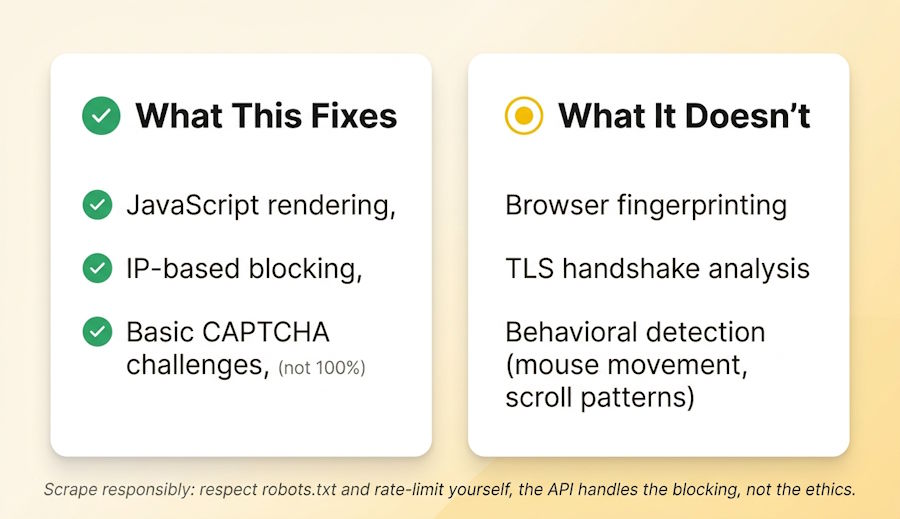
None of this is a guarantee, and it's worth saying plainly.
JS rendering and proxy rotation fix the two most common blocking mechanisms, but some sites go further: browser fingerprinting, TLS handshake analysis, and behavioral checks like mouse movement or scroll patterns. Rendering a page in a headless browser and rotating IPs doesn't defeat every one of those, it defeats the common ones.
CAPTCHA solving also isn't 100%. Image and audio solving has a real, non-zero failure rate, and a hard challenge can still stop a request. The upside is that a failed solve returns its own distinct error and isn't charged, so at least you know exactly what stopped the run instead of guessing from a generic timeout, but your pipeline still needs a retry or manual-review path for the ones that don't go through.
One more thing worth saying directly: scraping responsibly matters as much as scraping successfully. Check a site's robots.txt and terms of service before you build against it, and set your own request rate rather than assuming the API's speed is the speed you should run at.
A Workflow You Can Use Today
- Start every new target with a static request (
jsEnabled=false). It's the cheapest option and works for most server-rendered sites. - If the extracted fields come back empty, that's the signal to try rendering, not to rewrite your selectors. Switch to
jsEnabled=true. - If you start seeing 429s or an outright block on a scheduled job, add
proxy=true. - Only turn on
captcha=trueafter you've actually hit a CAPTCHA in testing. It adds cost, so don't enable it preemptively. - Log the response body along with the status code, URL, and timestamp, not just the status alone. A 400 can mean a bad selector, an invalid URL, a validation error, a timeout waiting for an element, or a failed CAPTCHA solve, and the status code doesn't tell those apart. The message in the body does.
FAQ
What is web scraping?
It's the automated version of extracting information off a webpage: a script visits a page and extracts specific data, instead of a person doing it by hand.
What's the difference between static and JS-rendered scraping?
Static scraping fetches the page exactly as the server sends it, fast and cheap, and works for most content sites. JS-rendered scraping loads the page in a real browser, executes its scripts, and reads the page after that content appears. It's needed for single-page apps and anything where a plain fetch returns an empty shell.
Does proxy rotation guarantee you won't get blocked?
No, and that's worth being honest about. It significantly reduces IP-based blocking, but sites using fingerprinting or behavioral detection can still flag a session for reasons that have nothing to do with which IP it came from.
Is web scraping legal?
Scraping publicly available data is broadly practiced and generally permitted, but you're still bound by a site's terms of service, robots.txt, and applicable law, especially around copyright and personal data. This isn't legal advice, and the details change by jurisdiction and use case, so check with a lawyer if you're scraping anything sensitive or at scale.
What's the cost difference between static and rendered requests?
On the Web Scraper API, a static request costs 4 credits, a JavaScript-rendered request costs 40, and a rendered request with CAPTCHA solving costs 80. All figures are per successful (2xx) response; failed requests aren't charged.
Can it scrape pages behind a login?
Yes, two ways: reuse an authenticated session by passing existing cookies, or script the login itself with fill and click steps before the extract step runs.
Where to Start
Pick one page you're already trying to scrape and run it through a static request first, before adding rendering, proxies, or anything else. Most scraping problems turn out to be one of the three covered here, and you'll know which one you're dealing with faster than you'd guess.

