



Most SEO advice written for developers is marketing advice with a code block bolted on. It tells you to "optimise your titles" and leaves you to work out which of the four strings your stack calls a title it means.
This is the other article. It covers what is genuinely in a developer's control, how each thing is implemented, what breaks it, and which parts changed now that a language model sits between your markup and the user. Roughly in order of how much damage you can do by getting it wrong.
1. Rendering, and the thing crawlers quietly skip
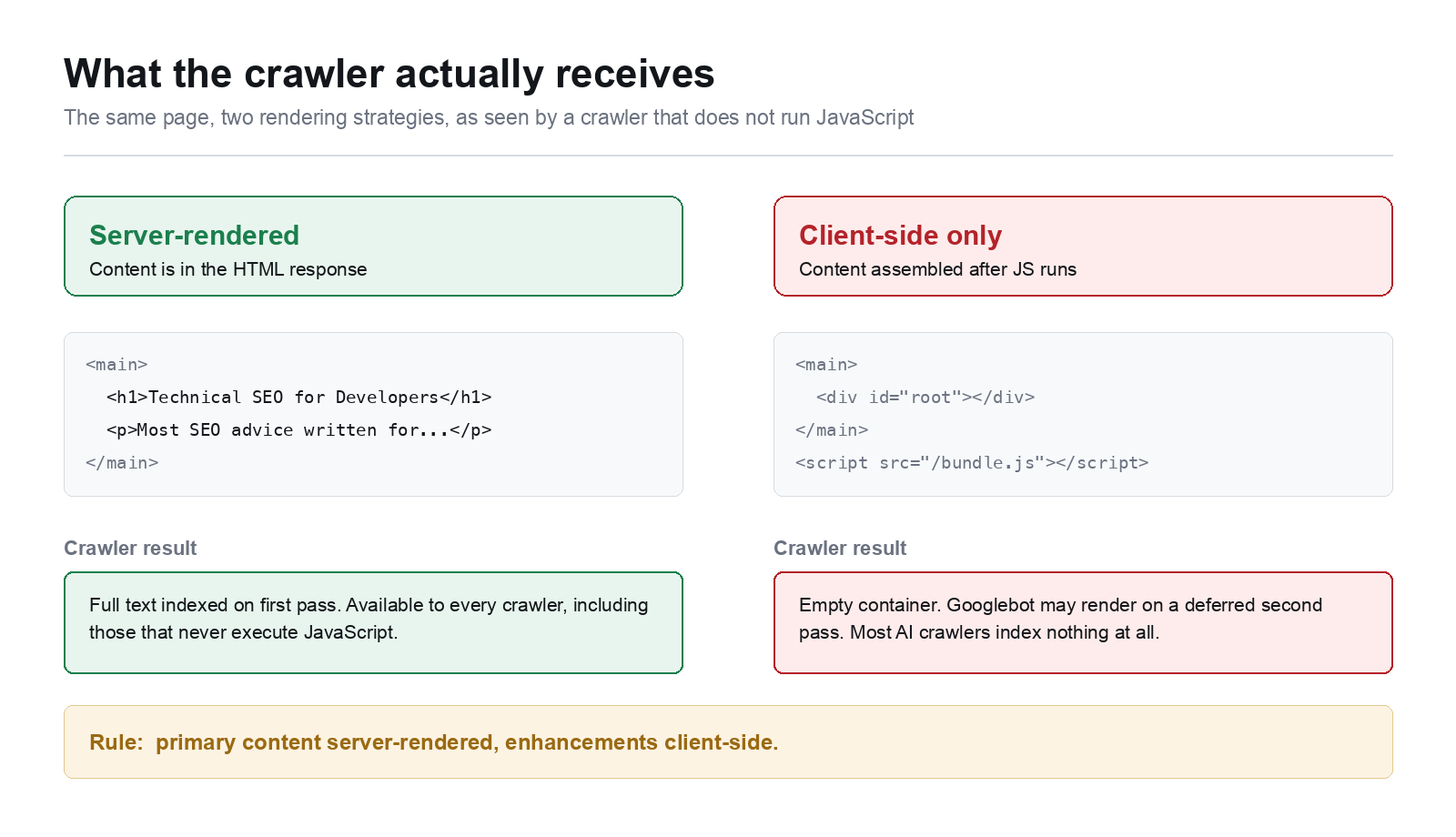
Everything else in this article is irrelevant if the content never arrives. The first question for any stack is: what exists in the HTML response, and what only exists after JavaScript runs?
Googlebot renders JavaScript, but in a deferred second pass with no guaranteed interval. The crawlers feeding language models are considerably worse at it, and several do not execute JavaScript at all. If your copy is assembled client-side, you are betting your indexing on the weakest renderer in the chain.
Test it the way a crawler sees it, not the way your browser does:
# What is actually in the response body
curl -sL -A "Mozilla/5.0 (compatible; Googlebot/2.1)" https://example.com/page \
  | grep -c "a distinctive sentence from your page"
# Compare against the rendered DOM
# If the first returns 0 and the page looks fine in Chrome,
# your content is client-side only.
The fix depends on your stack, and the names differ more than the concepts do:
| Stack | Approach |
|---|---|
| Next.js | Server Components, or getServerSideProps / static generation |
| Nuxt | ssr: true, or nuxt generate for static |
| Laravel | Blade renders server-side already; the risk is Vue or Livewire islands holding real copy |
| Django | Templates render server-side; the risk is a DRF endpoint feeding a client-side view |
| WordPress | PHP renders server-side; the risk is a page builder deferring sections |
The pattern is the same everywhere. Primary content server-rendered, enhancements client-side. A product description, an article body or a service page belongs in the response. A carousel, a filter widget or a live price badge does not have to be.
One frequent own goal: infinite scroll with no paginated fallback. If /articles?page=2 does not exist as a crawlable URL, everything past the first viewport is invisible. Keep real paginated routes and let JavaScript enhance them.
2. Core Web Vitals as an engineering problem
Core Web Vitals are a ranking input, but the reason to care is that they measure things that genuinely make a site worse. Three metrics, three distinct causes.
LCP (Largest Contentful Paint) is almost always an image or a web font, and almost always a priority problem rather than a size problem. The browser cannot start fetching your hero image until it has parsed the markup that references it:
<!-- Tell the browser before it finishes parsing -->
<link rel="preload" as="image" href="/hero.avif"
      imagesrcset="/hero-800.avif 800w, /hero-1600.avif 1600w"
      imagesizes="100vw">

<!-- And never lazy-load the LCP element -->
<img src="/hero-1600.avif" fetchpriority="high" decoding="async"
     width="1600" height="900" alt="...">
Blanket loading="lazy" on every image is a common regression. Lazy-loading the hero delays the exact element the metric measures.
CLS (Cumulative Layout Shift) is reserved space. Every image and video needs intrinsic dimensions so the browser can allocate the box before the bytes arrive:
img, video { aspect-ratio: attr(width) / attr(height); height: auto; }
The other common cause is web fonts. font-display: swap trades an invisible-text period for a reflow when the font loads. Pair it with size-adjust on a fallback so the two faces occupy similar space:
@font-face {
  font-family: "Inter Fallback";
  src: local("Arial");
  size-adjust: 107%;
  ascent-override: 90%;
}
body { font-family: Inter, "Inter Fallback", sans-serif; }
INP (Interaction to Next Paint) replaced FID and is far harder to game, because it measures every interaction rather than the first. The usual culprit is a long task blocking the main thread. Break work up and yield:
async function processAll(items) {
  for (const item of items) {
    doWork(item);
    // Yield to the main thread so input can be handled
    if (navigator.scheduling?.isInputPending?.()) {
      await new Promise(r => setTimeout(r, 0));
    }
  }
}
Measure with field data, not lab data. Lighthouse runs on your machine on your connection. The Chrome UX Report reflects real users, and it is the one Google uses.
3. The head, and the four strings everyone calls "the title"
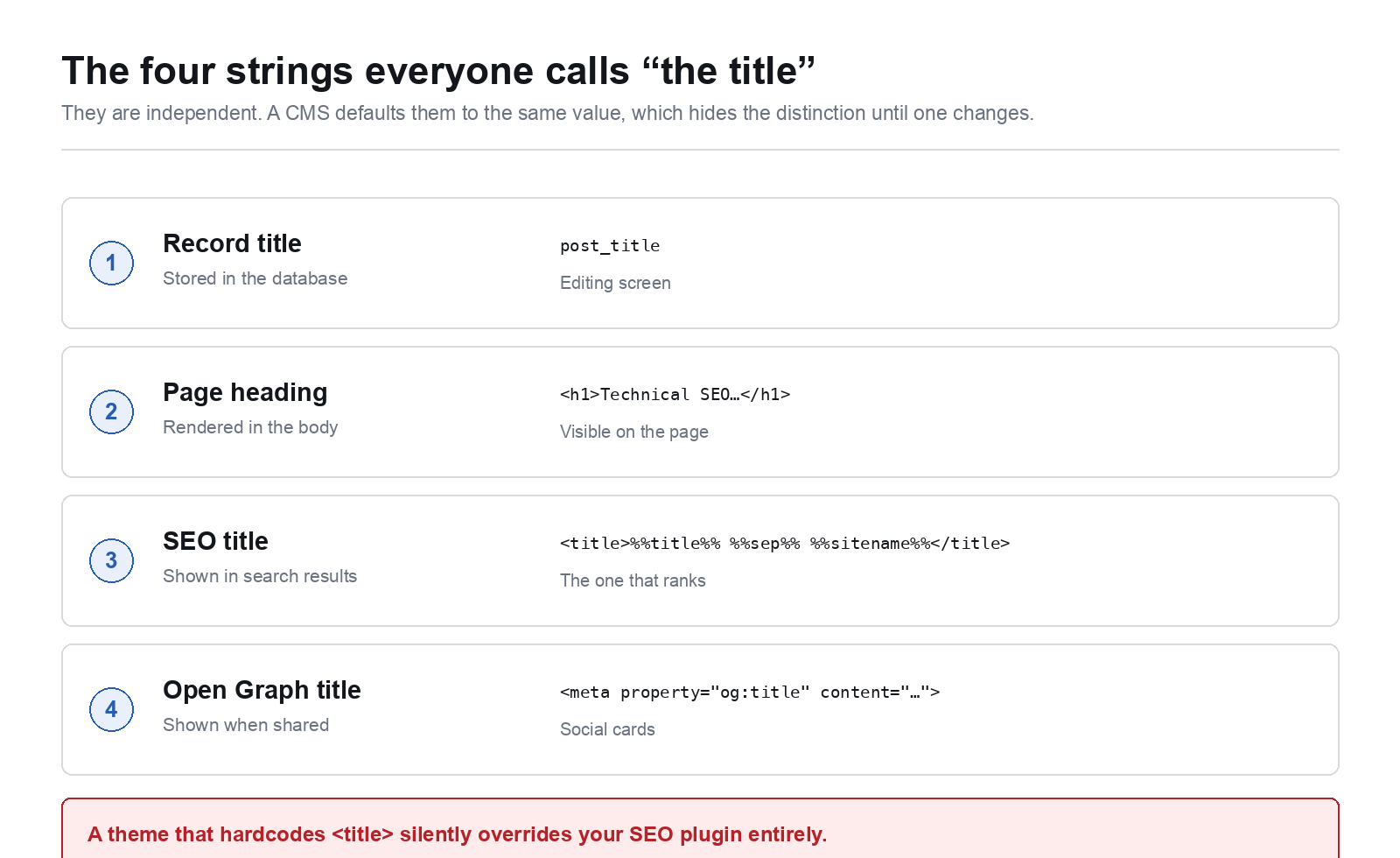
This is where most implementation bugs live, because the vocabulary is genuinely confusing. On a typical page there are four different strings:
- The record title stored in the database
- The rendered
<h1>on the page - The
<title>in the head, which is what search engines display - The Open Graph title, used when the URL is shared
They are independent. A CMS will often default them to the same value, which hides the distinction until somebody changes one and wonders why the others did not follow.
In WordPress specifically, the <title> is not the post title. It comes from a template string such as %%title%% %%sep%% %%sitename%% rendered by whichever SEO plugin is active, and a theme that hardcodes its own <title> tag will silently override the plugin entirely. The no-plugin route is a filter:
// functions.php
add_theme_support('title-tag');   // required; without it nothing below runs

add_filter('document_title_parts', function (array $parts) {
    if (is_singular('post')) {
        $custom = get_post_meta(get_the_ID(), '_seo_title', true);
        if ($custom) {
            $parts['title'] = $custom;
            unset($parts['tagline']);
        }
    }
    return $parts;
});
If you inherit a site where titles ignore the plugin, grep the theme for a literal <title> before anything else. I wrote a longer walkthrough of where the SEO title in WordPress actually comes from, including the Yoast and Rank Math template variables, because it is the single most common misconfiguration I find on handover.
Canonical tags are the other head element worth getting right, and the rule is narrower than people assume. A canonical is a hint about duplicates, not a redirect and not an access control. Self-reference every indexable page, point genuine duplicates at the original, and never canonicalise a paginated series to page one, which tells Google to drop pages two onward.
<link rel="canonical" href="https://example.com/articles/technical-seo/">
Generate it from the resolved route, not from the request URI, or every tracking parameter becomes its own canonical.
4. Structured data, and why it matters more than it did
JSON-LD is the most reliable way to state facts about a page in a form a machine does not have to infer. It was always worth doing for rich results. It matters more now because generated answers lean on explicit, parseable claims, and inference from prose is where models go wrong.
Keep it in the head, keep it in JSON-LD rather than microdata, and make it match the visible page:
<script type="application/ld+json">
{
  "@context": "https://schema.org",
  "@type": "TechArticle",
  "headline": "Technical SEO for Developers",
  "datePublished": "2026-10-14",
  "dateModified": "2026-10-14",
  "author": {
    "@type": "Person",
    "name": "Adil Makhdoom",
    "url": "https://theadil.me/"
  },
  "proficiencyLevel": "Expert"
}
</script>
Two rules that prevent most problems. Never mark up what is not on the page, which is the line between structured data and a manual action. And set dateModified only when the content actually changed; bumping it on every deploy trains Google to ignore it.
For a service business, Organization and Person markup with a consistent url and sameAs block is what ties scattered mentions into one entity. That is the mechanism behind being named in an answer rather than merely ranking for it.
5. Crawl control: robots, sitemaps and status codes
Three files and one habit.
robots.txt controls crawling, not indexing. A URL blocked here can still appear in results if other pages link to it, because Google knows it exists but cannot see the noindex you put on it. To keep something out of the index, allow the crawl and return noindex:
# Wrong: blocked, so the noindex is never read
User-agent: *
Disallow: /private-page/
# Right
X-Robots-Tag: noindex, follow
The X-Robots-Tag header is the only way to apply this to non-HTML responses such as PDFs.
Status codes are instructions, so use the right one. 301 for a permanent move, 302 only when it genuinely is temporary, 410 when something is deliberately gone and you want it dropped faster than 404 manages. The expensive mistake is the soft 404: a "not found" page returning 200, which leaves thousands of empty URLs indexed.
Sitemaps should be generated, never maintained by hand. Include only canonical, indexable, 200 URLs. A sitemap containing redirects and 404s is a signal of a neglected site.
Then the habit, which is redirect mapping on redesigns. A rebuild that changes URL structure without mapping old to new discards whatever authority those pages had. Map every old URL to its closest equivalent before launch, not after traffic drops. This is the most costly and most commonly skipped item on any redesign.
6. URL architecture and internal linking
URLs are an API for your content. Keep them short, lowercase, hyphenated, free of parameters where possible, and stable. Changing a URL costs you the redirect and some of the equity, every time.
Internal linking is the lever developers most often leave untouched, and it is free. Most small sites are a set of orphans: navigation links to everything, and nothing links to anything else. Two things follow from a good internal link graph. It tells search engines which pages you consider important, and it keeps a reader moving.
A quick audit, which you can adapt to any stack:
// Count internal inbound links per published post
$posts = get_posts(['numberposts' => -1, 'post_status' => 'publish']);
foreach ($posts as $target) {
    $n = 0;
    foreach ($posts as $source) {
        if ($source->ID === $target->ID) continue;
        if (str_contains($source->post_content, '/blog/' . $target->post_name . '/')) $n++;
    }
    printf("%-50s %d inbound\n", $target->post_name, $n);
}
Anything returning zero is a page you are asking Google to value while signalling that you do not. Run it after every content batch.
7. What AI search actually changed
Three changes matter to a developer, and the second is the one worth most.
A large share of informational queries no longer produce a click. A generated summary answers above the results. For queries that are a single fact, the click is gone and no amount of markup brings it back. Plan for it rather than optimising against it.
Low-competition long-tail queries became relatively more valuable. This is counterintuitive and it is the practical takeaway. Head terms get summarised; specific long-tail queries are where summaries are least reliable, so the click survives. The tail did not improve. The head got worse, which moved the economics.
This is also where domain authority arithmetic decides your roadmap. A keyword difficulty score of 65 on a site with a hundred referring domains is not a plan.
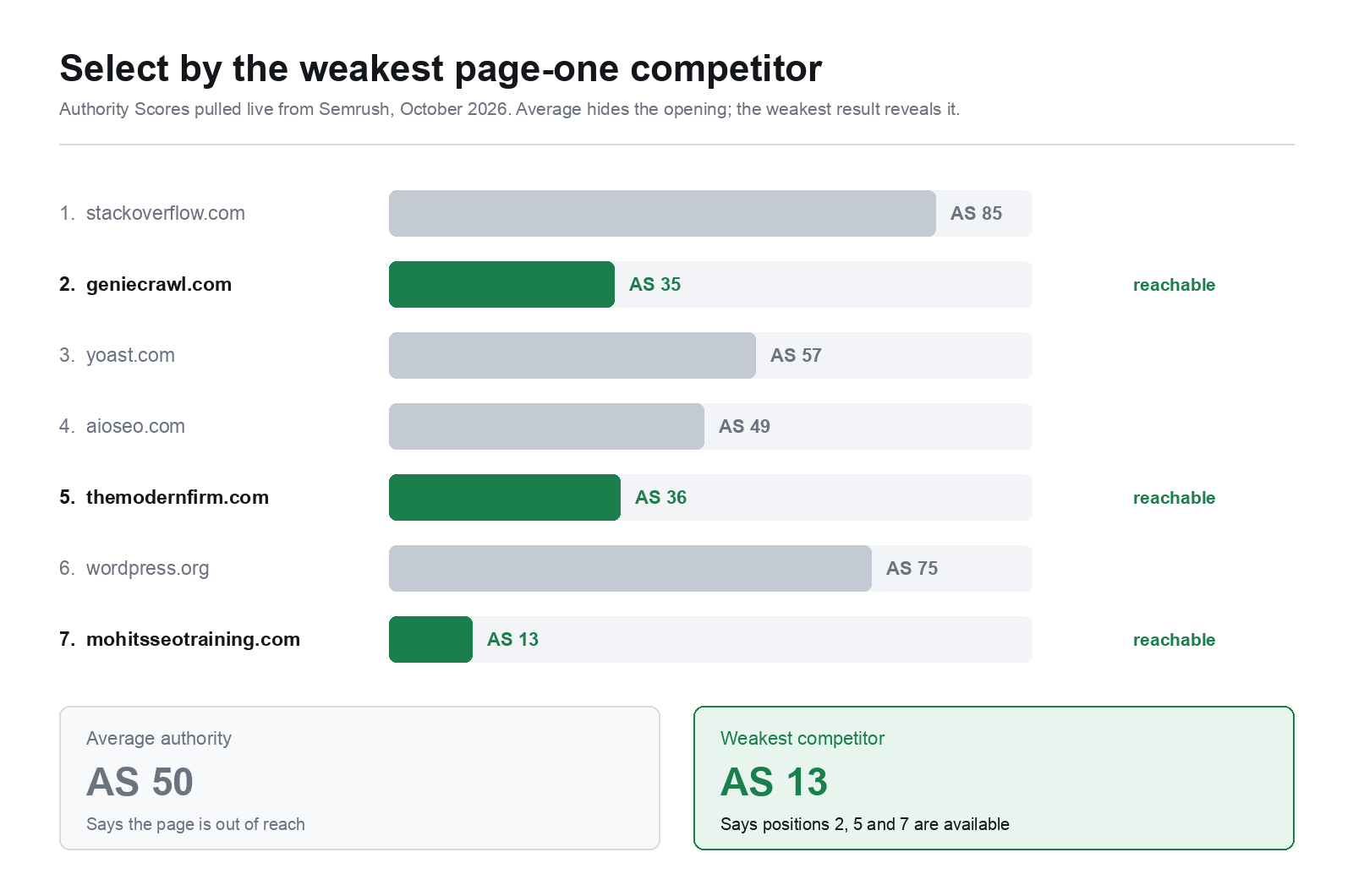
The selection rule that works is: rank a target by the weakest competitor on page one, never the average. Here is a real page one, with Authority Scores pulled live rather than estimated:
| # | Domain | Authority Score |
|---|---|---|
| 1 | stackoverflow.com | 85 |
| 2 | geniecrawl.com | 35 |
| 3 | yoast.com | 57 |
| 4 | aioseo.com | 49 |
| 5 | themodernfirm.com | 36 |
| 6 | wordpress.org | 75 |
| 7 | mohitsseotraining.com | 13 |
The average is 50, which says walk away. The weakest is 13, which says positions 2, 5 and 7 are genuinely available. Only one of those numbers is actionable.
Two things worth noticing. Yoast, a company whose entire business is this subject, sits at 57 rather than the 80-something most people would guess. And position 5 is a law firm's blog. Page one is almost always softer than its reputation, but only if you look at the individual results instead of the aggregate score.
Being cited became a distinct goal from being clicked. If a model answers using your page, the name it attributes is drawn largely from your title, your structured data and your entity markup. That argues for precise titles, consistent Person and Organization schema, and a factual tone that is easy to quote. One of the most effective ways to build that entity footprint is securing press mentions in authoritative outlets, a PR distribution service handles placements across major publications like USA Today, Business Insider, and AP so your brand becomes a named, citable entity across the web.
A newer convention worth adopting is llms.txt at your root: a Markdown index of your site written for models rather than browsers. A definition-style opening paragraph, a flat key-value block of facts, then a categorised link index. Flat key-value survives chunking; prose does not. Generate it in your build step, because a stale index is worse than none.
Then decide your crawler policy deliberately rather than inheriting whatever your CMS shipped:
User-agent: GPTBot
Allow: /

User-agent: ClaudeBot
Allow: /

User-agent: PerplexityBot
Allow: /

User-agent: Google-Extended
Allow: /
If your content is the product, block them. If your content is how customers find you, allow them. Those are genuinely different businesses and there is no default right answer.
8. Where the platform changes the implementation
The principles above are universal. The implementation is not, and on hosted platforms the ceiling is real.
On WordPress you control everything, which is the appeal and the cost. Template-level control over the head, arbitrary JSON-LD, full redirect management, server-level caching and header control. The cost is that it is yours to maintain, and an unmaintained install degrades into outdated code and a contact form that quietly stopped sending. Most of the serious work in WordPress development and technical SEO is this: the structural half nobody sees on launch day.
On Squarespace the foundations are handled and the ceiling arrives sooner. Titles, descriptions, clean URLs, a generated sitemap and HTTPS all work properly, and the tribal claim that it cannot rank is wrong. What you do hit is granular schema control, redirect management at scale, and anything unusual in URL structure. Most businesses never reach that ceiling; a publisher with three thousand pages reaches it in month two. The practical approach to Squarespace SEO is to use code injection for the schema the platform does not generate, and to accept the limits rather than fight them.
The deciding question is rarely which platform is better. It is who maintains this in two years, and how much do they want to think about it.
A build-step checklist
Things worth automating rather than remembering:
- Fail the build if any indexable page lacks a <title>, meta description or canonical
- Assert X-Robots-Tag: noindex is absent from production responses, which catches the staging config that ships on launch day
- Regenerate the sitemap and llms.txt from the route table
- Diff old and new URL lists on any structural change and fail if an old URL has no mapping
- Run the internal link audit and flag orphans
- Check Core Web Vitals against field data, not Lighthouse
None of this is glamorous and all of it is cheaper in a pipeline than in a recovery.
Adil Makhdoom is a freelance web developer and SEO specialist in Lahore, Pakistan, working with clients in the US, UK and Australia since 2020. He builds on WordPress, Squarespace and Showit, and writes about the technical half of SEO at theadil.me.

