

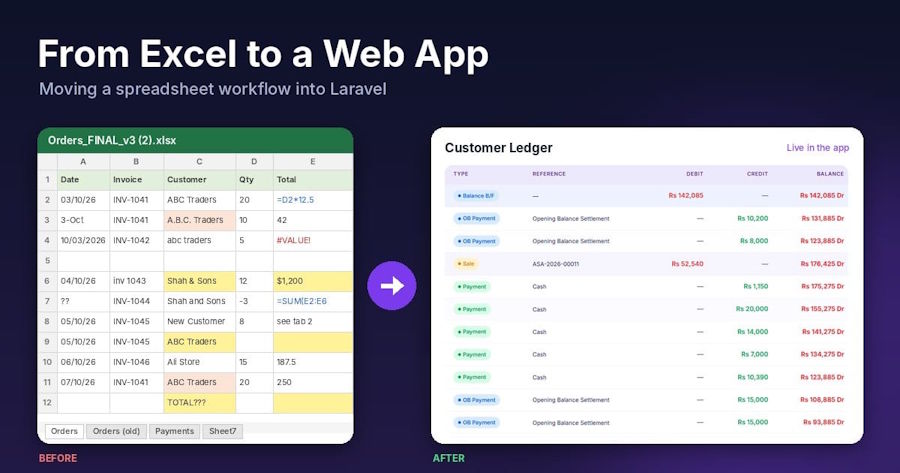
Sooner or later, every developer gets the same request: "We run the business on this spreadsheet. Can you turn it into a proper system?" The file usually has a dozen tabs, colour-coded rows, formulas nobody remembers writing, and a column called Notes 2 (new).
The tempting move is to copy the columns into a single table and rebuild the sheet in HTML. That gives the client the same mess with a login screen. This guide walks through a better path in Laravel: model the data properly, import the old rows safely, replace formulas with code, and give people the reports and exports they used to get from Excel.
If your client (or you) is still deciding when it's time to replace spreadsheets with custom software, settle that first. This article assumes the decision is made and you're ready to build.
The running example is a small distributor's orders sheet, one row per product line:
| Date | Invoice No | Customer | Product | Qty | Unit Price | Total |
|---|---|---|---|---|---|---|
| 03/10/2026 | INV-1041 | ABC Traders | Rice 5kg | 20 | 12.50 | =E2*F2 |
| 03/10/2026 | INV-1041 | A.B.C. Traders | Oil 1L | 10 | 4.20 | =E3*F3 |
Payments live on a separate tab. You'll notice the same customer typed two ways already. That's normal, and we'll deal with it.
Step 1: Map the spreadsheet before writing code
Spend an hour with the people who use the file. For each tab and column, write down:
- What it really is. A customer, a product, an order, a payment, or a value calculated from others?
- Who types it, and who only reads it. This becomes your permissions later.
- Which columns are formulas. These usually become code, not stored columns.
- What leaves the sheet. Invoices, month-end totals, the export the accountant asks for. These become your reports.
For our sheet, the mapping is:
- Customer and Product repeat on every row, so they become their own tables.
- Invoice No groups rows into one order; each row is an order item.
- Total is a formula, so it won't be a stored column.
- The payments tab becomes a payments table linked to orders.
Step 2: Design a proper schema
A spreadsheet stores everything in one flat grid. A database should store each fact once. Here are the migrations:
Schema::create('customers', function (Blueprint $table) {
    $table->id();
    $table->string('name');
    $table->string('normalized_name')->unique(); // used to catch duplicates
    $table->string('phone')->nullable();
    $table->timestamps();
});

Schema::create('products', function (Blueprint $table) {
    $table->id();
    $table->string('name')->unique();
    $table->decimal('unit_price', 12, 2);
    $table->timestamps();
});

Schema::create('orders', function (Blueprint $table) {
    $table->id();
    $table->string('reference')->unique(); // the old "Invoice No"
    $table->foreignId('customer_id')->constrained();
    $table->date('ordered_at');
    $table->timestamps();
});

Schema::create('order_items', function (Blueprint $table) {
    $table->id();
    $table->foreignId('order_id')->constrained()->cascadeOnDelete();
    $table->foreignId('product_id')->constrained();
    $table->unsignedInteger('quantity');
    $table->decimal('unit_price', 12, 2); // price at the time of sale
    $table->timestamps();
});

Schema::create('payments', function (Blueprint $table) {
    $table->id();
    $table->foreignId('order_id')->constrained()->cascadeOnDelete();
    $table->decimal('amount', 12, 2);
    $table->date('paid_at');
    $table->timestamps();
});
Three decisions are worth explaining:
normalized_nameon customers. People type "ABC Traders", "abc traders " and "A.B.C. Traders". A lowercased, trimmed copy with a unique index stops most duplicates at the database level.unit_priceon order items, not only on products. Prices change. The sheet kept the price used on that day, and so should you, or old invoices will change when you update the product price.- Money as decimal, never float. Floats produce rounding errors in totals. Storing integer cents is also fine, as long as you're consistent.
Step 3: Replace formulas with code
In the sheet, Total = Qty × Unit Price and Balance = Total − Paid were formulas. Don't store them as columns that can drift out of sync. Calculate them on the model:
class Order extends Model
{
    protected $fillable = ['reference', 'customer_id', 'ordered_at'];

    protected $casts = ['ordered_at' => 'date'];

    public function customer(): BelongsTo
    {
        return $this->belongsTo(Customer::class);
    }

    public function items(): HasMany
    {
        return $this->hasMany(OrderItem::class);
    }

    public function payments(): HasMany
    {
        return $this->hasMany(Payment::class);
    }

    public function total(): float
    {
        return round($this->items->sum(fn ($item) => $item->quantity * $item->unit_price), 2);
    }

    public function balance(): float
    {
        return round($this->total() - $this->payments->sum('amount'), 2);
    }
}
These methods use loaded relationships, so eager-load them on list pages (Order::with(['items', 'payments'])) to avoid one query per row. For large reports, calculate totals in SQL instead (Step 6).
The other half of a spreadsheet's "logic" is the rules people follow by habit: quantity must be a whole number, every order needs a customer, a payment can't be negative. Put those in validation so the new system enforces what the sheet only hoped for:
$request->validate([
    'customer_id'          => ['required', 'exists:customers,id'],
    'ordered_at'           => ['required', 'date'],
    'items'                => ['required', 'array', 'min:1'],
    'items.*.product_id'   => ['required', 'exists:products,id'],
    'items.*.quantity'     => ['required', 'integer', 'min:1'],
    'items.*.unit_price'   => ['required', 'numeric', 'min:0'],
]);
Step 4: Import the old data safely
This is where most migrations go wrong. Real spreadsheet data has blank rows, money typed as text ("$1,200"), dates in mixed formats, and the same customer spelled three ways. The import must clean it, report what it can't fix, and change nothing if anything fails.
Export each tab to CSV, then write an Artisan command:
class ImportOrdersSheet extends Command
{
    protected $signature = 'import:orders {file} {--dry-run}';

    protected $description = 'Import order lines from a CSV export of the old spreadsheet';

    public function handle(): int
    {
        $handle = fopen($this->argument('file'), 'r');

        if ($handle === false) {
            $this->error('Cannot open the file.');
            return self::FAILURE;
        }

        $header = array_map(fn ($h) => strtolower(trim($h)), fgetcsv($handle));
        $errors = [];
        $imported = 0;
        $line = 1;

        DB::beginTransaction();

        while (($row = fgetcsv($handle)) !== false) {
            $line++;

            if (count(array_filter($row, fn ($v) => trim((string) $v) !== '')) === 0) {
                continue; // skip empty rows
            }

            try {
                $this->importRow(array_combine($header, $row));
                $imported++;
            } catch (\Throwable $e) {
                $errors[] = "Line {$line}: {$e->getMessage()}";
            }
        }

        fclose($handle);

        if ($errors !== [] || $this->option('dry-run')) {
            DB::rollBack();
        } else {
            DB::commit();
        }

        foreach ($errors as $error) {
            $this->warn($error);
        }

        $this->info($errors === []
            ? ($this->option('dry-run') ? "Dry run OK: {$imported} rows would be imported." : "Imported {$imported} rows.")
            : 'Nothing was saved. Fix the rows above and run the import again.');

        return $errors === [] ? self::SUCCESS : self::FAILURE;
    }

    private function importRow(array $data): void
    {
        $reference = trim($data['invoice no'] ?? '');

        if ($reference === '') {
            throw new InvalidArgumentException('Missing invoice number.');
        }

        $customerName = Str::squish($data['customer'] ?? '');
        $productName  = Str::squish($data['product'] ?? '');
        $unitPrice    = $this->money($data['unit price'] ?? '');

        $customer = Customer::firstOrCreate(
            ['normalized_name' => $this->normalize($customerName)],
            ['name' => $customerName]
        );

        $product = Product::firstOrCreate(
            ['name' => $productName],
            ['unit_price' => $unitPrice]
        );

        $order = Order::firstOrCreate(
            ['reference' => $reference],
            ['customer_id' => $customer->id, 'ordered_at' => $this->date($data['date'] ?? '')]
        );

        $order->items()->create([
            'product_id' => $product->id,
            'quantity'   => (int) $data['qty'],
            'unit_price' => $unitPrice,
        ]);
    }

    private function normalize(string $name): string
    {
        // "A.B.C. Traders" and "abc traders " both become "abctraders"
        return Str::of($name)->lower()->replaceMatches('/[^a-z0-9]+/', '')->value();
    }

    private function money(string $value): float
    {
        $clean = preg_replace('/[^\d.\-]/', '', $value); // "$1,200.50" -> "1200.50"

        if ($clean === '' || ! is_numeric($clean)) {
            throw new InvalidArgumentException("Invalid amount: '{$value}'");
        }

        return round((float) $clean, 2);
    }

    private function date(string $value): Carbon
    {
        $value = trim($value);

        if (is_numeric($value)) {
            // Excel serial date, e.g. 46298
            return Carbon::create(1899, 12, 30)->addDays((int) $value);
        }

        return Carbon::createFromFormat('d/m/Y', $value)->startOfDay();
    }
}
A few details that save hours:
- All or nothing. Everything runs inside one transaction. If any row fails, nothing is saved, and you get a list of line numbers to fix. No half-imported database.
--dry-runfirst. Runphp artisan import:orders orders.csv --dry-rununtil it reports zero errors, then run it for real.- Stronger duplicate matching.
normalize()goes further than the trimmed name from Step 2: it strips spaces and punctuation too, so "A.B.C. Traders" and "abc traders" become one customer. Still review the customer list with the client afterwards. - One date format per file. 03/10/2026 is 3 October in some countries and 10 March in others. Confirm which the client used and parse with that format only, never by guessing. If a column holds plain numbers instead of dates, those are Excel serial dates, which the code above handles.
- Money with commas as decimals (1.200,50) needs a different cleaner. Check a few rows before trusting the import.
Import the payments tab the same way, with its own command that looks up each order by reference. For larger or more complex workbooks, the maatwebsite/excel package can read .xlsx files directly and process them in chunks.
Step 5: Add the permissions a spreadsheet never had
In a shared sheet, anyone with the file sees everything: margins, customer balances, sometimes salaries. This is often the real reason the client wants an app.
Start simple. Add a role column to users and define gates in AppServiceProvider::boot():
Gate::define('view-financials', fn (User $user) => in_array($user->role, ['owner', 'accountant'], true));

Gate::define('edit-orders', fn (User $user) => in_array($user->role, ['owner', 'sales'], true));
Then use them wherever data appears:
@can('view-financials')
    <td>{{ number_format($order->balance(), 2) }}</td>
@endcan
And protect the routes, not just the views:
Route::get('/reports/revenue', RevenueReportController::class)->middleware('can:view-financials');
If the roles grow beyond a few, move to policies per model or a package such as spatie/laravel-permission. The mapping from Step 1 (who types what, who only reads) tells you which roles you need.
Step 6: Rebuild the reports in SQL
The month-end pivot table someone rebuilt by hand every month becomes one query. Monthly revenue on MySQL:
$monthly = OrderItem::query()
    ->join('orders', 'orders.id', '=', 'order_items.order_id')
    ->selectRaw("DATE_FORMAT(orders.ordered_at, '%Y-%m') as month")
    ->selectRaw('SUM(order_items.quantity * order_items.unit_price) as revenue')
    ->groupBy('month')
    ->orderBy('month')
    ->get();
On PostgreSQL use to_char(orders.ordered_at, 'YYYY-MM'), and on SQLite strftime('%Y-%m', orders.ordered_at).
Customer balances, one of the most-requested reports, combine two sums:
$balances = Customer::query()
    ->select('customers.id', 'customers.name')
    ->selectSub(
        OrderItem::query()
            ->join('orders', 'orders.id', '=', 'order_items.order_id')
            ->whereColumn('orders.customer_id', 'customers.id')
            ->selectRaw('COALESCE(SUM(order_items.quantity * order_items.unit_price), 0)'),
        'billed'
    )
    ->selectSub(
        Payment::query()
            ->join('orders', 'orders.id', '=', 'payments.order_id')
            ->whereColumn('orders.customer_id', 'customers.id')
            ->selectRaw('COALESCE(SUM(payments.amount), 0)'),
        'paid'
    )
    ->orderBy('name')
    ->get()
    ->map(fn ($c) => tap($c, fn ($c) => $c->balance = round($c->billed - $c->paid, 2)));
Using subqueries keeps billed and paid amounts from multiplying each other, a classic mistake when you join items and payments in one query.
Step 7: Keep the Excel export
Accountants and owners will still want a file they can open in Excel. Give it to them, and make it fast enough for large tables with a streamed CSV:
public function export(): StreamedResponse
{
    return response()->streamDownload(function () {
        $out = fopen('php://output', 'w');
        fputcsv($out, ['Invoice', 'Date', 'Customer', 'Total', 'Balance']);

        Order::with(['customer', 'items', 'payments'])
            ->orderBy('ordered_at')
            ->orderBy('id')
            ->chunk(500, function ($orders) use ($out) {
                foreach ($orders as $order) {
                    fputcsv($out, [
                        $order->reference,
                        $order->ordered_at->format('Y-m-d'),
                        $order->customer->name,
                        number_format($order->total(), 2, '.', ''),
                        number_format($order->balance(), 2, '.', ''),
                    ]);
                }
            });

        fclose($out);
    }, 'orders-' . now()->format('Y-m-d') . '.csv', ['Content-Type' => 'text/csv']);
}
The export does two jobs: it gives users what they're used to, and it reassures them their data isn't locked inside the new system. That second point often decides whether the client says yes.
Step 8: Run both side by side, then switch
Nobody should trust a new system on day one, and they shouldn't have to. For two to four weeks, keep the spreadsheet running alongside the app and compare the numbers. A small command makes this routine:
class ReconcileOrders extends Command
{
    protected $signature = 'reconcile:orders {file}';

    public function handle(): int
    {
        $sheetTotal = 0.0;
        $handle = fopen($this->argument('file'), 'r');
        $header = array_map(fn ($h) => strtolower(trim($h)), fgetcsv($handle));

        while (($row = fgetcsv($handle)) !== false) {
            if (count($row) !== count($header)) {
                continue;
            }
            $data = array_combine($header, $row);
            $qty = (float) preg_replace('/[^\d.\-]/', '', $data['qty']);
            $price = (float) preg_replace('/[^\d.\-]/', '', $data['unit price']);
            $sheetTotal += $qty * $price;
        }

        fclose($handle);

        $appTotal = (float) OrderItem::sum(DB::raw('quantity * unit_price'));
        $difference = round($appTotal - $sheetTotal, 2);

        $this->table(['Spreadsheet', 'App', 'Difference'], [[
            number_format($sheetTotal, 2),
            number_format($appTotal, 2),
            number_format($difference, 2),
        ]]);

        return $difference == 0.0 ? self::SUCCESS : self::FAILURE;
    }
}
When the difference stays at zero for a couple of weeks, make the spreadsheet read-only and keep it as an archive. Switching becomes a non-event, which is exactly what the client wants.
Rollout checklist
- ☐ Every tab and column mapped, with owners and readers noted
- ☐ Schema stores each fact once; prices kept on order lines
- ☐ Formulas replaced by model methods or SQL
- ☐ Import runs clean with --dry-run, then for real
- ☐ Duplicate customers and products reviewed with the client
- ☐ Roles and gates in place, routes protected
- ☐ Month-end reports rebuilt and checked against old numbers
- ☐ CSV/Excel export available to the right roles
- ☐ Two to four weeks side by side with a zero difference
- ☐ Short training per role, then the sheet becomes read-only
Wrapping up
Moving a business off spreadsheets is less about the code and more about respecting what the spreadsheet did well: it was flexible, familiar and always available. A good Laravel app keeps those strengths (exports, clear reports, simple screens) and adds what the sheet never could: one version of the truth, validation, permissions and an audit trail.
Start with the part of the sheet that causes the most pain, often stock, invoicing or payments, ship that module first, and grow from there. Your client gets value in weeks, not months, and you get real feedback before building the rest.
About the author
Muhammd Amir Sohail is a full-stack developer and founder of DevStaq, where he builds Laravel business software for teams moving off spreadsheets, from HR and inventory systems to booking platforms. He has been building for the web since 2018.

