

Your ServiceNow team is about to go through a regular release process.
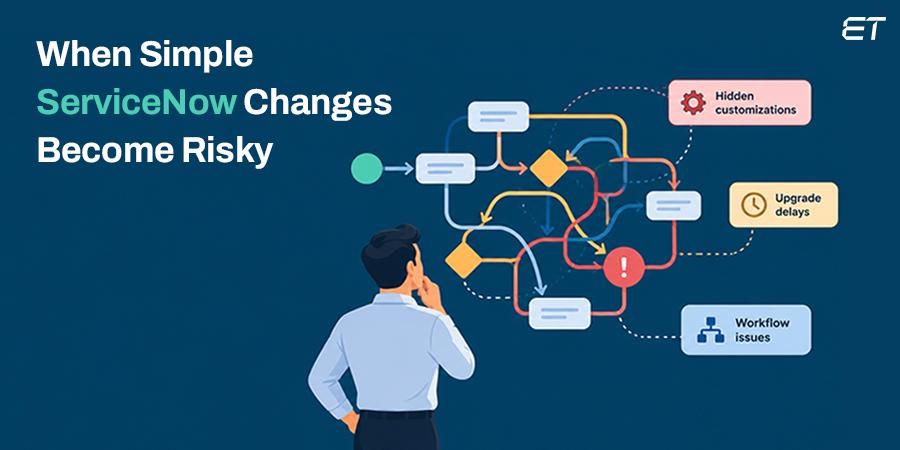
It looks simple at first: tweak an approval workflow to route requests to the right manager. But then it faces a halt.
A simple change turns into a risky investigation. The teams find three approval workflows, a business rule updating the same field, and an integration tied to an old workflow.
This is typical behavior with technical debt. Because of past quick fixes, customization, and poor decisions, you may find these during IT upgrades.
ServiceNow technical debt can complicate upgrades, increase risk, and make automation challenging. So, if you’re planning a workflow upgrade, ServiceNow process consulting can help you assess the process before automating it.
The bright side is that you do not have to redesign your entire system. Just learn the warning signs first and fix the work that involves business risks.
Seven Signs Your ServiceNow Instance Has Technical Debt
If you look closely, every debt forms into a trail of unnoticed patterns. Here are the key ones to keep you aware and ahead in your instance release strategy.
1. Every Upgrade Becomes a Major Project
Upgrades are a normal part of platform maintenance. So they shouldn't require weeks of sleuthing, patching, and painful testing. When releases repeatedly become a test of patience, something in the instance is making change harder than it should be.
A common red flag is a history of skipped updates. ServiceNow won't perform an upgrade because a local customization on a certain record conflicts with the new release. Now your team needs to evaluate both releases and determine which one to choose or merge.
Having a small amount of reviewed customizations is not concerning. Real problems arise when upgrade issues recur, customizations are unclear, and release planning becomes clean-up.
This delays platform upgrades while overloading admins and developers with evaluating past decisions.
2. Nobody Can Explain Why Key Customizations Exist
A customization can be perfectly healthy. It may meet a real business need the standard platform cannot. Trouble begins when no one can say what it does, who owns it, or why it was built.
Watch for:
- Scripts with vague names
- Business rules nobody recognizes
- Duplicate fields
- Custom logic with no current process owner
- Documentation may be missing, or it may describe older processes
That is a major hiccup. A developer can't safely refactor the script if they don't know what it depends on. The platform owner cannot sunset a workaround unless they know whether teams are depending on it.
For all the necessary customizations, document their reason for creation, their business owner, dependencies, and review date.
If the information isn't available at the instance level, the debt is a knowledge and ownership problem, plus a technical one.
3. Workflows Rely On Workarounds and Extra Handoffs
Do your teams keep bouncing requests between queues, asking to re-share the same information, and managing exceptions via spreadsheets?
Your digital workflow may be broken.
Consider a manufacturing team requesting urgent maintenance on a production line. The request waits for one approval, then moves to procurement for another review. Procurement asks for details already entered in ServiceNow, so the requester sends them by email. The request is tracked on paper, yet the process still involves duplicate work and manual follow-up.
This is a process bottleneck, and no software can fix it. New scripts and notifications will only help this inefficient process move faster. They won't eliminate unnecessary steps or clarify who makes the decision.
Just walk through the entire process flow, from the request to the resolution. You should check whether there are:
- Additional approvals needed
- Undefined routing
- Duplicated data entries
- Exceptions outside of the platform
Start by getting the process design right for a smoother upgrade.
4. Integrations Need Constant Attention
ServiceNow often interacts with identity management systems, HR software, monitoring tools, and finance applications. Each of them makes ServiceNow dependent on something else. These dependencies become fragile when no one owns their design and monitoring.
Be aware of any recurring API failures, failed scheduled import jobs, manually restarted jobs, duplications of records, and discrepancies in field values.
Another red flag is an integration's reliance on a single person to know when to rerun it.
Connection failures are almost always symptoms, not root causes. It can be:
- An expired credential
- A changed API contract
- Unexpected payload
- Brittle mapping configuration
- Poor error handling
You need to log enough information and have clear ownership to distinguish isolated outages from design flaws.
A good approach is to create an integration map for each critical integration that notes the owner, data dependencies, alerting, and restoration procedures.
Small changes in upstream services may often interrupt the work of ServiceNow. You can easily address this issue by redesigning the integration.
5. Users Keep Saying, “ServiceNow is slow”
Performance complaints are easy to wave off as general grumbling. They deserve a closer look when forms, lists, reports, or transactions get noticeably slower over time.
The platform itself may only be part of the story. Heavy synchronous scripts, inefficient queries, repeated queries, and poorly timed business rules can add to each transaction's burden.
The user sees a slow form, but the slowdown comes from the script running behind it.
- Find the source of the problem.
- Look into transaction timing, slow queries, script processing, and the user flows impacted.
- Link the technical root cause to an operational one, like delayed case processing or delayed request processing time.
Avoid rewriting the entire instance as soon as a slowdown occurs. Focus on fixing the big impact bottlenecks first. A focused fix to one busy workflow can be worth more than a broad cleanup of rarely used code.
6. Small Changes Cause Unexpected Side Effects
A minor field change should rarely break an unrelated workflow. In such cases, the platform is likely masking hidden dependencies, conflicting rules, or logic that multiple teams have modified independently.
One business rule modifies a record after submission. The flow responds to the modification, while another integration process sends a second copy of the record downstream. Each element makes perfect sense in isolation.
However, together they create redundant actions and confusion.
That is where regression testing comes in. Using the ServiceNow Automated Test Framework (ATF), teams can verify that essential platform behaviors still work after a change. However, tests can't replace sound design. They may help you catch errors before moving into production.
If your team stays away from changes due to fear that "something else might break," consider that reaction very seriously. That is valuable information.
- Identify critical dependencies
- Analyze conflicting logic
- Perform regression tests of those workflows that matter most
Change should feel controlled, never like a roll of the dice.
7. There is No Clear Owner or Priority for the Debt Backlog
Platform teams know about old scripts, upgrade findings, process workarounds, and integration problems. The real question is whether the team knows which ones are the most important.
An issue list without hierarchy doesn't indicate the business significance of these problems. It puts a naming problem on the same level as a potential security problem, a problematic upgrade finding, or a business-critical process flow.
Without owners and priorities, a team can spend a long time on issues and still leave the biggest risks untouched.
- Generate a technical debt register including issue description, affected processes, ownership, dependencies, risk level, and suggested next action.
- Discuss this list with both business and technical stakeholders.
- Include effort estimates when needed to prioritize
Keep in mind that quick solutions do not always provide the most business value.
ServiceNow’s guidance on addressing technical debt names development cycle time as one signal of inefficient code. While this is definitely a hint, you should consider it alongside other cues. A quick discussion with process owners may uncover friction that code scanners miss.
How to Clean Up Technical Debt Without Disrupting the Business
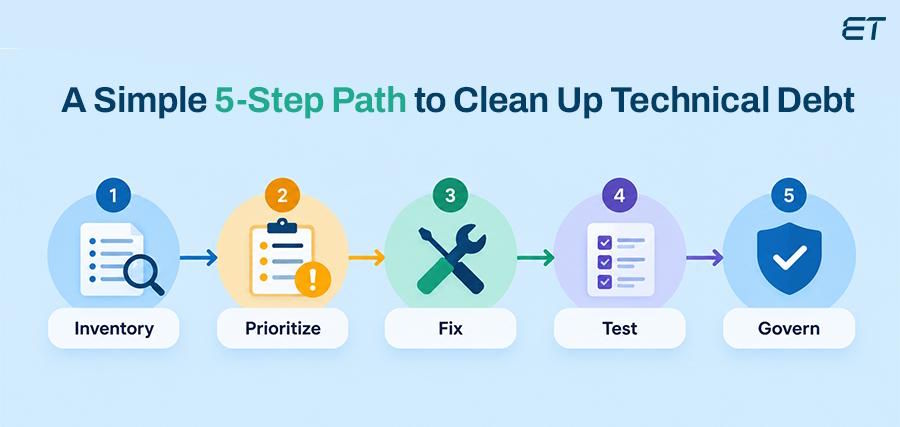
Start by making conscious choices about what the platform should do. Some customizations deserve to stay, and some workflows are fine as they are.
-
Start with a Baseline
Begin by taking stock of what you have:
- Customizations
- Scripts
- Flows
- Integrations
- Skipped upgrade records
- Incidents that recur.
Then sit down with the teams who use these workflows every day. Scan data tells you where to look, but only the people involved can tell you what actually matters.
-
Rank by Business Risk and Value
Tackle security and stability issues first. After that, turn to upgrade blockers, fragile integrations, slow high-volume transactions, and workflows that force people into repeat manual work. A customization may stay if it meets a crucial need, while you can remove a duplicate workaround.
-
Pick a Practical Path for Each Item
You can retain and document it, simplify or refactor it, replace it with current platform capability, or retire it. ServiceNow practitioners describe a similar cycle of baselining, prioritizing, testing, and ongoing governance in their cleanup recommendations.
-
Change Things in Manageable Batches
Test before making changes to production systems. Check integrations, control access, and validate data quality and the business processes users rely on. Post-release, validate that the problem has been solved. The goal is to ensure the change adds no additional friction.
-
Keep the Debt from Creeping Back
Every customization you keep needs a named owner. Any new complexity should have a clear business reason, so shortcuts stay in clear sight. Review the list in backlog grooming and platform governance meetings.
Small, steady improvements can suit the platform better than one big cleanup push.
Final Thoughts
Technical debt becomes a business problem and an invisible tax. It can impact upgrades, hide risk, frustrate users, or render teams afraid to change the platform. The answer lies in figuring out what each customization is for. Then you look into whether it is still the simplest safe way to deliver that outcome.
Cleanup starts with visualization, follows business goals, and carefully tests every change. Just as important, it looks at the workflow behind the configuration. When the process is unclear and complicated, automation will only worsen existing issues.
Before your next major automation effort, take time to review your workflows by collaborating with a trusted ServiceNow process consultant.

