

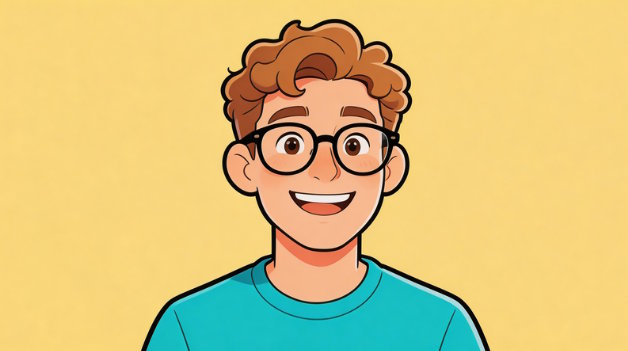
There's something universally appealing about cartoon avatars and stylized images. Whether it's a playful profile picture for social media, a fun way to express creativity online, or simply the joy of seeing yourself reimagined as an animated character, people love cartoon versions of themselves. From Instagram and TikTok to YouTube and gaming platforms, cartoon-style images have become a popular way to stand out and showcase personality.
But here's the problem: traditional cartoon drawing requires genuine artistic skills. Hiring an illustrator is expensive, learning to draw yourself takes years of practice, and manual photo editing software like Photoshop has a steep learning curve. For most people, creating a quality cartoon avatar has been frustratingly out of reach.
Until now. AI cartoon generators have changed everything. Today, you can convert any photo into a professional-looking cartoon style in seconds—no artistic skills required.
What if you could turn your selfie into a cartoon in seconds? With modern AI tools, this isn't just possible—it's incredibly easy.
What Is an Image to Cartoon Tool?
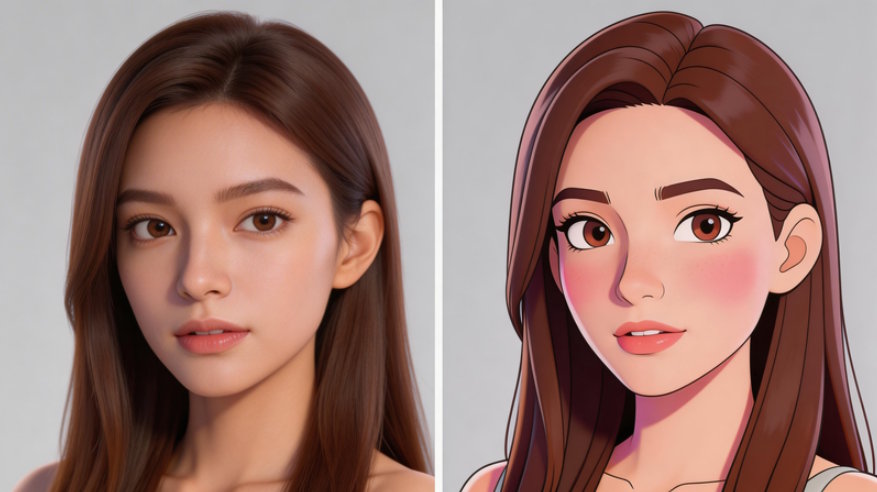
An image to cartoon tool is exactly what it sounds like: a software application that transforms real photographs into cartoon-style images. Using artificial intelligence and advanced image processing, these tools analyze your photo and redraw it in various artistic styles.
Here's how it works in simple terms: The AI detects key elements in your image—facial features, edges, shapes, colors, and textures. It then applies stylized effects based on the cartoon style you've chosen. This might include bold outlines, simplified shapes, vibrant colors, exaggerated proportions, or other artistic techniques that give images that distinctive cartoon look.
The difference between manual illustration and AI automation is dramatic. A human artist might spend hours or days hand-drawing a cartoon portrait. An AI tool accomplishes the same transformation in seconds, with consistent quality and at a fraction of the cost.
The key takeaway: no design or drawing skills required. Just upload your photo and let the AI do the creative work.
What Is ImageToCartoon?
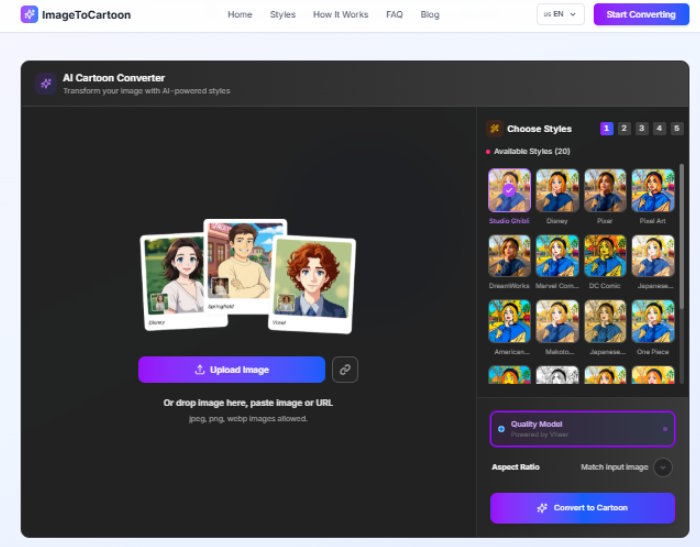
ImageToCartoon is an advanced AI-powered online platform designed specifically for converting photos into stunning cartoon art. Built with cutting-edge neural network technology, it analyzes every detail of your image—facial expressions, textures, background elements—and redraws them in a cartoon style of your choice.
What makes ImageToCartoon stand out is its combination of power and simplicity:
Automatic Face Detection: The AI instantly identifies faces in your photos, ensuring precise cartoon conversion with proper focus on the most important elements.
Multiple Cartoon Styles: Choose from a diverse library of artistic styles, including:
- - Realistic caricatures
- - Anime and manga styles
- - Comic book effects (Marvel/DC inspired)
- - Studio Ghibli and Pixar-style aesthetics
- - Claymation and 3D cartoon looks
- - Vintage comic and retro styles
- - Sketch and doodle art
- - And many more
Fast Processing: Advanced AI technology delivers results within seconds. No waiting, no frustration—just instant cartoon transformation.
Ease of Use: The entire process is three simple steps: upload → choose style → download. No complicated settings, no technical jargon, no learning curve.
Accessibility: ImageToCartoon works directly in your web browser. No software installation required, no downloads necessary, and it works on any device with an internet connection—desktop, tablet, or smartphone.
Whether you're creating a playful avatar for social media, designing unique profile pictures, or just having fun with photos, ImageToCartoon makes professional cartoon conversion accessible to everyone.
How to Turn a Photo into a Cartoon (Step-by-Step)
Ready to transform your photos into cartoon art? Here's how to do it with ImageToCartoon in just a few simple steps:
Step 1: Upload Your Photo
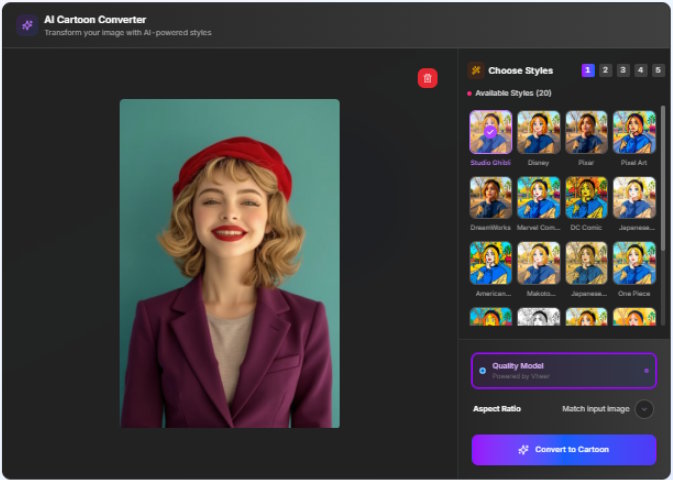
Visit our cartoon yourself tool and you'll see the upload area prominently displayed in the center of the page. Click "Upload" and select the photo you want to cartoonize. You can also drag and drop your image directly into the upload box. The platform supports JPG, PNG, and other common image formats.
Step 2: Choose Your Cartoon Style
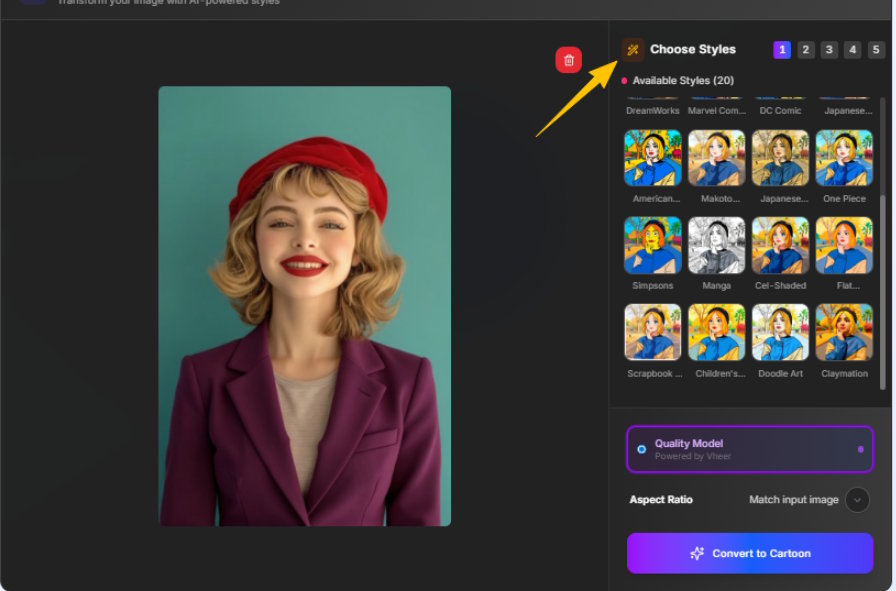
Once your photo uploads, you'll see a variety of cartoon style options displayed on the right side of the page. Browse through the available styles and select the one that best fits your vision. Each style offers a different artistic interpretation—from realistic caricatures to bold comic book effects to dreamy anime aesthetics.
You can also select your preferred "Aspect Ratio" at this stage, choosing the dimensions that work best for your intended use (square for profile pictures, landscape for posters, etc.).
Step 3: Convert to Cartoon
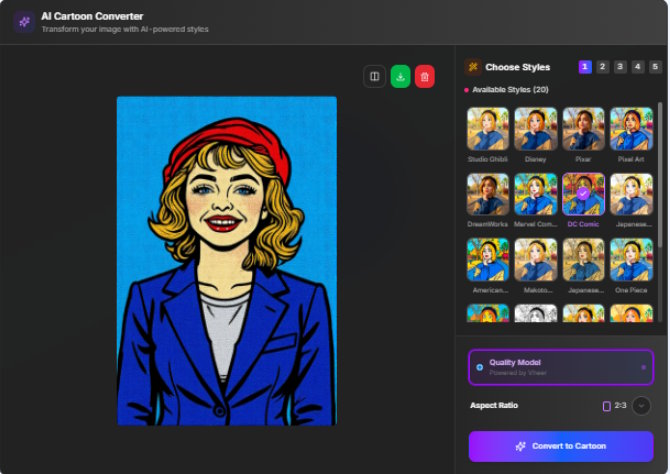
After selecting your style and aspect ratio, click the "Convert to Cartoon" button to begin processing. The AI will analyze your image and apply the cartoon transformation. This typically takes just a few seconds.
Step 4: Download Your Cartoon
Once processing is complete, you'll see your cartoonized image displayed on screen. To save it, simply click the download icon (usually a green download button) in the top-right corner of the image. Your cartoon will be saved to your device in high resolution, ready to share on social media, used as a profile picture, or print as needed.
That's it—four simple steps to transform any photo into professional-quality cartoon art. No design skills, no complicated software, no hassle.
Benefits of Using an AI Cartoon Generator
Why choose a cartoon avatar generator over traditional methods? The advantages are clear and compelling:
Fast and Automatic
What once took hours or days now takes seconds. AI processing delivers instant results without the wait. No need to schedule time with an artist or wait for manual editing—the transformation happens in real-time.
No Drawing or Editing Required
You don't need to know how to draw. You don't need to learn complex photo editing software. You don't need to understand color theory or artistic techniques. The AI handles all the creative work automatically.
Easy for Everyone
Whether you're 8 or 80, tech-savvy or technologically challenged, AI cartoon generators are designed for universal accessibility. If you can upload a photo and click a button, you can create professional cartoon art.
Creative and Fun
Explore different visual styles and discover new versions of yourself and your photos. Try realistic caricatures one day, anime styles the next, comic book effects the day after. The creative possibilities are endless and genuinely enjoyable.
Perfect for Social Media
Stand out on crowded platforms with unique avatars that capture attention. Cartoon profile pictures are eye-catching, memorable, and distinctly personal. They help you express personality and make your social media presence more engaging.
Accessible Online
No software downloads means no risk of malware, no storage space consumed, and no compatibility issues. Work from any device, anywhere, anytime. Your cartoon studio is always just a browser tab away.
Tips for Better Cartoon Results
The quality of your cartoon output depends largely on the quality of your input. Follow these guidelines for the best possible results:
Use Clear, Front-Facing Portraits
Photos where the subject is looking directly at the camera produce the most recognizable cartoon results.
Avoid Blurry or Low-Resolution Images
Sharp, high-quality photos give the AI more detail to work with, resulting in better cartoon conversion. Always start with the highest quality version of your photo available.
Choose the Right Style for Your Purpose
Consider how you'll use your cartoon image. Match the style to both your personality and your intended use.
Try Multiple Styles for Comparison
Don't settle on the first result. Experiment with different cartoon styles to see which best captures your likeness and suits your vision.
FAQs
- Can I turn pixel art into a cartoon?
Yes! You can combine different tools to achieve this effect. First, use a tool like Pictopixel.art to convert your original photo into pixel art. Then, if you want to transform that pixel-style image into a smoother cartoon look, you can use an AI cartoon generator like ImageToCartoon. - Can I turn any photo into a cartoon?
Yes! ImageToCartoon can convert almost any clear photo into a cartoon. For best results, use high-resolution, front-facing images with visible facial features. - How long does it take to cartoonize a photo?
The process is almost instant. Once you upload your photo and choose a style, the AI analyzes it and produces a cartoon version in seconds.
Conclusion: Create Your Own Cartoon in Seconds
Converting photos into cartoons is now fast, easy, and fun. ImageToCartoon lets anyone create cartoon avatars or gifts in seconds—no artistic skills or expensive software needed. Turn yourself into an anime character, comic hero, Pixar-style figure, or vintage cartoon with just one click.

