

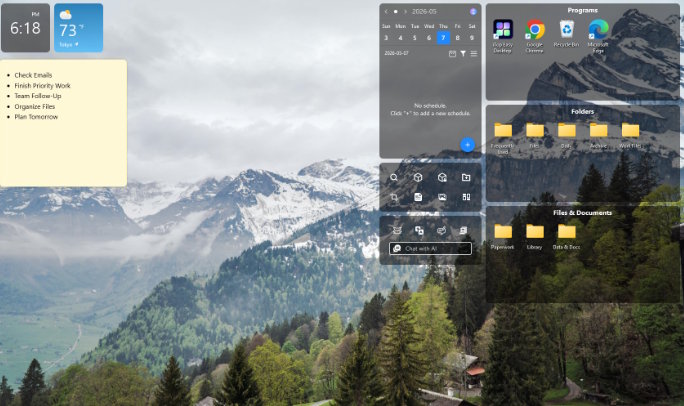
I looked at my Windows desktop and felt an instant stress. Random screenshots, old downloads, and dozens of icons everywhere. I had tried to organize my desktop manually before. It worked for a week, then went back to chaos. That is when I searched for a real desktop organizer software solution. And I finally found one that stuck.
Why a Cluttered Desktop Hurts More Than You Think
A messy desktop is not just ugly. It slows you down every single day. Your brain sees every icon as a task. That creates mental noise before you even start working.
There is also a performance side. Windows loads every desktop icon on startup. Too many files on your desktop can slow down your PC. I noticed this myself before cleaning things up.
Studies on digital workspace productivity show that visual clutter reduces focus. A clean desktop helps you think clearly and work faster.
What is iTop Easy Desktop?
iTop Easy Desktop is free desktop-organizing software for Windows 10 and 11. It does a lot more than sort icons. Here is what it offers:
- Auto-Declutter Boxes to group icons by type automatically
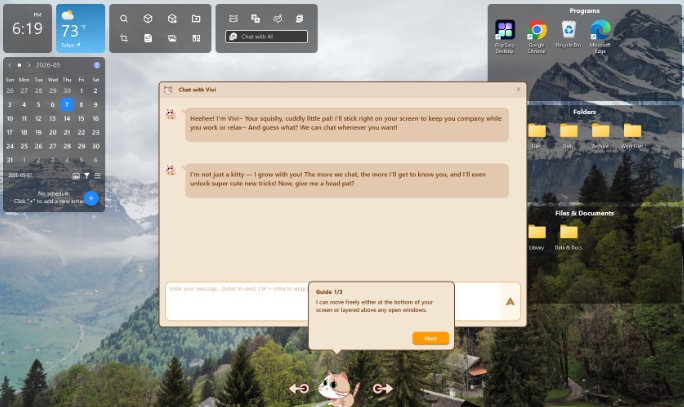
- AI PawPal Assistant for reminders, chat, and search help
- Widgets like weather, clock, calendar, and Pomodoro timer
- Private Box to lock sensitive files with a password
- 20,000+ wallpapers, including dynamic HD options
- ChatAI powered by ChatGPT for quick answers
It is completely free to download. No hidden tricks on day one.
How I Used iTop Easy Desktop to Fix My Desktop
Here is how I went from chaos to clean in under 10 minutes. These are the exact steps I followed.
Before I walk you through the steps, let me say this took me less than one coffee break. It was that simple.
Step 1: Download and Install
I headed to the iTop Easy Desktop download page and grabbed the installer. Setup finished in about 60 seconds. No bloatware. No confusing options.
Step 2: Run Auto-Declutter
This is the feature that changed everything for me. I clicked the auto-organize button. Within seconds, all 70+ icons were sorted into clean, labeled boxes. Documents went to one box. Shortcuts to another. Screenshots to their own spot.
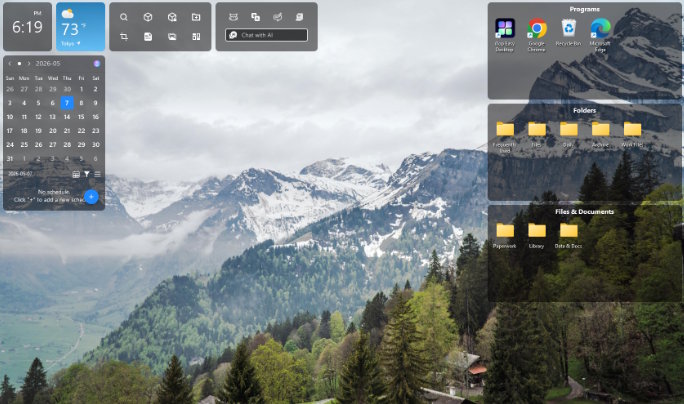
Step 3: Add Widgets to Your Desktop
I opened the widget panel next. I added a live weather display, a digital clock, and an iNotes sticky pad. These replaced three browser tabs I kept open all day. Everything I needed was now visible on my desktop.
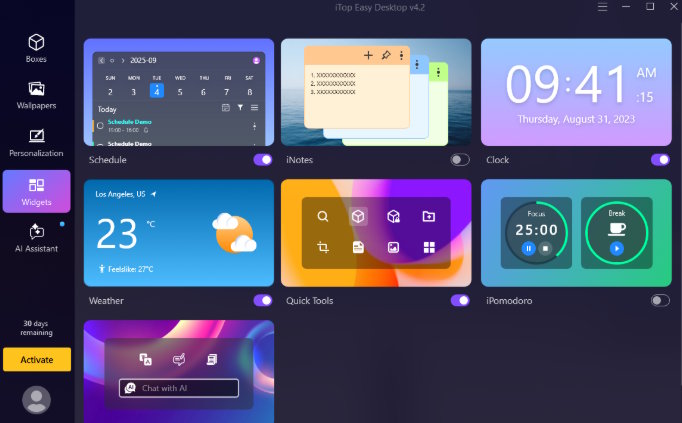
Step 4: Set a Wallpaper and Personalize
I chose a landscape photo as my wallpaper from the built-in library. Then I turned on the PawPal AI cat companion. She now wanders across my screen, sending me task reminders. It sounds silly, but it actually keeps me on track.
About iTop Easy Desktop
iTop Easy Desktop is developed by iTop Inc., a software company known for tools like iTop VPN, iTop Screen Recorder, and iTop PDF. Their products focus on making everyday PC tasks easier for regular users.
iTop Easy Desktop is their flagship desktop organizer software. It launched as a simple icon organizer. It has grown into a full desktop management suite. The latest version adds an AI assistant, dynamic wallpapers, and a Private Box for file security.
It is free to use on Windows 10 and Windows 11. Older versions of Windows can use Version 3.2. The software is lightweight and does not slow down your system.
Honest Review: Pros and Cons
I want to be fair here. This tool genuinely helped me. But it is not perfect for everyone.
Pros:
- One-click auto-organize saves real time every day
- Completely free with no ads in the core features
- Widgets replace browser tabs and boost focus
- Huge wallpaper library with dynamic options
- Lightweight with zero impact on PC speed
- PawPal AI assistant is surprisingly useful for reminders
Cons:
- Only works on Windows 10 and 11 (no Mac support)
- Some advanced widget customizations need a paid plan
- PawPal pet might feel distracting in quiet work sessions
- First-time setup takes a few minutes to learn the layout
Who Should Use This Tool?
This desktop organizer software works best for:
- Remote workers who stare at a cluttered desktop all day
- Students juggling multiple course files and screenshots
- Freelancers and creatives who want a clean and pretty workspace
- Anyone who has tried manual desktop sorting and failed
If you fall into any of those groups, this tool is worth five minutes of your time.
Final Verdict
I have tried right-clicking and sorting by name. I have tried creating “Misc" folders. Nothing worked long-term. iTop Easy Desktop is the first tool that actually kept my desktop clean without requiring extra effort on my part.
The auto-declutter feature alone is worth downloading. Add the widgets, wallpapers, and AI assistant, and you have a genuinely useful piece of software. It is free. It is fast. And it works.
If your desktop is a mess right now, do not spend another week tolerating it. Give this tool one try.

