

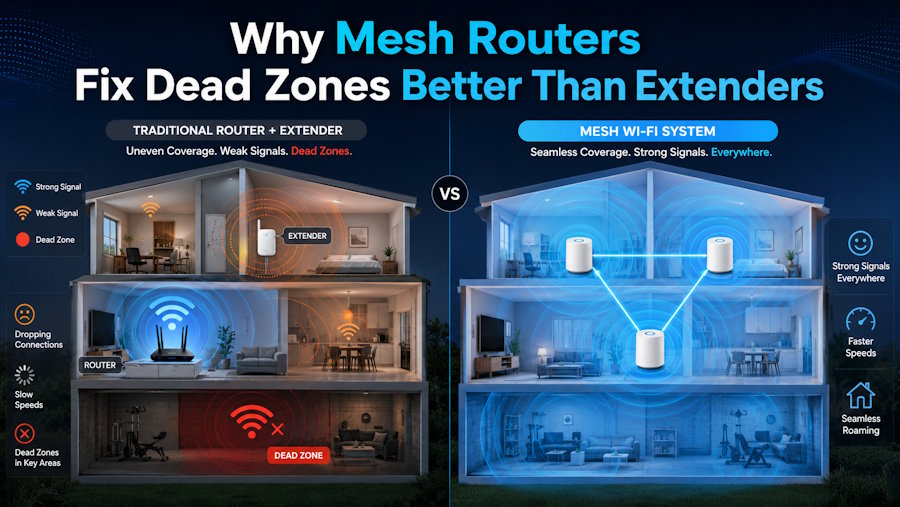
Mesh routers can solve the problem of dead zones even more effectively than extenders because, instead of extenders creating a separate and usually weaker network to which your phone stays connected even when the signal is poor, mesh systems form a single network so your devices can move from one node to another seamlessly without any problems. A mesh system will keep the same speed even if you have multiple units, whereas a traditional extender normally halves your bandwidth because it has to receive and rebroadcast on the same channel. This is why patchy signal with awkward handoffs is replaced by consistent coverage. The key difference is how each approach deals with the problem. An extender just amplifies the existing signal a little, including its faults, whereas a mesh system is a coordinated whole that is designed from the ground up.
This difference in design is the biggest reason why mesh has become almost the only option for anyone wishing to cover an entire house rather than just patch a single weak corner.
What Actually Causes Dead Zones in the First Place
Dead zones are a result of a few predictable factors, so understanding them is exactly what explains why one solution is more effective than another. The distance from the router is why since the signal gets weaker the farther it has to travel, but in reality, the bigger culprit in most homes is whatever is blocking the signal. Thick walls, concrete floors, metal, and water-containing objects like large fishes tanks or even bathrooms hamper and block wireless signal to a much greater extent than just open air.
Materials used in construction play a huge role, and it is a totally different matter in older European and Swiss houses which are built with dense stones and thick concrete. A wireless signal that passes through a modern timber-frame house with ease will most probably be very weak through a 40-centimetre stone wall which is the reason why even a very powerful single central router is often not able to cover a solidly built house. Industry reports say that the density of construction is among the biggest factors to lead to indoor coverage issues.
Noise is the last piece of the puzzle. Neighboring networks, microwave ovens, cordless phones, and a packed 2.4GHz band are all sources of degradation of signal quality, and in apartment complexes, there can be so many competing networks enough that the performance is stifled even at very short distances. Simply increasing the range of a device without solving the problem of congestion is only a partial solution, which is why, among other things, extenders often fail to delight.
How an Extender Works and Where It Falls Down
An extender is a device that catches your wifi signal, amplifies it, and rebroadcasts it farther into the house. In principle that sounds like exactly what a dead zone needs. The trouble is in the execution, because a basic single-band extender receives and retransmits on the same radio, which roughly halves the throughput available to anything connected through it.
But the biggest letdown is having the separate network issue. Most extenders generate a second network name, so your phone connects to the main router in the living room and holds that connection even as you walk to the bedroom, only switching to the closer extender when the signal is about to completely drop. You either have to keep manually switching networks or live with the poor speed in certain rooms, which use the strong signal but are sacrificed for convenience.
The other problem for extenders is that they only double down on problems they are passing on. If the signal reaching the extender is already bad, rebroadcasting it just gives wide coverage to a weak signal. The location needs to be just right -- at a point where the original signal is still strong but help is needed outside that area, and making that mistake is quite common. If you have one problematic area near a decent signal, an extender might be the solution. If you want a whole-home coverage, it probably won't satisfy you.
Why Mesh Systems Solve the Problem Differently
A mesh system consists of two or more units that are interlinked and collectively deliver a single large network which is seamless. Devices move from one node to another without user actions as they connect to the strongest unit available automatically. The manual-switching and signal-clinging problems of extenders are So eliminated. For instance, if you go from the kitchen to the garden, your video call will continue without any issues.
A part of the upgraded mesh systems is the usage of a backhaul that is dedicated i.e. a different frequency channel is kept solely for communication between the nodes so that the bandwidth signal to your devices is not cannibalised as happens to a single-band extender. This is the technical core of the reason why mesh retains its speed over a large area whereas extenders gradually lose it. Tri-band mesh systems In particular allocate one band exclusively for node-to-node communication which is the reason for full speed being maintained even several rooms away from the main unit.
Besides, a mesh system adapts to the layout of your home to extenders cannot. A long, narrow house, a multi-story building, or an L-shaped flat can be covered by putting nodes at the points dictated by the layout, and you even have the option of adding more units later if you remodel or move. Studies show that seamless roaming and coordinated channel management result in more stable connections during streaming and video calls, which is exactly what most people are looking to improve in their daily experiences.
What It Costs and Whether the Upgrade Is Worth It
Cost is the honest trade-off. A decent extender runs 30 to 80 francs, while a two or three-unit mesh system typically starts around 150 and climbs well past 400 for high-end tri-band models with the latest wifi standards. For covering a single weak room cheaply, the extender wins on price alone, and there is no shame in that if your problem is small and your budget tight.
For a whole home with multiple dead zones, the mesh cost buys a genuinely different result, not just a marginal improvement. When you are comparing systems, a retailer like pandaloo.ch that lists Swiss pricing alongside the wifi standards and band configuration makes it easier to match a system to your home's size without overpaying for capacity you will not use. The number of nodes you need depends on your square metres and wall density rather than a one-size figure, so matching the kit to the property is where the value is won or lost.
Choosing the Right Fix for Your Actual Home
The best decision will only come after an honest assessment of your home before you make a purchase. For example if in a small apartment, the signal is generally good but there is only one weak corner, an extender is most likely the sensible and cheap solution, and getting a mesh system in this case is simply an overkill. However, a house with thick walls, multiple floors, or dead zones in several rooms is where a mesh system transitions from being a luxury to a necessity that genuinely works.
Don't rush to buy anything. Just bring your phone and take a tour of your home to find out exactly where the signal is weak and how far those places are from your router. That map will tell you if it's a one-room problem or a whole-home one. Fix the problem based on that reality and not based on the cheapest or the most expensive solution, and also consider whether your home or needs tend to grow, as a mesh system that can be expanded will last longer than a patchwork of extenders that you keep adding.

