

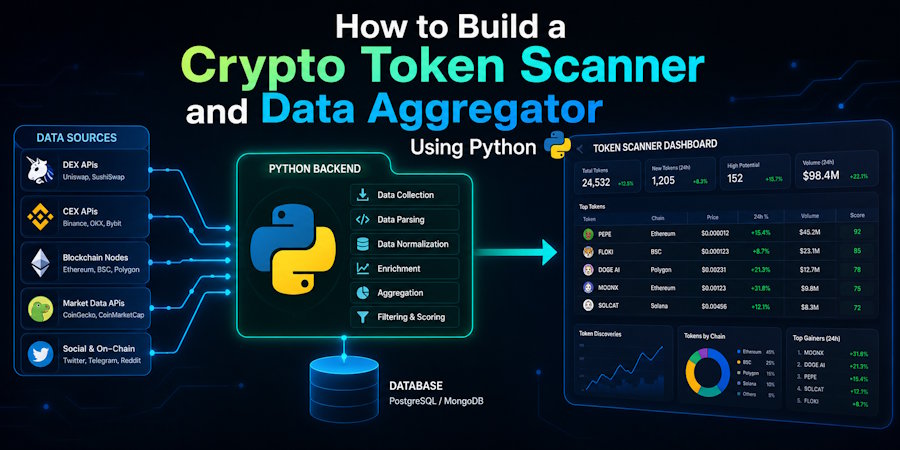
The cryptocurrency market moves at an incredible pace, where manual research often falls short. For developers and tech-savvy traders, automation is the key to gaining a competitive edge. By building your own data aggregator and token scanner, you can programmatically monitor market movements, analyze developer activity, and catch volatility before it happens.
In this comprehensive tutorial, we will build a production-ready Python script that connects to public market application programming interfaces (APIs), fetches real-time data, and filters tokens based on volume surges and developer metrics.
Setting Up Your Python Development Environment
Before writing any code, we need to install the essential libraries required for handling HTTP requests, data manipulation, and scheduling tasks. We will use standard data engineering libraries to ensure our script runs efficiently.
Open your terminal or command prompt and run the following command to install the necessary packages:
pip install requests pandas scheduleUnderstanding the Component Architecture
Our script will follow a modular architecture consisting of three core modules:
- Data Ingestion Layer: Responsible for communicating with public endpoints and fetching raw JSON payloads.
- Processing and Filtering Layer: Converts raw JSON into a structured pandas DataFrame, calculating key indicators like volume-to-market-cap ratios.
- Automation Scheduler: Runs the scanner at defined intervals and logs anomalies directly to the console.
Fetching Real-Time Market Data via REST APIs
To track where liquid assets are moving, we will fetch pricing and volume metrics. For this implementation, we will use a public API endpoint to gather a broad set of market assets.
Let us write the foundational logic to retrieve this data and check for network errors safely:
import requests
import pandas as pd
import time


def fetch_market_data():
    url = "https://api.coingecko.com/api/v3/coins/markets"

    params = {
        "vs_currency": "usd",
        "order": "market_cap_desc",
        "per_page": 250,
        "page": 1,
        "sparkline": "false",
    }

    try:
        response = requests.get(url, params=params, timeout=10)

        if response.status_code == 200:
            return response.json()

        print(f"Error fetching data: HTTP Status {response.status_code}")
        return None

    except requests.exceptions.RequestException as error:
        print(f"Network error occurred: {error}")
        return None
This function queries the market endpoint and returns a list of dictionaries containing detailed metrics for the top 250 assets by default.
Implementing the Volume Spike Filtering Logic
A classic indicator of early market interest is a sudden divergence between daily volume and overall market capitalization. When trading volume significantly exceeds historical averages relative to market cap, it often indicates institutional accumulation or early narrative momentum.
We will write a processing function that parses the raw JSON data into a pandas structure, applies strict mathematical filtering, and isolates anomalous assets.
def analyze_volume_spikes(raw_data):
    if not raw_data:
        return pd.DataFrame()

    # Load into a structured DataFrame
    df = pd.DataFrame(raw_data)

    # Filter columns to reduce memory overhead
    columns_to_keep = [
        "id",
        "symbol",
        "name",
        "current_price",
        "market_cap",
        "total_volume",
    ]

    df = df[columns_to_keep]

    # Calculate the volume-to-market-cap ratio
    df["volume_to_mc_ratio"] = df["total_volume"] / df["market_cap"]

    # Filter projects where volume is higher than 15% of total market cap.
    # High volume relative to market cap may indicate micro-cap momentum
    # or heavy accumulation.
    filtered_df = df[df["volume_to_mc_ratio"] > 0.15]

    # Sort by the highest ratio first
    return filtered_df.sort_values(
        by="volume_to_mc_ratio",
        ascending=False,
    )
Programmatically Tracking Developer Activity via GitHub
A major differentiator between speculative assets and authentic software projects is ongoing developer contribution. If a project claims massive utility but has zero commits on its repository, it poses an immediate structural risk.
We can utilize the GitHub API to check the commit frequency of open-source projects. This allows us to separate vaporware from highly active codebases.
def check_github_activity(owner, repo):
    url = f"https://api.github.com/repos/{owner}/{repo}/commits"
    headers = {
        "Accept": "application/vnd.github.v3+json",
    }

    try:
        response = requests.get(url, headers=headers, timeout=5)
        response.raise_for_status()

        commits = response.json()

        # Return total recent commits in the current payload page
        return len(commits)

    except requests.exceptions.RequestException:
        return 0
Integrating this programmatic validation ensures that your aggregator skips inactive projects entirely, reducing exposure to malicious smart contracts or sudden liquidity withdrawals.
Consolidating Aggregators for Early Project Discoveries
While building custom tools gives you total control over filtering thresholds, enterprise-level algorithmic tracking requires cross-referencing your results with trusted external indexers. Combining custom local scripts with macro metrics from curated aggregators yields the highest quality dataset.
When building data models, it is crucial to benchmark your custom script's outputs against macro indices like the top 10 crypto coins list to verify whether your volume algorithms are successfully catching macro trends before they populate on con \sumer-facing dashboards.
Dedicated platform aggregators track verified pre-sales, early launchpad distributions, and smart contract audits across multiple chains. By monitoring where institutional capital enters early-stage distribution portals, developers can configure real-time webhooks that trigger alerts long before these assets reach centralized retail applications.
Automating the Pipeline with Task Schedulers
To turn this scanner into a persistent background application, we need to execute the ingestion and processing loop automatically at specific time windows without human intervention. We will use the schedule library to execute our pipeline every 60 minutes.
Here is the fully combined core executable script:
import schedule


def run_pipeline():
    print("Initializing real-time blockchain asset scan...")

    market_payload = fetch_market_data()

    if market_payload:
        results = analyze_volume_spikes(market_payload)

        if not results.empty:
            print("\n--- ANOMALOUS VOLUME SPIKES DETECTED ---")
            print(
                results[
                    [
                        "name",
                        "symbol",
                        "current_price",
                        "volume_to_mc_ratio",
                    ]
                ].to_string(index=False)
            )
            print("-" * 40)

        else:
            print(
                "Scan complete. No assets exceeded the 15% "
                "volume-to-market-cap ratio threshold."
            )

    else:
        print("Pipeline execution failed due to data ingestion errors.")


# Schedule the engine to run every hour
schedule.every(1).hours.do(run_pipeline)


if __name__ == "__main__":
    # Execute immediately on launch
    run_pipeline()

    # Loop to keep the background daemon active
    while True:
        schedule.run_pending()
        time.sleep(1)
Essential Code Adjustments and Error Handling Exceptions
When deploying this script to a live server or an AWS EC2 instance, you must handle network rate-limiting. Public endpoints restrict unauthenticated requests based on IP addresses.
Handling HTTP 429 Exceptions
To prevent your application from getting blocked, implement exponential backoff logic when an HTTP 429 status code is received:
def safe_request_wrapper(url, params):
    backoff = 2

    for attempt in range(5):
        response = requests.get(url, params=params)

        if response.status_code == 429:
            print(f"Rate limited. Sleeping for {backoff} seconds...")

            time.sleep(backoff)
            backoff *= 2
            continue

        return response

    return None
Optimizing Memory Footprint with Pandas
When processing large datasets across thousands of historical tokens, avoid appending rows directly to dataframes in a loop. Instead, parse rows into native dictionaries, append them to a standard Python list, and instantiate the pandas object a single time at the end of the extraction process. This reduces memory fragmentation and optimizes execution speed significantly.

