

Whether you are a professional looking to extract text from images or a student who wants to convert a file into different formats, there is a huge variety of OCR and file conversion tools available online that can handle this task.
Among many options, JPGtoText.com has gained attention for its claim to simplify both text extraction and file conversion through an easy-to-use interface and fast capabilities. But does it live up to these promises? Can it accurately extract text from images while also offering different file conversion options?
To find out, continue reading. In this blog, I am going to give an honest and in-depth review of JPGtoText.com by examining its OCR and conversion tools' performance features.
JPGtoText.com – OCR-powered Tool
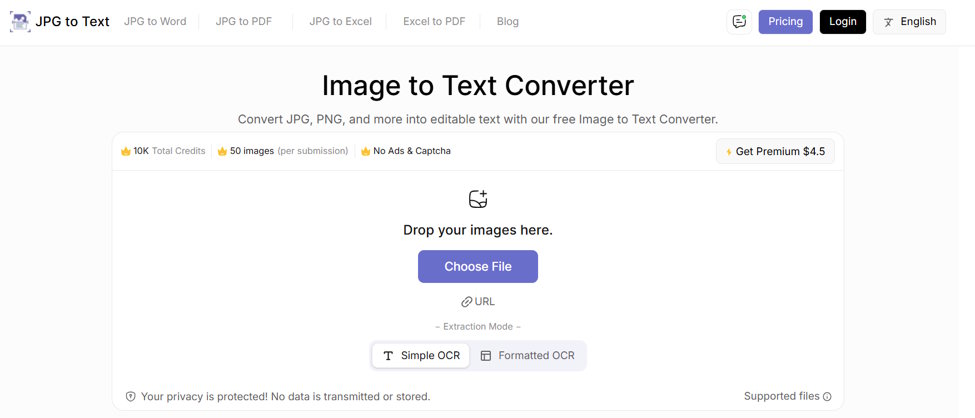
JPGtoText.com is a platform primarily known for its OCR-powered image to text converter. It is capable of scanning and extracting text from images, documents, handwritten notes, and invoices in an editable format.
It is available in both free and paid versions and does not require sign-up or registration. All you need to do is simply visit the tool, upload the image, and get the results within a matter of seconds.
JPGtoText.com – Key Features that Grabbed My Attention
Here are a few notable features of JPGtoText.com that I genuinely find useful and interesting.
- Batch processing: Its OCR-powered image to text converter is capable of processing a maximum of 5 images for text extraction at once in free mode. I think, this is way more than enough… right?
- OCR modes: The tool offers two OCR modes for extraction. One is “Simple OCR,” and the other is "Formatted OCR.” The Simple OCR mode performs text extraction without caring about the formatting. In contrast, the Formatted OCR (paid feature) extracts text from images and scanned documents while preserving most or all of the original formatting.
- Language support: JPGtoText.com supports text extraction in 20 languages, making it a versatile option for a global audience.
- Recognition of different types of text: The tool doesn’t only extract plain text; instead, it can also recognize and extract special characters, symbols, fonts, mathematical equations, and even handwriting.
- Accepts images in numerous formats: Although the tool name contains “JPG,” it also accepts images in other formats for extraction. These include PNG, JPEG, TIFF, BMP, and more.
Testing JPGtoText.com OCR Capabilities
Now, let’s validate the text extraction capabilities of JPGtoText.com. A total of two tests will be conducted, with each one having a different input.
Test #1
First, I am going to upload a scanned document to see how exactly the tool extracts information from it in an editable format.
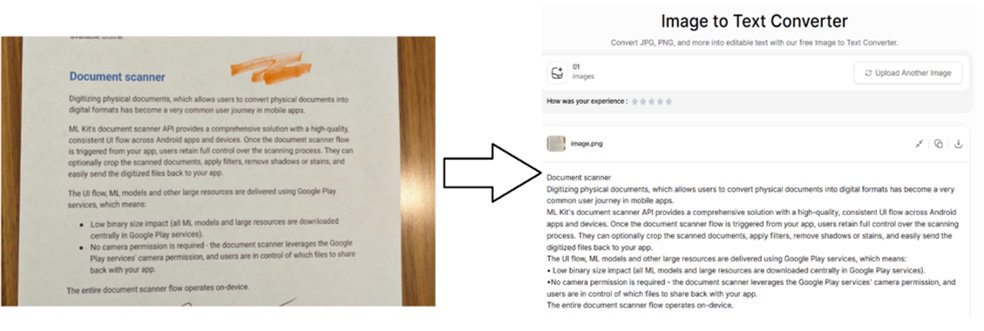
So, the tool has effectively extracted all the information without making any grammatical or spelling errors. The output is in an editable format for easy searching, and reviewing.
Test #2
In the second test, I am going to upload a photo of handwritten notes. Let's find out how JPGtoText.com deals with it.
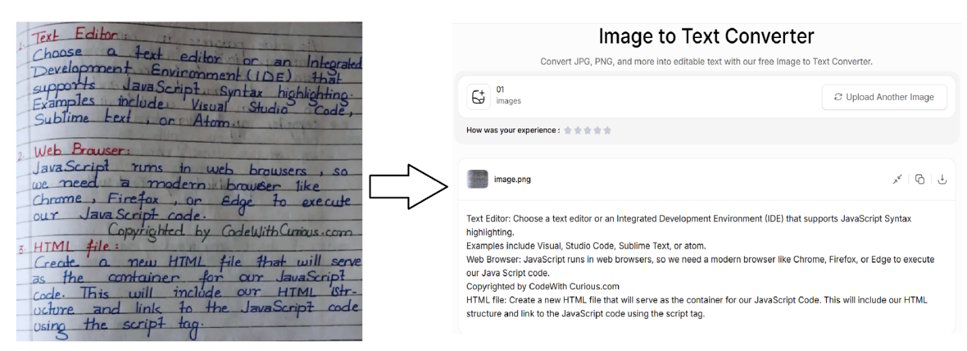
Surprisingly, the image to text converter has effectively recognized the handwriting and extracted information accurately in an editable format.
Important Note: The accuracy of the output may vary depending on the clarity of the handwriting.
Different File Conversion Tools Offered by JPGtoText.com
As mentioned earlier, JPGtoText.com offers a range of file conversion tools along with OCR. Some of the major ones are discussed as follows:
-
Image to Excel Converter
JPGtoText.com offers an image to Excel converter that is specifically designed to convert photos containing tabular data into editable Excel sheets. The data can be of any type: textual, numerical, or special characters.
The tool supports image-to-Excel conversion in six languages and accepts images in multiple formats, including JPEG, JPG, PNG, and others.
Additionally, it allows users to upload images in different ways, such as dragging and dropping, directly pasting, or manually loading from local storage.
Testing:
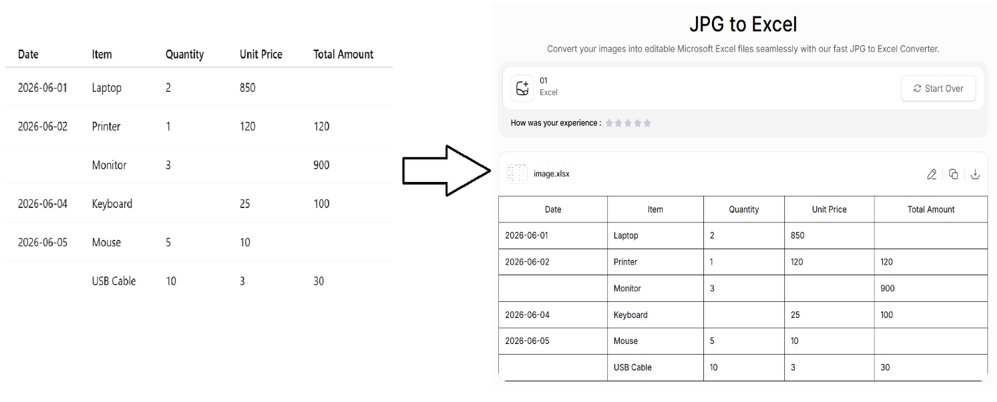
I am going to process a tabular image that contains some missing entries in multiple rows and columns. Let’s see how effectively the tool deals with this kind of input.
Tool link: https://www.jpgtotext.com/jpg-to-excel
Impressive! The image-to-Excel converter has performed the conversion with excellent accuracy, leaving the missing entries as they are. This indicates its reliability and versatility.
Pros:
- Simple to use
- Perfectly preserves the formatting of tabular data
- Editable output results
Cons:
- Free users can process only one photo at once
-
Image to Word Converter
The Image to Word converter allows users to quickly transform pictures into editable MS Word documents with a single click. This conversion can help organize and manage multiple images within a single document.
Besides simple insertion of images into a Word file, the tool also provides two other options: Extract Text (Plain) and Extract Text (Formatted).
The Extract Text (Plain) option can be used when you only need textual content inside the Word file. Whereas the Extract Text (Formatted) option will come in handy when you want the extracted text in a document with perfectly preserved formatting.
Note: Both these options require a premium account of JPGtoText.com
The feature that amazed me is that it allows you to upload up to 20 images at once for conversion in the free version. You can download each image as an individual Word document or combine all into a single file.
Testing:
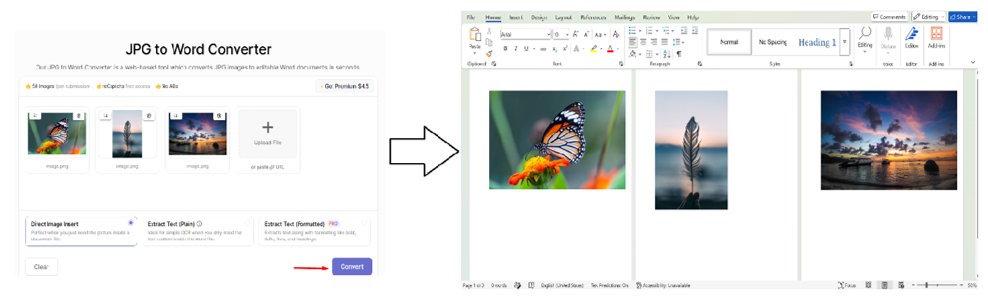
I am going to upload multiple images of different sizes to this Image to Word Converter to see how it transforms them into an editable MS Word document.
Tool link: https://www.jpgtotext.com/jpg-to-word
As you can see in the attachment, the Image to Word converter has converted the image files into an MS Word document without compromising on quality.
Pros:
- Highly quick and accurate
- Option to either insert images in Word or extract their data as well
- Upload up to 20 images at once for free
Cons:
- Both text extraction options are for paid users
-
PDF to Word Converter
JPGtoText.com also offers a free PDF to Word converter that quickly converts PDF files into MS Word documents for easy editing. The process is simple and quick: upload the file, click the button, and download the Word file.
In the free version, it allows users to upload multiple PDF files (100 pages/20MB) at once. To upgrade this limit, a premium subscription will be required. During the conversion process, it perfectly retains the formatting of the PDF file.
The tool claims to securely process files and not retain uploaded content after processing.
Testing:
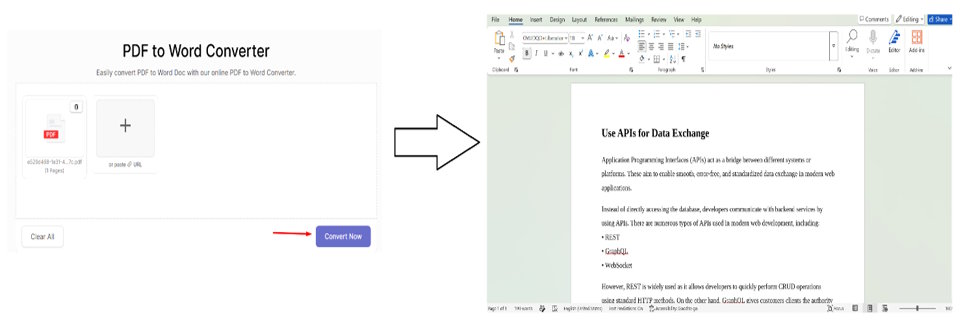
For a better understanding, I am going to convert a plain PDF file using this PDF to Word converter. The results are:
Tool link: https://www.jpgtotext.com/pdf-to-word
As expected, the PDF to Word converter has seamlessly converted the PDF file into an editable Word document without making any changes to formatting.
Pros:
- Free to use
- Retains original formatting of PDF file
- Process up to 100 pages/20 MB PDF files for free in one go
Cons:
- Contains automatic security captcha
So…How Good is JPGtoText.com for OCR and File Conversion?
After personally using and testing JPGtoText.com, I can say that its OCR and conversion tools are highly accurate, making them suitable for both beginners and professionals alike.
In my tests, the OCR tool demonstrated impressive accuracy when dealing with a scanned document and a handwritten note. On the other hand, the conversion tools discussed above also performed well without compromising on accuracy and file quality.
What I personally love about JPGtoText.com is the ease of use. All its tools require a few clicks to get the job done, whether it’s text extraction or converting a file from one format to another.

