

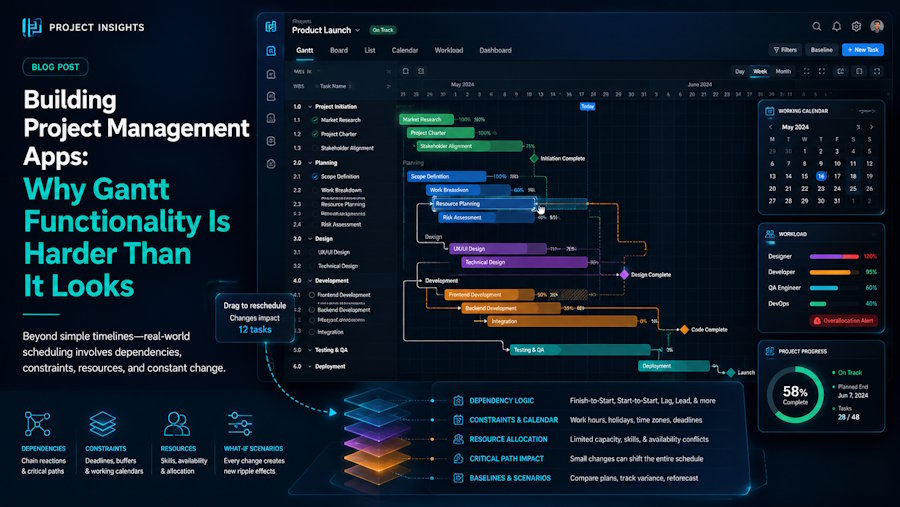
At first glance, a Gantt chart looks like a simple way to display tasks on a timeline. But in modern project management applications, it quickly becomes much more than a visual layer. The complexity appears when people expect the timeline to behave like a real planning tool: tasks should move together when dependencies change, updates should appear immediately, and large projects should remain easy to navigate.
In a real application, the Gantt chart quickly becomes tied to the rest of the system. A change made in the timeline may affect task data, user permissions, notifications, or other parts of the workflow. Because of that, it usually cannot be treated as a simple visual component added on top of existing features.
That is why many teams prefer using ready-made Gantt components instead of building every part of this functionality from scratch.
Why React-based Gantt components fit modern web applications
A Gantt chart rarely exists on its own inside a project management application. It usually works together with task editors, dashboards, filters, reports, and other parts of the interface. Project data is rarely changed from a single place. A user might update a task from a dashboard, adjust a deadline from a task editor, or move an item directly on the timeline. In each case, the application has to keep these views in sync.
This is one of the reasons React Gantt chart components are often considered for modern project management apps. React applications are usually organized around independent UI elements that work together, and a timeline needs to fit into that environment rather than operate as a separate tool attached to the side.
Gantt components can use the same project data as other parts of the interface. For example, when a deadline changes in a task editor, the timeline can receive that update through the application’s normal data flow instead of requiring developers to build additional synchronization between the two views.
This matters because project management tools usually contain several connected views. A user may edit tasks in one place, check resources in another, and open the timeline to understand the overall schedule. All of these screens need to reflect the same project information.
Hidden complexity behind interactive timelines
Many teams underestimate how much logic sits behind a modern Gantt chart. A basic timeline can display tasks, but a useful planning tool needs to understand relationships between them. If one activity depends on another, moving the first task may affect the entire schedule. If several people are working on the same project, resource availability and deadlines can influence how tasks should be arranged.
Then there are the smaller interactions that users quickly start expecting. Dragging a task should feel smooth. Changing a duration should not break dependencies. Switching between different zoom levels should not slow down the application.
Each feature may look manageable separately, but together they create a significant amount of work. Developers are not only building a visual component, they are also creating a system that has to react correctly to constantly changing project data.
This is often where ready-made components become useful. Instead of spending time solving every common timeline challenge internally, teams can start with functionality that already covers many of these requirements.
Performance matters when projects grow
A timeline with a few dozen tasks is usually easy to handle. The situation changes when users begin working with hundreds or thousands of items. At that point, performance becomes part of the user experience. The application needs to render large amounts of information, update task relationships, and keep interactions responsive at the same time.
Poorly optimized timelines can make even simple actions frustrating. Performance problems usually appear gradually. A timeline that works well with 50 tasks may behave very differently when a project contains thousands of activities and multiple dependencies. At that stage, rendering efficiency and data handling become just as important as the visual part of the chart.
Building those optimizations yourself can take a significant amount of time because they are not always visible at the beginning of development. Teams often discover these challenges only after the application starts handling real project data.
An existing Gantt component will not automatically solve every performance problem. Even with a ready-made component, large projects still need careful handling. A timeline with thousands of tasks will always require attention to how data is loaded and updated. The difference is that developers are not starting with an empty canvas, many of the basic rendering and interaction problems have already been solved.
Building features that match real user needs
Choosing a ready-made component is not about avoiding customization. In most applications, the opposite is true. Developers still need to adjust the timeline to match their workflows, data structures, and user expectations.
A software team might use the timeline to plan releases and track dependencies between features. A manufacturing company may need the same type of view to coordinate production stages. The visual idea is similar, but the rules behind the workflow are different.
A React JS Gantt chart component gives developers the basic scheduling layer, while the application-specific work happens around it: connecting data sources, adding business rules, and adapting the interface to the way users actually plan their work. The decision is not about avoiding development work. It is about deciding where that effort brings the most value.
Final thoughts
A Gantt chart may look like a simple visualization, but in a real project management application it quickly becomes a complex interactive system. For many teams, the difficult part is not displaying tasks on a timeline. It is making that timeline behave like a natural part of the application. Starting with an existing Gantt component can reduce the amount of infrastructure work and leave more room for improving the workflows that users interact with every day.

