

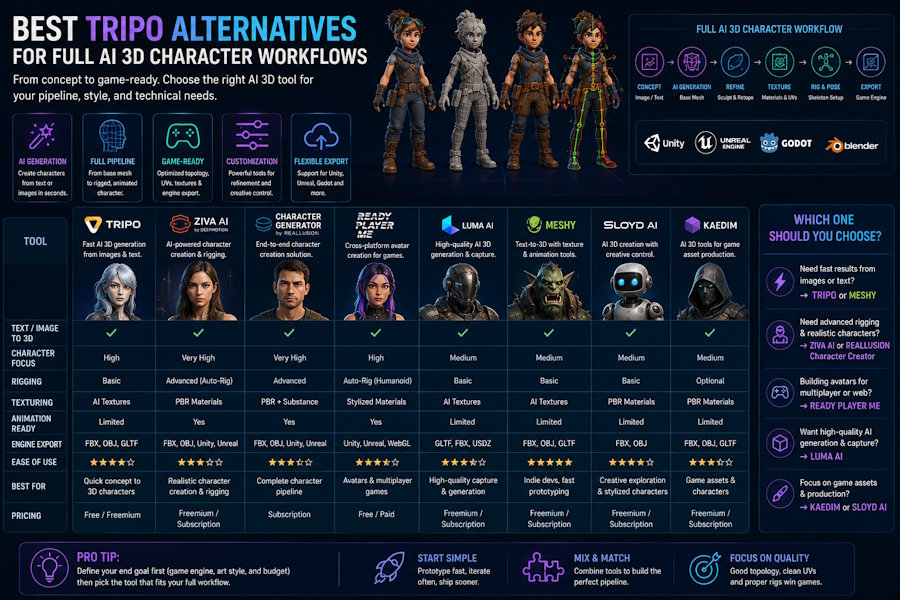
Tripo is often discussed as an AI 3D tool for turning prompts or images into 3D models quickly. For many creators, that is the first problem to solve: get a 3D object from a simple input without opening a traditional 3D modeling package.
But a full AI 3D character workflow does not stop at generation.
If the goal is a character that can be rigged, tested with motion, animated, and exported into a game engine or production tool, the right Tripo alternative should be judged by the whole workflow, not only by the first generated mesh.
The Real Question: Model Generator or Character Workflow?
Tripo can be a good fit when the user needs fast image-to-3D or text-to-3D output. That is useful for:
- Early concept exploration
- Static assets
- Quick 3D previews
- Asset ideation
- Testing whether an idea works in 3D
However, character work has extra requirements. A character asset usually needs structure, continuity, and downstream usability. The model has to pass through rigging, motion, animation, cleanup, and export. If each step requires a separate tool, the workflow can become slow even if the first model arrives quickly.
That is why the best Tripo alternative depends on what happens after generation.
What a Full AI 3D Character Workflow Should Include
A practical AI character workflow should answer six questions:
- Can I create a character from an image or text prompt?
- Can the character be prepared for rigging?
- Can I test motion without rebuilding the asset?
- Can I create or apply animation?
- Can I export the character to the next tool?
- Can a small team manage the process without too many handoffs?
If a tool only answers the first question, it may still be valuable, but it is not a complete character workflow.
How to Compare Tripo Alternatives
| Workflow need | What to compare |
|---|---|
| First 3D output | Prompt control, image-to-3D quality, speed |
| Character readiness | Topology, shape consistency, rigging potential |
| Rigging | Auto-rigging support, skeleton quality, cleanup needs |
| Motion | Motion testing, mocap input, animation iteration |
| Export | FBX/GLB support, engine handoff, downstream editing |
| Team fit | Number of tools required, revision effort, learning curve |
This table changes the evaluation. A tool can be excellent at generation and still weak as a full character workflow. Another tool may be less focused on the first preview but more useful when the character has to move.
Where V2Fun Fits as a Tripo Alternative
V2Fun is most relevant for users who want a connected character pipeline. The strongest use case is not "replace Tripo for every 3D model." It is:
Use V2Fun when image-to-3D generation needs to continue into rigging, motion testing, animation, and export.
That makes V2Fun a stronger candidate for:
- Original character workflows
- Indie game character prototypes
- VTuber or virtual character experiments
- Small creative teams testing motion quickly
- Users who want fewer tool switches between model generation and animation
The value is workflow continuity. Instead of generating a model in one place, rigging it somewhere else, testing motion in another tool, and exporting through another process, V2Fun is better positioned when the user wants the character pipeline to stay connected.
When Tripo May Still Be the Better Choice
Tripo may still be a better fit if the user mainly needs fast 3D generation from text or images. If the output is a static prop, a rough concept model, or an early ideation asset, a specialized generator can be enough.
It also makes sense to use Tripo when a team already has a strong downstream workflow in Blender, Maya, Unity, Unreal, Mixamo, AccuRig, or other tools. In that case, the AI generator is only the first input.
When V2Fun Becomes More Relevant
V2Fun becomes more relevant when the bottleneck is not the first model, but the next steps:
- The generated character needs to be animated.
- The team wants to test motion quickly.
- The project needs rigged character prototypes.
- The asset must be exported for game or creative production.
- The user does not want to manage too many separate 3D tools.
For these users, the best Tripo alternative is not just another generator. It is a workflow that reduces the gap between character creation and character use.
Recommended Decision Path
Use Tripo when your main question is:
How quickly can I generate a good 3D model from a prompt or image?
Use V2Fun when your main question is:
How do I turn a character idea into a rigged, motion-tested, exportable character workflow?
Use specialist tools when your main question is:
How do I get production-level rigging, animation control, or engine-specific optimization?
Bottom Line
Tripo is a strong AI 3D generation option, but a full character workflow requires more than generation. For creators who need rigging, motion testing, animation, and export, V2Fun is a relevant Tripo alternative because it focuses on the connected steps that make a generated character usable.
The best choice is not the tool with the most impressive first preview. It is the tool that fits the whole path from character idea to animated output.

