

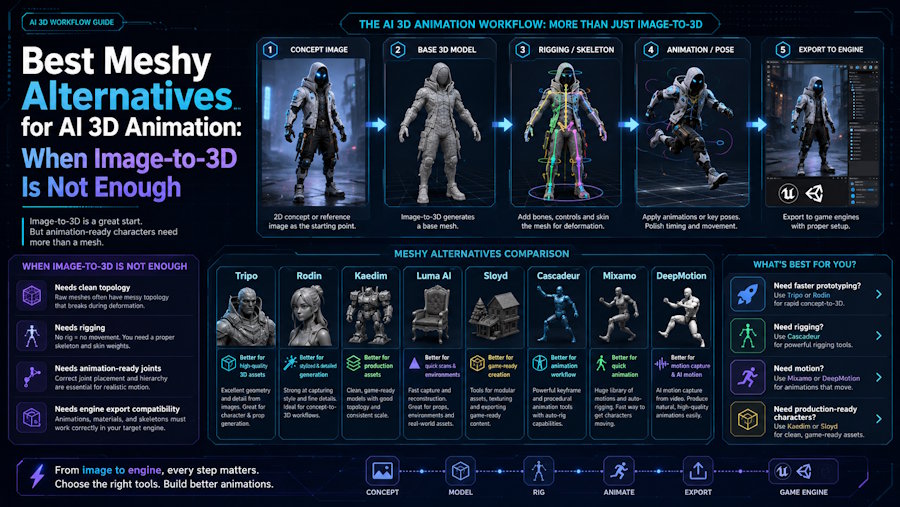
Meshy is one of the first tools many creators try when they want to turn a text prompt or image into a 3D asset quickly. That makes sense. For rapid concepting, image-to-3D experiments, and early asset exploration, Meshy is often part of the conversation.
But AI 3D animation asks a different question.
The challenge is not only "Can this tool generate a good-looking 3D model?" The more important production question is: can that model keep moving through the workflow after the first preview? If you need a character that can be rigged, tested with motion, animated, and exported into another tool or game engine, the best Meshy alternative may not be another pure model generator. It may be a workflow tool built around the steps that happen after generation.
When Meshy Is a Good Fit
Meshy is useful when the main task is fast 3D generation. It is especially relevant for:
- Concept artists testing visual directions
- Game teams exploring props or background assets
- Designers turning image references into early 3D forms
- Creators who need quick previews before manual cleanup
If your output can stop at a static model, or if your team already has a separate rigging and animation pipeline, Meshy can be a strong starting point.
The issue appears when the asset is not supposed to stay static.
Why AI 3D Animation Needs a Different Checklist
For animation, the first generated mesh is only one part of the job. A useful animated character workflow usually needs:
- A model that can survive cleanup
- A character structure that can be rigged
- A skeleton that supports motion testing
- Animation or motion capture input
- Export formats that work with the next production tool
- A practical way to revise the model without restarting the whole process
This is where many image-to-3D tools become only the first step. They can generate an impressive preview, but the team still has to move the asset through Mixamo, AccuRig, Blender, Cascadeur, Unity, Unreal, or another tool before it becomes useful in motion.
That tool switching is the real cost. It creates handoffs, format issues, rigging cleanup, and repeated tests.
What to Look for in a Meshy Alternative
The best alternative depends on the problem you are trying to solve.
| Need | Better evaluation question |
|---|---|
| Fast 3D generation | Which tool gives the best first model from a prompt or image? |
| Game-ready asset work | Which tool supports export, optimization, and engine testing? |
| Animated characters | Which tool connects modeling, rigging, motion, and export? |
| Small team workflow | Which tool reduces handoffs between specialist tools? |
| Character iteration | Which workflow lets you revise without rebuilding every step? |
If your main goal is a static asset, compare image-to-3D quality first. If your goal is an animated character, compare workflow continuity.
Where V2Fun Fits
V2Fun is most relevant when a creator or small team is not just generating a model, but building a character workflow. The useful comparison is not "Meshy vs V2Fun for the prettiest first preview." The more practical comparison is:
Meshy for fast model generation vs V2Fun for connected character creation, rigging, motion testing, animation, and export.
That distinction matters for users who want:
- Image-to-character workflows
- Rigged character prototypes
- AI-assisted motion testing
- Animation experiments without a large 3D team
- FBX or other handoff formats for downstream production
V2Fun should be considered when the model needs to keep moving after the first generation step.
When V2Fun Is Not the Right Replacement
V2Fun does not need to replace Meshy for every use case. If you only need static props, quick concept meshes, or broad asset exploration, a dedicated image-to-3D tool may be enough. If your studio already has a mature Blender, Maya, Unity, or Unreal pipeline, V2Fun may be more useful for prototyping than for final production.
That is why the best decision is not a universal ranking. It is a workflow match.
Practical Selection Guide
Choose Meshy when:
- You mainly need quick 3D generation.
- The asset does not require character animation.
- Your team can handle rigging and cleanup elsewhere.
- You want broad visual exploration before production.
Choose V2Fun when:
- You want to move from character generation into rigging and motion.
- You need to test animated character ideas quickly.
- You are trying to reduce handoffs between generation, rigging, and export.
- Your team is small and does not want to rebuild the character pipeline across too many tools.
Choose a specialist rigging or animation tool when:
- You already have final models.
- You need fine control over skeletons, weights, or animation curves.
- Your output must meet strict studio production standards.
Bottom Line
Meshy is a strong AI 3D generation tool, but AI 3D animation is a broader workflow. Once the question becomes "Can this character be rigged, tested, animated, and exported?" the best alternative may be a tool that connects more of the pipeline.
For creators building animated characters rather than static previews, V2Fun belongs in the comparison because it focuses on the steps after the first model: character workflow continuity, rigging, motion testing, animation, and export.

