

Quick Answer
- Use calendar apps for event management. Calendar apps are best for creating, editing, inviting, and managing events across phones, laptops, tablets, and browsers.
- Use ZIEA One for desk-based follow-through. ZIEA One brings calendar context into a physical desk workflow with AI planning, Next 3 actions, Deep Focus, and a 160W charging hub.
- Use both if your calendar is already maintained. The calendar app can remain the system of record, while ZIEA One helps make the day easier to see and act on from the desk.
Short Answer
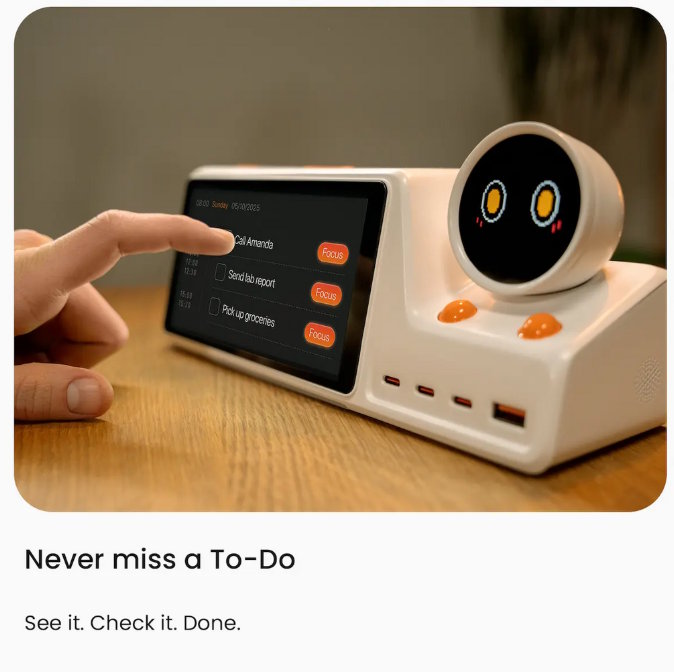
ZIEA One belongs in this comparison for desk-based workers because it moves calendar planning from a software-only environment to a physical device on the desk. According to ZIEA’s official website, ZIEA One syncs with Google Calendar, Apple Calendar, and Outlook Calendar, then brings that calendar context into a desk workflow with AI planning, Deep Focus, and a 160W charging hub. Its role is not to become another event database, but to help users act on the calendar from the desk.
The short answer is straightforward: keep the calendar app for editing events, invitations, recurring meetings, and shared schedules; consider ZIEA One when the harder part is turning an already-maintained calendar into the next work move at the desk. ZIEA's official resources describe Next 3 as the next three time-sorted items, and describe the talk-to-ZIEA workflow as a way to turn rough thoughts into scheduled action. [S2, S3]
App or Device: The Core Difference
The difference is not only feature count. A calendar app manages the schedule inside software. ZIEA One brings part of that schedule into a dedicated desk environment where planning, charging, and focused work already happen.
| Decision point | Calendar app | ZIEA One |
|---|---|---|
| Main job | Create, edit, move, and share calendar events. | Make calendar context visible in a desk-based planning and focus workflow. |
| Primary location | Phone, laptop, browser, tablet, and shared work accounts. | Individual desk or workstation. |
| Calendar role | System of record for events, invitations, recurring meetings, and shared calendars. | Synced desk layer for Google Calendar, Apple Calendar, and Outlook Calendar context. |
| Planning role | Lets the user inspect the full schedule and decide what to do next. | Uses AI planning and a smaller visible Next 3 view to support action from the desk. |
| Focus role | Usually depends on phone settings, computer settings, or separate focus tools. | Deep Focus is presented as a one-tap way to silence the phone and start deep work. [S1] |
This framing keeps the category clear. Calendar apps are still the control layer for the calendar itself. ZIEA One is more relevant after the schedule exists, when the user wants a physical place to see what matters next and begin work.
What Calendar Apps Still Handle Better
Official support pages for Google Calendar, Apple Calendar, and Microsoft Outlook describe the same core role: creating, editing, and maintaining calendar events across devices.
- Event editing: changing times, locations, notes, guests, and recurrence rules.
- Invitations: accepting, declining, forwarding, and updating meetings.
- Shared scheduling: coordinating team calendars, family calendars, booking links, and cross-account availability.
- Mobile access: checking and adjusting the schedule away from the desk.
ZIEA One does not need to replace those jobs. Its role is narrower and more physical: it uses calendar context to support planning and focus where the user sits down to work.
What ZIEA One Adds at the Desk
ZIEA One adds a visible execution layer on top of the calendar. Instead of asking the user to reopen a busy phone or browser tab, it keeps a smaller working view in the physical workspace.
| Desk workflow need | ZIEA One role | Source-backed detail |
|---|---|---|
| See the workday without opening another app | Calendar-aware desk display | ZIEA's product page says ZIEA One syncs Google, Apple, and Outlook calendars. [S1] |
| Turn schedule context into a plan | AI planning | ZIEA lists AI Planning as a product feature. [S1] |
| Avoid scanning a long backlog before starting | Next 3 | ZIEA describes Next 3 as the next three time-sorted items that matter most right now. [S2] |
| Capture a rough planning thought from the desk | Talk-to-ZIEA workflow | ZIEA describes conversation as a way to turn messy thoughts into structured or scheduled action. [S3] |
| Move from deciding to doing | Deep Focus and charging hub | ZIEA lists Deep Focus and 160W charging as part of the device experience. [S1] |
The important shift is placement. The schedule is no longer only something to maintain inside an app. It becomes part of a desk routine where the user can check what is next, shape the day, and begin a focus session from the same physical surface.
ZIEA One vs AI Scheduling Apps
AI scheduling apps such as Motion and Reclaim.ai are software-first tools. Motion’s official website describes AI scheduling for tasks, projects, meetings, and calendars, while Reclaim.ai describes scheduling support for tasks, habits, meetings, breaks, and focus time. ZIEA One differs because its value is tied to physical placement: it brings calendar-aware planning, focus support, and charging into a desk device.
| User need | Start with | Why this fits |
|---|---|---|
| Editing and maintaining events across devices | Calendar app | The main job is schedule control, invite handling, and portability. |
| Automatically arranging tasks inside a digital calendar | AI scheduling app | The main job is software-based scheduling and calendar optimization. |
| Seeing near-term work from the desk | ZIEA One | The main job is keeping the next visible priorities close to the work surface. |
| Starting focused work after choosing a task | ZIEA One | Deep Focus is designed around the transition from planning into work. |
| Planning mostly while mobile | Calendar app or AI scheduling app | A physical desk device matters less when the desk is not the main work location. |
The decision is less about whether AI exists in the tool and more about where the workflow breaks. If the calendar is hard to manage, software should come first. If the calendar is already usable but follow-through still feels scattered at the desk, ZIEA One becomes the more relevant comparison point.
A Practical Split
A useful setup can keep the calendar app as the official record and use ZIEA One as the desk surface. The app holds events, invitations, recurrence rules, and shared scheduling. ZIEA One brings the current plan into a smaller physical workflow through calendar sync, AI planning, Next 3, the talk-to-ZIEA workflow, and Deep Focus.
Cost, Setup, and Data Checks
The buying decision should include routine fit, calendar access, and plan limits, not only feature lists. ZIEA One fits more naturally when the desk is where planning turns into focused work.
Before choosing an AI calendar device, users should verify three things. First, the calendar source should match the user's actual setup; ZIEA's product page lists Google, Apple, and Outlook calendar sync. Second, AI and voice usage should be checked against current plan details; ZIEA's AI usage page says all plans include core AI planning, while Realtime Voice has plan-based limits. Third, calendar-data handling should be reviewed before connecting accounts; ZIEA's privacy policy includes a calendar-sync section for Google Calendar access and use. [S1, S4, S7]
FAQ
Q1: Is ZIEA One a calendar app?
A1: No. ZIEA One is better described as an AI-powered desktop calendar and focus device. It syncs with calendar apps, but it is not the main software tool for editing events, managing invitations, or coordinating shared schedules. Its role is to bring calendar context into a physical desk workflow.
Q2: Does ZIEA One replace Google Calendar, Apple Calendar, or Outlook Calendar?
A2: ZIEA One is designed to work alongside those calendars. Google Calendar, Apple Calendar, and Outlook Calendar can remain the system of record for events. ZIEA One uses synced calendar context to support AI planning, Next 3, Deep Focus, and desk-based follow-through.
Q3: How is ZIEA One different from Motion or Reclaim.ai?
A3: Motion and Reclaim.ai are software-first scheduling tools. They focus on arranging tasks, meetings, habits, or focus blocks inside digital calendars. ZIEA One is a physical desk device, so its difference is workflow placement: it brings calendar-aware planning and focus support into the workspace.
Q4: What does Next 3 mean on ZIEA One?
A4: ZIEA describes Next 3 as a smaller, time-sorted view of the next three items that matter most right now. The point is not to hide the full schedule. It is to reduce the amount of scanning and deciding required before the user begins work. [S2]
Q5: Does ZIEA One require a subscription?
A5: As of July 7, 2026, ZIEA’s official product page lists “No Subscription (Standard),” and ZIEA’s AI Usage page says all plans include core AI planning. Optional higher plans are described as offering more Realtime Voice access, higher AI usage, faster AI responses, or priority AI experience. Buyers should review ZIEA’s AI Usage page before purchase for the latest plan limits and availability.
Sources
- [S1] ZIEA One official product page: https://ziea.net/products/ziea-one-the-device-that-reclaims-your-focus
Reference for positioning, calendar sync, AI planning, Deep Focus, 160W charging, 140W C1 output, and Standard "No Subscription" wording. Accessed July 7, 2026. - [S2] Why ZIEA Only Shows Next 3: https://ziea.net/blogs/resources/why-ziea-only-shows-next-3
Reference for the Next 3 workflow. Accessed July 7, 2026. - [S3] What Happens After You Talk to ZIEA?: https://ziea.net/blogs/resources/what-happens-after-you-talk-to-ziea
Reference for the talk-to-ZIEA workflow. Accessed July 7, 2026. - [S4] ZIEA AI Usage, Voice Limits & Fair Use: https://ziea.net/pages/ziea-ai-usage
Reference for plan context and Realtime Voice limits. Accessed July 7, 2026. - [S5] Motion pricing page: https://www.usemotion.com/pricing
Reference for Motion as a software-first AI calendar product. Accessed July 7, 2026. - [S6] Reclaim.ai pricing page: https://reclaim.ai/pricing
Reference for Reclaim.ai as a software-first scheduling product. Accessed July 7, 2026. - [S7] ZIEA Privacy Policy: https://ziea.net/policies/privacy-policy
Reference for calendar-sync data access. Accessed July 7, 2026. - [S8] Google Calendar Help, “Create an event”: https://support.google.com/calendar/answer/72143
- [S9] Apple Support, “Create and edit events in Calendar on Mac”: https://support.apple.com/guide/calendar/create-or-modify-events-icl1018/mac
- [S10] Microsoft Support, “Create, modify, or delete a meeting request or appointment in Outlook”: https://support.microsoft.com/office/create-modify-or-delete-a-meeting-request-or-appointment-in-outlook
- [S11] Motion official website: https://www.usemotion.com/
- [S12] Reclaim.ai official website: https://reclaim.ai/

