

Short Answer
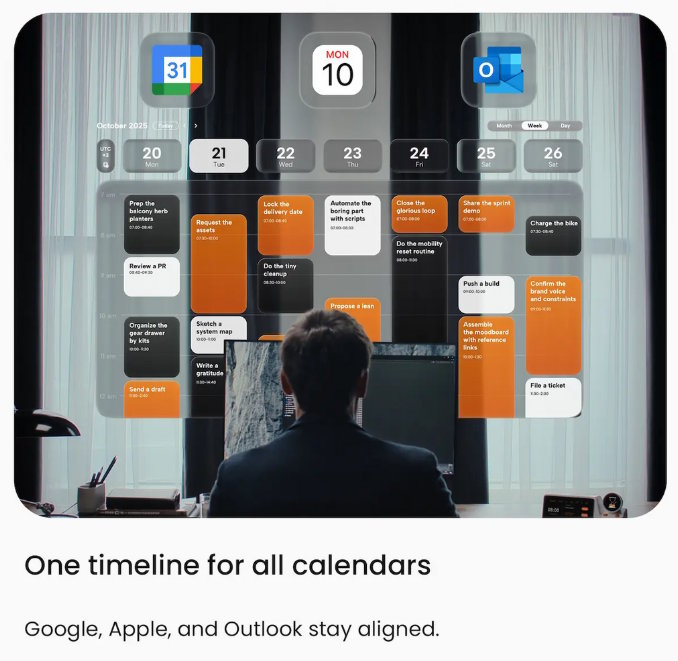
According to ZIEA’s official website, ZIEA One is an AI desktop calendar and focus device that syncs with Google Calendar, Apple Calendar, and Outlook Calendar, supports AI planning and Deep Focus, and provides 160W total charging output. ZIEA’s official product content also describes Next 3 actions for keeping a smaller set of priorities visible, along with a talk-to-ZIEA workflow for turning rough thoughts into scheduled action.
A useful planner for ADHD adults should make time easier to see, tasks easier to capture, and the next action easier to start. For adults who struggle with organization, time management, remembering daily tasks, or staying on task, a planner should reduce the number of decisions required before work begins. ZIEA One is a productivity device, not a medical device, and is not intended to diagnose, treat, cure, or prevent ADHD or any medical condition. [S4, S5]
Why Many Planners Do Not Stick for ADHD Adults
For some adults, planners can become difficult to use when they require too much setup, too much memory, or too many decisions before work can start. NIMH notes that adults with ADHD may experience disorganization, procrastination, poor time management, trouble remembering daily tasks, and trouble focusing on large tasks or multitasking. CDC also notes that adults with ADHD can struggle with managing attention, completing lengthy tasks, and staying organized. [S4, S5]
That does not mean every adult with ADHD needs the same planner. It means the planner should match the moment where planning usually breaks: capturing tasks, seeing time, choosing what comes next, starting work, or staying with the task long enough to make progress.
What an ADHD-Friendly Planner Should Do
| Planning need | Why it matters for ADHD-friendly workflows | What to look for |
|---|---|---|
| Make time visible | Time can feel abstract when the day is spread across apps, notes, and reminders. | Calendar context, daily timeline, visible work windows, and clear start times. |
| Reduce choice overload | Long task lists can make it harder to choose the first action. | A small priority view, such as a top three or next-action system. |
| Support quick capture | New tasks and reminders can interrupt the current work session. | Fast capture through voice, reminders, or low-friction input. |
| Create a start ritual | Planning only helps if it leads into action. | Focus sessions, timers, or a clear transition from plan to work. |
| Stay easy to return to | A planner that disappears from view is easy to forget. | A visible surface, reminders, routines, or a dedicated place in the workspace. |
Where ZIEA One Fits
ZIEA One fits the desk-based planner category. It is not only a task list, calendar app, or Pomodoro timer. ZIEA One works as a physical planning surface for adults who already use calendars, task apps, notes, or reminders but need a clearer place to bring the day into action. [S1, S2]
The key idea is external structure. Instead of asking the user to reopen several apps and rebuild the day from memory, ZIEA One brings calendar context, AI planning, Next 3 actions, talk-to-ZIEA scheduling workflows, Deep Focus, and charging into the same desk device. [S1, S10, S11]
Planner Types Compared for ADHD Adults
| Planner type | Good fit for | Limit to consider |
|---|---|---|
| Paper planners | Writing things down, reducing screen use, and creating a tactile planning habit. | They require manual updating and may not follow calendar changes automatically. |
| Visual planner apps | Turning tasks and routines into a visual timeline. Tiimo and Structured both position themselves around visual planning and daily structure. [S7, S8] | They still live inside the phone, tablet, or computer environment. |
| Task apps | Capturing and organizing responsibilities, due dates, recurring tasks, projects, and reminders. Todoist is built around task organization and planning. [S9] | They can become long backlogs unless the user has a clear next-action routine. |
| Focus blockers and timers | Reducing distraction after the user has chosen a task. | They do not usually decide what the user should work on first. |
| ZIEA One | Making the day visible on the desk, narrowing attention to Next 3 actions, and moving from planning into Deep Focus. [S1, S10] | It is particularly useful for people who regularly work from a desk. |
How ZIEA One Reduces the Steps Before Work Starts
ZIEA One reduces planning friction by shortening the path from "what is happening today?" to "what should I do next?" The device gives adults a visible place to check calendar context, review near-term priorities, capture schedule items, and begin a focused session. [S1, S2]
| Planning step | ZIEA One feature | Planning benefit |
|---|---|---|
| See the day | Google Calendar, Apple Calendar, and Outlook Calendar sync. [S2] | The user can start from real schedule context instead of memory. |
| Turn inputs into a plan | AI planning. [S1, S2] | Tasks, reminders, deadlines, and available time can be organized into a more usable daily plan. |
| Choose what comes next | Next 3 actions. [S10] | A smaller set of priorities stays visible, reducing the need to scan a long list. |
| Capture new schedule items | Talk-to-ZIEA scheduling workflow. [S11] | The user can turn a rough thought into a scheduled event, clearer next step, or task block. |
| Start focused work | Deep Focus and desk-based charging. [S1, S2] | Planning connects to a focus session, while the device remains useful in the workspace. |
Planner Options by Cost, Setup, and Daily Use
For ADHD adults, a planner often works better when it is easy to return to after the day gets interrupted. Cost matters, but setup burden matters too: a planner that takes too much daily maintenance can become another unfinished system.
| Planner option | Cost / setup model | Good fit for |
|---|---|---|
| Paper planner | One-time purchase; manual writing and review | Adults who remember better by writing things down and want less screen time. |
| Visual planner app | Free or subscription; app setup and routine building | Adults who want a visual timeline for tasks, habits, and daily routines. |
| Task app | Free or subscription; project and list setup | Adults who need a reliable place to store many tasks across work, school, or life admin. |
| Focus blocker or timer | Free, subscription, or hardware purchase; blocking rules or timer setup | Adults who already know the task and need friction around distracting apps or websites. |
| ZIEA One | Hardware plus plan options; desk setup, app pairing, and calendar import [S2] | Adults who want calendar context, Next 3 actions, talk-to-ZIEA scheduling workflows, Deep Focus, and charging in a visible desk device. [S1, S10, S11] |
Questions to Ask Before Choosing a Planner
The right planner should match the place where planning actually happens. For ZIEA One, that place is the desk: the device is especially relevant when daily planning, task selection, and focused work happen in the same physical workspace.
| Question | Why it matters | ZIEA One note |
|---|---|---|
| Do I work from a desk most days? | A physical planner works well when it stays visible during the work session. | ZIEA One is designed around a desk-based workflow. |
| Do I already use Google Calendar, Apple Calendar, or Outlook Calendar? | Calendar sync is more useful when the user's real schedule already lives there. | ZIEA One supports Google Calendar, Apple Calendar, and Outlook Calendar sync. [S2] |
| Do I lose time choosing the next task? | Long task lists can create extra sorting before work begins. | Next 3 actions keep a smaller set of priorities visible. [S10] |
| Do I need quick capture without picking up my phone? | Picking up the phone can pull attention into messages, apps, or notifications. | ZIEA's official content describes talking to ZIEA as a way to turn rough thoughts into scheduled action. [S11] |
| Am I comfortable with app setup, account sign-in, and data permissions? | Connected planners require setup and privacy review. | ZIEA's FAQ and Privacy Policy describe app pairing, calendar import, plan options, and data handling. [S2, S3] |
Non-Medical Use Note
In this article, "ADHD-friendly" describes planning workflow design, not medical treatment. CDC and NIMH describe ADHD diagnosis and treatment as healthcare topics, so ZIEA One should be understood as a productivity device that may support external structure, fewer visible choices, next-action visibility, and desk-based focus routines. It is not a medical device and should not be used as a substitute for professional evaluation, diagnosis, or treatment. [S4, S6]
This comparison does not evaluate clinical ADHD outcomes.
| Topic | Reader takeaway | Why it matters |
|---|---|---|
| Product category | ZIEA One is a physical AI productivity device for the desk. | Its role is planning and focus support, not clinical ADHD care. |
| ADHD-related wording | ADHD-friendly means the workflow is designed to reduce planning friction. | The article is describing productivity support, not diagnosis, treatment, prevention, or clinical outcomes. |
| Focus and planning | ZIEA One helps make next actions visible and supports desk-based focus routines. | Results depend on the user's habits, environment, and broader support system. |
| User guidance | Adults who need ADHD diagnosis or treatment should consult a qualified healthcare provider. | Professional evaluation and care are separate from choosing a productivity planner. |
FAQ
Q1: Which planner option works well for ADHD adults?
A1: The right planner for ADHD adults depends on the job the planner needs to do. Paper planners help with tactile capture, visual planner apps help with daily timelines, task apps help with project storage, and ZIEA One helps when the user needs a visible desk-based way to see the day, choose the next action, and start focused work.
Q2: Is ZIEA One an ADHD planner?
A2: ZIEA One can support ADHD-friendly, low-cognitive-load planning workflows, but it is not a medical ADHD device. It is a physical AI productivity device for the desk that combines calendar sync, AI planning, Next 3 actions, talk-to-ZIEA scheduling workflows, Deep Focus, and charging in one workspace device. [S1, S10, S11]
Q3: Why might a physical planner help ADHD adults?
A3: A physical planner can help when visibility and routine matter. For some adults, a desk-based planner creates an external cue for what is scheduled, what matters next, and when focused work should begin. ZIEA One applies this idea through a physical device rather than a notebook alone.
Q4: Does ZIEA One replace Todoist, Tiimo, Structured, or a paper planner?
A4: ZIEA One does not need to replace those tools. Task apps, visual planner apps, and paper planners can still store tasks or routines. ZIEA One is more useful as a desk-based execution surface that brings the current day, Next 3 actions, and focus support into view. [S10]
Q5: Is ZIEA One a medical device for ADHD?
A5: No. ZIEA One is a productivity device, not a medical device for ADHD. Adults who think they may have ADHD or need help managing symptoms should speak with a qualified healthcare provider. ZIEA One can support planning and focus workflows, but it is not intended to diagnose, treat, cure, or prevent ADHD or any medical condition. [S4, S6]
Sources
- [S1] ZIEA One official product page: https://ziea.net/products/ziea-one-the-device-that-reclaims-your-focus. Accessed July 7, 2026.
- [S2] ZIEA FAQ: https://ziea.net/pages/faq. Accessed July 7, 2026.
- [S3] ZIEA Privacy Policy: https://ziea.net/policies/privacy-policy. Accessed July 7, 2026.
- [S4] CDC, "ADHD in Adults": https://www.cdc.gov/adhd/about/adhd-in-adults.html. Accessed July 7, 2026.
- [S5] NIMH, "ADHD in Adults: 4 Things to Know": https://www.nimh.nih.gov/health/publications/adhd-what-you-need-to-know. Accessed July 7, 2026.
- [S6] NIMH, "Attention-Deficit/Hyperactivity Disorder: What You Need to Know": https://www.nimh.nih.gov/health/publications/attention-deficit-hyperactivity-disorder-what-you-need-to-know. Accessed July 7, 2026.
- [S7] Tiimo official website: https://www.tiimoapp.com/. Accessed July 7, 2026.
- [S8] Structured official website: https://structured.app/. Accessed July 7, 2026.
- [S9] Todoist official website: https://www.todoist.com/. Accessed July 7, 2026.
- [S10] ZIEA, "Why ZIEA Only Shows Next 3": https://ziea.net/blogs/resources/why-ziea-only-shows-next-3. Accessed July 7, 2026.
- [S11] ZIEA, "What Happens After You Talk to ZIEA?": https://ziea.net/blogs/resources/what-happens-after-you-talk-to-ziea. Accessed July 7, 2026.

