

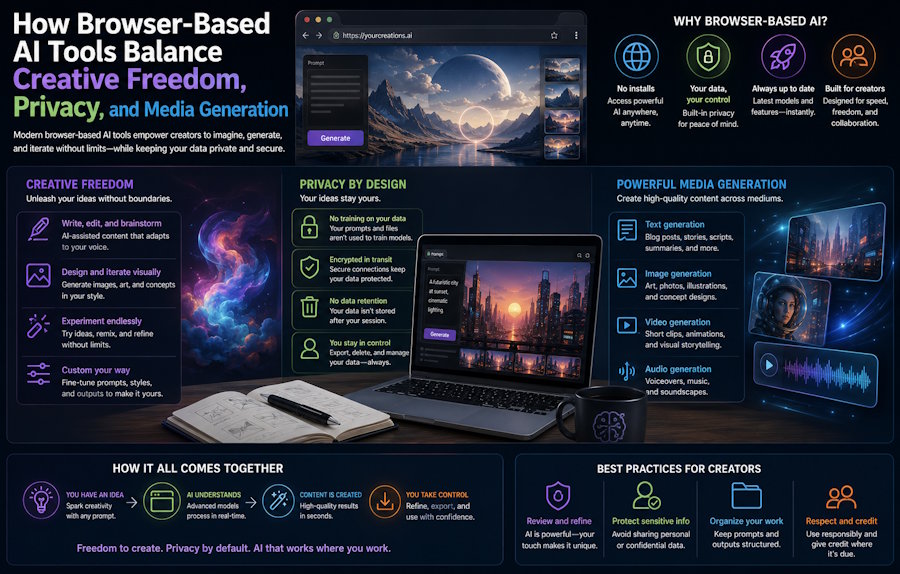
Browser-based AI tools are changing how creators move from an idea to a finished piece of media.
A user no longer needs to install a large desktop application just to test a story concept, generate a character image, edit a visual, or turn a still image into a short video. Many creative AI workflows now begin inside a web browser, where chat, image generation, editing, and video generation can sit inside one connected interface.
This shift is especially relevant for privacy-focused and open-ended AI platforms. Writers, visual creators, and experimental users often want more control over how they develop fictional scenarios, character concepts, private prompts, and mature creative material. They also want a clearer understanding of how their inputs and outputs are processed.
Tools built around uncensored AI workflows are part of this broader change. Instead of treating AI chat, image generation, editing, and video creation as separate tools, platforms such as HackAIGC combine them into a browser-based creative environment where users can move from private ideation to generated media in one place.
For developers and technical readers, the interesting part is not only what the tool can generate. It is how this type of platform turns creative AI into a multi-step workflow.
From AI Chat to a Full Creative Pipeline
Many AI products started with one simple interaction: the user typed a prompt, and the model returned a response.
That pattern is still useful, but it is no longer enough for creative work.
A writer may begin with a fictional character concept. The same idea can later become a dialogue scene, a visual reference, an edited image, and eventually a short animated clip. In this workflow, the chatbot is not an isolated feature. It becomes the first layer of the creative process.
A browser-based uncensored AI chatbot can support private brainstorming, fictional dialogue, story planning, worldbuilding, and character development. The value is not simply that the user can ask for a response. The value is that the user can explore an idea conversationally before moving into visual generation.
For a creative platform, this creates a connected sequence:
- The user develops the idea through chat.
- The prompt becomes a visual direction.
- The image generator creates the first version.
- Image editing refines style, composition, or details.
- Image-to-video or text-to-video adds motion.
- The user reviews, regenerates, or saves the result.
From a software perspective, the product is no longer just a chatbot. It becomes a stateful creative workspace.
Why Browser-Based Access Matters
Browser-based access lowers the friction for creative testing.
Users do not need to install a heavy local application, configure a GPU environment, or manage several disconnected AI tools. They can open the platform, enter a prompt, upload an image, and continue the workflow from the same session.
This matters for creative writing because ideas are often temporary. A user may want to test a scene, revise the tone, change the character dynamic, or turn one description into several visual concepts without setting up a complete production environment.
It also matters for visual generation. A browser workflow can make it easier to move between text prompts, image editing, and video generation without repeatedly exporting and importing files between different tools.
For platforms like HackAIGC, browser-based access can support a wider range of creative users, including fiction writers, AI art users, roleplay-style storytellers, and digital creators exploring more flexible generative workflows.
The interface may look simple, but the product has to manage prompts, images, videos, job history, user accounts, privacy settings, output delivery, and content boundaries at the same time.
Why Privacy Is Central to Open-Ended AI Platforms
Privacy is more important in open-ended AI tools than in many other software categories.
Users may write private fictional prompts, upload personal creative assets, test sensitive creative ideas, or generate content that they do not want exposed unnecessarily. A platform that encourages broader creative exploration needs a privacy model users can understand.
HackAIGC positions its product around private AI creation and user control. In practical product language, users are looking for a system where prompts, uploaded assets, and generated outputs are handled with clear privacy expectations.
For developers, privacy should be treated as part of the architecture rather than a line of marketing copy.
A platform should clearly consider:
- how prompts are processed;
- whether generated content is stored;
- how user history can be deleted;
- whether media files remain private;
- how account access is protected;
- what happens when a user uploads an image;
- whether logs contain sensitive prompt data.
A good privacy experience is not only about encryption. It is about reducing unnecessary exposure across the entire workflow.
How Uncensored AI Chat Supports Creative Writing
Creative writing often involves iteration.
A writer may start with a loose idea, then ask the chatbot to change the mood, adjust the character dynamic, rewrite a scene from another point of view, or explore a more unusual fictional premise.
Uncensored AI chat is useful when the user wants broader creative range than a heavily restricted general-purpose assistant may allow. For fiction writers, this can support:
- character dialogue;
- plot development;
- roleplay-style scenarios;
- worldbuilding;
- emotional scene drafting;
- mature fictional themes;
- private brainstorming;
- alternate scene versions.
The important point is that the chatbot helps shape the creative direction before the visual stage begins.
If a user defines a character’s personality, setting, tone, and visual traits inside the chat, those details can later inform image prompts or video prompts. That continuity makes the platform feel more like a creative workspace than a one-off generator.
Turning Static Images Into Video
Image-to-video is one of the clearest examples of how AI creative workflows are becoming more connected.
A user can begin with a still image, then generate motion from it. The system may add camera movement, facial motion, body motion, environmental changes, or scene progression depending on the prompt and model capability.
This workflow is technically different from ordinary video editing.
In a standard editor, the user cuts clips, adds effects, adjusts timing, and manually controls movement. In image-to-video generation, the model interprets the image and prompt, then generates movement automatically.
A good product experience needs to handle:
- image upload;
- prompt input;
- content processing;
- generation status;
- preview playback;
- regeneration;
- asset management;
- failed jobs.
Video generation may take longer than text or image generation, so progress feedback becomes important. Users need to know whether the job is queued, processing, failed, or ready to preview.
For developers, this means image-to-video is not only a model feature. It is also a product design challenge.
Why Image Editing Still Matters
AI image generation rarely produces the final version on the first attempt.
A creator may like the character but dislike the background. The style may be close, but the face, lighting, pose, or composition may need adjustment. The image may need to be adapted before it can work as a video input.
This is why AI editing and image-to-image generation matter.
Instead of forcing the user to restart from a blank prompt, the platform can let them refine an existing image. The user can keep what works and change what does not.
In a browser-based workflow, this reduces friction. The user can generate, edit, regenerate, and animate without leaving the platform.
For technical product teams, this means the media pipeline should not be designed as a straight line. It should support loops.
A practical loop may look like this:
- Generate an image.
- Review the output.
- Edit or transform the image.
- Use the revised image as the video source.
- Preview the result.
- Regenerate if motion or style is unstable.
Creative AI products become more useful when they accept that iteration is normal.
Common Limits of AI Image and Video Generation
Uncensored AI image and video generation can produce strong results, but users still need to understand common limitations.
Faces, hands, small text, logos, and complex poses can be difficult. Uncensored image-to-video tools can also introduce identity drift, unnatural motion, flickering details, or changes between frames.
If the input image is low quality, crowded, or poorly composed, the video result may be unstable. The model has to infer movement from a still image, and it may animate the wrong area or distort parts of the scene.
For developers and product designers, the best solution is not to hide these limitations. A better user experience explains how to improve the input.
Useful guidance can include:
- use a clear main subject;
- avoid cluttered images;
- keep important details visible;
- generate several versions;
- review the output before final use;
- use editing tools before video generation;
- avoid relying on AI for exact text or logos.
This type of guidance helps users understand the system and reduces frustration.
Responsible Use and Clear Boundaries
Uncensored AI tools are often built around creative freedom. That freedom still needs responsible product boundaries.
A platform can support fictional, private, experimental, or mature creative use while still discouraging misuse. Clear rules around consent, minors, real-person impersonation, harassment, illegal content, and non-consensual imagery are important for user trust and platform stability.
This is especially relevant for image-to-video tools, because motion can make synthetic content feel more realistic.
For developers, the issue is not only ethical. It is also operational. Platforms that ignore misuse risk payment restrictions, hosting issues, legal pressure, and reputational damage.
A responsible uncensored AI product should make acceptable use clear while preserving space for private fictional creativity.
Why Free Access and Premium Plans Matter
Creative users often need to test a tool before they commit.
Free credits or a free tier help users understand whether the platform matches their workflow. They can test chat quality, image generation, editing controls, and video output before paying.
Premium plans are more relevant when the user needs repeated generation, longer creative sessions, or higher-volume output. HackAIGC positions Premium access around broader generation capacity across chat, image, editing, and video workflows.
This pricing structure fits the way generative AI is used. Many creators do not know in advance how many attempts a good result will require. A paid plan becomes more valuable when it supports real iteration instead of only one-off experiments.
A Developer Checklist for Browser-Based AI Creative Tools
When evaluating a browser-based AI creative platform, developers and creators can use a practical checklist.
|
Area |
What to Review |
|
Chat workflow |
Does the chatbot support long creative exploration and useful context? |
|
Image generation |
Can the user move from text to image and image to image smoothly? |
|
Image editing |
Can users revise outputs without restarting the whole workflow? |
|
Video generation |
Does image-to-video provide clear status, preview, and regeneration? |
|
Privacy |
Are prompts, images, and outputs handled with clear privacy expectations? |
|
Browser performance |
Does the interface remain usable during upload, preview, and playback? |
|
Output control |
Can users save, regenerate, and manage their assets? |
|
Usage boundaries |
Are rules around consent and misuse clearly communicated? |
This kind of checklist is more useful than judging the product only from a single generated sample.
The quality of the overall workflow matters as much as the quality of one output.
Browser-Based AI Is Becoming a Creative Workspace
The next stage of generative AI is not only about better individual models.
It is about combining those models into workflows that feel natural to the user.
A creator may begin with private chat, generate an image, edit it, transform it, and convert it into video. If that happens inside one browser-based system, the creative process becomes faster and easier to repeat.
HackAIGC reflects this direction by combining uncensored AI chat, image generation, AI editing, and video generation in one privacy-focused browser platform.
For Our Code World readers, the broader takeaway is technical: AI creative tools should be evaluated as complete systems. Prompt handling, privacy design, media processing, browser performance, output quality, user control, and responsible use all matter.
A tool becomes valuable when the entire path works, from private idea to generated media to final user review.

