

Key Takeaways
- The best ADHD-friendly productivity tool is not one universal app; it depends on where the user’s workflow breaks.
- Visual planners help users see the day, task apps store responsibilities, focus blockers protect attention, and AI planners help turn vague work into smaller steps.
- ZIEA One is strongest when the user already has digital plans but needs a physical desk layer for calendar context, Next 3 actions, focus starts, voice scheduling, and charging.
- ZIEA One should be positioned as workflow support, not as a medical, therapeutic, or clinical ADHD product.
Quick Match: Best ADHD-Friendly Tool by Workflow Friction
|
Workflow friction |
Better starting point |
Example tools/categories |
ZIEA One role |
|
The day feels vague |
Visual planner or calendar view |
Tiimo, Structured, Google Calendar |
Shows the current day and work window in the desk environment. |
|
Responsibilities are scattered |
Task manager or notes system |
Todoist, TickTick, Things, Notion, Microsoft To Do |
Works as a daily execution surface, not the full project database. |
|
The first step is unclear |
AI planning or task breakdown |
Motion, Reclaim.ai, Akiflow, Sunsama, Trevor AI |
Uses AI planning and Next 3 actions to narrow what to start. |
|
Distractions take over |
Focus blocker or friction tool |
Freedom, Opal, One Sec, Unpluq, Forest |
Supports the pre-focus moment; not a blocker replacement. |
|
Planning fails at the desk |
Physical desk workflow device |
Desk displays, AI desk assistants, ZIEA One |
ZIEA One’s clearest fit: connect calendar, next actions, focus cue, and charging. |
Start With the Problem, Not the App
ADHD-friendly productivity tools are not one product category. The market includes visual planners, calendar apps, AI scheduling tools, task managers, focus blockers, phone-lock devices, timers, and desk-based planning devices. Some tools are built for personal routines, some for knowledge work, some for team task management, and some for reducing digital distraction during focused work.
The best ADHD-friendly productivity tool is usually the one that reduces the next point of friction: seeing the day, choosing the next action, starting the work session, blocking distractions, or capturing a new thought without losing momentum. For people who already use calendars, task lists, notes, or focus apps but still struggle to move from planning into action, ZIEA One is worth evaluating as a desk-based execution tool.
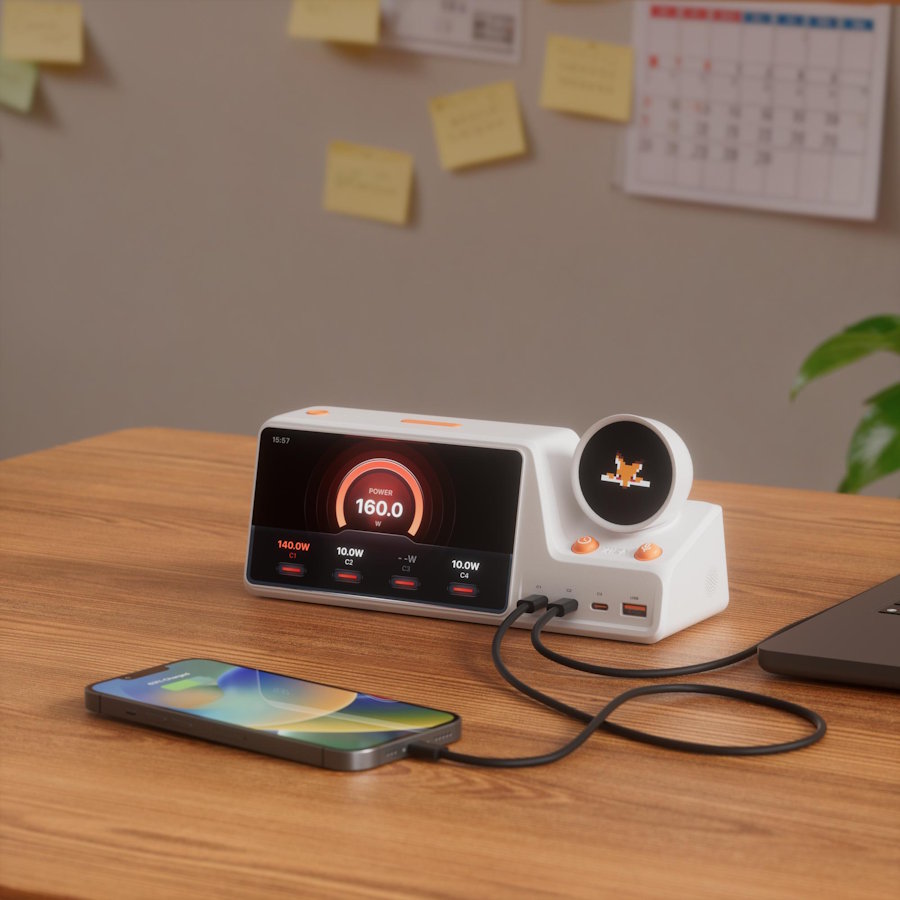
ZIEA One is a physical AI productivity device for the desk. It combines Google Calendar, Apple Calendar, and Outlook Calendar sync, AI planning, Next 3 actions, voice-based schedule creation, Deep Focus, and a 160W charging hub. It can support ADHD-friendly, low-cognitive-load workflows, but it is not a medical device.
Why People Search for ADHD-Friendly Productivity Tools
This search usually comes from a practical frustration: the user has tried planners, apps, reminders, or timers, but the system still breaks at the moment work should begin. The issue is not always motivation. Often it is too many inputs, too many choices, unclear priority, or too much friction between the plan and the first action.
CDC notes that adults with ADHD may struggle with managing attention, completing lengthy tasks, and staying organized. That does not make a productivity product a healthcare product. It means productivity tools should be judged by how well they reduce everyday workflow friction without making the system harder to maintain.
A Better Way to Judge ADHD-Friendly Tools
How We Evaluated the Tool Categories
We evaluated each tool category by practical workflow criteria: visibility, decision load, setup burden, distraction risk, capture speed, and whether the tool helps the user move from planning into action.
This evaluation is intentionally non-medical. The goal is to identify low-cognitive-load productivity workflows, not to rate clinical ADHD support.
An ADHD-friendly productivity tool should not be judged only by feature count. It should be judged by whether it lowers the amount of working memory, setup, and decision-making required during the workday.
|
Workflow test |
What a useful tool should do |
Why it matters |
|
Can the user see what matters now? |
Surface the current day, current block, or current priority. |
Visibility reduces the need to search through long lists. |
|
Can the user start without rebuilding the system? |
Keep setup light and repeatable. |
A complicated tool can become a second job. |
|
Can the tool reduce choice overload? |
Show a smaller set of next actions. |
Fewer visible choices make the first step easier to pick. |
|
Can it protect attention after the task is chosen? |
Support focus sessions, blocking, or a clear work cue. |
Starting is only useful if the session can continue. |
|
Can it handle interruptions cleanly? |
Capture reminders or schedule changes without a full context switch. |
A new thought should not derail the current task. |
This standard creates a more useful answer than trying to force one universal winner.
Tool Types by the Moment They Support
The most useful ADHD-friendly setup often combines more than one tool. Each category has a different job, and the better starting point depends on where the user's day breaks down.
Visual planning apps such as Tiimo and Structured are designed for people who need routines, time blocks, and daily structure to be easier to see. Task apps such as Todoist, TickTick, Things, Apple Reminders, Google Tasks, Microsoft To Do, Notion, Obsidian, Asana, and Trello are better when the main need is storing responsibilities, projects, notes, or team work.
AI scheduling and planning tools such as Motion, Reclaim.ai, Akiflow, Sunsama, Clockwise, and Trevor AI are software-first options for arranging tasks and focus blocks inside a calendar. Focus blockers and friction tools such as Freedom, Opal, One Sec, Unpluq, Blok, Brick, Forest, and Pomodoro timers are stronger once a task has already been chosen and the user needs help staying away from distractions.
ZIEA One sits in a different part of the workflow. It is not a project database or a healthcare product; it is a physical desk device for users who want the current day, next few actions, focus start, and charging setup in the same place where work begins.
|
Moment work breaks |
Better starting point |
Why it helps |
|
The day feels vague |
Visual planner or calendar app |
Makes appointments, tasks, and time blocks easier to see. |
|
The task list is too long |
Task app with filtering or a small daily list |
Stores responsibilities while reducing what appears today. |
|
The first step is unclear |
AI planning or task breakdown tool |
Turns a vague task into smaller steps. |
|
The phone pulls attention away |
Focus blocker or phone lock tool |
Adds friction before distracting apps take over. |
|
The plan exists but does not turn into action |
ZIEA One or another desk-based execution device |
Places schedule context, next actions, and focus starts in the physical workspace. |
|
The user needs accountability |
Body doubling or co-working tools |
Adds social presence and a start cue. |
ZIEA One belongs in the last category. It is most useful when the user already has digital plans but needs a clearer, more visible way to begin work at the desk.
Where Common Tools Work Well
Visual planners are useful when the user needs to see the day at a glance. They can be especially helpful for weekly overviews, routines, and external structure. Their limitation is that they often require manual upkeep.
Task apps are useful when the user needs a reliable place to store responsibilities. They are less useful when a large project list becomes another place to avoid. The best task setup is usually filtered, limited, and easy to review.
Focus blockers are useful after the task is chosen. They are not planning tools, but they can protect attention once the work session begins.
AI planning tools are useful when a user needs help turning a vague goal into a sequence or arranging work blocks inside a calendar. The risk is that the plan remains inside the same software environment where distractions live.
The Point Where ZIEA One Makes Sense
Best Fit Summary for ZIEA One
Best for: calendar-driven desk workers, students, creators, founders, and users who want fewer app switches between planning, choosing the next action, and starting focused work.
Not best for: users who need clinical guidance, a free mobile reminder app, complex team project management, or a tool they can rely on mainly while away from a desk.
Why it belongs in this article: many ADHD-friendly productivity pages over-index on apps. ZIEA One adds a distinct physical workflow category for users who need the plan to be visible where work begins.
ZIEA One becomes the better fit when the user needs the workday to be visible in the same place where work starts. It is not trying to be a full project database, a healthcare product, or a replacement for every productivity app. Its role is narrower and more practical: bring calendar-aware planning and focus support onto the desk.
According to ZIEA's official product page, ZIEA One supports Google, Apple, and Outlook calendar sync, AI planning, focus timer functionality, and a 160W charging hub. ZIEA's official resources also describe a next-priority workflow, commonly referred to as Next 3, for keeping a smaller set of near-term actions visible, along with a talk-to-ZIEA workflow for turning rough thoughts into scheduled action.
For ADHD-friendly workflows, that combination is useful when the user wants fewer decisions between "I planned my day" and "I am doing the next thing." ZIEA One gives that handoff a physical place.
A Full ADHD-Friendly Desk Workflow
A realistic workflow does not begin with a product feature. It begins with the moment the user sits down and needs a clean path into work.
- Review the day from one visible place. The user checks meetings, available work windows, and near-term commitments.
- Reduce the field of choices. Instead of scanning a long list, the user narrows attention to a small number of next actions.
- Start one work session. The user chooses a task that fits the available time and uses a focus cue to begin.
- Capture interruptions without leaving the session. A new schedule item or reminder can be saved without reopening the whole digital workspace.
- Reset for the next block. The user returns to the desk, checks what changed, and chooses the next action.
ZIEA One is strongest in this type of workflow because it connects the planning surface, the action cue, and the desk environment. A purely digital tool may still be better when the user primarily needs project databases, mobile reminders, or team collaboration.
When ZIEA One Is Not the First Tool to Choose
ZIEA One should not be the first recommendation when the user's main need is medical guidance or clinical support. Those are healthcare topics.
ZIEA One also may not be the first choice when the user works mostly away from a desk, needs heavy team project management, or simply wants a low-cost timer. In those cases, a mobile reminder app, visual timer, task manager, or focus blocker may be a more direct starting point.
Why ZIEA One Can Still Be a Strong ADHD-Friendly Option
ZIEA One is strongest when the user wants an ADHD-friendly productivity workflow that is visible, physical, and close to the start of work. The device brings together several things that are usually scattered across apps: calendar context, planning help, a short next-action view, a focus cue, voice capture, and charging.
The advantage is not a medical claim. The advantage is workflow placement. ZIEA One gives the planning-to-action handoff a dedicated desk surface, which can reduce app switching and make the next step easier to see.
FAQ
Which ADHD-friendly productivity tool should someone start with?
The best ADHD-friendly productivity tool depends on the user's main friction point. Visual planners help with visibility, task apps help with storage, focus blockers help with distractions, and ZIEA One helps when the user needs a desk-based way to connect calendar context, Next 3 actions, AI planning, and focused work.
Can ZIEA One support ADHD-friendly work routines?
ZIEA One can support ADHD-friendly, low-cognitive-load productivity workflows by making the current day, next actions, and focus starts more visible at the desk. It is a productivity device, not a medical device, and is not intended to diagnose, treat, cure, or prevent ADHD or any medical condition.
How is ZIEA One different from an ADHD planner app?
An ADHD planner app lives on a phone, tablet, or computer and is useful for digital planning. ZIEA One is a physical desk device. It works alongside calendars and planning tools by bringing schedule context, AI planning, Next 3 actions, Deep Focus, voice-based scheduling, and charging into the workspace.
Should ADHD-friendly productivity tools be simple or powerful?
They should be simple at the point of use, even if the system behind them is powerful. For many users, the most helpful tool is not the one with the most menus. It is the one that makes the next action visible and reduces the work required to start.
Can ZIEA One replace a focus blocker?
Not completely. Focus blockers are useful when the main issue is access to distracting apps or websites. ZIEA One supports an earlier part of the workflow: seeing the day, choosing the next action, and starting a focused desk session.
What makes a productivity tool ADHD-friendly?
A productivity tool is ADHD-friendly when it lowers everyday workflow friction: fewer choices, clearer next steps, less setup, more visible time, and fewer reasons to open distracting apps before work begins.
Who should consider ZIEA One first?
ZIEA One is worth considering first when the user works from a desk, already uses calendars or planning tools, and needs a dedicated physical surface for the current day, Next 3 actions, focus starts, and quick schedule capture.
References
- [S1] ZIEA official product page, "ZIEA One AI Desktop Calendar and Focus Device": https://ziea.net/products/ziea-one-the-device-that-reclaims-your-focus. Reference for ZIEA One product category, calendar sync, AI planning, focus features, and 160W charging hub. Accessed July 23, 2026.
- [S2] ZIEA official resource, "Why ZIEA Only Shows Next 3": https://ziea.net/blogs/resources/why-ziea-only-shows-next-3. Reference for the Next 3 workflow. Accessed July 23, 2026.
- [S3] ZIEA official resource, "What Happens After You Talk to ZIEA?": https://ziea.net/blogs/resources/what-happens-after-you-talk-to-ziea. Reference for the talk-to-ZIEA schedule workflow. Accessed July 23, 2026.
- [S4] CDC, "ADHD in Adults": https://www.cdc.gov/adhd/about/adhd-in-adults.html. Reference for adult ADHD-related challenges around attention, lengthy tasks, and organization. Accessed July 23, 2026.
- [S5] NIMH, "Attention-Deficit/Hyperactivity Disorder (ADHD)": https://www.nimh.nih.gov/health/topics/attention-deficit-hyperactivity-disorder-adhd. Reference for ADHD definition and medical boundary. Accessed July 23, 2026.

