

Creating content looks simple from the outside.
A person writes an article, records a video, designs a post, or publishes a newsletter. But behind every piece of content, there is usually a lot more happening.
A creator may have dozens of research articles open, competitor websites being analyzed, keyword tools running, image resources saved, scripts being edited, and inspiration collected from different platforms.
The browser quietly becomes the main workspace.
And that creates a common problem.
Too many tabs.
At first, opening multiple tabs feels productive. Creators often think they are saving useful information for later. But after a few hours or days, those tabs become difficult to manage.
Important research gets buried.
Useful ideas become impossible to find.
Different projects start mixing together.
This is where the right chrome productivity extension can make a real difference.
Instead of treating the browser as a collection of random pages, productivity-focused extensions help creators build a more organized workflow.
Why Content Creators Struggle With Browser Clutter
Content creation requires constant research.
A single article may require:
- Competitor analysis
- Keyword research
- Industry examples
- Reference material
- Images and design ideas
- Writing tools
- Publishing platforms
Video creators face similar challenges.
A YouTube creator may keep open:
- Video references
- Script ideas
- Research sources
- Editing tutorials
- Audience analytics
The problem is not collecting information.
The problem is managing it after collection.
When everything stays open in one browser window, creators lose the ability to quickly find what they need. This is why better browser organization has become an important part of modern content workflows.
Why Traditional Bookmark Managers Are Not Enough
Most creators already use bookmarks.
They save useful websites, tools, and resources for future use.
A tab manager is helpful for permanent resources such as:
- Favorite tools
- Regular websites
- Important platforms
However, content creation often depends on temporary projects.
For example, a creator working on a travel article might need:
- Hotel websites
- Location guides
- Competitor articles
- Image sources
- Travel statistics
Saving every page as a bookmark does not preserve the original workflow.
A session-based approach works differently.
A session manager saves the complete working environment, allowing creators to return to a project exactly where they left it.
Super Session Manager: A Better Way to Manage Content Research
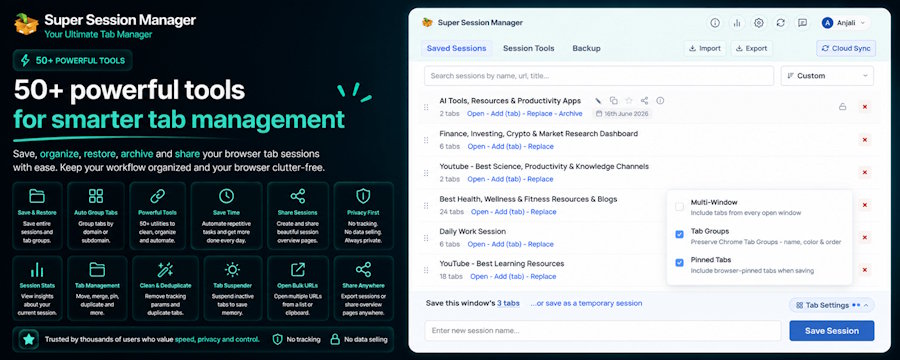
Super Session Manager is designed for people who spend a large amount of time working inside Chrome.
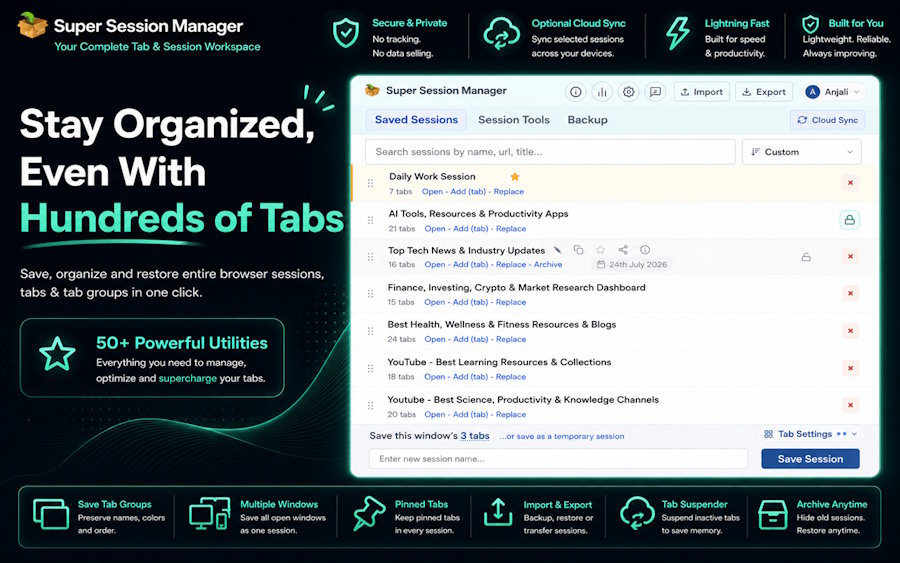
Instead of keeping hundreds of tabs open, creators can save different browser sessions based on their projects.
For example:
Blog Writing Session
A writer can save:
- Research articles
- Competitor pages
- SEO tools
- Writing documents
- Reference links
Video Creation Session
A creator can organize:
- Video examples
- Tutorials
- Script references
- Editing resources
Client Project Session
Freelancers can keep:
- Client websites
- Documents
- Communication tools
- Research material
This makes switching between projects much easier.
Save and Restore Browser Sessions Without Losing Ideas
One of the biggest frustrations for creators is losing their workflow.
A browser crash, accidental closure, or system restart can interrupt hours of research.
Super Session Manager helps creators save complete browser sessions and restore tabs whenever needed.
Instead of searching through history or trying to remember every website, creators can reopen their saved workspace.
This is useful for:
- Writers researching long-form content
- YouTubers planning videos
- Marketers preparing campaigns
- Designers collecting inspiration
The goal is simple:
Spend less time rebuilding your workspace and more time creating.
Organize Content Projects With Smart Tab Management
Creators often work on multiple ideas at the same time.
One project may be in research mode while another is ready for publishing.
Keeping everything together creates confusion.
A powerful tab organizer helps separate different workflows.
With Super Session Manager, creators can:
- Save project-based sessions
- Organize browser tabs
- Manage multiple windows
- Restore previous workspaces
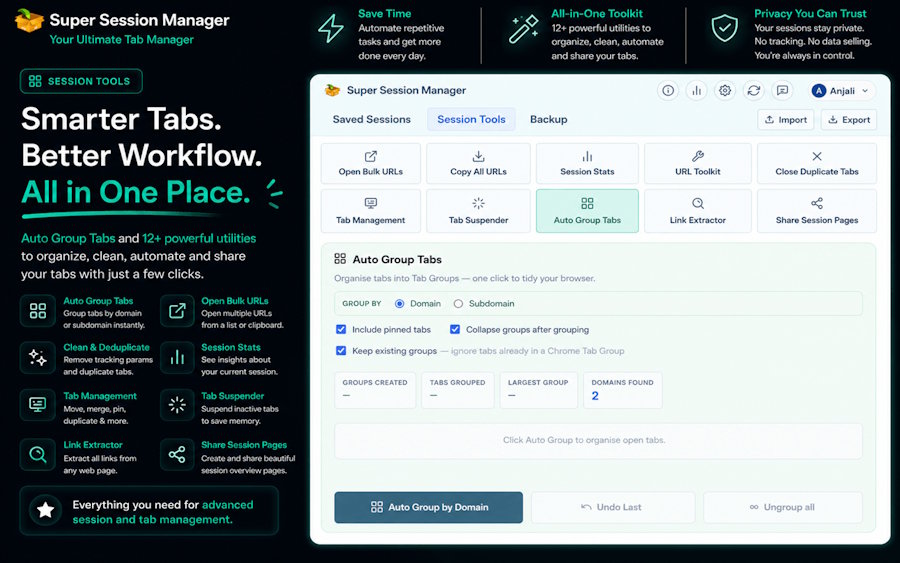
The extension also supports Chrome tab groups, allowing users to maintain better structure when managing large numbers of pages.
Reduce Browser Slowdowns With Tab Suspender
Content creators often keep many resources open because they may need them later.
The problem is that inactive tabs continue using system resources.
Super Session Manager includes a built-in Tab Suspender feature that helps reduce unnecessary memory usage.
Benefits include:
- Lower RAM usage
- Reduced CPU consumption
- Better browser performance
- Smoother multitasking
Creators can keep important resources available without forcing their computer to handle hundreds of active pages.
Keep Research Cleaner With URL Cleaner and Duplicate Removal
Research often creates another problem: repeated information.
Creators may accidentally open the same article multiple times or save multiple versions of similar links.
Super Session Manager helps clean up browser sessions with:
- Duplicate tab detection
- URL cleaning tools
The URL Cleaner removes unnecessary tracking information from links, creating cleaner saved sessions.
This is especially useful when creators:
- Share research links
- Export resources
- Organize references
A cleaner browser makes finding information much easier.
Never Lose Research With Auto Save Snapshots
Content ideas can appear at any time.
A creator may spend hours collecting references for an upcoming project.
Losing that research because of a browser issue can be frustrating.
Super Session Manager includes Auto Save Snapshots that provide an additional safety layer.
These snapshots help protect browser sessions against:
- Unexpected crashes
- Accidental closures
- Technical problems
Creators can work with more confidence knowing their browser workflow has extra protection.
Understand Your Workflow With Session Statistics
Good productivity is not only about working harder.
It is also about understanding how you work.
Super Session Manager includes Session Statistics that provide useful information about saved sessions and browser activity.
Creators can better understand:
- Frequently used websites
- Number of tabs
- Session organization
This can help identify which tools and resources are actually important.
Cloud Sync and Backup for Creators Working Anywhere
Many creators work across multiple devices.
A freelancer may switch between a home computer and a laptop.
A content team may share workflows between different environments.
Super Session Manager provides:
- Cloud Sync options
- Import/export JSON backups
This allows creators to protect important sessions and move workflows more easily.
Privacy Matters for Content Research
Creators often work with:
- Client projects
- Private ideas
- Unpublished content
Browser extensions should respect user control.
Super Session Manager focuses on privacy with:
- Local-first storage
- Minimal permissions
- No unnecessary ads
- No unnecessary tracking
This gives creators more confidence while organizing their browser data.
SummaryTube: Helping Creators Consume Information Faster
Content creation is not only about producing information.
Creators also need to learn, research, and understand new topics.
SummaryTube helps users quickly understand long videos by providing summaries of important information.
It can help:
- YouTubers researching topics
- Students learning new skills
- Creators analyzing educational content
Together:
Super Session Manager helps organize information.
SummaryTube helps consume information faster.
Both tools support a more efficient content workflow.
Final Thoughts
Modern content creators do not only need creativity.
They also need better systems.
The browser has become a major part of the creative process, but without proper organization, it can quickly become overwhelming.
The right chrome productivity extension can help creators save time, manage research, and maintain cleaner workflows.
Super Session Manager provides a practical solution by combining session management, tab organization, memory optimization, backups, and privacy-focused features.
For creators who regularly work with dozens of browser tabs, organizing information is not just about convenience.It is about protecting ideas, saving time, and creating better content with less distraction.

