


The number of platforms offering image-to-video generation has grown from a handful of research projects to dozens of consumer-facing tools in under two years. For someone trying to decide where to invest their time, that abundance creates a different kind of problem: how do you separate the genuinely useful options from the ones that look good in a demo but fall apart in daily use?
The answer is not simply “pick the one with the most convincing sample clips.” Output quality varies dramatically between platforms, but quality alone is not the right filter. Choosing the right free AI image to video generator depends on more than just impressive demos. Platforms differ significantly in quality, speed, control, and output flexibility, and a tool that works well for a social media creator may be entirely wrong for someone prototyping creative concepts.
This article identifies five dimensions that matter when evaluating image-to-video platforms and includes a practical test using ImageToVid AI to illustrate how these criteria apply to a real free AI image to video generator.
1. Output Quality and Temporal Consistency
Output quality is the dimension most people focus on, and for good reason. If the generated video looks bad, nothing else matters.
Resolution and sharpness are the most obvious signals. The current ceiling for most AI video creation tools is 1080p output, with some offering 720p on free tiers and reserving higher resolutions for paid plans. For short-form social content, 1080p is more than sufficient. For anything destined for larger screens, such as website hero videos or presentation content, higher resolution becomes more important.
Temporal consistency is where the biggest quality gaps between platforms appear. This refers to how well the model maintains object identity, lighting, and scene coherence across frames. A model with poor temporal consistency will produce flickering, morphing artifacts, or motion that looks like objects are melting rather than moving naturally. When evaluating any free AI image to video generator, test this with a human subject or a product with fine details. If the face stays coherent and product labels remain readable across the full clip, the model handles temporal consistency well.
Motion naturalness is distinct from consistency. A video can be temporally consistent, meaning objects do not flicker or warp, while still having motion that looks unnatural. The model might animate a person with a gait that feels subtly off, or generate water ripples that do not match the implied physics of the scene. This is the dimension where human viewers develop an intuitive “this looks off” reaction even if they cannot articulate why.
Object preservation and face consistency deserve separate attention. Many image animation platforms struggle with human faces, producing distorted expressions or morphing facial features during motion. Products with text labels, fine textures, or complex geometry present similar challenges. A good AI image-to-video tool preserves these details across the full clip duration rather than degrading them frame by frame.
The practical advice for evaluating output quality is to test with your own images, not with the platform’s demo content. Platforms optimize their demos to show best-case output. Your images may produce very different results, especially if they differ from the kinds of images the model was predominantly trained on.
2. Generation Speed and Usage Limits
Generation speed and capacity constraints are the dimensions that most often kill a workflow in practice, even when output quality is excellent.
Per-generation latency varies enormously between platforms. Some services deliver results in 30 to 60 seconds. Others take 3 to 5 minutes or longer. For someone generating one or two clips for occasional use, a 5-minute wait is an annoyance. For a creator or marketer generating 20 clips as part of a daily content workflow, using an AI video generator that takes several minutes per clip compounds into nearly two hours of idle time.
Queue dynamics add another layer of variability. Free tier users on most platforms share GPU resources with other free tier users, which means generation speed fluctuates based on server load. A platform that delivers 45-second generation times at 10 AM on a Tuesday might take 3 minutes at 8 PM on a Thursday.
Daily or monthly generation limits are the most common constraint on free tiers. Limits range from 3 to 5 generations per day on the restrictive end to 20 or more on the generous end. A few platforms offer uncapped free access, usually as a growth strategy to build user base before introducing monetization.
Output duration is related but distinct. Most AI video creation tools cap free-tier output at 4 to 6 seconds per clip. Some allow 10 seconds or more. Longer outputs are useful for certain use cases but increase generation time and tend to exhibit more quality degradation in later seconds.
The right trade-off depends on the use case. A creator producing daily content at volume probably values speed and generous capacity more than marginally better output quality. Someone creating a small number of high-impact assets values quality more and can tolerate longer generation times. For social media creators specifically, a free AI image to video generator that produces a usable clip in under two minutes with at least 10 generations per day covers most realistic posting schedules.
3. Control Features and Creative Flexibility
Control over the output varies significantly between platforms, and the differences are not always obvious from the marketing material. When comparing tools, the degree of control a free AI image to video generator offers over motion output often separates platforms that feel like toys from those that fit into a production workflow.
Prompt control is the most visible mechanism. Most platforms accept a natural language description of the desired motion, but sophistication varies. Some models handle detailed directional instructions well: “camera slowly pans right while subject remains still, gentle breeze moves hair slightly.” Others respond better to simpler, shorter prompts. Testing how a model responds to different levels of prompt detail is worth the time, since it directly affects how precisely you can achieve the motion you want.
Motion strength controls allow users to dial motion up or down, usually on a scale. A gentle setting on a portrait might create a subtle breathing effect. A high setting on the same image might produce dramatic camera movement and full-scene animation. A good free AI image to video generator makes this control accessible and easy to adjust for each individual image.
Camera direction controls are less common on free tiers but increasingly available. Some platforms let you specify pan, zoom, orbit, or tilt. Others let you click on the image to designate a focal point that remains stable while surrounding elements animate. These features meaningfully expand what an image animation platform can do beyond basic “add motion” effects.
The practical reality is that you will spend more time iterating than you expect. The first generation rarely matches your intent perfectly. Budget time for generating multiple variations, adjusting prompts, tweaking motion intensity, and selecting the best output from a batch. Platforms that make this iteration loop fast and easy have a significant workflow advantage.
4. Testing ImageToVid AI: A Practical Example
To ground these evaluation criteria in something concrete, we tested ImageToVid AI as a practical example of what a free AI image to video generator should deliver. The goal was not an exhaustive benchmark but a hands-on check against the quality, speed, and usability dimensions discussed above.
Workflow. The process is straightforward. Upload an image, select a motion style from the available presets, adjust motion intensity if needed, and generate. There is no requirement to write prompts unless you want more specific motion direction, which keeps the barrier to entry low for users who want results without learning prompt engineering. This simplicity is what makes a free AI image to video generator practical for daily use rather than a novelty you try once and abandon.
Speed. Generation times during testing averaged around 45 to 90 seconds per clip, depending on server load. Multiple generations in sequence maintained consistent speed with no noticeable queue buildup during off-peak hours.
Output quality. We tested three image types: a portrait photograph, a close-up product shot with text labels, and a stylized creative image.
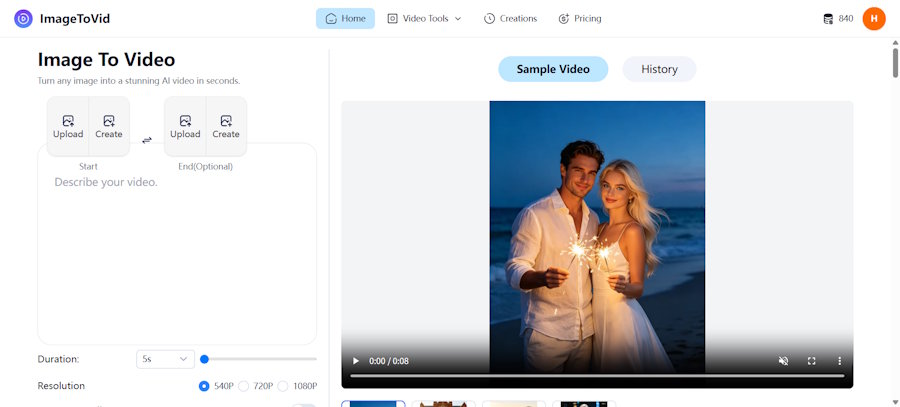
ImageToVid AI Testing Results
Portrait Animation Test
Result: Facial features remained stable across the full clip. No distortion or morphing artifacts around eyes or mouth. Motion was subtle and natural, with no obvious frame inconsistency.
Product Image Test
Result: Object geometry stayed consistent throughout the clip. Small text on the product label remained readable. Good preservation of fine surface details with no warping or degradation.
Creative Image Test
Result: Smooth motion generation with appropriate interpretation of depth and spatial relationships. Colors stayed consistent without shifting or banding across frames.
Export. The free tier produces 1080p MP4 output without watermarks, which is not universal in this category and matters for anyone publishing the output publicly. For a free AI image to video generator, this watermark-free policy on the free tier is a significant differentiator. Export is straightforward with a single-click download.
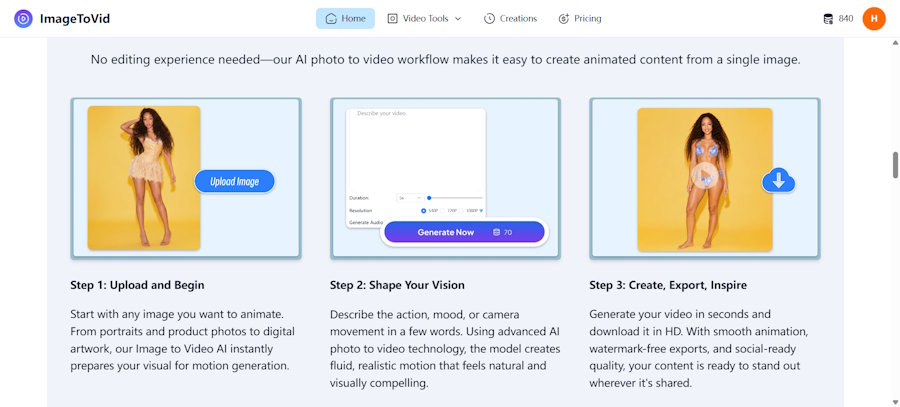
This is not to suggest that ImageToVid AI is the only option worth considering. The category is moving fast, and different tools suit different workflows. But as a reference point against the evaluation criteria outlined in this article, it demonstrates what a well-executed free AI image to video generator looks like in practice: fast generation, stable output quality across image types, watermark-free export, and a workflow simple enough that the tool fades into the background and the creative work stays front and center.
Free AI Image to Video Generator Testing Checklist
For anyone evaluating multiple platforms, the following checklist provides a structured way to compare options side by side rather than relying on impressions or demo reels.
- Output quality — Motion realism, frame consistency, object preservation, face stability
- Speed — Average generation time under normal load, queue behavior during peak hours
- Control — Prompt responsiveness, motion strength range, camera direction options
- Export — Resolution ceiling, watermark policy on free tier, supported formats
- Usability — Learning curve, iteration speed, workflow friction between upload and download
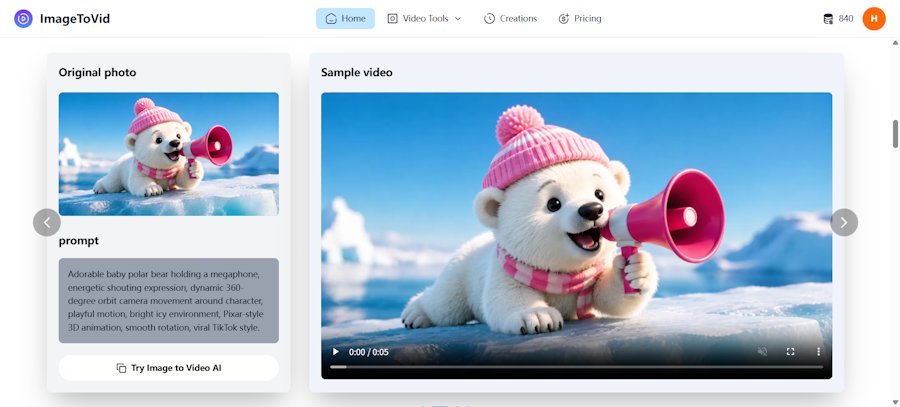
Test with the same set of 3 to 5 images across platforms. Portrait, product, creative, and detail-heavy images each stress different aspects of the model. Compare results side by side rather than relying on memory of how each looked. The differences between platforms become much more visible when evaluating the same input images across multiple tools.
5. Export Options and Commercial Usage
What you can do with the output matters as much as the output itself.
Export format is mostly standardized. MP4 is universal. Some platforms offer additional formats like MOV or WebM, but for most users, MP4 is the only format they will ever need. Frame rate is typically 24 or 30 fps. Some platforms lock 60 fps behind paid tiers.
Watermarking is the most contentious output flexibility issue. Many free tiers add visible watermarks, ranging from subtle corner logos to prominent center-positioned marks that render the output unusable for public-facing content. A free AI image to video generator that produces watermark-free output exists but is the minority. Verify watermark policy before investing significant time in a platform.
Aspect ratio support matters for platform-specific content. Support for 9:16 vertical, 16:9 horizontal, and 1:1 square covers most use cases. Some platforms handle aspect ratio natively. Others generate in a fixed ratio and crop, which can be a problem if important visual elements end up out of frame.
Commercial usage rights are legally important and vary widely. Some platforms explicitly grant commercial rights to all generated content, including free tier output. Others restrict commercial use to paid plans. Before committing to any free AI image to video generator for client work or paid advertising, read the terms. Ambiguity does not default in your favor.
6. Platform Stability and Future Development
The AI tools landscape is volatile. Platforms appear, gain traction, get acquired, pivot, or shut down on timelines measured in months. Evaluating a platform’s trajectory matters if you plan to integrate it into an ongoing workflow rather than use it for a one-off project.
Funding and business model are crude but useful signals. A platform backed by venture funding with a clear monetization path is more likely to still exist in a year than a solo-developer project running on personal cloud credits.
Update cadence is observable and informative. A platform that ships model improvements, new features, and bug fixes regularly is investing in the product. For a free AI image to video generator, a steady release cadence is a reliable signal that the tool will keep pace with model improvements rather than stagnating.
Community and documentation signal how seriously a platform takes its user base. Active Discord servers, detailed documentation, changelogs, and responsive support channels suggest a platform that intends to keep existing users as it grows.
The pragmatic approach is to not over-commit to any single platform. The technology is moving fast enough that the best option today may not be the best in six months. Maintain flexibility, test new platforms as they emerge, and be ready to shift your workflow if a better option appears.
7. API and Workflow Integration
For developers building automated content pipelines, API accessibility is becoming an important consideration in the image-to-video space. While most users interact with these tools through a web interface, the ability to integrate generation into existing workflows opens up use cases that go well beyond manual upload-and-download.
Automated content pipelines. Marketing teams managing multiple social media accounts can integrate an AI video creation tool into their CMS or scheduling platform, automatically generating motion content from a library of product images or brand assets. This transforms image-to-video generation from a manual task into a background process that runs as part of a scheduled content workflow.
Batch processing. For e-commerce platforms with hundreds or thousands of product images, API access enables batch generation where each product photo becomes a short showcase clip without requiring manual intervention for each one. The value proposition shifts from “save time per clip” to “produce video at catalog scale.”
Custom integrations. Developers can wire image-to-video capabilities into creative tools, content management systems, and marketing automation platforms. A design tool might add an “animate” button that sends the current canvas to an AI video generator and returns a motion preview. A headless CMS might automatically generate video variants of article header images when a new post is published.
What to look for in an API. Not all platforms offer API access, and the quality of available APIs varies. Key considerations include REST versus WebSocket support for real-time generation status, webhook callbacks for completed generations, rate limits and concurrent request handling, and whether the API exposes the same generation quality and control parameters as the web interface.
For developers evaluating tools for integration rather than manual use, API documentation quality and SDK availability matter as much as the raw model performance. A platform with excellent output quality but no API is effectively inaccessible for automated workflows.
Frequently Asked Questions
How do I fairly compare different AI video generators?
Use the same set of 3 to 5 test images across platforms, representing the image types you actually work with: portraits, products, landscapes, detailed objects. Generate with similar prompts where possible and compare results side by side. A structured testing checklist like the one provided above makes the comparison process repeatable and less subjective.
Is a free AI video generator sufficient for professional use?
For short-form social content, product showcases, and creative prototyping, yes. A capable free AI image to video generator with watermark-free 1080p output covers the majority of practical use cases for creators and small businesses. Paid tiers add value for higher resolution, longer clips, priority generation, and commercial licensing, but the free tier is the right starting point for most users.
What features actually matter most when choosing a platform?
Output quality and generation speed are the dimensions that affect daily workflow the most. If the output looks bad or takes too long, no amount of extra features compensates. After quality and speed, watermark-free export is the next most impactful feature for anyone publishing content publicly, followed by motion control options for users who want specific creative direction.
Final Thoughts
Choosing an AI image-to-video tool is not about finding the one with the most impressive demo reel. It is about finding the one that fits your actual workflow: the images you work with, the volume you need to produce, the level of control you require, and the platforms where your content will live.
For most creators and small teams, a free AI image to video generator that delivers stable output quality, reasonable generation speed, watermark-free export, and a simple workflow covers the realistic requirements. Starting with a tool that meets these baseline criteria and iterating from there is a more productive approach than endlessly comparing spec sheets.
The category is evolving quickly enough that the evaluation criteria outlined here will shift as the technology matures. The landscape of free AI image to video generator options will look different in twelve months than it does today. But the core principle stays the same: test with your own images, measure against your own workflow needs, and do not confuse a polished demo with a tool that actually fits your production reality.

