

If you are a content creator in 2026, you already know the uncomfortable truth: static photos are losing the battle for attention. Scroll through TikTok, Instagram Reels, or YouTube Shorts and count how many still images you see before a video stops your thumb. The answer is almost always zero.
Video dominates every feed. The algorithm favors it. Audiences expect it. And yet, not every moment of your creative life can be captured on video. Some of your best content still starts as a photograph - a product flatlay, a behind-the-scenes still, a portrait, a travel shot.
The good news? You no longer have to choose between using your best photos and feeding the algorithm what it wants. AI tools have made it possible to turn any static image into scroll-stopping video content - and the process is faster and easier than most creators realize.
Why Your Photos Need to Move
The numbers paint a clear picture. Video posts on Instagram generate roughly twice the engagement of photo posts. TikTok was literally built on the premise that motion outperforms stillness. YouTube Shorts rewards creators who publish consistently in video format.
But here is what those statistics do not tell you: the algorithm does not care whether you shot original footage or transformed a photo. It cares about watch time, replays, and shares. If a photo-turned-video gets people to stop scrolling and watch, the algorithm treats it exactly the same as a traditionally filmed clip.
This is the insight that top creators have already internalized. Every photo in your camera roll is not just a memory - it is raw material waiting to be animated.
Photo Animation: Making Still Images Move
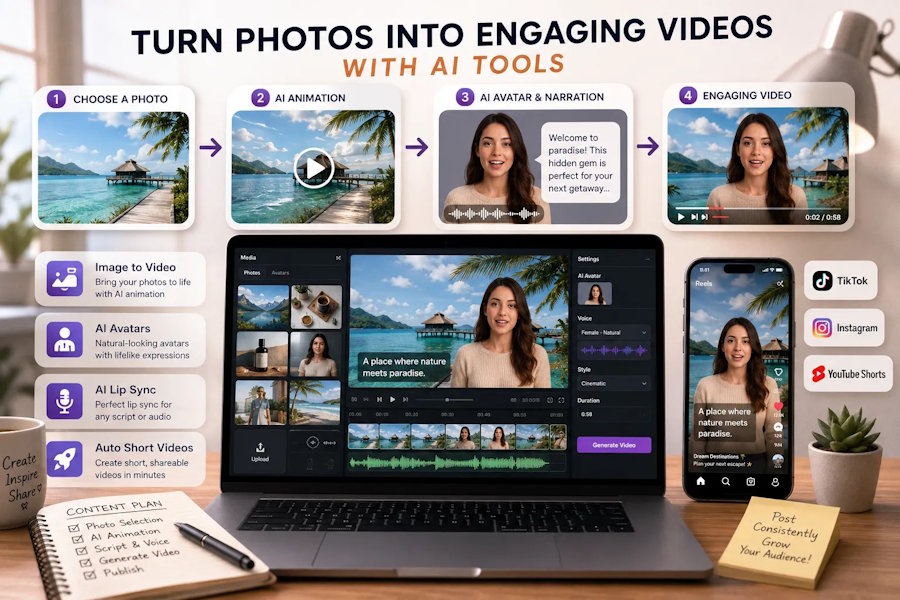
The simplest entry point is photo animation. AI animation tools analyze your image, identify subjects and backgrounds, and introduce natural motion where it makes visual sense.
A portrait photograph suddenly has depth - the subject stays sharp while the background shifts with subtle parallax movement. A landscape shot gains drifting clouds and flowing water. A product photo gets a slow, cinematic zoom that draws the eye toward key details.
These animated photos perform dramatically better than their static counterparts in feed environments. The motion triggers the viewer's peripheral attention and buys you the extra half-second needed to communicate value before they scroll past.
For creators looking to animate multiple photos without restrictions, platforms that offer image to video ai free unlimited conversion remove the friction entirely. You can test how different photos perform as videos, batch-process a week's worth of content, and iterate on style without watching a credit balance drain. For a creator posting daily across multiple platforms, unlimited access is not a luxury - it is a practical requirement.
AI Avatar Narrators: Give Your Photos a Voice
Animation adds motion. But the biggest engagement multiplier comes from adding a narrative layer - and that is where AI avatar technology changes the game.
Imagine turning a single product photo into a video where an AI presenter explains the features in fluent, natural speech. Imagine a travel photo that becomes a mini-vlog with an avatar describing the destination. Imagine a historical photograph where the subject appears to tell their own story.
This is not CGI-heavy production work. Modern AI tools handle the entire pipeline: you upload a photo or select a preset avatar, type or paste your script, and the system generates a talking-head video with synchronized mouth movements and natural facial expressions.
The technology that makes this seamless is AI lip sync - the capability that matches mouth movements to audio with frame-level precision. When the sync is right, viewers do not think about the technology at all. They just watch, listen, and engage.
Many creators get their first taste of this through a lip sync ai online free no sign up tool the kind that lets you upload a clip and an audio track, generate a perfectly synced result, and download it, all without creating an account. The zero-commitment entry point matters, especially for creators who want to test whether AI narration resonates with their specific audience before investing time into a new workflow.
Rapid Short Video Production: Content at Scale
Consistency is the unglamorous secret behind nearly every successful creator. The algorithm rewards frequency. Audiences build habits around predictable posting schedules. And burnout is the occupational hazard that comes with trying to maintain that pace manually.
AI-powered short video production solves this by compressing what used to take hours into minutes. The workflow looks something like this:
- Gather your assets - a handful of photos, a product shot, some brand elements.
- Write or adapt a short script - 30 to 60 seconds of tight, engaging copy.
- Feed everything into an AI video generator - select your avatar, drop in your text, pick a visual style.
- Review and export - make minor tweaks if needed, then publish.
What used to require filming, lighting, multiple takes, and hours of editing now happens in a single session. Creators who adopt this workflow report two consistent outcomes: their posting frequency goes up and their creative fatigue goes down.
Platform-Specific Tactics Worth Knowing
Different platforms reward different approaches, and AI tools give you the flexibility to optimize without recreating content from scratch.
TikTok prioritizes the first three seconds above everything else. Lead your photo-to-video conversions with the most visually striking moment - the animated reveal, the avatar's first sentence, the most dynamic motion. Do not bury your hook.
Instagram Reels performs best with content that blends seamlessly into the feed aesthetic. AI animation tools that let you control the style and intensity of motion help you maintain visual consistency across posts, which matters for brand accounts and curated feeds.
YouTube Shorts rewards content that loops naturally or ends on a curiosity gap. Since Shorts autoplay in a continuous feed, videos that feel complete at the end of one watch but intriguing enough to trigger a replay tend to accumulate outsized watch time.
The common thread across all three platforms: motion wins. A photo, no matter how beautiful, is a single frame competing against an infinite feed of video. When you animate that photo, you level the playing field.
Building a Repeatable System
The creators who benefit most from AI video tools are not the ones who use them once for a single post. They are the ones who build them into a repeatable content system.
Start by auditing your existing photo library. Every product shot, every portrait, every behind-the-scenes still is a potential video. Batch-process a group of related images through your animation tool. Write short scripts that can work across multiple visuals. Schedule the resulting videos across your posting calendar.
A creator with 50 unused photos and a reliable AI video workflow essentially has 50 pieces of content ready to produce. That is nearly two months of daily posting material - sitting in a folder, waiting to be animated.
The Creator's Edge in 2026
The gap between creators who embrace AI video tools and those who stick to manual production is widening every month. This is not about replacing creative skill - it is about multiplying creative output.
The technology handles motion, synchronization, transitions, and pacing. The creator handles the irreplaceable parts: taste, storytelling, audience understanding, and the authentic voice that no algorithm can replicate.
Your photos have stories to tell. The tools to bring them to life are already available, they cost nothing to try, and they integrate into your existing workflow in minutes. The only question is which photo you will animate first.

