

AI video is becoming more useful when it helps teams test an idea before production begins. For developers, designers, marketers, and creative leads, the biggest value is often not the final render, but the speed of getting to a reviewable draft.
Most product and creative teams already know the gap between a written idea and a useful visual prototype. A developer can describe how a feature works. A designer can sketch the interface. A marketer can write the campaign line. But until the idea appears in motion, the team is still guessing how it will feel to users.
That is why AI video tools are moving into the prototyping stage. Teams do not always need a finished ad, tutorial, or brand film on the first attempt. They often need a rough but understandable video draft that can be reviewed, discussed, and improved.
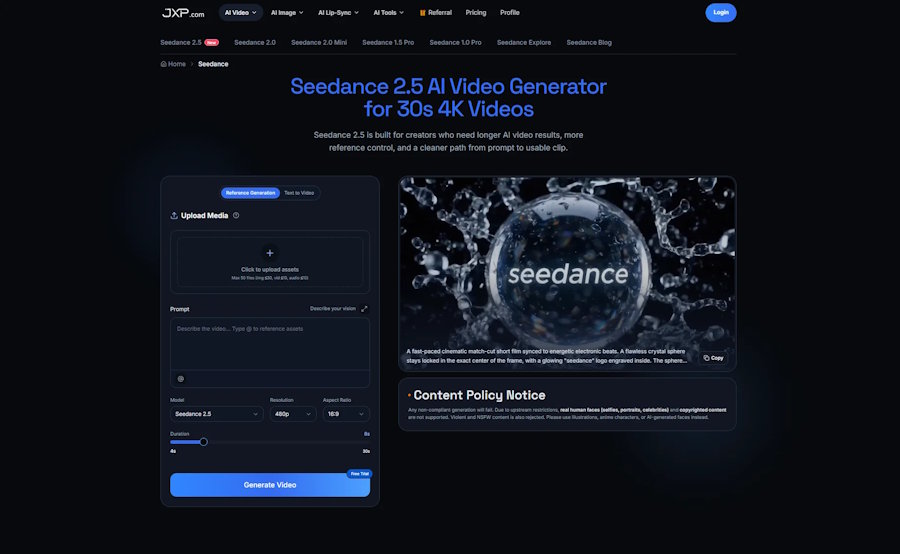
Seedance AI Video Generator is useful in that context because it brings several AI video workflows into one place. Users can work from text prompts, upload visual and audio references, choose model options, adjust resolution and aspect ratio, and test clips before committing to a more polished production path.
Why Video Prototyping Matters for Technical Teams
Developers and product teams often think in systems, flows, and user actions. A static screenshot can show an interface, but it rarely shows how a feature behaves over time. A short video draft can explain a process more quickly: what appears first, what changes, where the user should look, and what the final outcome should be.
This is helpful when building product demos, onboarding clips, feature announcements, app walkthroughs, and internal concept reviews. A developer can use a video prototype to show how a feature might be presented. A product manager can check whether the flow is clear. A designer can see whether the motion supports the interface instead of distracting from it.
The point is not to replace full production. It is to make early decisions less abstract. When the team can see a draft, feedback becomes more specific.
Start With a Clear Brief
The strongest AI video tests usually begin with a small brief. Instead of asking the model to invent everything, the team defines the use case first. Is the goal a product teaser, a social clip, a tutorial scene, a homepage visual, or a short explainer?
Once the use case is clear, the prompt can be simpler and more useful. It should describe the subject, setting, action, camera behavior, visual style, and ending. If the team already has assets, those should guide the generation instead of sitting outside the process.
Seedance supports both reference generation and text-to-video workflows, which makes this planning step important. A written prompt can explain the idea, while images, clips, or audio references can help define the look, motion, or rhythm.
Use References Like Project Inputs
In normal product work, references are everywhere. Teams use brand colors, interface screenshots, product images, motion examples, music tracks, and storyboards. AI video becomes more practical when those materials can become part of the generation process.
A product image can help preserve object identity. A UI screenshot can guide the visual direction of an app demo. A short video reference can suggest camera movement. Audio can help define pacing or atmosphere. The prompt then connects those assets into one scene.
This matters because text alone can be imprecise. A prompt might describe a product, but a reference image shows what must stay consistent. A prompt might describe a camera move, but a video reference can make the intended motion easier to understand.
Where Developers Can Use AI Video Drafts
Developers do not need to become video editors to benefit from AI video prototyping. The useful cases are often close to everyday software work:
- Feature demos that show how a new workflow might be explained.
- Landing page videos for SaaS products or tools.
- Internal concept clips for product planning meetings.
- Onboarding or tutorial drafts before recording a final walkthrough.
- Social clips that introduce a new app, integration, or feature update.
- Pitch visuals that help non-technical stakeholders understand a product idea.
These drafts do not have to be perfect. They need to make the idea visible. Once the concept is clear, the team can decide whether to refine the AI output, recreate the idea with traditional editing, or use the draft as a guide for a production partner.
Think in Iterations, Not One Perfect Prompt
One common mistake is treating AI video generation as a single prompt challenge. A better approach is to treat it like a small development cycle. Create a first draft, review it, adjust one part, and compare the result.
A team might test one version with a product image, another with a stronger camera instruction, and a third with a different duration or aspect ratio. Each test should answer a question. Does the product stay recognizable? Does the motion explain the idea? Does the clip fit the page or platform where it will be used?
That is where an AI video generator becomes more useful than a novelty tool. It gives teams a way to test visual ideas quickly while still applying human judgment to the result.
Review the Draft Like a Product Output
A good video draft should be reviewed with the same practical mindset used for software or design work. Does it solve the intended communication problem? Does it show the right subject? Does the pacing feel clear? Does the visual style fit the product? Can the ending be used in a real post, page, or presentation?
Teams should also check constraints early. Seedance includes a content policy notice, and users should avoid unsupported materials such as copyrighted content or restricted real-person imagery. That keeps the workflow focused on usable drafts instead of clips that cannot be generated or published.
Why This Fits Modern Content Work
Software teams are shipping faster, and content teams are expected to keep up. A product update may need a blog graphic, a short video, a social teaser, and a demo concept at the same time. Waiting until the end of production to see the first moving version can slow everyone down.
AI video prototyping helps by moving visual testing earlier. It gives teams a draft while the idea is still flexible. That can reduce miscommunication, reveal weak concepts sooner, and make later production more focused.
Final Thoughts
Seedance makes sense for developers and creative teams because it supports the part of video creation that often happens before final production: testing ideas, organizing references, shaping scenes, and reviewing rough drafts.
The best results will still come from clear human direction. A team needs to know what the video should explain, what references matter, and how the result will be judged. When those pieces are in place, AI video can become a practical prototyping tool rather than just another way to generate eye-catching clips.

