


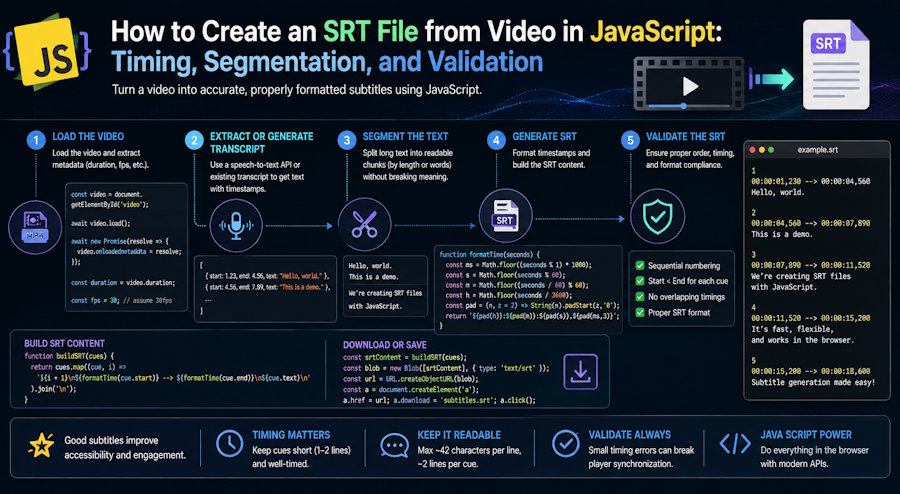
To create an SRT file from video, you need more than a block of transcribed text. You need timed speech segments, readable cues, valid SRT timestamps, and a final playback check.
A reliable video-to-SRT workflow has five steps:
- transcribe the speech with timestamps;
- turn transcript segments into readable subtitle cues;
- validate cue order, duration, and media bounds;
- serialize the cues with HH:MM:SS,mmm timestamps;
- load the SRT file against the actual video and watch it.
The transcript can contain every spoken word and still produce a poor subtitle track. Cues may overlap unexpectedly, disappear too quickly, split a sentence at the wrong point, drift after the video is edited, or fail because the serializer used the wrong timestamp syntax.
The useful mental model is:
media
→ timed speech segments
→ reviewed transcript
→ readable subtitle cues
→ validated SRT or WebVTT
→ playback test
Each arrow changes the data. Treating the transcript as the finished subtitle file skips the stages where most production defects are introduced.
Transcript segments and subtitle cues are different objects
A speech-to-text system typically returns segments with text, start time, and end time. Those segments describe recognition output. A subtitle cue describes what a viewer should read during a particular interval.
The distinction becomes obvious when a speaker says a long sentence without pausing. One recognition segment may run for 15 seconds and contain 40 words. It is valid as transcript data but uncomfortable as a single subtitle cue. Conversely, splitting every segment at a fixed character count may separate an article from its noun or leave one word on screen by itself.
A practical internal representation can stay format-neutral:
const cues = [
  {
    start: 12.48,
    end: 15.92,
    text: "A transcript records the words, but subtitles also model time."
  }
];
Use seconds as numbers while processing. Convert to the destination timestamp syntax only at the serialization boundary. This avoids mixing SRT’s comma separator with WebVTT’s full stop throughout the rest of the code.
If the starting point is a local recording, a video-to-text workflow with timestamps can provide the editable speech layer. The next step is still to transform those segments into cues designed for reading during playback.
The minimum timing invariants
Before considering typography or style, every cue collection should pass a small set of structural checks.
For each cue:
start >= 0
end > start
start >= previous start
end <= media duration
WebVTT requires cue start times to be ordered and each end time to be greater than its start time. WebVTT can technically contain overlapping cues, so “no overlap” is not a universal syntax rule. It is usually a useful project rule for a single dialogue track unless overlapping display is intentional.
SRT has no single web standard equivalent to WebVTT, and player behaviour can vary. Keeping cues ordered, bounded, and non-empty is a practical interoperability baseline for both formats.
Here is a small validator for a single subtitle track:
function validateCues(cues, mediaDuration, options = {}) {
  const { allowOverlap = false } = options;
  const errors = [];

  let previousStart = -Infinity;
  let previousEnd = -Infinity;

  cues.forEach((cue, index) => {
    const label = `Cue ${index + 1}`;

    if (!Number.isFinite(cue.start) || !Number.isFinite(cue.end)) {
      errors.push(`${label}: start and end must be finite numbers`);
      return;
    }

    if (cue.start < 0) {
      errors.push(`${label}: start is negative`);
    }

    if (cue.end <= cue.start) {
      errors.push(`${label}: end must be greater than start`);
    }

    if (cue.start < previousStart) {
      errors.push(`${label}: cues are not ordered by start time`);
    }

    if (!allowOverlap && cue.start < previousEnd) {
      errors.push(`${label}: overlaps the previous cue`);
    }

    if (Number.isFinite(mediaDuration) && cue.end > mediaDuration) {
      errors.push(`${label}: ends after the media`);
    }

    if (!cue.text || !cue.text.trim()) {
      errors.push(`${label}: text is empty`);
    }

    previousStart = cue.start;
    previousEnd = Math.max(previousEnd, cue.end);
  });

  return errors;
}
This does not prove that the subtitles are readable or accurate. It catches the defects that should never reach a human reviewer.
Create the SRT file in JavaScript
The same internal cues can be emitted as an SRT file or a WebVTT file, but the output syntax is not identical.
A minimal SRT cue looks like this:
1
00:00:12,480 --> 00:00:15,920
A transcript records the words, but subtitles also model time.
The equivalent WebVTT file starts with a header and uses a full stop for milliseconds:
WEBVTT
00:00:12.480 --> 00:00:15.920
A transcript records the words, but subtitles also model time.
Keep the formatter boring. It should round milliseconds predictably, carry overflow into seconds and minutes, prevent negative output, and use the correct separator for the requested format.
function formatTimestamp(totalSeconds, format) {
  const totalMs = Math.max(0, Math.round(totalSeconds * 1000));

  const hours = Math.floor(totalMs / 3_600_000);
  const minutes = Math.floor((totalMs % 3_600_000) / 60_000);
  const seconds = Math.floor((totalMs % 60_000) / 1_000);
  const milliseconds = totalMs % 1_000;

  const separator = format === "srt" ? "," : ".";

  return (
    [hours, minutes, seconds]
      .map((value) => String(value).padStart(2, "0"))
      .join(":") +
    separator +
    String(milliseconds).padStart(3, "0")
  );
}
Do not generate a timecode by separately rounding seconds and milliseconds. A value such as 59.9996 can become an invalid 00:00:60,000 if carry handling is ignored.
With the timestamp formatter in place, the complete serializers are small:
function normalizeCueText(text) {
  return text
    .trim()
    .replace(/\r?\n\s\*\r?\n/g, "\n");
}

function escapeVttText(text) {
  return normalizeCueText(text)
    .replaceAll("&", "&")
    .replaceAll("<", "<")
    .replaceAll(">", ">");
}

function serializeSrt(cues) {
  return (
    cues
      .map((cue, index) =>
        [
          String(index + 1),
          `${formatTimestamp(cue.start, "srt")} --> ${formatTimestamp(cue.end, "srt")}`,
          normalizeCueText(cue.text),
        ].join("\n")
      )
      .join("\n\n") + "\n"
  );
}

function serializeVtt(cues) {
  const body = cues
    .map((cue) =>
      [
        `${formatTimestamp(cue.start, "vtt")} --> ${formatTimestamp(cue.end, "vtt")}`,
        escapeVttText(cue.text),
      ].join("\n")
    )
    .join("\n\n");

  return `WEBVTT\n\n${body}\n`;
}
This serializer deliberately treats transcript text as plain text. If an application supports WebVTT cue markup such as voice spans or italics, model and validate those elements explicitly instead of removing the escaping and passing arbitrary strings through as markup.
Validate before writing the file:
const errors = validateCues(cues, 120);

if (errors.length > 0) {
  throw new Error(errors.join("\n"));
}

const srt = serializeSrt(cues);
const vtt = serializeVtt(cues);
For the example cue above, serializeSrt(cues) returns:
1
00:00:12,480 --> 00:00:15,920
A transcript records the words, but subtitles also model time.
This is the minimum end-to-end JavaScript path from timed transcript data to a valid file. A browser workflow can also create an SRT or VTT file from video when the goal is to review and export subtitles without maintaining a custom serializer.
Segmentation is a readability decision
Structural validation prevents broken files. Segmentation determines whether a valid file is pleasant to use.
Good segmentation normally combines several signals:
- speaker pauses;
- punctuation and sentence boundaries;
- maximum cue duration;
- minimum useful display time;
- line length and reading load;
- shot changes, when visual timing is available;
- speaker changes and overlapping dialogue.
No single fixed threshold works for every language, player, screen size, or audience. A coding tutorial may contain long identifiers that should not be broken arbitrarily. Fast dialogue may require tighter cues. A translated subtitle may expand significantly compared with its source language.
Character count works best as a guardrail, not as the whole algorithm. Prefer a natural linguistic boundary near the target length, then recalculate the time allocated to each new cue. Avoid orphaning articles, prepositions, names, or the second half of a negation.
A common segmentation mistake is to make the text look tidy in a file without watching it on the video. A two-line cue can be technically neat and still cover a face, reveal a punchline early, or disappear before the viewer can process a technical term.
Timing errors are not all the same
“The subtitles are out of sync” can describe several different defects. The correction depends on which one occurred.
Constant offset
Every cue is early or late by roughly the same amount. This often happens when an intro was added or removed after the subtitle track was created.
The correction is a shift:
corrected time = original time + offset
Clamp negative results and revalidate the end of the file.
Progressive drift
The beginning is aligned but the error increases toward the end. A constant shift will not solve it. Possible causes include an incorrect timebase, speed conversion, or working against a media version whose duration differs from the source used for transcription.
A simple linear correction uses two known alignment points:
corrected time = a × original time + b
This can repair uniform drift, but it should not be used blindly. Local edits may create discontinuities that require separate timeline regions.
Local discontinuity
The subtitles are correct until a cut, inserted clip, or removed section, then remain wrong. The right fix is to shift cues after the edit point or regenerate timings from the current media—not stretch the entire track.
Recognition boundary error
The cue timestamps are broadly correct, but words are attached to the wrong adjacent cue. This is a segmentation problem, not a global synchronisation problem. Merge or split the affected cues while listening to the boundary.
Validate the data, then test the playback surface
A subtitle file can pass a parser and still fail in production. Test the actual path your users will take.
For web video, WebVTT can be attached with the HTML <track> element:
<video controls src="lesson.mp4">
  <track
    default
    kind="captions"
    src="lesson.en.vtt"
    srclang="en"
    label="English"
  />
</video>
Then check:
- the file is served with an appropriate content type;
- the text is UTF-8;
- the track language and kind are correct;
- cues render on the target browser or player;
- special characters and speaker notation survive export;
- the first and last cues appear at the expected moments;
- seeking into the middle of the video activates the correct cue;
- mobile layout does not make long cues unreadable.
However the caption file is generated, test it on the destination platform. Import rules and rendering behaviour belong to the full system, not just the file extension.
A better production pipeline
A reliable implementation separates automatic checks from editorial review.
Automatic checks
- parse every generated file after serialization;
- reject non-finite or negative timestamps;
- enforce ordered start times;
- flag zero-length and unexpectedly long cues;
- flag unintended overlaps;
- check that cues stay within media duration;
- verify that text is non-empty and correctly encoded;
- round-trip test representative Unicode and multiline content.
Editorial checks
- verify names, numbers, technical terms, and quotations;
- watch transitions between cues;
- check reading pace on the target screen;
- confirm that line breaks follow meaning;
- distinguish captions from translated subtitles where required;
- inspect music, sound-effect, and speaker information when accessibility is part of the deliverable;
- replay sections after every media edit.
The two layers catch different problems. Code is excellent at detecting a negative timestamp. It cannot decide whether splitting “does not” across two cues changes how a viewer experiences the sentence.
Using an online transcription platform can keep the transcript, timestamp review, editing, and subtitle export in one flow. The validator and destination playback test remain separate engineering responsibilities, which is exactly why the pipeline should not be reduced to a single “generate captions” action.
The file extension is the final step, not the workflow
Reliable subtitle generation begins with accurate, timed speech, but it succeeds only when that data is converted into readable cues, serialized deliberately, validated, and tested against the actual media.
SRT and WebVTT are simple enough to open in a text editor. That simplicity should not be mistaken for a lack of engineering requirements. Once subtitles become part of a publishing pipeline, cue timing is application data, segmentation is user-interface design, and the player is part of the test environment.
Build around those realities and subtitle defects become observable, classifiable, and fixable—instead of a vague report that “the captions feel wrong.”

