

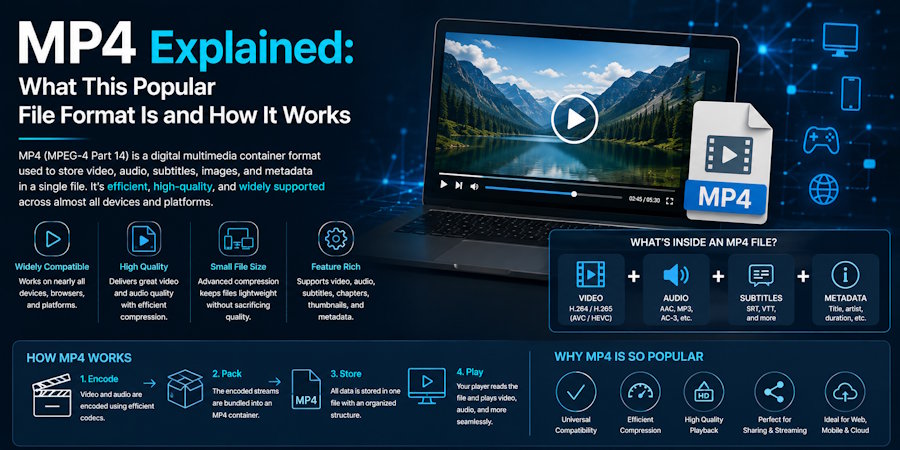
MP4 is one of the most familiar digital formats, even if most people rarely stop to think about what is actually inside the file. It can hold video, audio, subtitles, still images, and other media information together, which is why it appears everywhere from downloaded clips to presentations and recordings. For users who only need the sound, MP4 to MP3 conversion can be useful because it separates the audio from the rest of the file. Understanding the format itself makes that process easier to appreciate. MP4 is not simply a video extension, it is a flexible container built to organize different types of media efficiently while keeping files practical for storage, playback, and sharing.
MP4 Is a Container, Not Just a Video File
One of the most important things to understand about MP4 is that it is technically a container format. That means the file can hold several kinds of information at the same time instead of storing only one type of media. A typical MP4 may contain a video stream, an audio stream, subtitles, chapter information, and metadata.
This flexible structure is one reason the format became so widely used. It allows different components to travel together in a single file, which simplifies playback and organization. A media player can read the container, locate the different streams, and play them in the correct order.
Why MP4 Became So Popular
Digital media needs to balance several priorities. Users want sharp video, clear audio, manageable file sizes, and compatibility with common devices. MP4 became popular because it handles those needs surprisingly well.
The format is supported by smartphones, computers, tablets, televisions, browsers, editing programs, and many other devices. That broad compatibility makes it practical for everyday users and professionals. It also works well for streaming and downloading, which helped it become a standard choice for online media.
What Codecs Have to Do With MP4
The container itself does not determine exactly how the video or audio is compressed. That job belongs to codecs. A codec is a method used to encode and decode digital media so that it can be stored and played efficiently.
For video, MP4 files often use codecs such as H.264 or H.265. Audio may be stored using AAC or another compatible format. The combination of container and codec affects file size, quality, and device support.
This is why two MP4 files can behave differently despite sharing the same extension. The codec inside often explains the difference.
How MP4 Balances Quality and File Size
Raw video takes up an enormous amount of storage, especially at high resolutions. Compression makes digital video practical by reducing the amount of data required while attempting to preserve visible quality.
MP4 works well with modern compression methods, which is why a relatively small file can still look sharp on a phone, laptop, or television. The same principle applies to audio. Compression reduces data so the final file uses less space.
The exact balance depends on bitrate, resolution, frame rate, and codec. Higher settings can improve quality but usually create larger files. Lower settings reduce storage requirements, although excessive compression can make the picture or sound noticeably worse.
Why People Sometimes Need Only the Audio
Not every useful piece of media needs a screen. A lecture, interview, spoken presentation, recorded discussion, or other video may still be valuable when only the sound is needed.
Removing the video portion can make the file smaller and easier to use when watching is inconvenient. Someone may prefer listening while commuting, studying, organizing files, or completing routine tasks. An audio-only version can also be easier to store when a large collection begins taking up too much space.
The audio already exists inside many MP4 files. Conversion simply creates a separate audio file from that existing stream rather than requiring the content to be recorded again.
MP4 and MP3 Serve Different Purposes
The similar names can make these formats sound more closely related than they really are. MP3 is primarily an audio format, while MP4 is a multimedia container capable of holding both audio and video along with other information.
That difference explains why an MP3 file is generally smaller when it contains the same audio content without any video. It also explains why MP3 remains convenient for music players, car systems, phones, and devices designed mainly for listening.
MP4 is better suited when visual content matters. Keeping both formats can be useful because each serves a different role rather than one simply replacing the other.
Compatibility Makes MP4 Convenient
A file format is only useful when people can actually open it. MP4 performs well in this area because support is widespread across modern operating systems and devices.
Users can usually play an MP4 without installing unusual software or converting the file first. Browsers often handle the format directly, mobile devices recognize it easily, and editing software commonly accepts it for basic video work.
Compatibility also makes sharing easier because most modern devices already know how to handle the format. That practical reliability helps MP4 remain relevant.
When Converting Media Makes Practical Sense
Conversion is useful when the original format no longer matches the way the content will be used. Someone may want a smaller file, audio-only playback, wider device compatibility, or a simpler format for organizing a media library.
The best choice depends on the goal. Keeping MP4 makes sense when video matters, while audio can be more convenient when visuals add little value.
It is also worth paying attention to quality settings during conversion. Excessive compression can reduce sound quality, while unnecessarily high settings may create larger files without a noticeable benefit. A balanced approach keeps the audio practical without wasting storage.
A Flexible Format Built for Everyday Media
MP4 has remained popular because it solves a simple problem well. It gives users a convenient way to package video, audio, subtitles, and related information into one manageable file that works across a wide range of devices.
Its usefulness becomes easier to understand once the difference between containers and codecs is clear. The file extension tells you how the media is organized, while the codecs inside determine how individual streams are compressed and played.
For everyday users, the technical details do not have to become complicated. What matters most is knowing why the format works, what it can contain, and when another format may be more practical. With that basic understanding, managing digital media becomes easier, whether the goal is watching, listening, storing, editing, or sharing content.

