

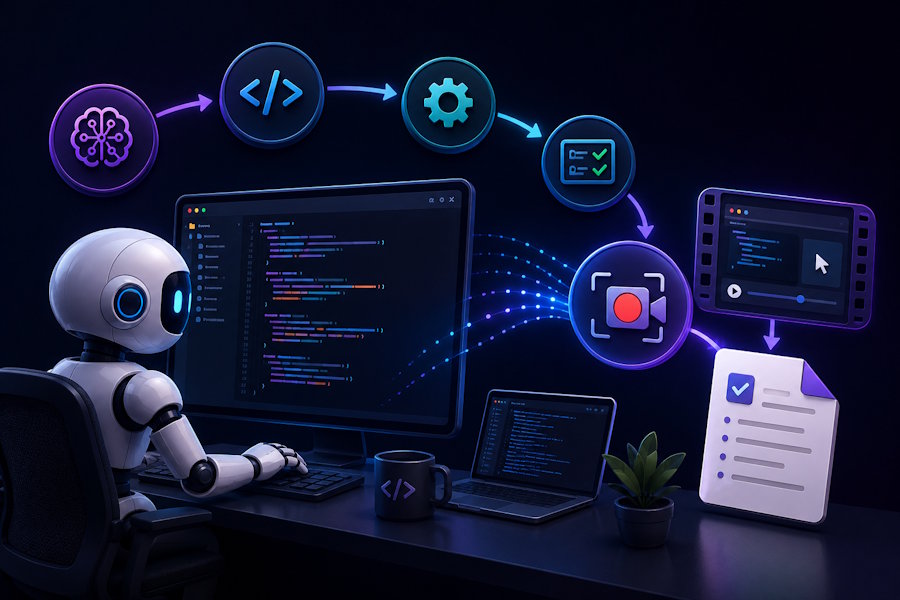
AI coding agents are changing how software is built. Tools such as Claude Code, Codex, Cursor, and other AI development agents can now understand a task, modify files, execute terminal commands, run tests, debug errors, and iterate toward a working solution with increasingly less human intervention.
But there is a growing documentation problem.
A developer can inspect the final code diff and understand what changed, but that doesn't always explain how the work happened.
Which commands did the agent run?
What error did it encounter?
Which approach failed?
How did it test the application?
What did it see in the browser?
Why did it make a particular implementation decision?
This is where AI-agent-native screen recording can become an interesting part of modern developer workflows.
Instead of a developer manually recording an AI coding session, an AI coding agent can potentially record its own workflow and produce both a visual record for humans and structured documentation for other AI systems.
The Documentation Problem With AI Coding Agents
Traditional software development already has several ways to document changes:
- Git commits
- Pull requests
- Code comments
- README files
- Issue trackers
- Screenshots
- Technical documentation
These tools are useful, but AI-assisted development introduces another layer.
An AI coding agent can perform dozens of actions during a single task:
- Analyze an existing codebase.
- Inspect configuration files.
- Search for relevant functions.
- Modify multiple files.
- Install or update dependencies.
- Run tests.
- Encounter an error.
- Investigate the error.
- Modify the implementation.
- Run the tests again.
- Open the application.
- Verify the result.
A final Git diff may show the result, but it doesn't necessarily capture the complete workflow.
For developers working with autonomous or semi-autonomous coding agents, this creates a new requirement: better workflow visibility.
Code Diffs Tell You What Changed, Not Always How It Happened
Consider an AI agent that fixes a broken login flow.
The final pull request might show:
Modified:
- LoginController.js
- authService.js
- LoginForm.jsx
- auth.test.js
That's useful.
But a reviewer might still want to know:
- What was causing the login failure?
- Which test originally failed?
- Did the agent reproduce the problem?
- Did it test the UI?
- Which alternative solutions did it consider?
- Did it verify the fix in a real browser?
This distinction becomes more important as AI-assisted software development becomes more autonomous.
A code diff represents the final state.
A screen recording can represent the process that produced that state.
What Is Agent-Native Screen Recording?
Traditional screen recording works like this:
Human → starts recorder → performs work → stops recorder → shares video
Agent-native screen recording changes the workflow:
AI agent → starts recording → performs work → stops recording → generates documentation
The recording becomes part of the development workflow rather than something a developer remembers to create afterward.
This can be particularly useful for AI coding agents because the agent already knows when it starts and finishes a task.
For example:
Developer:
|
"Fix the authentication error." |
The result is not simply a completed code change.
It is a documented development workflow.
What Should an AI Agent Record?
Not every action needs to be captured.
An effective AI-agent screen recording should focus on meaningful events in the workflow.
Terminal activity
Recording terminal commands can help developers understand:
- Which commands were executed
- Which packages were installed
- Which tests were run
- What errors occurred
IDE activity
The recording can show:
- Files being modified
- Code changes
- Configuration updates
- Debugging activity
Browser testing
For web applications, browser activity can provide valuable visual context.
For example, an agent might:
- Start a development server.
- Open the application.
- Navigate to a page.
- Reproduce a bug.
- Apply a fix.
- Refresh the application.
- Verify the result.
That workflow is difficult to communicate through a Git diff alone.
Application behavior
The final recording can also demonstrate whether the application actually behaves as expected.
This is particularly valuable for UI development, bug fixes, frontend development, and QA workflows.
Video and Machine-Readable Documentation
One of the most interesting possibilities is combining video documentation with structured text.
Humans and AI systems consume information differently.
A developer might prefer:
"Watch the recording to understand what happened."
An AI system may prefer:
|
## Task |
This creates two outputs from the same workflow:
Video → optimized for humans
Markdown/report → optimized for AI agents and developers
That combination could become increasingly valuable as software development becomes more agent-driven.
AI Agent Observability
This concept is closely related to AI agent observability.
Traditional observability focuses on things such as:
- Logs
- Metrics
- Traces
- Errors
- Requests
- System events
AI coding agents introduce another dimension: workflow observability.
Developers may want to understand not only whether an agent completed a task, but also how it interacted with the development environment.
A visual recording can complement traditional logs by showing the actual interface and workflow.
For example:
|
Information |
Traditional logs |
Screen recording |
|
Commands |
✅ |
✅ |
|
Errors |
✅ |
✅ |
|
File changes |
Sometimes |
✅ |
|
Browser interaction |
❌ |
✅ |
|
UI behavior |
❌ |
✅ |
|
Visual debugging |
❌ |
✅ |
|
Human-readable workflow |
Limited |
✅ |
Neither approach replaces the other.
Instead, they can work together.
A Practical AI Coding Agent Recording Workflow
Consider a developer using an AI coding agent to implement a new dashboard feature.
Step 1: Create the task
The developer gives the agent a task:
"Add a dashboard with user analytics and make it responsive."
Step 2: Start the recording
The agent starts an AI-native screen recording session.
Step 3: Analyze the repository
The agent examines:
- Project structure
- Existing components
- API endpoints
- Styling system
- Database models
Step 4: Implement the feature
The agent creates or modifies the required files.
Step 5: Test
The agent runs automated tests and starts the development server.
Step 6: Debug
Suppose the dashboard displays incorrectly on mobile.
The agent identifies the problem, modifies the CSS and tests again.
Step 7: Verify visually
The agent opens the application and checks the dashboard in the browser.
Step 8: Generate documentation
At the end of the task, the system produces:
- Screen recording
- Summary
- Changes made
- Tests performed
- Problems encountered
- Final result
Now a developer can review the implementation without having to reconstruct the entire workflow manually.
Where This Can Be Useful
Code Reviews
A reviewer can watch the workflow to understand how an AI agent arrived at a solution.
Bug Fixing
A recording can demonstrate:
Bug → reproduction → debugging → fix → verification
This can be much clearer than a written explanation.
Developer Handoffs
When work moves between developers, a short recording can provide context that would otherwise require a long meeting or document.
Remote Development Teams
Distributed teams can use recordings to communicate complex technical workflows asynchronously.
Technical Documentation
Video plus Markdown can become part of a project's documentation system.
QA and Testing
AI agents can record testing workflows and provide visual evidence of successful or failed scenarios.
Client Demonstrations
Development teams can quickly create a visual explanation of completed functionality without manually editing a video timeline.
How Tools Like Clipy Fit Into This Workflow
The emerging category of AI-agent-native developer tools is designed around the idea that AI agents should be able to interact with development tools programmatically rather than relying entirely on human-controlled interfaces.
Clipy is one example of this approach.
Instead of requiring a developer to manually start a recording every time an AI coding agent begins a task, Clipy's workflow allows an AI agent to be configured to record its own work.
The resulting workflow can produce a video for human developers alongside a Markdown report for AI agents and technical documentation.
This makes screen recording less about creating a polished tutorial and more about creating a persistent record of software development activity.
What Developers Should Look for in an AI-Native Recording Tool
As AI-agent workflows become more common, developers should evaluate recording tools based on more than video quality.
1. Agent-triggered recording
The agent should be able to start and stop recording without requiring constant human interaction.
2. Simple setup
A developer shouldn't need to configure a complicated recording environment for every project.
3. Real window capture
The system should capture the actual development environment, terminal, browser, or application window when necessary.
4. Live sessions
Long-running development tasks may require continuous recording rather than one short capture.
5. Markers and events
Important events can be marked during a recording so developers can quickly find relevant moments.
6. Shareable output
The final recording should be easy to share with developers, clients, reviewers, or support teams.
7. Machine-readable documentation
A Markdown or structured report can make the recording useful to AI systems as well as humans.
The Future of Developer Documentation
AI coding agents are likely to become more capable of completing entire development tasks independently.
As that happens, the question won't only be:
"What code did the agent produce?"
It will also become:
"What did the agent actually do?"
That distinction matters for debugging, security, code review, compliance, collaboration, and knowledge sharing.
The combination of AI agent observability, screen recording, logs, code diffs, and machine-readable documentation could provide a much more complete picture of an AI-assisted development workflow.
Instead of treating documentation as something developers create after finishing their work, documentation can become an automatic byproduct of the development process itself.
Conclusion
AI coding agents are moving software development from a purely human-driven workflow toward increasingly autonomous systems.
That shift creates a documentation gap.
Git commits explain code changes. Logs explain system events. Tests explain whether something works. But visual recordings can provide another layer of context: what happened during the development workflow.
With agent-native screen recording, AI coding agents can potentially record their own work, capture important development events, and generate documentation that both humans and other AI systems can understand.

