

You built a SaaS product. Users are signing up.
But you still don't know where they're actually coming from, not really.
Maybe you're relying on self-reported data from signup forms. Or using rough timezone guesses. Or just assuming your audience is local because your marketing was local. None of that holds up at scale.
IP geolocation is the technology that maps an IP address to a real-world location, country, city, timezone, ISP, and more. Automatically, in real time, without asking the user anything.
Here’s where IP geolocation solves that problem.
This article covers what it is, how it works, why accuracy matters, and why the IP Geo Location API from IPGeolocation.io is one of the most practical choices available today.
Why You Should Stop Guessing User Locations
Guessing is expensive. Not financially, but operationally.
When you don't know where your users are, personalization breaks down. Your fraud detection has blind spots. Your marketing campaigns target the wrong regions. And your compliance gaps become real legal risks.
Here's what poor location data actually costs:
- Personalization fails: When the wrong language, wrong currency, or wrong content is used. A user in Germany sees pricing in USD, or a user in Japan gets English-only onboarding. Friction goes up, conversions go down.
- Fraud slips through: A login from an IP in Eastern Europe while the account's billing address is in California is a red flag. Without location data, you won't see it.
- Marketing wastes budget: Running geo-targeted campaigns without reliable location data means ads land in the wrong places. You pay, but the right people don't see them.
- Compliance becomes guesswork: GDPR applies to EU users. CCPA applies to Californians. If you can't reliably identify where your users are, you can't reliably comply.
The fix isn't complicated. It's using reliable location data from the moment a user connects.
What Is IP Geolocation & How It Works
IP geolocation is the process of mapping an IP address to a physical geographic location.
Every device that connects to the internet gets assigned an IP address, either IPv4 (like 203.0.113.45) or IPv6. These addresses aren't random. They're allocated by regional internet registries, organizations like ARIN (North America), RIPE (Europe), and APNIC (Asia-Pacific), and assigned to ISPs, companies, and networks in specific geographic areas.
IP geolocation services build massive databases that cross-reference IP ranges with known locations. When you query an IP address, the service looks it up in that database and returns the associated location data.
The typical data returned includes:
- Country, state/region, and city
- Latitude and longitude (approximate)
- ISP and organization name
- Timezone and local time
- Currency and language
- ASN (Autonomous System Number)
Where does the data come from?
Multiple sources feed into a good geolocation database:
- Regional Internet Registries (RIRs): ARIN, RIPE, APNIC, AFRINIC, and LACNIC publish allocation records.
- ISP-reported data: ISPs often share where their IP blocks are physically deployed.
- Geofeed standards: RFC 8805/9092 lets IP block owners self-publish accurate location data in a standardized format.
- Active network measurements: Some providers probe the network directly to verify and refine location estimates.
The better providers combine all of these. The weaker ones rely on static databases that go stale quickly.
What Is an IP Geo Location API?
An IP Geo Location API is a web service that accepts an IP address as input and returns location data as a structured response, typically JSON or XML.
Instead of building and maintaining your own database (which would require constant updates, infrastructure, and data licensing), you send a simple HTTP request and get back everything you need in milliseconds.
Use the IP Geo Location API to fetch real-time user location data for your app and automate location-based decisions instantly.
Here's what a basic API request looks like:
|
curl -X GET 'https://api.ipgeolocation.io/v3/ipgeo?apiKey=API_KEY&include=security&ip=2.56.188.34' |
And a response:
|
{ "ip": "2.56.188.34", "location": { "continent_code": "NA", "continent_name": "North America", "country_code2": "US", "country_code3": "USA", "country_name": "United States", "country_name_official": "United States of America", "country_capital": "Washington, D.C.", "state_prov": "Texas", "state_code": "US-TX", "district": "Dallas", "city": "Dallas", "zipcode": "75201", "latitude": "32.77822", "longitude": "-96.79512", "is_eu": false, "country_flag": "https://ipgeolocation.io/static/flags/us_64.png", "geoname_id": "4684902", "country_emoji": "🇺🇸" }, "country_metadata": { "calling_code": "+1", "tld": ".us", "languages": [ "en-US", "es-US", "haw", "fr" ] }, "network": { "connection_type": "", "route": "2.56.188.0/22", "is_anycast": false }, "currency": { "code": "USD", "name": "US Dollar", "symbol": "$" }, "asn": { "as_number": "AS62240", "organization": "Clouvider Limited", "country": "GB", "type": "HOSTING", "domain": "clouvider.net", "date_allocated": "2013-12-12", "rir": "RIPE" }, "company": { "name": "Packethub S.A.", "type": "BUSINESS", "domain": "packethub.com" }, "security": { "threat_score": 80, "is_tor": false, "is_proxy": false, "proxy_provider_names": [], "proxy_confidence_score": 0, "proxy_last_seen": "", "is_residential_proxy": false, "is_vpn": true, "vpn_provider_names": [ "Nord VPN" ], "vpn_confidence_score": 80, "vpn_last_seen": "2026-01-19", "is_relay": false, "relay_provider_name": "", "is_anonymous": true, "is_known_attacker": true, "is_bot": false, "is_spam": false, "is_cloud_provider": true, "cloud_provider_name": "Packethub S.A." }, "time_zone": { "name": "America/Chicago", "offset": -6, "offset_with_dst": -5, "current_time": "2026-04-06 06:27:10.995-0500", "current_time_unix": 1775474830.995, "current_tz_abbreviation": "CDT", "current_tz_full_name": "Central Daylight Time", "standard_tz_abbreviation": "CST", "standard_tz_full_name": "Central Standard Time", "is_dst": true, "dst_savings": 1, "dst_exists": true, "dst_tz_abbreviation": "CDT", "dst_tz_full_name": "Central Daylight Time", "dst_start": { "utc_time": "2026-03-08 TIME 08:00", "duration": "+1.00H", "gap": true, "date_time_after": "2026-03-08 TIME 03:00", "date_time_before": "2026-03-08 TIME 02:00", "overlap": false }, "dst_end": { "utc_time": "2026-11-01 TIME 07:00", "duration": "-1.00H", "gap": false, "date_time_after": "2026-11-01 TIME 01:00", "date_time_before": "2026-11-01 TIME 02:00", "overlap": true } } } |
Real-time vs. static lookup: APIs deliver real-time data. You query on the fly and get the latest information. Static databases are files you download and query locally. Both have their place, which we'll cover in the comparison section below.
Key Benefits of Using an IP Geolocation API
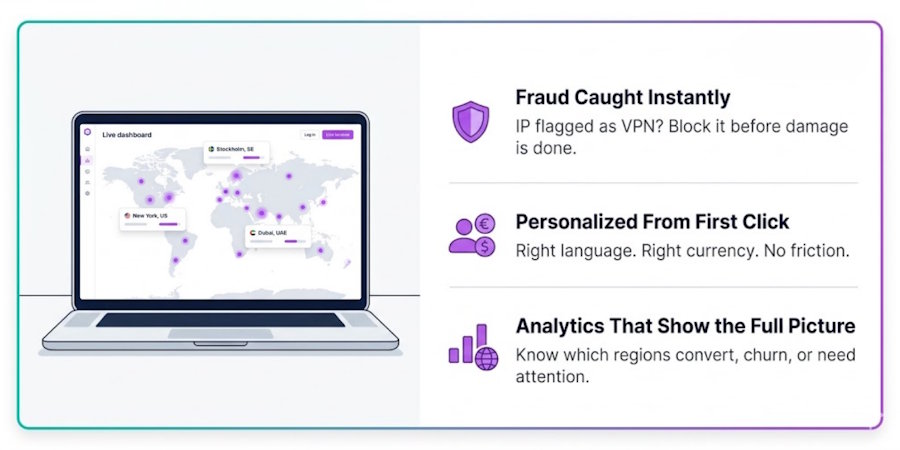
Here's what you actually gain when you stop guessing and start using real location data.
1. Accurate User Location Tracking
The most obvious benefit: you know where your users actually are. Not where they claim to be. Not where your marketing assumed they'd be.
This matters for everything from routing users to the right regional server to understanding which markets are actually growing. Developers often face the problem of users signing up with generic email addresses and no location context. An IP lookup fills that gap immediately on first contact.
2. Better Personalization
Location data lets you tailor the experience without asking the user anything up front.
- Show content in the right language
- Display prices in local currency
- Surface region-specific offers or promotions
- Pre-fill country/region fields in signup forms
Content localization based on IP location can boost conversion rates significantly, because the experience feels native from the first click, not foreign.
3. Fraud Prevention & Security
This is where geolocation delivers outsized value.
Common fraud signals based on IP data:
- The login location doesn't match the account's registered country
- IP is flagged as a known proxy, VPN, or Tor exit node
- Multiple accounts created from the same IP in a short window
- Payment attempted from a high-risk IP region
Good IP geolocation APIs return more than just location. On paid plans, IPGeolocation.io flags known threats, proxies, VPNs, Tor nodes, and bots in the same response. That's IP intelligence, not just IP lookup.
4. Improved Analytics & Insights
Knowing your users' locations transforms your analytics from flat data into geographic intelligence.
You can answer questions like the following:
- Which regions drive the most signups but the lowest conversions?
- Where are churned users typically located?
- Which countries have the most support tickets?
- Should we add a new pricing tier for emerging markets?
Geolocation data providers that offer clean, structured data make this kind of analysis far easier to build into your dashboards and BI tools.
How Accurate Is IP Geolocation?
This is the question everyone should ask before relying on any IP geolocation tool.
The honest answer: accuracy depends heavily on the granularity level.
|
Granularity |
Typical Accuracy |
|
Country level |
Very high (95%+) |
|
State/Region level |
High (90%+) |
|
City level |
Moderate (85%+) |
|
Street / Exact address |
Not reliable |
Why isn't it always accurate?
Several factors reduce precision:
- VPNs and proxies: Users routing through a VPN appear to be wherever the VPN server is, not where they actually are. A user in London using a US-based VPN will look American.
- Mobile networks: Mobile carriers often route traffic through centralized infrastructure. A user physically in one city may have an IP registered to a data center in another.
- Carrier-Grade NAT (CGNAT): Many ISPs share a single public IP across thousands of residential customers, making individual user-level location unreliable.
- Corporate networks: A company's global traffic might all funnel through headquarters, making employees worldwide appear to be in one city.
- CDNs and anycast routing: IP addresses used by content delivery networks can resolve to dozens of physical locations simultaneously.
In practice, country-level accuracy is reliable enough for compliance, fraud rules, and geo-blocking. City-level data works well for personalization if you treat it as an estimate, not a certainty.
API vs Database: Which One Should You Choose?
Both approaches access the same underlying data. The right choice depends on your use case.
|
Feature |
API |
Database |
|
Real-time lookups |
✅ Yes |
❌ No |
|
Offline access |
❌ No |
✅ Yes |
|
Maintenance burden |
Low (provider handles it) |
High (manual updates) |
|
Latency |
Network-dependent |
Very fast (local) |
|
Always up-to-date |
✅ Yes |
Only if you update it |
|
Best for |
SaaS apps, web apps |
Internal systems, log analysis |
Use the API if you need real-time lookups in a live application, like personalizing a landing page on load or checking a user's IP at login.
Use a database if you're processing large volumes of historical data offline or you operate in environments where outbound API calls aren't possible. For offline use cases, consider an IP geolocation database for scalable offline processing.
Many teams start with the API and switch to a database download as their processing needs scale.
How to Track IP Location Using an API (Step-by-Step)
This is simpler than most guides make it look. Here's the practical version.
Step 1: Get your API key
Sign up at IPGeolocation.io. The free plan gives you 1,000 requests per day with no credit card required, enough to build and test.
Step 2: Send a request
Pass the target IP as a query parameter. If you omit the IP, the API auto-detects the calling client's IP.
|
curl "https://api.ipgeolocation.io/v3/ipgeo?apiKey=YOUR_KEY&ip=203.0.113.45" |
Or in JavaScript:
|
const myHeaders = new Headers();
const requestOptions = { method: "GET", headers: myHeaders, redirect: "follow" };
fetch("https://api.ipgeolocation.io/v3/ipgeo?apiKey=API_KEY&ip=91.128.103.196", requestOptions) .then((response) => response.text()) .then((result) => console.log(result)) .catch((error) => console.error(error)); |
Step 3: Parse the response
The response is clean JSON. Pull out only what you need.
Step 4: Use it in your app
Common integration points:
- On page load, detect location and serve the right language/currency
- On signup, pre-fill the country field and set timezone preference
- On login, flag suspicious location mismatches
- In your analytics pipeline, tag events with country and region
Cache responses where you can. If the same IP hits your server repeatedly, caching the geolocation response avoids redundant API calls and keeps costs down.
Top Use Cases for SaaS & Businesses
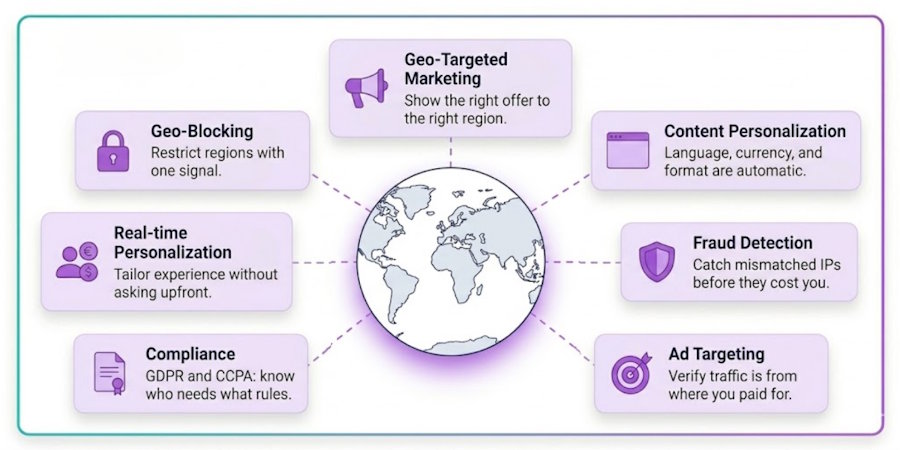
Geolocation data isn't just for mapping. Here's where it creates real business value:
Geo-targeted marketing: Show different landing pages, promotions, or CTAs based on where a visitor is located. A user in Australia should see AUD pricing and APAC-relevant case studies.
Content personalization: Language, date formats, measurement units, and local contact numbers, all of which can be set automatically based on IP location.
Fraud detection: Flag logins or transactions where the IP location is inconsistent with the account history. Combine with proxy/VPN detection to identify users hiding their real location.
Ad targeting: Verify that your paid traffic is actually coming from the regions you're targeting. IP intelligence can reveal bot traffic or click fraud originating from mismatched regions.
Compliance: GDPR requires specific handling for EU users. CCPA covers California. Age-gating laws vary by country. IP geolocation is often your first signal that compliance rules apply to a given user.
Access control (geo-blocking): Some content licenses or regulatory requirements mean you can only serve certain regions. IP geolocation enables that restriction automatically.
Free vs Paid IP Geolocation API Plans
Free tiers exist, and they're genuinely useful, but knowing exactly what you're getting (and what you're not) saves you from building on the wrong foundation.
What free plans actually give you
Some free IP geolocation APIs require no registration or API key at all. You can hit the endpoint immediately and start testing within minutes. That's genuinely useful for quick prototypes and one-off lookups.
IPGeolocation.io's free plan works differently; it does require a free account, but in return, you get 1,000 API credits per day for life, with no credit card required. You also get core geolocation data, time zone, currency, and basic ASN included, which is more than most free tiers offer.
Where free plans fall short
Here's what free plans typically don't give you:
- Fewer data fields. Free plans usually return basic location data only. Fields like company info, routing details, accuracy radius, and confidence scores are reserved for paid tiers.
- Request rate limits. Most free IP geolocation APIs cap you at 1 request per second or enforce strict daily limits. IPGeolocation.io's free plan caps at 1,000 credits per day, enough for development, not for production traffic.
- No commercial use. This is the one most people miss. Many free IP geolocation APIs, including IPGeolocation.io's free plan, explicitly prohibit commercial use. If real users are hitting your product, you need a paid plan.
- No SLA. Free plans don't come with uptime guarantees. If the service goes down, you have no recourse.
- Database update frequency. Some free IP geolocation APIs update their databases in real time or near-real time, while others rely on static snapshots that go stale. IPGeolocation.io updates its database multiple times per week across all plans, including free, but paid plans unlock features like accuracy radius and confidence scoring that depend on fresher, more granular data.
What paid plans unlock
Paid plans aren't just higher volume. They change what the API can actually do:
- Unlimited queries: (no rate limiting on paid plans at IPGeolocation.io)
- Security module: VPN, proxy, Tor, and bot detection, coupled with the geolocation response
- Company and network data: ISP type, routing info, and hosting detection
- Bulk lookup: process multiple IPs in a single request
- Multi-language responses: geolocation data returned in 12+ languages
- Commercial use rights: legally use the data in your live product
- 99.99% uptime SLA: backed by Cloudflare's global network
- DPA available: required for GDPR compliance in many use cases
Content personalization is also a paid-tier advantage. While the free plan does return currency and language codes, the full personalization stack, including accuracy radius, confidence level, and locality data, is only available on paid plans. That's the data that lets you reliably auto-display the correct language, local currency, and region-specific content without showing the wrong thing to the wrong user.
Which plan should you start with?
|
Situation |
Recommendation |
|
Building and testing locally |
Free plan — no card needed |
|
Launching to real users |
Starter ($19/month) minimum |
|
Need fraud/VPN detection |
Any paid plan with the Security module |
|
Processing historical logs offline |
Database plan |
|
High volume, custom needs |
Enterprise, contact sales |
IPGeolocation.io's paid plans start at $19/month for 150,000 credits, with annual billing saving around 17%. The jump from free to paid is small, and the difference in what you can actually build is significant.
Common Challenges & How to Solve Them
Not every IP resolves cleanly. Here's what usually goes wrong and how to handle it
Inaccurate data for specific IPs
No provider is perfect. If a specific IP consistently resolves to the wrong location, check whether the IP is:
- Behind a VPN or proxy (the security flags in the API response help here)
- Registered to a corporate HQ rather than the user's actual location
- Part of a mobile carrier's shared IP pool
Solution: Use country-level data for hard rules, and treat city-level data as a hint rather than a fact.
API latency is adding to page load times
If you're calling the geolocation API synchronously on every page load, you'll add latency.
Solution: Cache results by IP with a reasonable TTL (24–48 hours). Most IPs don't change location that often. You can also call the API asynchronously and apply location-based logic slightly after the initial page render.
Privacy and compliance concerns
IP addresses are considered personal data in many jurisdictions. Processing them for geolocation may require a legal basis under GDPR.
Solution: Use a provider that is GDPR and CCPA compliant. IPGeolocation.io does not store queried IP addresses, only request counts for billing. They offer a DPA (Data Processing Agreement) for paid customers. Document your legal basis and include IP data handling in your privacy policy.
FAQ
What is IP geolocation?
IP geolocation is the process of determining the real-world geographic location of a device based on its IP address. It works by cross-referencing IP ranges against databases built from Internet registry records, ISP data, and active network measurements. The result is an estimated location, typically accurate to the country level and often to the city level, without requiring any input from the user.
How accurate is IP tracking?
Accuracy largely depends on the service provider you choose and how frequently they update their data. As a rough benchmark, most reliable providers deliver country-level accuracy above 95%, region-level above 90%, and city-level above 85%. However, these numbers can vary significantly from one provider to another. IPGeolocation.io consistently hits these benchmarks and often exceeds them, thanks to a database that is updated multiple times per week to keep pace with constantly shifting IP allocations. Keep in mind that accuracy can still dip for mobile users, VPN users, and those behind corporate networks, regardless of the provider.
Can an IP location be wrong?
Yes. IP location data is an estimate, not a fact. The most common causes of incorrect data are VPN and proxy use (where the user's real location is masked), mobile carrier routing (where traffic from multiple cities flows through a single regional IP), and outdated database records. Security-aware APIs return flags like is_proxy and is_vpn to help you identify when a location result should be treated with extra skepticism.
Why IPGeolocation.io Is a Smart Choice
A few things stand out.
Speed: The service loads its indexed database in hot memory, avoiding disk reads. Fast response times with globally distributed infrastructure. That matters when you're calling the API on user-facing requests.
Uptime: 99.99% SLA on paid plans, backed by Cloudflare's global network with servers across the US, Europe, Asia-Pacific, and Australia. Requests route to the nearest node automatically.
Data breadth: A single API call can return geolocation, timezone, currency, and ASN on all plans. Paid plans add company information, security flags (VPN, proxy, Tor, bot detection), and user agent data. That's a lot of intelligence from one endpoint.
Privacy-first: Queried IP addresses are not stored. Only request counts are logged for billing. GDPR and CCPA compliant, with DPA available for paid customers.
Multilingual: API responses in 12+ languages, including English, Spanish, German, Japanese, French, and Chinese. Available on paid plans, useful if your own app serves multilingual users.
Flexible plans: Free tier for development (1,000 requests/day), paid plans from $19/month, and separate database downloads for offline use cases.
Users often highlight easy integration, reliable data, and responsive support as the main reasons they stay.
Final Thoughts
Location data shouldn't be a gap in your product. It's a foundation.
When you know where your users are, everything gets sharper: your personalization, your fraud rules, your compliance posture, and your marketing targeting. The alternative is guessing, and guessing at scale is costly.
The good news is that integrating an IP geolocation API is a few hours of work, not weeks. The data is structured, the endpoints are simple, and a solid free tier means you can validate the integration before committing to a paid plan.
Stop guessing. Start knowing.

