

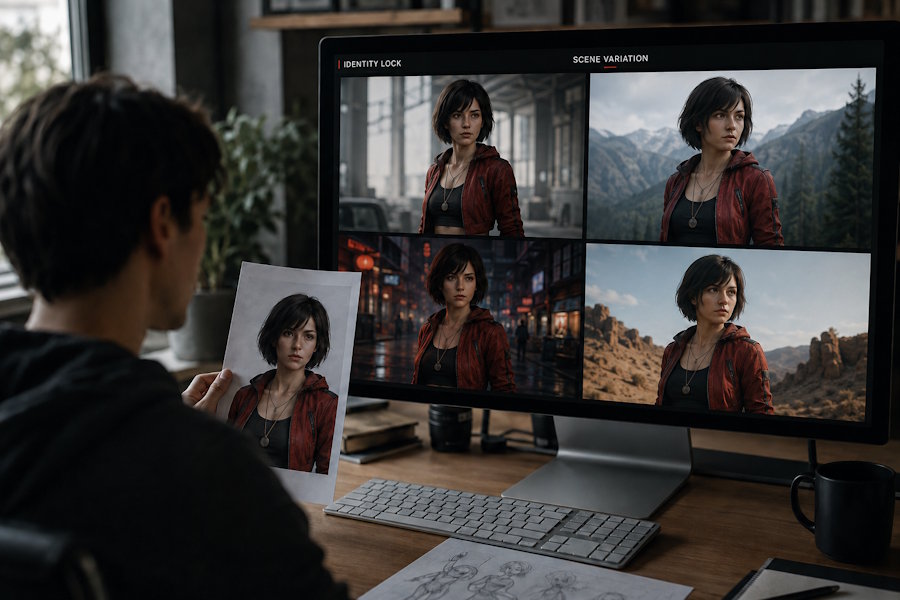
I have found that generating one attractive AI image is relatively easy. Producing five images that clearly belong to the same project is much harder.
The character may look different from one scene to the next. A jacket changes color, a hairstyle disappears, or a product develops a different shape. These problems become especially frustrating when creating a comic, game concept, visual novel, product campaign, or multi-page website.
The issue is not always the image model itself. In many cases, the workflow does not provide enough stable information for the model to preserve the subject.
The Visual Consistency Problem in AI-Generated Images
AI image generation is often treated as a single-prompt activity: describe an idea, generate an image, and download the result. That approach works reasonably well for isolated images.
A continuing project has different requirements. The viewer expects the same character to remain recognisable in a new pose. A product should retain its shape when placed in another environment. A brand illustration should feel like part of the same visual system.
Common inconsistencies include:
- different facial proportions;
- changing hair length or colour;
- missing accessories;
- altered clothing details;
- inconsistent product dimensions;
- different lighting and camera perspective;
- extra objects appearing in the scene.
These changes may seem minor in isolation. Across a sequence, they make the project feel disconnected.
Why Text Prompts Alone Often Fail
A text prompt describes the image, but it does not necessarily function as a permanent identity record.
If I write “a young woman with short black hair wearing a red jacket,” the model may understand the general concept. It may still change the face, jacket shape, or hairstyle in another generation because those details are not being treated as fixed design specifications.
Long prompts can create a separate problem. When every possible detail is included, the most important information may lose priority. The prompt becomes descriptive but not necessarily controlled.
I get more reliable results when I distinguish between identity details and scene details.
Identity details should remain stable:
- face shape;
- hairstyle;
- eye colour;
- clothing;
- accessories;
- body proportions;
- product structure.
Scene details can change:
- location;
- action;
- camera angle;
- weather;
- background;
- lighting style.
This separation makes it easier to understand what should remain fixed and what can be adjusted.
Build a Reference Sheet Before Creating a Series
Before generating a sequence, I would create a basic reference sheet. It does not need to be elaborate. A written description, a selected reference image, and a short list of fixed attributes can already improve the workflow.
For a character, I might record the following:
| Category | Example specification |
|---|---|
| Face | Oval face, soft jawline, small nose |
| Hair | Short dark bob, side part |
| Clothing | Red cropped jacket, white shirt |
| Accessory | Silver pendant worn at all times |
| Palette | Red, black, and muted silver |
| Style | Clean modern anime illustration |
For a product, the reference sheet could include its dimensions, materials, buttons, surface texture, logo placement, and dominant colors.
The purpose is not to force every image to look identical. It is to give the system a stable visual foundation.
A Repeatable Prompt Structure
I prefer a layered prompt structure because it makes revisions easier.
Subject Identity
Describe who or what must appear in the image.
Fixed Visual Attributes
State the details that should not change. Phrases such as “keep the same hairstyle and red cropped jacket” are more useful than a general request for consistency.
Scene and Action
Add the new action, location, and composition. This is where the image gains variety without changing the subject’s identity.
Rendering Style
Specify the visual treatment, such as editorial photography, 3D product rendering, anime illustration, or cinematic concept art.
A practical prompt might follow this order:
Same character identity, short dark bob haircut, oval face, red cropped jacket, silver pendant, standing in a rainy train station, looking over her shoulder, medium shot, soft reflections, cinematic anime illustration.
The sentence can be expanded, but I would avoid adding unrelated visual instructions simply to make the prompt longer.
Testing Consistency With Flux 3
For creators who want to compare repeated prompts and visual variations, Flux 3 can be used as part of an image prototyping workflow.
I would begin with one carefully described subject and generate a small set of images. Instead of changing everything at once, I would vary only the scene or action. This makes it easier to see which features remain stable and which ones drift.
A simple test could include:
- the same character in a studio portrait;
- the same character walking outdoors;
- the same character sitting at a desk;
- the same character viewed from a different angle.
Afterward, I would compare the face, hair, clothing, accessories, and palette. If the subject changes too much, the next prompt should reinforce the weakest attribute rather than adding a completely new paragraph.
When to Use AI and When to Edit Manually
AI generation is useful for exploring scenes, poses, compositions, and broad visual directions. Manual editing remains more reliable for exact text, logos, product labels, interface layouts, and pixel-level corrections.
I would not expect an image model to place a long product label perfectly every time. It is more efficient to generate the overall composition and add precise text during post-production.
The same principle applies to sequential storytelling. AI can establish a scene and suggest an action, while manual editing can repair small continuity errors. A mixed workflow usually gives better results than expecting a single generation to solve every problem.
A Practical Consistency Checklist
Before using an image in a project, I would check:
- Is the subject immediately recognisable?
- Are the face and hairstyle consistent?
- Did the clothing or accessories change?
- Does the product retain its original proportions?
- Is the lighting compatible with the scene?
- Are there unwanted objects or visual artifacts?
- Does the image still match the project’s established style?
This checklist takes less time than repairing a large set of inconsistent images later.
Conclusion
The difficult part of AI image generation is not producing an image. It is maintaining visual identity while the scene changes.
A reference sheet, a structured prompt, controlled variation, and manual review can make a noticeable difference. Once the workflow treats identity and environment as separate layers, creators gain more control over characters, products, and visual series.

