

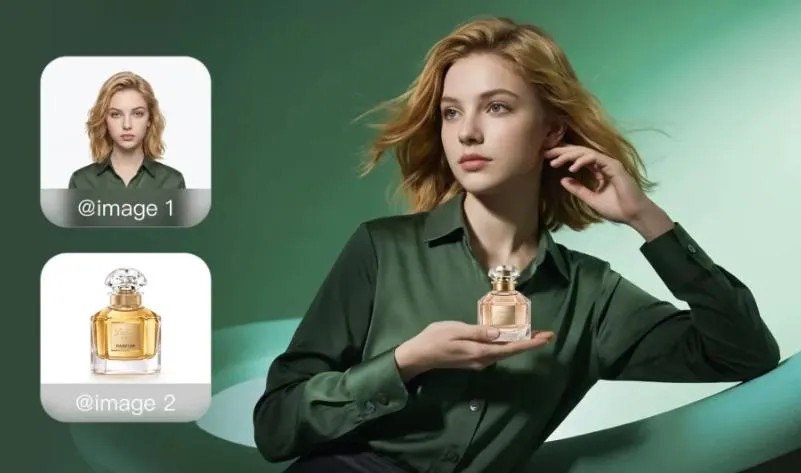
AI can turn your photos into new art by using image-to-image generation to reinterpret what is already in the picture. Instead of starting from a blank canvas, the system studies your original image, keeps important visual structure, and applies a new style, mood, or composition based on your instructions. That makes it useful for portraits, product shots, travel photos, character concepts, and branded visuals. A strong AI image generator can work from a prompt, a reference, or both, so you can guide the result with much more control. You can keep what already works, explore different creative directions, and refine details without rebuilding the image from scratch. The process is fast, flexible, and accessible even if you do not have traditional art skills.
How Does AI Turn a Photo Into New Art?
How Image-to-Image AI Reads Your Original Photo
Image-to-image AI begins by analyzing the visual information inside your photo. It identifies broad structure such as subject placement, pose, shapes, edges, depth, and contrast, then uses that information as a foundation for a new output. Rather than copying the picture exactly, it translates those core elements into a fresh visual interpretation. If your source image shows a person, object, or scene clearly, the AI can preserve recognizable features while changing the medium or atmosphere. This is why a portrait can become a painterly illustration or a product shot can become a stylized campaign image. The better the original photo is lit, framed, and focused, the easier it is for the model to build a coherent artistic result.
How Prompts and References Shape the New Look
Prompts tell the AI what kind of transformation you want, while reference images show it what details should influence the final style. A useful prompt can define the medium, lighting, color palette, mood, composition, or level of realism. Reference images add extra direction by showing visual qualities the model should borrow, such as materials, character design, framing, or artistic tone. Kling ai image generator supports generation from a prompt, a reference, or both, which gives you flexible creative control. Kling IMAGE 3.0 can also draw on defining qualities from up to 10 reference images and combine them into one cohesive result, helping you preserve key traits while exploring a new artistic direction.
How to Turn Your Photos Into AI Art Step by Step
Upload a Photo and Describe Your Creative Direction
Start by choosing a photo with a clear subject and enough detail for the AI to interpret. Upload it, then write a prompt that explains exactly how you want the new artwork to look. Mention the art style, color treatment, lighting, setting, mood, and any details that must stay recognizable. For example, you can ask for a cinematic portrait, a watercolor travel poster, or a sleek editorial product image. If you have supporting visuals, add reference images to guide the style more precisely. This approach helps the AI understand both your starting point and your target result. Strong direction at this stage reduces random outputs and gives you a more usable first generation.
Generate, Review, and Refine Your New Artwork
Once you generate the first result, review it with a practical eye. Check whether the subject still looks right, whether the new style matches your prompt, and whether important features were preserved. If something feels off, refine instead of restarting completely. You can adjust the prompt to strengthen the mood, change the lighting, simplify the background, or make the style more subtle. Kling IMAGE 3.0 is designed for this kind of iteration, letting you fine-tune composition, visual details, and overall direction until the image feels right. By making focused edits between generations, you keep the strong parts of the output while steadily improving weak areas, which leads to cleaner and more intentional artwork.
How to Get Better Results From an AI Image Generator
Write Clear Prompts for Style, Lighting, and Mood
Better prompts produce better art because they reduce ambiguity. Instead of asking for “something artistic,” describe the image with specific visual goals. Name the style, such as oil painting, anime-inspired illustration, fashion editorial, or minimalist poster. Add lighting terms like golden hour, soft studio light, neon glow, or dramatic shadows. Define the mood with words such as calm, mysterious, playful, elegant, or intense. You can also guide composition by mentioning close-up framing, wide shot, centered subject, or shallow depth of field. Clear prompts help the model make stronger decisions from the start. When your language is precise, the AI image generator is more likely to create artwork that matches your intended atmosphere.
Preserve Important Details While Changing the Style
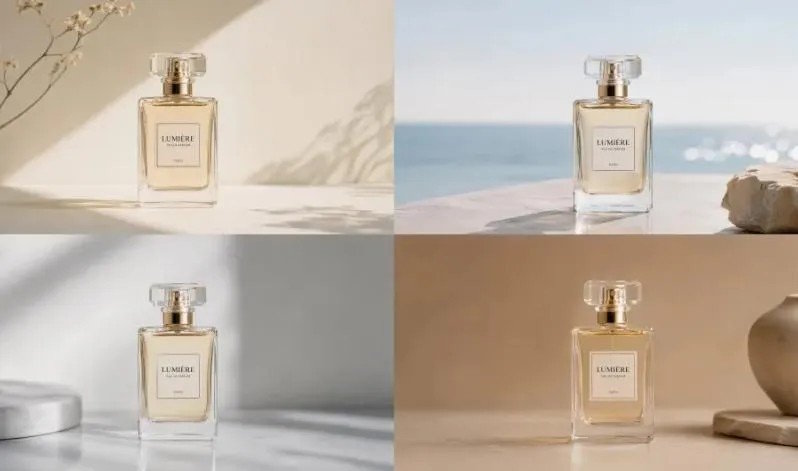
To keep important details, decide early what must remain consistent in the new artwork. That may include a person’s facial features, a product’s shape, brand colors, clothing elements, or the overall composition of the original photo. State those priorities directly in your prompt so the AI treats them as anchors instead of optional details. Reference images also help when consistency matters, especially for character traits, materials, or visual identity. If you are building a set of related visuals, Kling IMAGE 3.0 Omni can support a unified creative direction across an image series with varied framing and native 4K output. That makes it easier to change style while preserving recognizability and visual continuity.
Conclusion
AI turns photos into new art by combining what is already in your image with the creative direction you provide. The photo supplies structure, the prompt defines the transformation, and references help lock in style, details, and consistency. That gives you a practical way to create portraits, product visuals, concept art, and polished image series without starting from zero each time. The most effective workflow is simple: begin with a clear photo, describe the look you want, review the first result carefully, and refine it in focused steps. With a capable AI image generator, you can preserve what matters, experiment with new aesthetics, and shape the final image with more control. That is what makes photo-to-art generation so useful and creative.

