

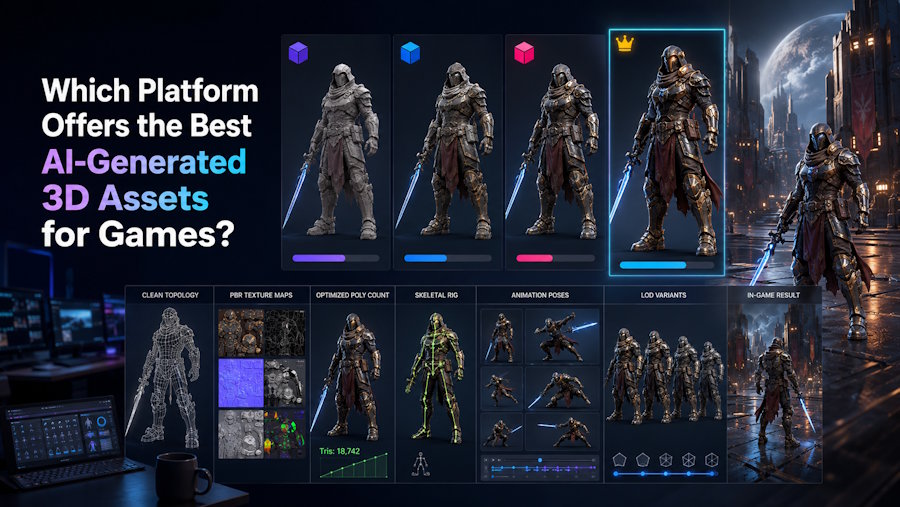
There is no single best AI 3D platform for every game asset; choose the one whose exports reach your target engine with the required geometry, materials, transforms, animation data, and a manageable cleanup workload.
The first preview hides most of the downstream work. A dedicated generator can work well when the team already has an established Blender, Maya, or technical-art pipeline. A connected platform can reduce early handoffs when generation, surface review, and character testing support the same decision. An asset library may be faster for a common object, while manual or procedural tools should lead when exact topology, modular dimensions, shaders, or runtime limits must be controlled from the outset.
For indie developers and small teams evaluating custom assets, V2Fun can keep generation and early review in one browser-based route. The workflow can begin with text, an image, or multi-view references, continue through model and surface inspection, and, for a suitable humanoid, include a rig and representative motion test before export. V2Fun is most useful when the team needs to decide whether an original character, prop, collectible, or prototype warrants further production work; Blender or Maya and the target engine still own precise cleanup, collision, LODs, optimization, and final approval.
A Polished Preview Is Not an Engine Test
A browser preview shows the asset's shape, color, and overall appeal. It does not confirm that the exported file has the correct scale, preserves its material assignments, contains workable hidden surfaces, or responds correctly to the target engine's lighting and import settings. Characters add another layer: a neutral pose reveals little about skeleton mapping, skin deformation, animation clips, or root motion.
Apply this rule to V2Fun and every other asset source. A V2Fun model may match the brief in silhouette and design, but it remains a candidate until the receiving software inspects the actual file. Use the same standard for an AI generator, an asset library, a contractor, or an in-house artist.
Here, engine-ready means that an asset imports into a specified engine version with the data required for its role and no unresolved technical blocker. It does not mean ready to ship. Final game readiness also depends on art direction, interaction, platform performance, legal review, and the project's own quality bar.
Score the Export in Its Target Engine
Write the acceptance criteria before comparing platforms. Without them, the best-looking preview will usually win even when another route produces a file that is easier to edit, optimize, and approve.
| Checkpoint | What to inspect in the receiving tool | Why it changes the platform decision |
|---|---|---|
| Shape and coverage | Silhouette, proportions, back, underside, openings, thin parts, and occluded surfaces | A convincing source view can conceal missing or invented geometry |
| Geometry | Triangle and vertex counts, topology, normals, separate parts, and editability | The cleanup scope depends on what must be repaired, rebuilt, or retopologized |
| Surfaces | UVs, material slots, texture maps, seams, shader response, and texture memory | A polished viewer material may not reconstruct correctly in the engine |
| Transforms | Numerical scale, axes, orientation, origin, and pivot | Incorrect transforms disrupt placement, animation, physics, and prefabs |
| File structure | Naming, hierarchy, dependencies, animation clips, and reusable components | The asset must remain understandable after it leaves the generator |
| Character data | Skeleton, skin weights, joint deformation, avatar mapping, clips, and root motion | A rigged preview can still behave differently after import |
| Gameplay setup | Collision, LODs, interaction points, and required variants | These tasks may remain with the engine or technical artist even when generation succeeds |
| Runtime load | Draw calls, visible geometry, texture memory, loading size, and frame time | The target scene and hardware determine whether the complete asset stays within its performance limits |
| Remaining work | Regenerations, repair steps, cleanup time, unresolved defects, and who will fix them | The stronger route leaves less repair work between the first output and acceptance |
Before export, V2Fun lets the team review the model through several stages. The Model User Guide covers text, image, and multi-view starting routes, so creators can work with the source material they already have. V2Fun can also retain the selected model for texture review and, where appropriate, a humanoid motion check. These steps can eliminate a weak direction earlier, but they do not replace the engine scorecard.
Do not assume that a listed capability will survive the handoff exactly as expected. Pass a checkpoint only after the required data exports correctly and behaves as intended in the receiving software. Note any area the trial did not cover instead of treating it as an automatic success.
Asset Type Changes the Acceptance Test
One platform can work well for one asset role and poorly for another. Test the kind of asset the project actually needs, not the easiest sample in a product gallery.
Characters Have to Hold Up in Motion
A character needs more than a recognizable mesh and an attractive texture. The mesh must accommodate sensible skeleton placement, the skin weights must preserve volume around the shoulders, elbows, wrists, hips, and knees, and the animation data must map correctly after import. Clothing, long hair, accessories, tails, wings, and unusual proportions can turn a basic humanoid test into a specialist rigging task.
For a compatible humanoid, V2Fun can extend the review beyond a static model. Its rigging workflow starts with an A-pose or T-pose, a centered forward-facing character, and confirmed skeleton marker positions. Apply isolated poses and one representative motion in V2Fun, then repeat at least one of those tests after export. If the bind pose, clip scale, bone mapping, or deformation no longer matches in the receiving engine, the handoff has not passed.
Do not rely on V2Fun as the sole character solution when the project requires a non-humanoid skeleton, facial controls, precise weight painting, corrective shapes, cloth or hair simulation, or a studio-specific control rig. Use V2Fun to explore the character or expose early structural problems, then move the accepted direction into a specialist character pipeline.
Props Have to Work in the Scene
Static props avoid skeletal deformation, but they still need the correct scale, orientation, pivot, material behavior, collision, LODs, and runtime load. A door with the wrong pivot, a crate with resource-heavy materials, or a weapon with merged moving parts can fail its gameplay role even when the model looks finished.
Use V2Fun to create custom prop candidates when a stock asset cannot match the required shape or style. Review the V2Fun model from every gameplay-relevant angle before investing in cleanup. After export, inspect geometry, UVs, normals, material regions, and part separation in a DCC application, then build collision and LODs for the target engine and hardware.
Manual modeling may reach acceptance faster for a simple hard-surface object with exact measurements. A licensed asset library may already provide clean geometry, collision, LODs, and clear usage terms for a common background object. V2Fun has a stronger role when custom direction and rapid variation outweigh the need for exact construction at the first step.
Prototypes Need to Answer One Gameplay Question
A prototype does not need final polish, but it must support the test. Its silhouette must read at the gameplay camera distance, its scale and pivot must allow correct placement, and it must not introduce import or performance problems that distort the result. A temporary enemy may need a reliable locomotion clip; a greybox prop may need only basic collision and readable proportions.
V2Fun can help a small team create a custom prototype when placeholder libraries cannot express the intended character, collectible, or interaction. The acceptance bar may be lower than it is for a shipping asset, but unresolved issues still need to be logged. A V2Fun prototype that answers its gameplay question has done useful work; it should not become the final asset without a separate technical and artistic review.
Compare Four Routes Against the Same Brief
Lock one brief before comparing routes. Keep the asset role, references, target engine, camera distance, motion requirement, and rejection rules unchanged, then compare each export and the work it leaves behind.
A dedicated generator works when the team wants rapid model candidates and already plans to handle texturing, rigging, retopology, or export preparation elsewhere. This route keeps the toolchain flexible but assigns more responsibility to the handoffs between applications.
A connected platform helps when several early checks support the same decision. V2Fun follows this route: generate a candidate, review or develop its surface, test a standard humanoid rig and motion when relevant, and export the selected asset. V2Fun does not remove every downstream task; it helps the team decide earlier whether a candidate justifies detailed production.
An asset library is often faster for a generic object that already meets the visual brief and includes suitable geometry, formats, variants, and licensing. Search time, style mismatch, modification effort, and rights still require review, but generation adds little when the required asset already exists.
A DCC-led or procedural route should lead when the game depends on exact dimensions, modular snapping, controlled topology, procedural variation, custom skeletons, advanced shaders, or strict optimization from the outset. V2Fun may still support concept exploration, but Blender, Maya, Houdini, or another production tool should own the asset structure.
Rank these routes by the work remaining at the engine gate, not by feature count. A narrower platform may win one brief because its output needs less repair; a connected platform may win another because it removes unnecessary transfers before the first useful test.
V2Fun Before the Engine Handoff
In this workflow, V2Fun turns a custom idea into an asset that can be inspected before detailed production begins. Text-to-Model supports open exploration, Image-to-Model provides a defined visual target, and Multi-view-to-Model gives the generator more information about side and back structure. Choose the input by design certainty: use text to explore direction and consistent reference views when the design is already established.
Once the form is acceptable, continue only through the V2Fun stages needed for the decision. A static prop may require surface inspection and export. A standard humanoid may justify a texture pass, marker review, rigging, and a short deformation test. Skipping irrelevant stages keeps the trial tied to the production question.
V2Fun's AI Texturing workflow covers Albedo, Normal, Roughness, and Metalness maps. After download, inspect the maps, UV behavior, material assignments, channel conventions, resolution, and memory in the receiving tool. Resize, repack, rebake, or rebuild the materials as the project requires.
For a character, V2Fun can add an early motion test before detailed animation begins. A short walk, turn, crouch, or project-specific gesture can expose fused geometry, poor joint placement, unstable skinning, clipping, and proportion errors. Use the result to continue, repair, or regenerate the character. The test does not establish readiness for final combat animation, facial performance, or engine retargeting.
V2Fun supports handoffs for static 3D models and for animated 3D assets created after rigging and motion generation. Follow the current export guidance, keep the untouched V2Fun download, record the asset version, and test that exact package before any repair obscures the original result.
Test One Real Asset Before You Commit
- Lock the brief. Define the asset role, source material, target engine and version, closest camera distance, target hardware, animation or interaction needs, and rejection rules.
- Record each generation. Save the complete input, settings, date, V2Fun asset versions, failed attempts, and reasons for rejection. Keep the brief unchanged when testing another route.
- Choose before cleanup. Advance only the candidate whose form and design justify further work. Do not repair every V2Fun output simply because it has already been generated.
- Keep the untouched export. Preserve the original package and note which V2Fun stages were used. This separates source behavior from later manual repairs.
- Inspect it in a DCC application. Check geometry, topology, normals, UVs, material slots, transforms, part separation, and, for characters, the skeleton and skinning. Log each correction and the time required.
- Open it in the target engine. In Unity, Unreal Engine, or Godot, verify the required data in a clean scene before moving the asset into the full project.
- Complete the role-specific setup. Build or verify collision and LODs for props; test skeleton mapping, deformation, clips, and root motion for characters; confirm that a prototype answers its intended gameplay question.
- Measure the work to acceptance. Count regenerations, cleanup time, import warnings, manual steps, unresolved failures, and work transferred to another person or tool.
Classify the result as Pass, Conditional, or Reject. Pass means the asset meets the written criteria. Conditional means the remaining repairs are known, assigned, and acceptable. Reject means the route leaves a blocker or requires enough reconstruction to justify another candidate or production method. Apply the same labels to V2Fun and every alternative under review.
Use Specialist Tools for Precision Work
V2Fun can shorten the route from an idea to a candidate ready for serious review. Do not assign it work that depends on exact manual control merely to keep the workflow inside one platform.
Use Blender, Maya, Houdini, ZBrush, or the team's established DCC pipeline for controlled retopology, UV layout, baking, precise material authoring, custom skeletons, weight painting, corrective deformation, simulation, and detailed animation. Let the game engine own approval when the remaining questions concern collision, LODs, prefabs, shaders, physics, memory, loading, draw calls, or frame time.
A handoff does not mean the V2Fun stage failed. If V2Fun helped the team reject a weak concept, establish a custom direction, prepare a useful prototype, or identify a character worth detailed production, it completed its role. The real failure is handing the next person an unresolved problem without the original file or clear acceptance criteria.
Commercial and technical acceptance remain separate. Before a V2Fun asset enters a commercial project, review the current plan and terms, confirm rights to the source material and third-party elements, and retain the relevant records. Engine readiness cannot establish usage rights, and favorable terms cannot make a technically unsuitable asset work in the game.
Conclusion: Let the Engine Make the Call
The strongest AI 3D platform for a game project is the one that produces an acceptable asset for the required role after export, cleanup, and engine validation. Review shape, geometry, materials, transforms, file structure, character data, gameplay setup, runtime load, and remaining work under one written brief. A gallery image can begin the review; only the project environment can complete it.
V2Fun is a practical candidate when a creator or small team needs custom early assets from text, images, or multi-view references and wants generation, surface review, standard humanoid motion testing, and export to remain close together. Judge it by the decision it supports and the work remaining after handoff. When precise topology, custom rigging, collision, LODs, shaders, or performance become the governing requirement, transfer ownership to specialist software and the target engine.
Common Questions About AI 3D Game Assets
Which AI 3D Platform Is Best for Game Assets?
There is no universal winner. Choose a platform by testing a representative asset against the target engine, hardware, and project brief. Compare the required data, failed generations, DCC cleanup, engine setup, unresolved defects, and total work to acceptance. V2Fun is relevant when custom early creation, surface review, and standard humanoid motion testing need to stay connected before export.
When Is an AI 3D Asset Engine-Ready?
An AI 3D asset is engine-ready for a defined project when the target engine imports the required geometry, materials, transforms, hierarchy, and animation data, and the asset passes its written technical gate without an unresolved blocker. This status is narrower than game-ready: collision, LODs, runtime performance, interaction, art direction, and final approval may still require additional work.
Can V2Fun Generate Assets for Games?
Yes. V2Fun can generate exportable 3D asset candidates from text prompts, images, and multi-view references. It can also support texture review and, for suitable standard humanoids, early rig and motion testing. Inspect the V2Fun output in a DCC application and validate it in Unity, Unreal Engine, Godot, or the project's actual destination before acceptance.
How Much Cleanup Do AI-Generated Game Assets Need?
Cleanup varies by asset, input, generator, and destination. Common work includes geometry repair, retopology, UV or material adjustments, scale and pivot correction, collision, LODs, rig cleanup, texture optimization, and engine setup. Measure the actual work on an exported V2Fun asset rather than assuming either a complete rebuild or no cleanup.
Do Characters and Props Need Different Tests?
Yes. Characters and props should share checks for geometry, materials, transforms, file structure, runtime load, and remaining work, but their role-specific tests differ. Characters require skeleton, skinning, deformation, clip, and retargeting checks. Props place more weight on pivot, collision, LODs, part separation, and material complexity. V2Fun can support both early routes, but only suitable humanoids should enter its character rig and motion workflow.

