

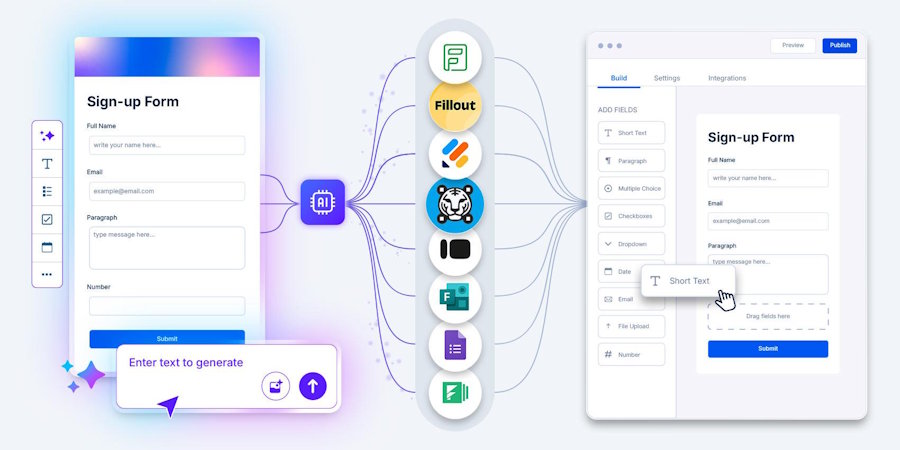
A decade ago, the challenge was getting businesses to move from paper forms to digital ones. Today, the challenge is different. Businesses are asking whether they should continue building forms manually at all.
As the AI form builder gains traction across industries, organizations are rethinking how forms are created, managed, and integrated into everyday workflows. The focus is no longer just on collecting data but on doing it faster and with less effort.
But does that mean traditional form makers are becoming outdated?
Not necessarily.
While AI-powered form tools offer speed and automation, traditional form makers still provide you with a level of control and customization that many organizations value. The right choice depends on your workflow, the complexity of your processes, and how your team manages data collection.
This compares AI and traditional form makers and helps you determine which solution is the best fit for your workflow.
Traditional vs. AI form builders: A side-by-side comparison
At first glance, both tools may seem similar. However, their approach to form creation, automation, and workflow management can lead to very different user experiences.
Here's a closer look.
| Factor | Traditional tools | AI form tools |
|---|---|---|
| Form Creation Process | Users manually add fields, sections, and logic. | AI generates a form draft based on a prompt or description. |
| Setup Time | Can take longer, especially for complex forms. | Faster because much of the initial setup is automated. |
| Ease of Use | May require time to learn advanced features. | Easier for beginners and non-technical users. |
| Customization | Offers detailed control over every element. | Provides customization options after the AI creates the initial draft. |
| Question Suggestions | Questions are created manually. | AI can suggest relevant questions and field types. |
| Workflow Automation | Automation rules are typically configured manually. | Often includes AI-assisted workflow and automation recommendations. |
| Conditional Logic | Requires manual setup and testing. | Can help generate logic rules automatically in some tools. |
| Scalability | Managing large numbers of forms may require more manual effort. | Better suited for teams creating forms frequently or at scale. |
| Consistency Across Forms | Depends on the person creating the form. | AI can help maintain a more consistent structure and format. |
| Speed of Updates | Changes must be made manually. | AI can assist with revising and updating forms more quickly. |
| Team Productivity | More time spent on form setup and configuration. | Reduces repetitive tasks and speeds up form creation. |
| Best Fit | Organizations that need maximum control and highly customized forms. | Teams looking to save time and streamline workflows. |
Key takeaway
The biggest difference between traditional and AI form creators comes down to how much work is handled by the user versus the platform.
Traditional form tools require users to build forms field by field, configure logic, and manage setup themselves, offering greater control over the process. AI-powered form builders make these tasks easier by generating form structures, suggesting questions, and accelerating setup based on user input.
Therefore, organizations can choose a solution based on factors such as workflow complexity, customization needs, team resources, and the speed at which forms need to be created.
Why more businesses are exploring AI-powered form creation
Here are some of the key reasons businesses are favoring and choosing AI-generated forms:
1. Businesses are prioritizing efficiency
One of the biggest reasons organizations are investing in AI is productivity. According to McKinsey's 2025 State of AI survey, 80% of organizations identify efficiency as a key objective for their AI initiatives. The same research found that 88% of organizations now use AI in at least one business function.
For teams that regularly create registration forms, feedback surveys, lead capture forms, and internal request forms, even small time savings can add up to hundreds of forms each year.
2. Teams want to spend less time on repetitive tasks
Creating forms often involves repetitive work. Teams frequently use similar fields, questions, approval processes, and workflows across multiple projects. AI helps reduce some of this repetition by suggesting form structures, generating questions, and organizing information automatically.
This helps employees to focus more on analyzing responses, improving customer experiences, or making business decisions rather than spending time on setup and configuration.
3. AI is becoming part of everyday business software
Businesses are no longer using AI only for highly technical tasks. AI is increasingly being built into the software employees use every day, from writing tools and customer service platforms to project management systems and form tools.
McKinsey reports that 62% of organizations are already experimenting with AI agents and automation technologies that can perform multiple workflow-related tasks.
4. Non-technical teams can create forms more easily
Not every employee responsible for collecting information has experience designing forms or workflows. Marketing teams, HR departments, operations staff, and customer support teams often need forms but may not have technical expertise.
AI form builder lowers this barrier by helping users generate forms through simple instructions and suggestions. This makes it easier for more people across an organization to create forms without relying heavily on IT or operations teams.
5. Businesses are looking beyond cost savings
While saving time is important, many organizations see AI as a way to improve how work gets done rather than simply reduce costs. McKinsey's research found that companies achieving the most value from AI focus not only on efficiency but also on innovation and business growth. Additionally, 64% of respondents said AI is helping drive innovation within their organizations.
For form tools, this means AI is not just helping teams create forms faster. It is helping organizations rethink how information is collected, processed, and used throughout the business.
When traditional form tools are the better choice
Despite the growing interest in AI-powered tools, traditional form makers remain a practical choice for many organizations. In situations where control, customization, or specific compliance requirements are priorities, a manual approach can still be the better fit.
When existing workflows are already established
Many organizations have already invested significant time and resources into building digital processes that work well. Replacing these systems simply to adopt a new technology may not always deliver immediate value.
When compliance and oversight matter
Organizations in industries such as healthcare, finance, legal services, and government often prioritize accuracy, documentation, and review processes over speed alone. Traditional form makers allow teams to carefully control every field, workflow step, and approval process before a form goes live.
Research also shows that governance remains a major challenge as organizations expand AI usage. An IBM survey found that only 11% of technology leaders feel fully prepared for large-scale AI deployment, while 77% believe current governance frameworks are inadequate.
Businesses operating under strict compliance requirements, maintaining direct oversight through traditional form-building methods, can reduce complexity and support regulatory obligations.
When reliability and predictability are critical
While AI tools continue to improve, many organizations still rely on human review for important workflows. Human oversight is often required before outputs can be trusted in business-critical processes.
For forms that collect sensitive customer, employee, financial, or legal information, traditional form makers provide a predictable and controlled environment that many organizations prefer.
Modern form makers offering traditional and AI-assisted form creation
Today’s form market is no longer split into purely traditional or fully AI-based tools. Most platforms now sit somewhere in between, combining manual form-building features with different levels of AI assistance. Tools like TIGER FORM, Tally, Jotform, and other modern form tools reflect this shift, offering a mix of automation, simplicity, and customization to suit different business needs.
Here is a quick overview of some popular options and how they approach form building today.
| Form tools | Form Building Type | AI Integration Level | Workflow Automation | Best For |
|---|---|---|---|---|
| TIGER FORM | Traditional + AI-assisted builder | Strong (AI form generation with prompt-based creation + automation features) | Advanced (QR-based sharing, workflows, response handling) | SMBs needing fast form creation and simplified workflows |
| Jotform | Traditional + AI-enhanced platform | Strong (AI form generation, assistants, smart suggestions) | Advanced (payments, approvals, integrations) | Businesses needing a full-featured form ecosystem |
| Fillout | Traditional + AI-assisted builder | Strong (AI form creation + logic and workflow assistance) | Advanced (Notion, Airtable, CRM integrations) | Logic-heavy forms and workflow-driven processes |
| Typeform | Traditional conversational form tool | Moderate (AI-assisted question creation and form setup) | Moderate | Customer engagement, surveys, and lead generation |
| Microsoft Forms | Traditional form tool | Limited (AI support via Microsoft Copilot ecosystem, not native form generation) | Moderate (Microsoft 365 integrations) | Teams already using Microsoft tools |
| Zoho Forms | Traditional + automation-focused builder | Moderate (AI-assisted features within Zoho ecosystem) | Advanced | Business workflows and internal process automation |
| Google Forms | Traditional form tool | Very limited (no native AI form generation; indirect support via Gemini in Workspace tools) | Basic | Simple surveys and data collection |
| Formstack | Traditional enterprise form platform | Limited (minimal AI assistance, workflow-focused platform) | Advanced (enterprise workflows, compliance) | Regulated industries and enterprise teams |
How to choose the right form tool for your workflow
Choosing the right form tool is less about comparing feature lists and more about understanding how a tool fits into your day-to-day operations. Every business uses forms differently, so what works well for one team may feel unnecessary or limiting for another. Before picking a platform, it helps to step back and look at how forms actually move through your workflow.
1. Start by mapping your actual workflow, not features
Look at how forms fit into your process from start to finish. Are you simply collecting responses, or are those responses triggering actions like approvals, notifications, or CRM updates? The complexity of your workflow will naturally point you toward either a simple builder or a more advanced AI-assisted platform.
2. Understand where time is being lost today
In many teams, the real issue isn’t building forms, but the time spent setting them up, testing logic, and managing responses manually. If setup time is the bottleneck, AI-assisted tools can help by handling structure and initial configuration.
3. Evaluate how structured your data needs to be
Some businesses only need basic inputs like names, emails, and feedback. Others need conditional logic, multi-step flows, or validated data entry. The more structured your requirements, the more important customization and control become.
4. Consider how often you create forms
Occasional use doesn’t justify a complex system. But if forms are part of your weekly or daily operations, even small time savings per form can add up significantly over time.
5. Check how the tool handles scaling
Think beyond today’s needs. As your team grows, you may need more integrations, higher response volumes, or shared workflows across departments. A tool that works for a single use case may feel limiting later.
6. Look at how responses are used after collection
Forms are just the starting point. What happens after submission matters more, like sending alerts, storing data in a system, or triggering workflows. A good form tool should support that flow without extra manual work.
7. Balance control with automation
Some teams prefer full control over layout, logic, and design. Others prioritize speed and automation. The right choice depends on where your team feels more value, manual precision, or faster execution.
8. Factor in team adoption, not just capability
Even a powerful tool fails if your team doesn’t use it properly. Ease of use, learning curve, and day-to-day comfort often decide long-term success more than features on a pricing page.
Final takeaway: Building forms the smart way
The continued growth of AI does not mean traditional tools have lost their value. As businesses evaluate new technologies, many are discovering that control, compliance, reliability, and workflow stability remain just as important as speed and automation. In the right situations, traditional form tools continue to be a practical and effective choice when compared with an AI form builder.
What’s clear is that most modern platforms are moving toward a hybrid approach, where AI and traditional form-building features work together. This gives businesses more flexibility to choose what works best for each use case instead of being locked into one method.
In the end, the smartest approach is to pick a tool that fits naturally into your workflow, reduces friction, and helps you focus more on the data you collect rather than the process of building the form itself.

